|
By Eric C (RL) - 5 Years Ago
|
|
Dear iCloners,
The iClone 7.22 update has now been released! This update includes the compatibility with upcoming Smart Gallery plug-in, as well as some enhancements and bug fixes. You may find the Update tab in Reallusion Hub to download the patch. See the full release note below:
Added:
Compatible with Smart Gallery plug-in. Stay tuned and more details will be provided next week!
Enhanced:
GI settings on default project for better visual quality.
Fixed:
Incorrect teeth position, twisted thumbs, and visual flaws of the inner eye corner for Jody. *Jody is an embedded female Digital Human character. Teeth position: 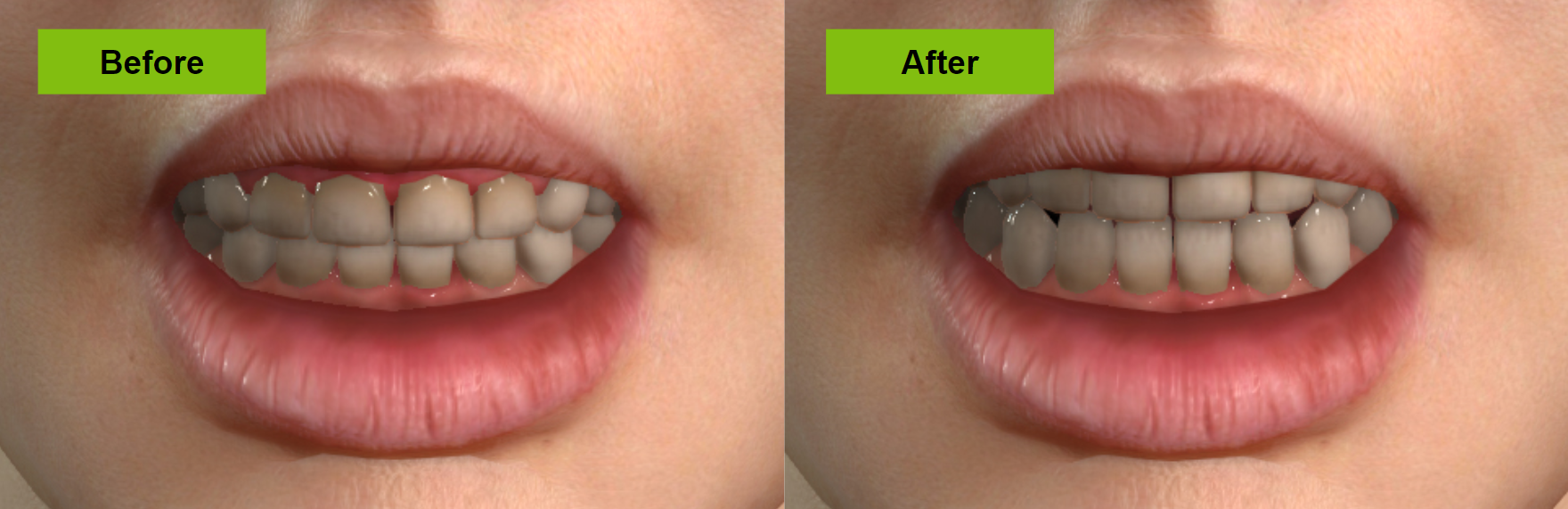 Twisted thumbs: 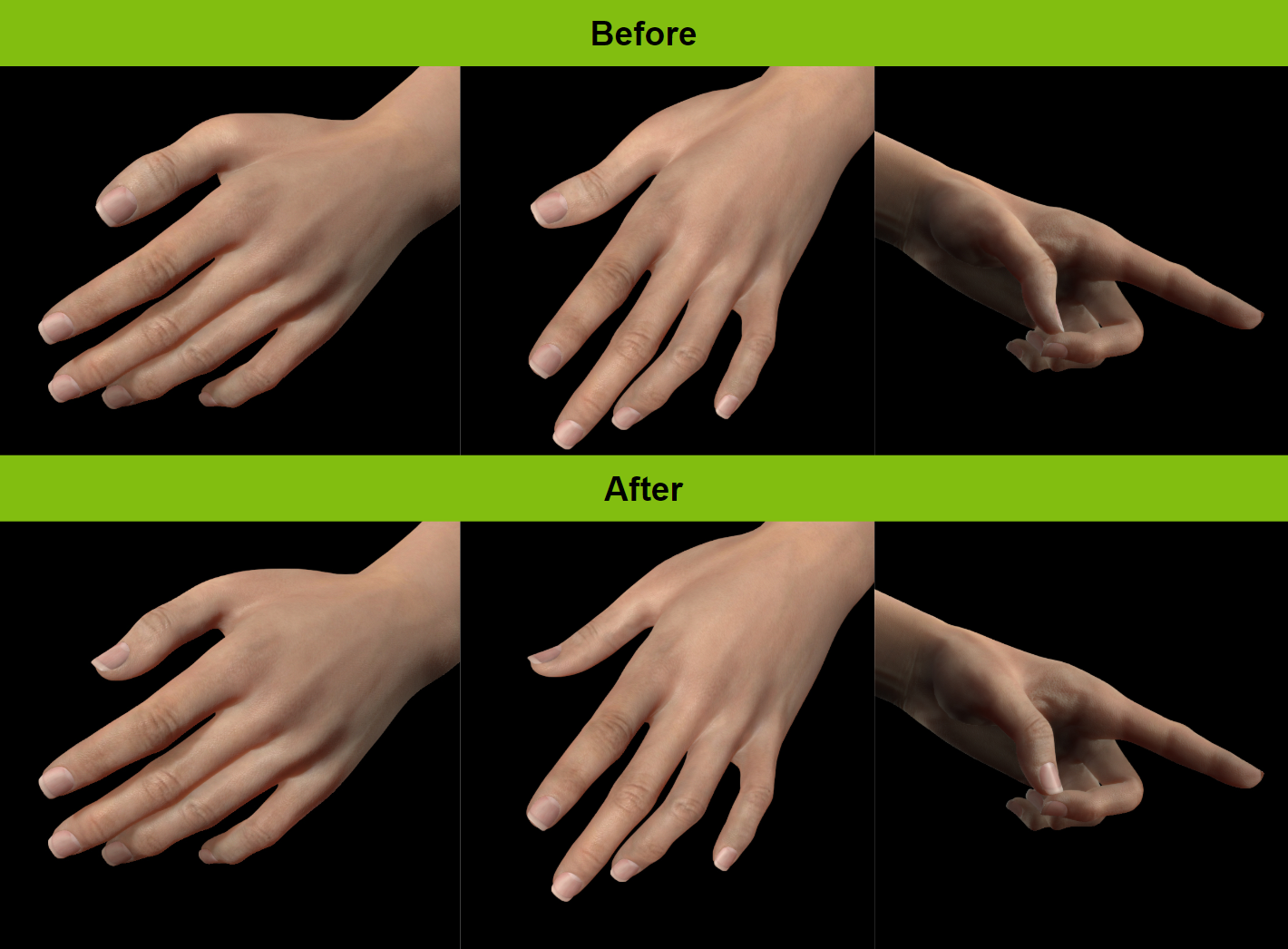 Visual flaws of inner eye corner: 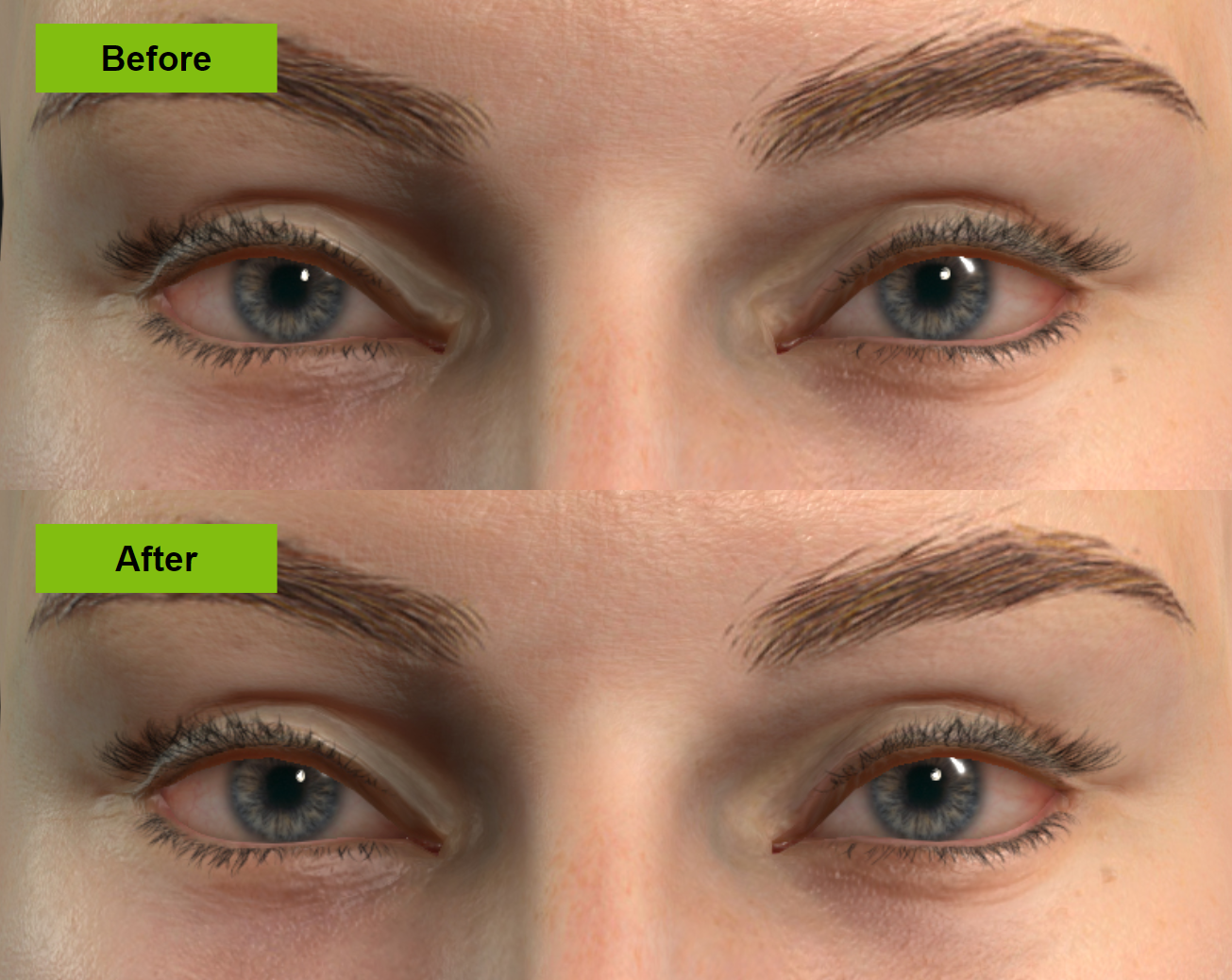 Have a nice day!
Reallusion Team
|
|
By Zeronimo - 5 Years Ago
|
|
for the moment the HUB does not show any update.
EDIT : sorry, after a refresh in the HUB, I can see the updates
|
|
By wildstar - 5 Years Ago
|
i want to undestand this please
" Enhanced:GI settings on default project for better visual quality.
|
|
By LookingGlassGraphics - 5 Years Ago
|
|
Is there more information on The Smart Gallery Plug-in, what is it?
|
|
By LookingGlassGraphics - 5 Years Ago
|
Disregard the previous inquiry, I was able to find the information. Thank you.
Smart Gallery
|
|
By Marty3DGuru - 5 Years Ago
|
This update fails to install on my machine.
The hub fails to install it.
I try to manual install it via the hard drive location on pc and I get the message 'Setup has detected Iclone is in use' and it won't continue.
It is not in use. I've even run the program and then closed it down and tried again. It installed firstly into CC3 and that worked, but will not install after several restarts.
In short your installer is borked!!!
|
|
By Marty3DGuru - 5 Years Ago
|
I can't even uninstall anything from the hub. Not even CC3 or IC7.
Everytime I get a message Setup has detected Iclone in use.
It is not in use!!!!!
FFS. What a mess you have created with this latest update.
I have sorted the issue, thanks to my own ingenuity and endeavour. :D
|
|
By Hookflash - 5 Years Ago
|
Any update on this issue?:
https://www.reallusion.com/FeedBackTracker/Issue/Reach-keys-are-not-baked-properly
Looks like it hasn't been fixed yet in 7.72, and I'm just wondering if a fix is going to be possible in the near future.
|
|
By Peter (RL) - 5 Years Ago
|
|
Marty3DGuru (2/22/2020)
FFS. What a mess you have created with this latest update.
While frustrating for sure, if the issue was a bug in the installer it would affect everyone but that is not the case.
I have sorted the issue, thanks to my own ingenuity and endeavour. :D
That's good news. Glad you got it sorted in the end. :)
|
|
By Peter (RL) - 5 Years Ago
|
I'll check to see what the latest is on this issue and update again when I know more. :)
|
|
By Hookflash - 5 Years Ago
|
Peter (RL) (2/24/2020)
I'll check to see what the latest is on this issue and update again when I know more. :)
Thanks Peter! I'm really hoping to get an answer before the 3dxchange 60% off Flash Sale ends, as that bug is the one thing holding me back (I'm planning to use 3dxchange to export BVH motions to Daz, so precise baking of reach constraints will be a necessity).
|
|
By Eric C (RL) - 5 Years Ago
|
Hello wildstar,
We are introducing the Smart Gallery plugin to help you manage your asset in a comprehensive way.
Hope this update will bring efficiency and help you deliver more videos in the future.
(Webpage) https://www.reallusion.com/smartgallery/
We have also prepared a step-by-step tutorial for you, please check.
|
|
By kmitchell.12catblackstudios - 5 Years Ago
|
Eric C (RL) (2/27/2020)
Hello wildstar, We are introducing the Smart Gallery plugin to help you manage your asset in a comprehensive way. Hope this update will bring efficiency and help you deliver more videos in the future. (Webpage) https://www.reallusion.com/smartgallery/We have also prepared a step-by-step tutorial for you, please check.
Can this be used to Organize my custom content that I created or is it just for store items?
|
|
By Eric C (RL) - 5 Years Ago
|
Hello kmitchell12catblackstudios,
Check the video at 5:50", that's where we mentioned custom contents.
Hope that part answers your question. ;)
|
|
By Amper Sand - 5 Years Ago
|
A quick, positive feedback: just updated iClone and CC3 to 7.72 and 3.22 respectively and everything went smooth, no issues at all.
I have a question, though: is there a maximum limit of polygons iClone can handle?
My current project is using ~1.940.000 polygons, ~2.1/6.1 GB video memory, high-realtime preview rendering is at ~20fps and the iClone is performing extremely well from my point of view for the available hardware resources. But I'm interested to know when should I start to worry about such limit (ie, splitting in sub-projects, reducing poligon counts, LOD and so on)
|
|
By Peter (RL) - 5 Years Ago
|
ampertox (3/1/2020)
I have a question, though: is there a maximum limit of polygons iClone can handle?
iClone does not set limits on the number of objects (or faces) that can be added to a project as every users computer will be different, however, project sizes are not infinite.
It is important to ensure that your projects remain at a manageable level to avoid stability issues.
It is always advised when working with iClone to save your projects at regular intervals and always to a new file each time. This way, should a project become unstable or corrupt in some way, you will always have a working version of the project available to drop back to.
The simplest solution if the size or complexity of the project becomes a problem is to try to break the project into two or more smaller projects. It is much better to have a few smaller projects than to try and have one large project that may become slow to respond to commands and in extreme cases can become corrupt.
|
|
By Amper Sand - 5 Years Ago
|
|
Thanks, Peter! Great product - thanks and congratulations to RL team for it!
|
|
By Peter (RL) - 5 Years Ago
|
Hi Hookflash
In case you haven't seen it yet, we have replied to you (March 3rd) on the Feedback Tracker.
|