|
By Eric C (RL) - 6 Years Ago
|
|
Dear iCloners,
Get ready to implement spring effects into your animations! With our Spring Joints plugin, you can create spring physics for your characters and props in a snap!
We have uploaded an awesome trailer, and make sure you watch the FULL VIDEO as we carried out a sophisticated demo.
Install for this plug-in is fast and easy! Download it for FREE right now! > Spring Joints
Feature:
This plug-in allows you to build your physics simulation quick and easy. Start out by building a prop hierarchy by parenting one prop after another. Select the individual props in the chain and load them into the script window. By adjusting the spring parameters, you can adjust the spring joints' stiffness, bounciness, and damping. Let's take a look of the applications below.
Application on Objects:
Setup the hierarchy from a chain of props and simulate the motions (0:24~1:03) Demonstrations of Stiffness, Stiffness Scale, Bounciness, Bounciness Scale and Damping (1:05~3:55) 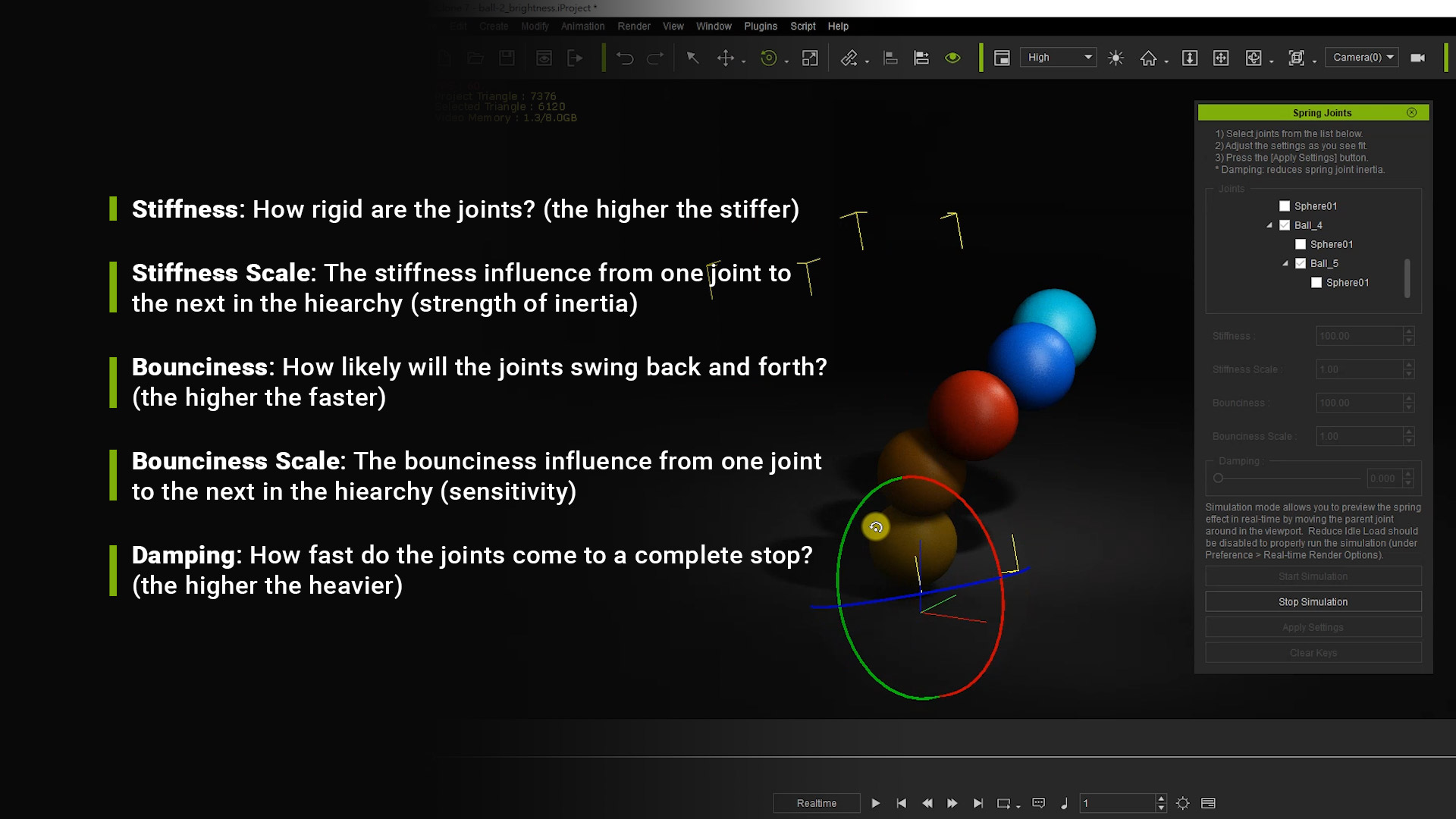
Application on Characters: (simulating the work movement with )Simulation on bones (4:05~4:50) In this part, we demonstrated how spring physics simulates a flowing hair.
More flexible hierarchy structures (4:52~6:42)
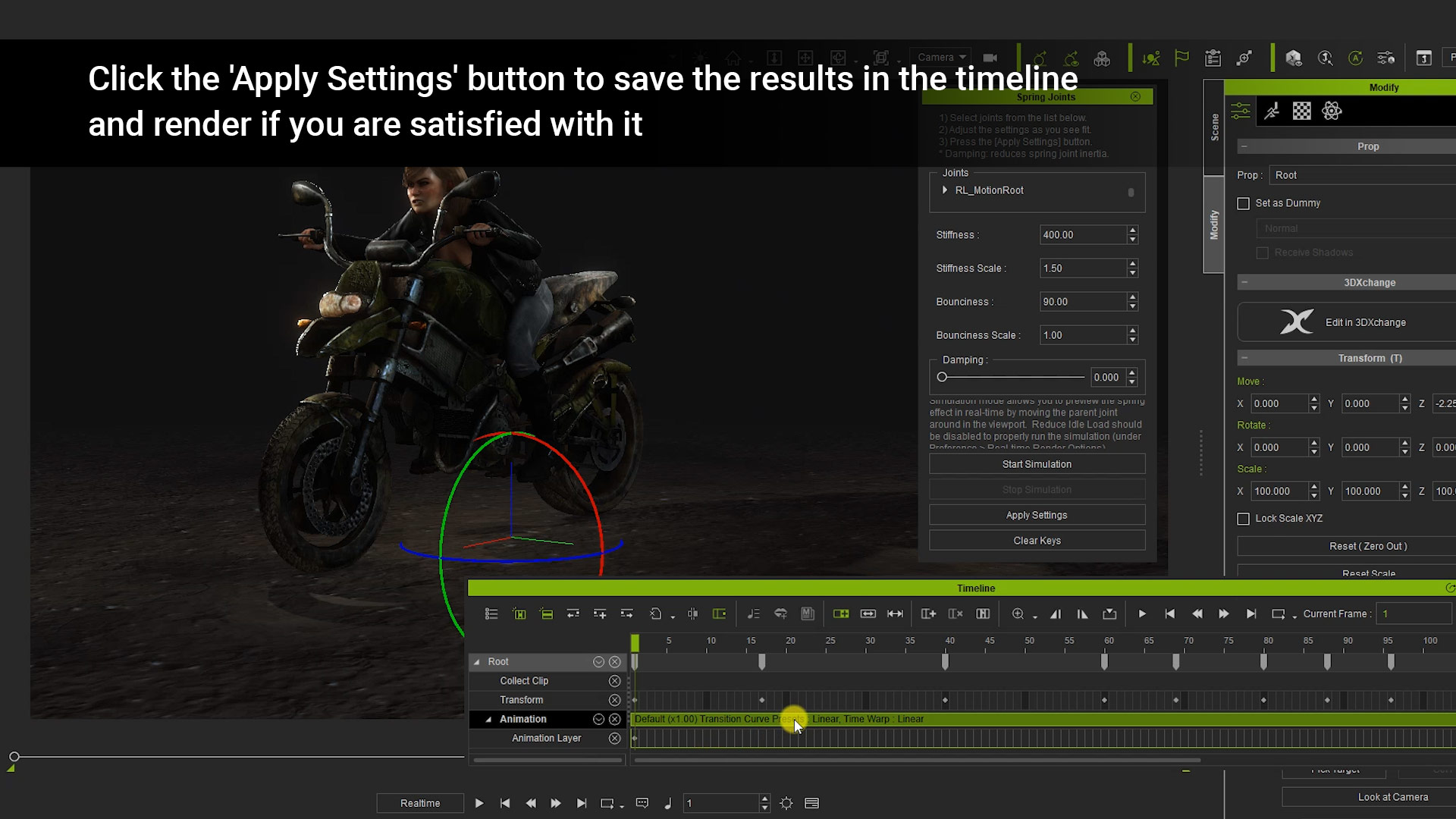
Spring physics can simulate passengers on a bumpy ride! Take a closer look at our step-by-step tutorial and learn how to adjust the spring parameters. 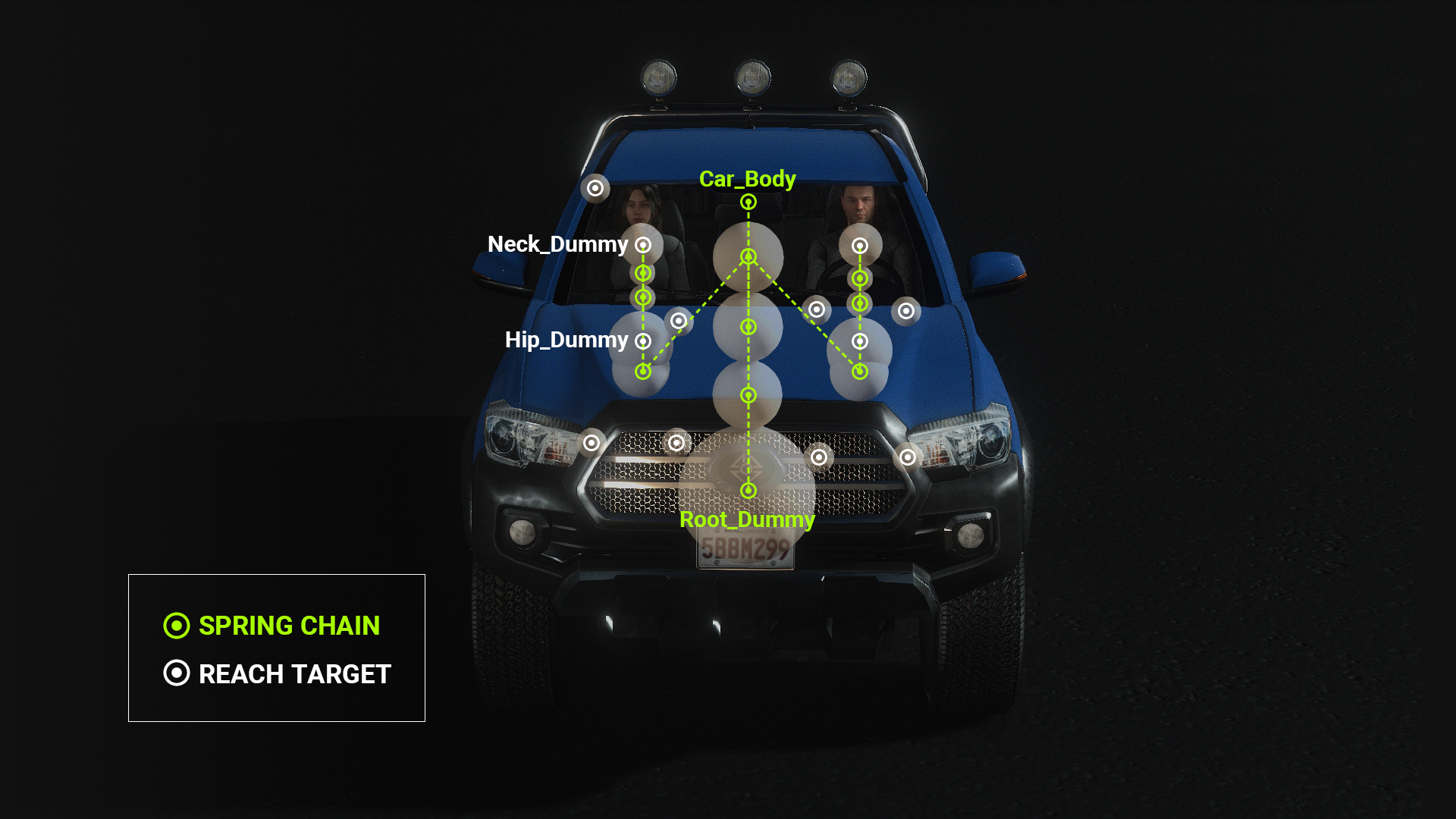
Explore our wiki page and find out how we create this with Python!
|
|
By 2IDs media:design - 6 Years Ago
|
Wow, brilliant and excellent work and for free....amazing. Thank you very much.....:P:)
By the way
what about this article?
https://forum.reallusion.com/356769/Upcoming-PopcornFX-Plugin-for-iClone-v11-More-Enhancements
Did we miss something? It is 2 YEARS AGO :crying:
Have a nice day and go on with your great work.
|
|
By ToKoMotion - 6 Years Ago
|
|
Amazing feature! Great work RL. I think I really need to learn Python now :).
|
|
By 4u2ges - 6 Years Ago
|
|
Marvelous!
|
|
By thebiz.movies - 6 Years Ago
|
|
Very cool! Would love to see it incorporated into the main program.
|
|
By Zeronimo - 6 Years Ago
|
|
thebiz.movies (2/20/2020)
Very cool! Would love to see it incorporated into the main program.
+1
|
|
By Rampa - 6 Years Ago
|
This one is super cool. What a great visual reward it gives!
Let's see if anyone can use it for rag-doll effects. ;)
|
|
By Angel Alonso - 6 Years Ago
|
|
very GREAT!!!!
|
|
By Kelleytoons - 6 Years Ago
|
|
Rampa (2/20/2020)
This one is super cool. What a great visual reward it gives!
Let's see if anyone can use it for rag-doll effects. ;)
Great idea, Rampa -- something along those lines ought to be possible (I'm thinking now you could rig your avatar up with it, and then link to a dummy object which you then apply physics to, like having it get hit by something).
|
|
By nealtucker - 6 Years Ago
|
It says available now, has others got it yet? when I click the Buy button it says to call back later?
N.
|
|
By Eric C (RL) - 6 Years Ago
|
|
nealtucker (2/20/2020)
It says available now, has others got it yet? when I click the Buy button it says to call back later?
N.
Hello nealtucker,
Can you double check if you were logged in Reallusion Marketplace?
Once logged in, you will be able to add this plugin to cart and follow the steps to proceed checkout.
And you will be able to FREE DOWNLOAD the plugin. Enjoy!

Reallusion Team
|
|
By Eric C (RL) - 6 Years Ago
|
To all iCloners,
And don't forget to leave a review and let more people to know the plugin.
Many thanks!
Reallusion Team
|
|
By linus10111 - 6 Years Ago
|
This totally revolutionizes the way we animate!
Three cheers to reallusion!!!
|
|
By argus1000 - 6 Years Ago
|
Is there going to be a tutorial or two to illustrate how this awesome plugin works? I know there is already a 6 minutes video, but it is kind of concise and can hardly be called a tutorial. Thanks.
|
|
By nealtucker - 6 Years Ago
|
Thanks RL for this great plugin, it works great, it takes a bit of trial and error....more error on my part to be honest but when I got it right it works Fab.
Neal
|
|
By 3dtester - 6 Years Ago
|
This is amazing, thanks so much!
I have a question though.
In the bike sample, there are 2 dummies: assistant and root.
How do they relate to the bike?
I mean, you are moving around the root dummy and the bike moves with it.
Obviously there is something missing in the video, and i can't figure it out.
Well, here are 2 screenshot which show what i mean:
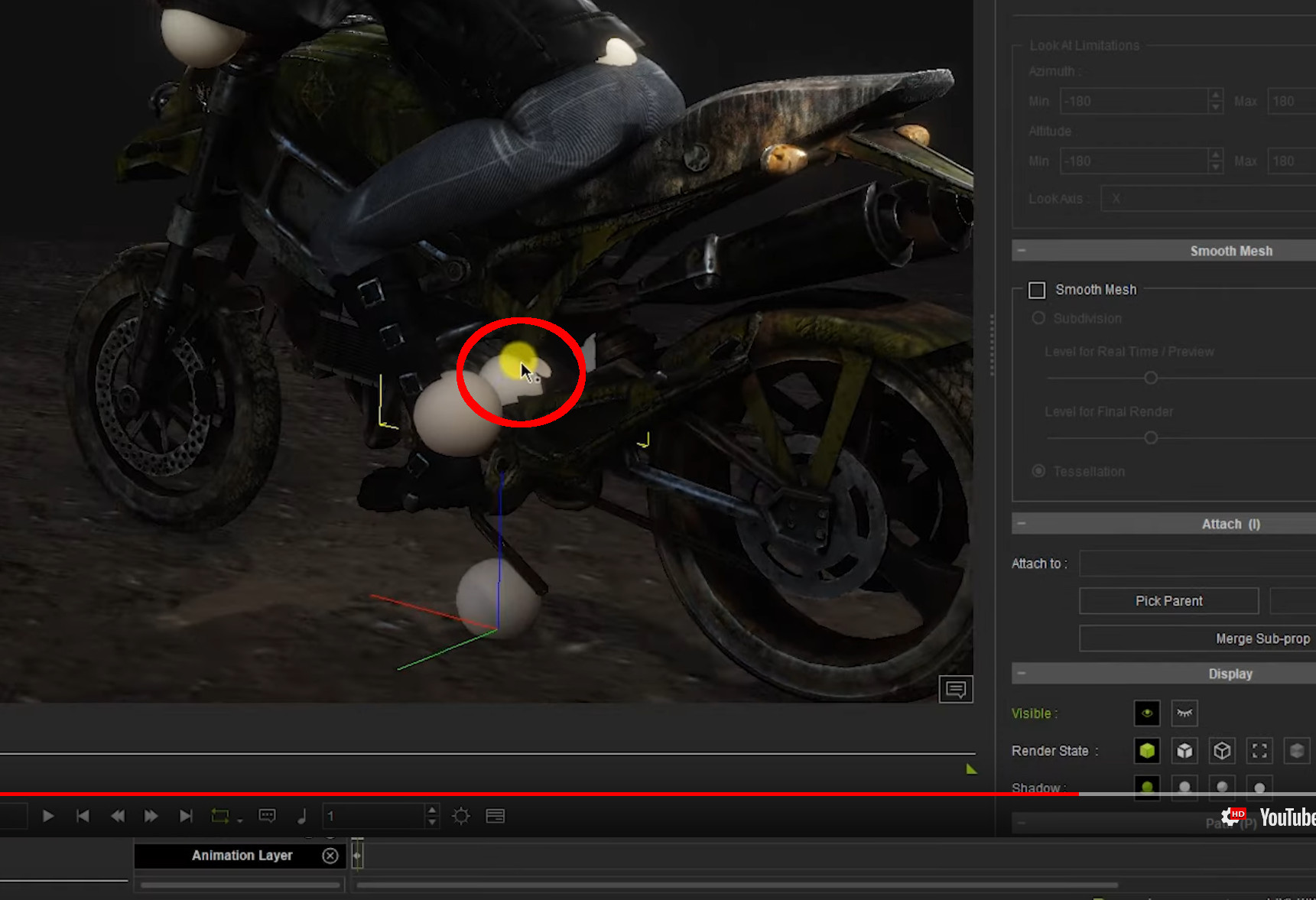
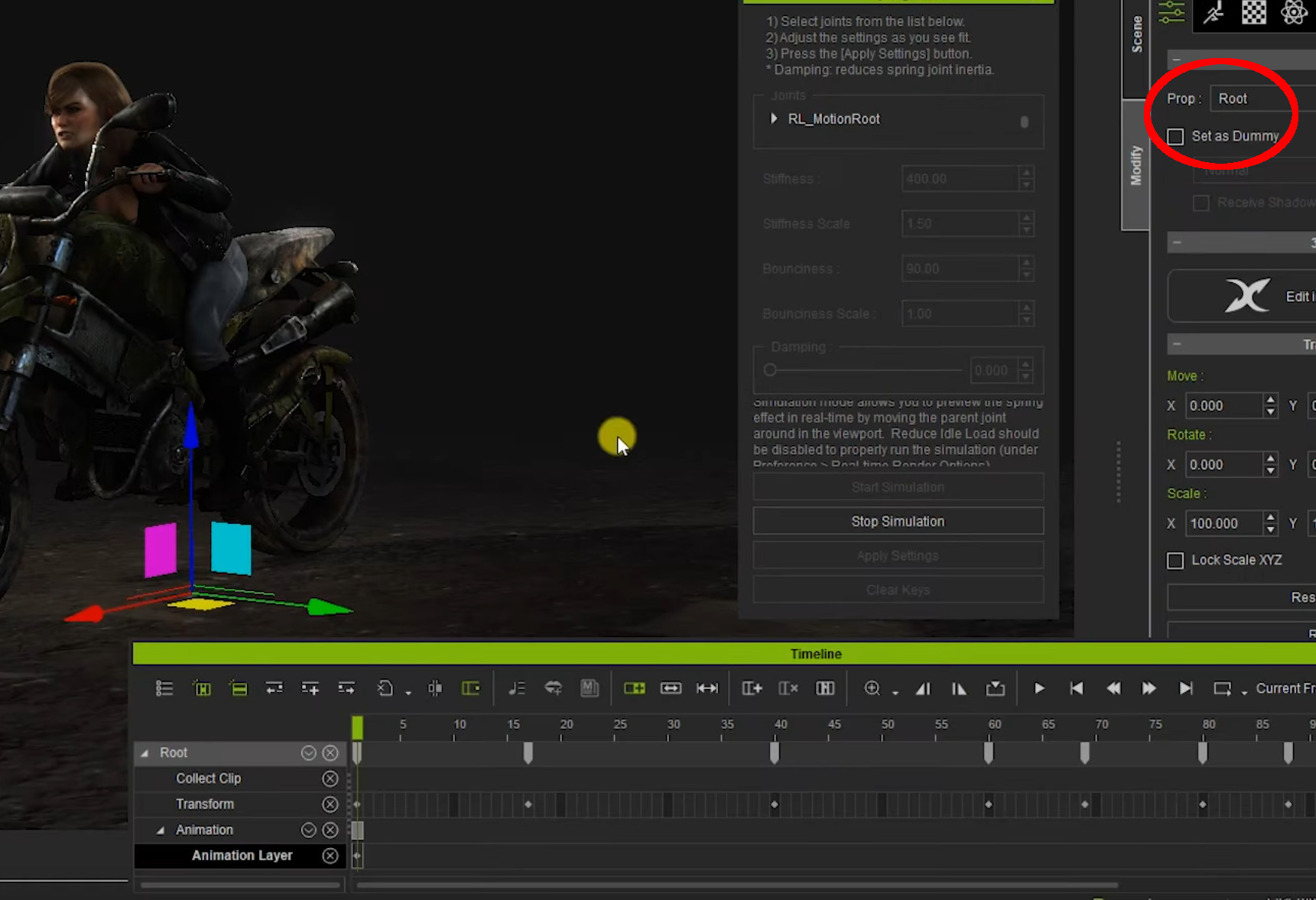
What should be done with these dummies, other than making an attachment chain?
I would be very glad if anyone could help me with this.
|
|
By Rampa - 6 Years Ago
|
@3Dtester
I believe that is the character's root. So the root would link to the motorcycle to keep the character mounted on it.
|
|
By AutoDidact - 6 Years Ago
|
|
Rampa (2/20/2020)
This one is super cool. What a great visual reward it gives!
Let's see if anyone can use it for rag-doll effects. ;)
Seems like a good foundation for a ragdoll solver..there is more work to be done to make it invokable on demand for characters Poser has had a python based ragdoll plugin for over ten years 🤪
|
|
By 3dtester - 6 Years Ago
|
|
Rampa (2/21/2020)
@3Dtester
I believe that is the character's root. So the root would link to the motorcycle to keep the character mounted on it.
Thanks for the idea, but unfortunately it seems not that simple :(
Here again you can see that dummy that he called 'Root':
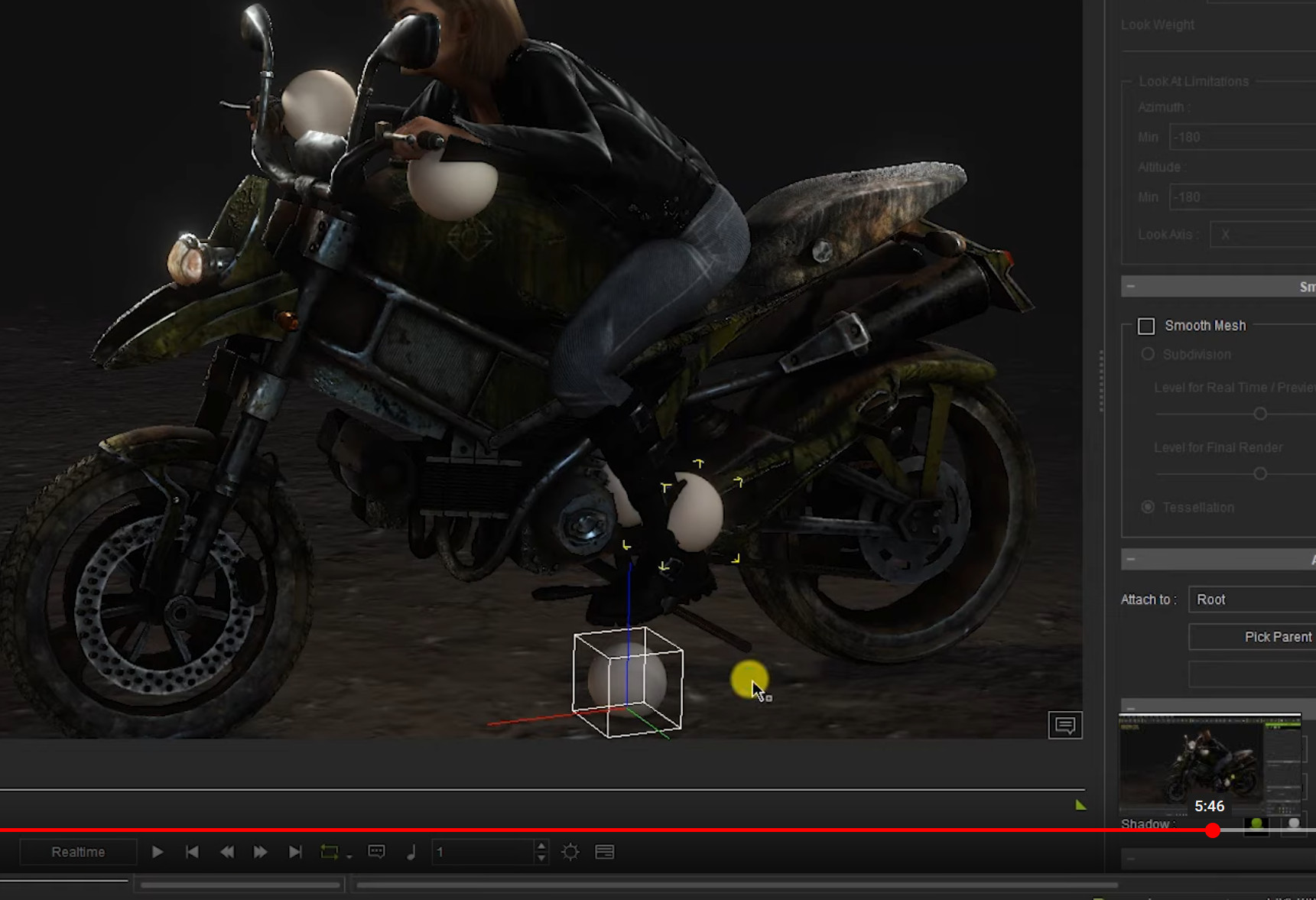
The other dummies are attached to it.
|
|
By 3dtester - 6 Years Ago
|
I have still not figured out what to do with the 'Root' dummy.
I've attached my vehicle to it, but it doesn't work.
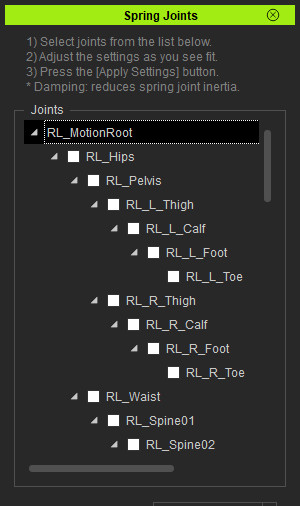
Yet here's another question.
What to select there, if anything?
|
|
By Pollux - 6 Years Ago
|
Thank you so much for the Spring Joints Plugin. Can't wait to try it out.
:)
|
|
By 3dtester - 6 Years Ago
|
Ok, i got it running now!
I was wrongly using the auto-created character reach dummies at first.
With fresh dummies, it just works.
Also, there is an issue with the realtime simulation.
At least for me, it only works in quick mode, regardless the reduce idle load switch.
These two things caused me some frustration and a sleepless night :angry:
But now i'm happy again :D Will post some result soon.
|
|
By 3dtester - 6 Years Ago
|
Here is my attempt:

https://forum.reallusion.com/FindPost436702.aspx
As another member already stated, it is relatively simple to use as soon as you understand how it works ;)
I probably have to tweak it a little more.
Finally i can say this is a fun plug-in and very very useful :)
|
|
By Eric C (RL) - 6 Years Ago
|
|
Dear all,
Thanks for the discussion and support on this plugin. Reading your replies really made our team smiling.
|
|
By wires - 6 Years Ago
|
|
I've removed this plugin from my system due to it creating Crash Dump files and have opened a ticket in the Feedback Tracker - Nr. 6696 on the issue.
|
|
By Postfrosch - 6 Years Ago
|
I also temporarily uninstalled the plug-in.
For me the same mistake occurs as for Wires.
With the plug-in installed, IClone 7. xx
Crash dump files (36.XXX KB) when shutting down even if the plug-in was not used at all.
I voted in the feedback tracker Wires entry.
Greets from Germany
Postfrosch
|
|
By Eric C (RL) - 6 Years Ago
|
@wires
@Postfrosch
Hi there,
We appreciate your feedback, and our people are taking care of this issue.
Thanks for reporting, and we will give everyone the updates when ready, thank you!
|
|
By animagic - 6 Years Ago
|
Each crash dump is about 300 MB, so that adds up. Check %LOCALAPPDATA%\CrashDumps and look for files starting with "iClone". Delete those files.
While waiting for a fix and in order to keep using the plugins, I have written a simple batch file that deletes the iClone crash dumps. It is launched via a scheduled task once a day.
Here is the batch file:
cd %LOCALAPPDATA%cd CrashDumps del iClone.* /Q /F exit
Save this as a .bat file. Then open Task Scheduler and create a new task (google if you need instructions how to do that). I've set my task to run at 5:00 AM every day.
|
|
By wires - 6 Years Ago
|
|
I just run Ccleaner once a day to take care of housekeeping, but I've also removed both offending Python scripts to avoid any other unseen issues. Both Feedback Tracker issues have been tagged as "Assigned" for a while, so hope is on the horizon. :):Whistling:
|
|
By toystorylab - 6 Years Ago
|
|
Though both Python plugins Popcorn FX Sequencer and Spring Joints are handy I also removed them as a normal iClone day quickly creates up to 2 GB and more dump files. No big issue as I also use CCleaner every evening but its annoying...
|
|
By Eric C (RL) - 6 Years Ago
|
|
Hello all,
Good news, the crash dump issue will be solved when we release iClone 7.8 update. Be ready to re-install our plugin soon!
|
|
By wires - 6 Years Ago
|
|
Excellent news Eric. :cool::smooooth:
|
|
By Eric C (RL) - 6 Years Ago
|
Hello Gerry,
Really appreciate your feedback and reporting us the problem about the crash dump. We have made some great progress on tackling the situation.
Our product group will announce an iClone 7.73 update next Monday or Tuesday. By updating the new version, the problem will be fixed,:) So no need to uninstall it, and please do support our RL made plugins!
|
|
By mechatrex69 - 6 Years Ago
|
Hi 3dtester
thanks for sharing your animation
could you give us a tip
about how to set for a hair animation with spring effect
for example a dancing simulation
My problem is I can not see the hair bones when I attach my hair to a character, so I set my hair to link
to my character, and run the spring joints script make the setting.
I can see the simulation when I move my character, but when I apply a dance animation the
simulation does not work...
|
|
By 3dtester - 6 Years Ago
|
Hi mechatrex69,
i think i know what you are trying.
You are attaching a hair prop to your character and want to have spring effect for it.
I think it won't work. You will need a complete rig for the hair.
You would have to use a dummy character with the hair prop being the only visible mesh.
Set-up the spring in 3DXchange for that.
Then you can attach that dummy to the head bone of your actual character.
I have done this one time to add a ponytail simulation to one of my characters.
And it was the only way it would work because iClone seems to deny additional springs for CC3 character.
Hope that helps.
|
|
By simon_20140205222146880 - 6 Years Ago
|
Demo video looks amazing but when I try to do this with a boned prop:
1. The option to switch of Spring is greyed out
2. I cant see my bones in the viewport
3. The simulation is a complete mess and the prop warps and crumples.
I'm trying to create my own bendy antenna from my own model.
|