|
By animagic - 7 Years Ago
|
This is a request for clarification regarding an Alembic import function that seems to be part of the API.
RLPy.RFileIO.LoadAlembicFile(spObject, strFilePath, eUpAxis)
My question is what spObject should be set to and what the result of the function is.
|
|
By animagic - 7 Years Ago
|
The documentation is minimal, but spObject is called the target object and must be defined.
To test I created an Alembic file of Gwyn dancing. As I exported an avatar, i figured the target must be an avatar to, so I used the same one.
The assumption is correct and the file does import, but the result is kind of strange. Part of the character is animated and part stays in place:
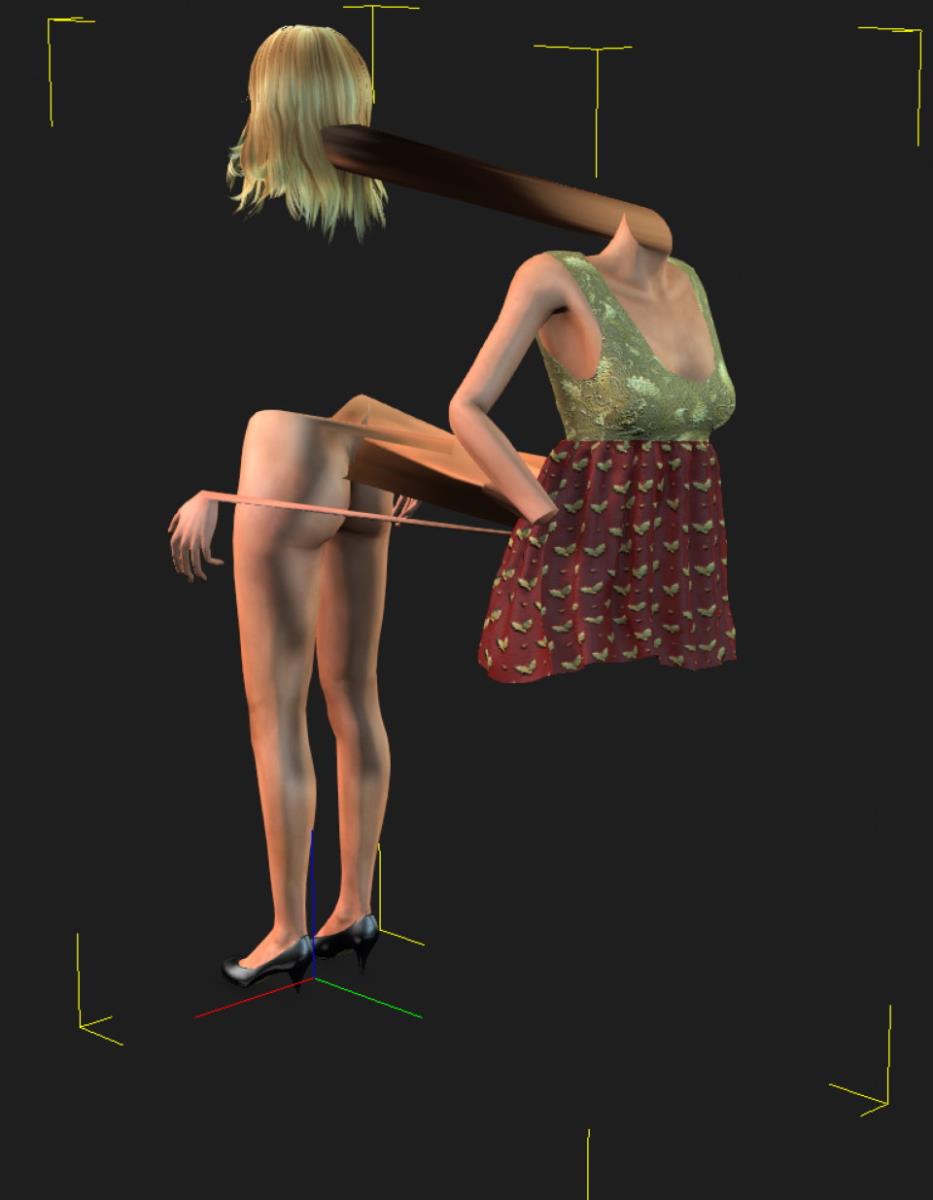
Obviously, there must be a correct way to do this. What is important is that a point cache can be imported into iClone, so RL may have plans for it somewhere.
EDIT: Also, the animation is only shown when the playhead is moved along the timeline. The animation does not play back.
|
|
By MIDI3D - 7 Years Ago
|
I agree! It seems like Reallusion does have plans for it to have even gone this far in the development process. iClone 8.0? :) Who knows. (Maybe Peter would be my guess)
This is great news for me to see that you got this far. As you already know, if Alembic import is developed to its full potential in iClone, my little Marvelous Designer issue will be a very small thing to celebrate. In the larger scope of things, we could benefit from Houdini, Maya, 3DS Max , and even Blender or any other program that exports Alembic files as either geometry or particles. Right now, I'm having a blast with the seamless back and forth between C4D and Blender. It's nice to have the ability to at least export Alembic files from both iClone and Daz, but it would be much, much better if we could import as well. Especially in iClone! Thanks animagic for including me on your progress!
|
|
By GOETZIWOOD STUDIOS - 7 Years Ago
|
@animagic
Perhaps it should be loaded into a new spObject that you create from code and add to the scene ?
|
|
By GOETZIWOOD STUDIOS - 7 Years Ago
|
In fact I think you should not even try to reload an alembic file as an "Avatar".
That make sense because now the Avatar has been "baked" as a static geometry plus animated points cached information.
There is no bones nor rigging involved anymore at this point.
That's may be why you get theses artefacts, the static mesh is being "re-skinned" or something.
|
|
By animagic - 7 Years Ago
|
I was surprised myself that the function required a target because as you say all the data is already in the Alembic file. That's why I hope someone knowledgeable from RL will see this and pinch in.
I think I have had beginners luck with this one, because I haven't had any success with other imports...:crying:
|
|
By Rampa - 7 Years Ago
|
|
Nice of you to remember. I made this one a long time ago. Now had a chance to import as alembic :)
BTW. The material/mesh name does not matter. It can be anything.
The object name though does matter and it must match the name in the alembic file.
That reminds me of when I made an ocean in Blender that was retroactively animated by a skeleton rig. It was pretty tricky, and involved a lot of little bones spread over the grid.
Loading a mesh animation is waaaaaaay easier! :)
|
|
By MIDI3D - 7 Years Ago
|
Is this a process that I should wait for a script or plugin to be released, or is it simple enough for the rest of us that don't have a working knowledge of Python to be able to do now?
Thanks in advance
|
|
By MIDI3D - 7 Years Ago
|
|
I will frequently be checking this thread and the marketplace in hopes that you do! For me, this would be my last hurdle to fully embrace iClone as my main program instead of just a very, very nice plugin. Thanks for giving me something to look forward to, hopefully in the near future! :)
|
|
By videodv - 7 Years Ago
|
Just a quick couple of tests using Cinema 4d
The first is the melt Deformer
The Second is the Twist Deformer
These are just quick test to get the workflow sorted.
Chris.
|
|
By AllenLee (RL) - 7 Years Ago
|
|
Sorry everyone,
Actually, this API (LoadAlembicFile) is an experimental function but the official description is not marked.
We are making our official API page better internally.
And this API can only be used to load the alembic data into the soft cloth track of the object.
Allen
|
|
By Rampa - 7 Years Ago
|
Thought I would mention that Blender ocean sim is the same algorithm as Houdini. But free, of course! :)
|
|
By GOETZIWOOD STUDIOS - 7 Years Ago
|
|
Rampa (12/21/2019)
Thought I would mention that Blender ocean sim is the same algorithm as Houdini. But free, of course! :)
Not really, not anymore, all was based on the open source HOT. But since, SideFX developers have raised the bar far far above of what HOT is.
Nowadays there is no comparison, Ocean and Water simulations in Houdini are at another "level" of what you can do with HOT (and with any other 3d application on that matter) which didn't really evolve since its creation.
Not saying HOT is not nice or obsolete, but it is like comparing iClone native particles with PopcornFX particles ;)
|
|
By 4u2ges - 7 Years Ago
|
|
Rampa (12/21/2019)
Thought I would mention that Blender ocean sim is the same algorithm as Houdini. But free, of course! :)
Nice of you to remember. I made this one a long time ago. Now had a chance to import as alembic :)
BTW. The material/mesh name does not matter. It can be anything.
The object name though does matter and it must match the name in the alembic file.
|
|
By GOETZIWOOD STUDIOS - 7 Years Ago
|
|
animagic (12/16/2019)
../.. As before, when importing I needed to enable Soft Cloth physics for the cloth to be affected and then of course turn it off before playing back../..
You mean on the object itself or the global Soft Physic flag ?
On my side as long as the Prop has Soft Cloth enable it will successfully load the point cache. I don't need to turn it off.
The global flag must be turn off at all time though or else, obviously, a new simulation would override any existing clip in the timeline whenever a playback is played.
|
|
By animagic - 7 Years Ago
|
I had forgotten about the global flag...:blush: I haven't used Soft Cloth in a while.
You're right, if the global flag is turned off then the Alembic clip will not be overwritten even if Soft Cloth is on on the object.
|
|
By GOETZIWOOD STUDIOS - 7 Years Ago
|
Good news. It works:
It is a little crowd created in Houdini. I exported a simple *.obj file and the *.abc file containing the point cached animation.
I've loaded the *.obj file directly into iClone (File -> Import...), enabled Soft Cloth on it, disabled the Global Soft Cloth flag and then imported the Alembic file.
One important point is that iClone load alembic files to an object by materials name. Each material defines a group of vertices so it is important that the names of each group from the alembic file match the material names of the object in iClone.
This opens the door to many interesting things. I'm thinking about direct import of Marvelous Designer simulations through Alembic for instance :w00t:
|
|
By MIDI3D - 7 Years Ago
|
That's HUGE!
I intentionally stayed on the sideline throughout the technical process of what you guys were figuring out, but I was frequently checking the post for new developments. With my limited grey matter in regards to python and whatever else you were doing, any contribution from me would have only been a distraction, and maybe a hindrance! What I can do is to be one of the 1st to congratulate you and to say THANKS! ...even if I can't benefit from this right away. You guys are super! I'm looking forward to learning what I have to know to take advantage of this! :)
|
|
By animagic - 7 Years Ago
|
A special thanks to Guy for noticing the Alembic API function in the first place and then showing that it works with external files.
I don't master Houdini at all, but I'm interested in learning it (it's on my to-do list). For me it would be great if we could import wave simulations for example.
|
|
By GOETZIWOOD STUDIOS - 7 Years Ago
|
|
animagic (12/18/2019)
A special thanks to Guy for noticing the Alembic API function in the first place and then showing that it works with external files../..
Oh don't mention it, it's not like the LoadAlembic method was hidden or something, it's just there in plain sight and not even marked as "experimental", while the LoadObject (Props,..) is, which is kind of weird.
animagic (12/18/2019)
../.. I don't master Houdini at all, but I'm interested in learning it (it's on my to-do list). For me it would be great if we could import wave simulations for example.
Yes Houdini is quite a beast, it opens doors to things you couldn't imagine doing with any other 3d application. It is not the easiest one to learn though, but nothing is impossible, with time and efforts, elbow grease and patience, it is certainly possible. But this is the kind of software if you don't read that (f*cking) manual, you won't be able to "guess" how it works ^^.
Regarding wave simulations, you can already import those into iClone through displacement and normal maps (using the Tesselation and Displacement features in iClone). You can create the grid (Plane/Floor) directly into iClone, activate Tesselation and use displacement and normal maps from Houdini (or from any other wave simulation software for that matter). You won't get vector displacement though, only normals displacement but that should already work pretty well for most of the cases. But of course now we know we can also import already displaced animated grids too. That said I believe that for this specific effect (wave simulation), letting iClone handle the Tesselation and Displacement through the GPU should be much more efficient than importing massive displaced grids from Houdini.
That's why I thought about crowds, because this is something much more challenging to accomplish in iClone. Houdini can do amazing crowd simulation from low poly, low end game quality to high-end, state of the art, movie quality. The challenge is to import the result into iClone, and clearly, FBX is far from being the most efficient mean. But with Alembic, this is clearly easy and very efficient. In my example I don't have materials but it is just a matter of defining those in Houdini and then addressing those once in iClone to the original *.obj imported file. Once that's set you can then import any alembic file (matching the obj file that is). And all the characters in my exemple are the same one but that is just a detail, I could have different humans running among a horde of Tyrannosauruses, or a bunch of cars and trucks on a highway, that would be equally as easy to import and use in iClone. Could be a flock of spaceships, of birds, anything.. Could be an entire city destroyed by a nuclear blast, that would be as easy too.. A forest of animated trees..(so you can use your own trees and not only rely on speedtrees). etc..
One thing I am thinking about too, is to have actual hairs and hairs simulations (or fur) for hero characters. Of course a mesh of "true hairs" would be quite heavy from an iClone Avatar perspective, but it all depends on what we are after, if we need that kind of quality, there is no reason not to push iClone and our graphic card(s) that far.
And all this is valid not only from Houdini, but also from any 3d application, Blender, Lightwave, XSI, Maya, 3DS Max, C4D, Marvelous Designer, etc.. as long as they are able to export Alembic files.
And this is a feature available TODAY :)
One just has to release a little plugin able to load those Alembic files on the MarketPlace or somewhere. I'll probably do that soon unless someone else does it first.
|
|
By GOETZIWOOD STUDIOS - 7 Years Ago
|
|
animagic (12/15/2019)
I was surprised myself that the function required a target because as you say all the data is already in the Alembic file. That's why I hope someone knowledgeable from RL will see this and pinch in.
I think I have had beginners luck with this one, because I haven't had any success with other imports...:crying:
I've just tried myself and while the alembic files load without error, whatever the spObject given, I get no animation at all.
The first time you tried and you got the animation, was it not because you didn't removed the Animation from the Avatar itself before loading back the alembic file ?
|
|
By animagic - 7 Years Ago
|
|
GOETZIWOOD STUDIOS (12/15/2019)
The first time you tried and you got the animation, was it not because you didn't removed the Animation from the Avatar itself before loading back the alembic file ?
I checked, and I had indeed removed all animation.
However, I discovered something interesting: the Soft Cloth animation of the clothing is implemented by the Alembic file (it names the file). So maybe it only imports Soft Cloth?
BTW, I was wrong about it not playing back. It is important to disable any Soft Cloth animation otherwise it will just be overwritten.
|
|
By 4u2ges - 7 Years Ago
|
|
I checked, and I had indeed removed all animation.
But did you bake soft cloth before exporting?
And then did you remove soft cloth clip before importing as well (I know you said you removed a motion animation already)?
I cannot import anything either.
This: "Import the alembic file from the given file into the current scene." does not make sense to me at all.
And then the object. What kind of object is required?
As I expect it to work, a new object should be created for each mesh in the alembic file
(or combine those meshes internally in iClone and present as a single object).
Don't understand how it is associated with existed object, if we plan to import something from outside of iClone.
|
|
By animagic - 7 Years Ago
|
4u2ges (12/16/2019)
I checked, and I had indeed removed all animation.
But did you bake soft cloth before exporting?
And then did you remove soft cloth clip before importing as well (I know you said you removed a motion animation already)?
Yes and yes.
I found out further that in order for the Alembic file to catch on, Soft Physics must be enabled during import and then turned off after import, obviously.
I think we may conclude that this is "experimental". :P
|
|
By GOETZIWOOD STUDIOS - 7 Years Ago
|
@animagic
That's odd, in my case I don't need to enable Soft Physics during import.
@4u2ges
Yes, clearly in iClone, Alembic import is just used as point cache files for existing objects, a scene cannot be "reconstructed" from the Alembic file only.
If you load the same alembic file to the wrong object, there is an assertion error, so the file clearly has to match the original object found in iClone.
What I don't know yet is that if iClone will be able to correctly load and "re-associate" an Alembic file to an object that has been created externally (in the software that generated the Alembic file) and imported into iClone. The same process as for export with a *.fbx file + .abc but from an external 3d application.
If that works, it is an open door to many possibilities: imagine a mesh with hundreds of animated peoples imported into iClone. It would be quite light (compared to hundreds of Avatars..) because only a "static mesh" would be rendered (no bones/rigging/skinning/etc..) and animated through one Soft Cloth clip (which in this case would obviously contains the baked animation of the characters which in turn could include any Rigid or Soft Physics generated from the external 3d application.
|
|
By animagic - 7 Years Ago
|
I decided to do one more test.
We've discovered so far that Alembic import seems to be limited to Soft Cloth. I tried this with a piece of clothing for a CC avatar, but as of now we don't seem to be able to affect a mesh object.
So instead I tried a prop with Soft Cloth properties, and that works. I tested with the Round Table Soft Cloth prop (Props/Physics Props/Softcloth Props/Roundtable).
I ran the Soft Cloth simulation with baking enables and then exported the Alembic file.
As before, when importing I needed to enable Soft Cloth physics for the cloth to be affected and then of course turn it off before playing back.
The test prop is 8192 triangles and you can only apply the Alembic file to the same kind of prop. I have not tried with an external prop of that size.
|