yazkin (11/23/2019)
I've tried everything, but whenever I try to import a head that isn't the template, the eyes don't import at all.
I've even tried using a template and just replacing the layers as well as drawing over them, but the result is always the same.
I'm using Medibang Pro to edit the PSD files because I don't have Photoshop.
Everything else imports fine, it's JUST the eyes. I can't even replace them in the sprite editor or else they'll just be flat eyes (no iris separation).
Any help?
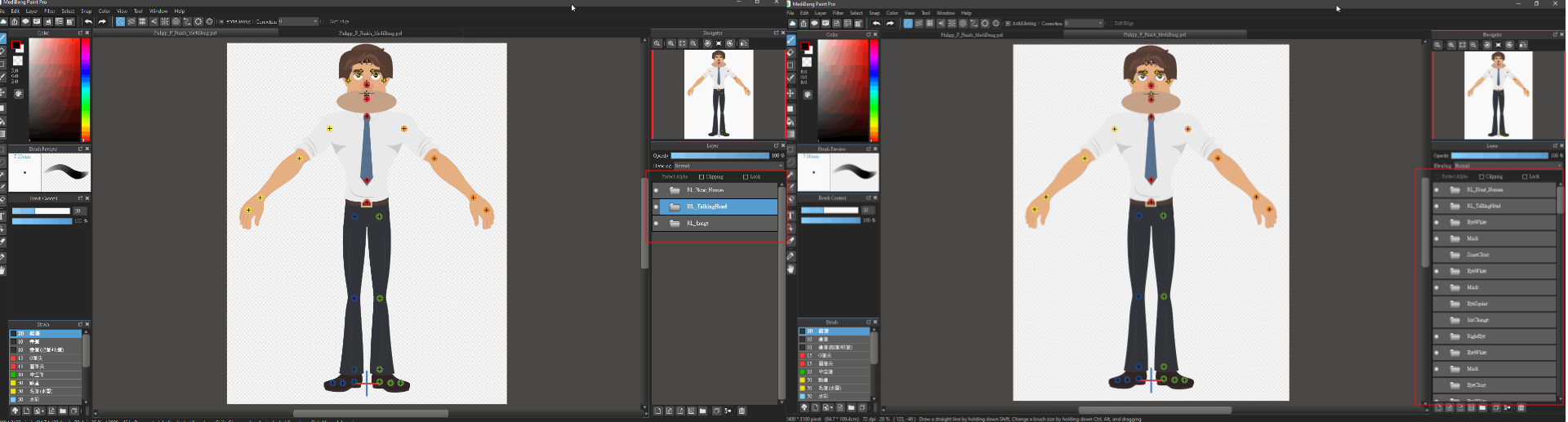
Hi, this is my testing, I think this is a defect of MediBang.
I imported a PSD template (Philipp_F_Finish.psd) file to MediBang and save it as a PSD file (Philipp_F_Finish_MediBang.psd).
You can see the Philipp_F_Finish_MediBang.psd the layer will be messed.
I prefer using Krita, this is verified to compatible with Cartoon Animator 4.
And Kria is a free tool.
https://krita.org/en/