Getting Started: My first Animation Project


https://forum.reallusion.com/Topic425544.aspx
Print Topic | Close Window

By gregg2g - 6 Years Ago
Hello. I am new to Animation and just purchased CTA 4. I am currently on the first project: Getting Started: My First Animation Project. The place I am having trouble with is the Leaf motion 01 in the TimeLIne. It shows in the video tutorial to select Motion on the timeline and delete the extra timeline frames. He then selects  Loop and extends the motion 01 timeline out several frames. 
My problem is that I can't extend the Motion 01 timeline adding more frames. I can only see a little plus at the end of the motion 01 timeline which adds the same timeline again with a brake line (causing to start over with the new motion 01 timeline).
How do I extend a Motion on the timeline?
I hope this all makes since.
By vepop - 6 Years Ago
You have to click the 'SPEED' icon first. Then, drag the motion to make it slower or faster.
By kylelee - 6 Years Ago
gregg2g (10/27/2019)
Hello. I am new to Animation and just purchased CTA 4. I am currently on the first project: Getting Started: My First Animation Project. The place I am having trouble with is the Leaf motion 01 in the TimeLIne. It shows in the video tutorial to select Motion on the timeline and delete the extra timeline frames. He then selects  Loop and extends the motion 01 timeline out several frames. 
My problem is that I can't extend the Motion 01 timeline adding more frames. I can only see a little plus at the end of the motion 01 timeline which adds the same timeline again with a brake line (causing to start over with the new motion 01 timeline).
How do I extend a Motion on the timeline?
I hope this all makes since.


You can refer to this manual for extending a motion.
http://manual.reallusion.com/Cartoon_Animator_4/ENU/Pipeline/Content/Resources/ENU/09_Timeline/Speed_Loop_and_Blending.htm?Highlight=speed
By gregg2g - 6 Years Ago
Thank you both for your responses. I was not actually wanting to deal with the speed of the loop but with the distance (extending the loops frames) of the motion loop. I have figured that out by adding (+1) loops, but what confused me is the line between the two loops and that transition between the two same types of motion loops.
So if my leaf goes through the first motion loop and starts on the second motion loop (I added), there is this slight break in the repeating motion. In the video tutorial, it shows the person grabbing the end of the motion loop and extending it to make the leaf motion loop continue through more frames. A longer time period for the leaf motion to play. Not slow the speed but lengthen the motion.
By kylelee - 6 Years Ago
gregg2g (10/28/2019)
Thank you both for your responses. I was not actually wanting to deal with the speed of the loop but with the distance (extending the loops frames) of the motion loop. I have figured that out by adding (+1) loops, but what confused me is the line between the two loops and that transition between the two same types of motion loops.
So if my leaf goes through the first motion loop and starts on the second motion loop (I added), there is this slight break in the repeating motion. In the video tutorial, it shows the person grabbing the end of the motion loop and extending it to make the leaf motion loop continue through more frames. A longer time period for the leaf motion to play. Not slow the speed but lengthen the motion.


Hi, I have tested, is this you would like to do?
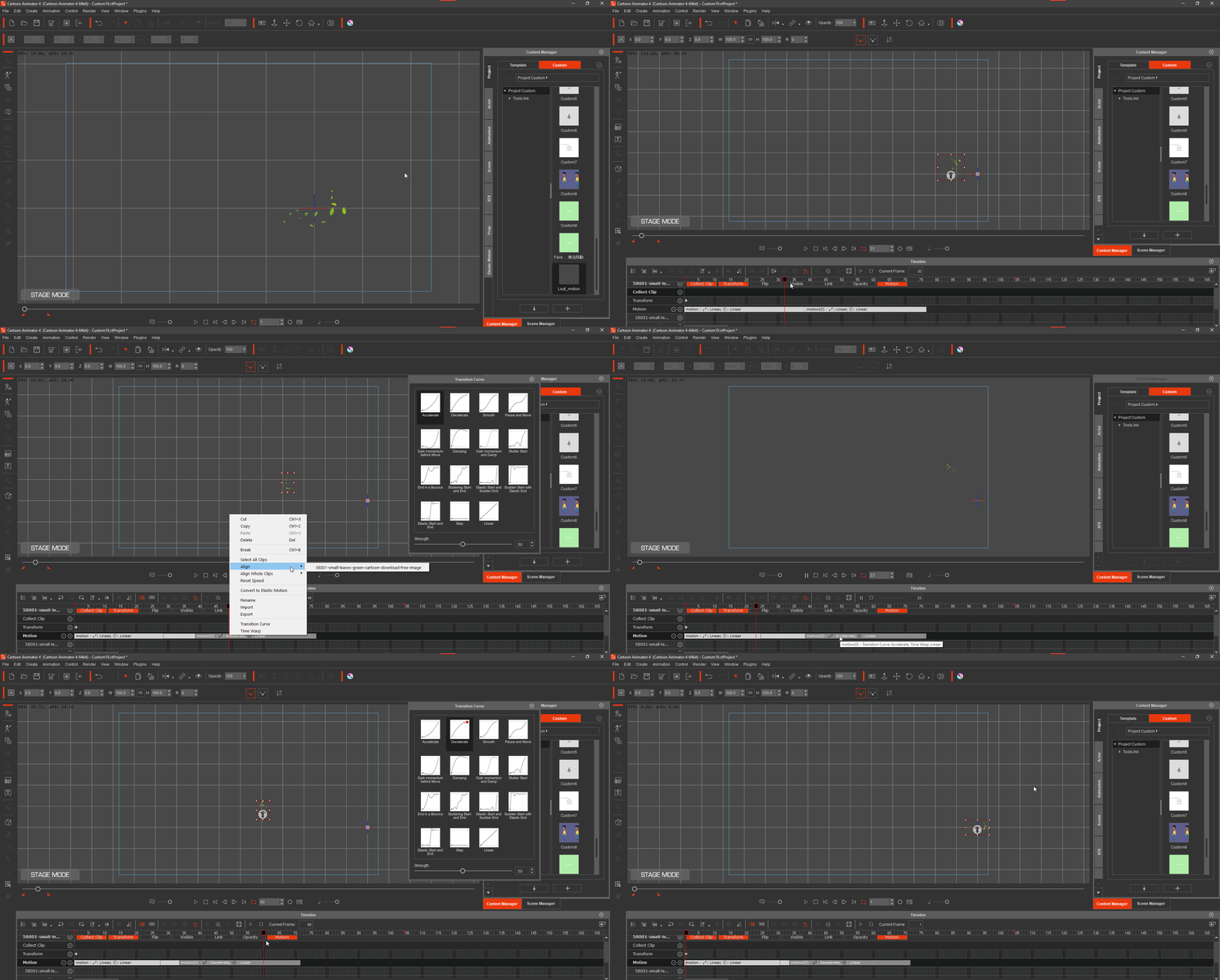
https://forum.reallusion.com/uploads/images/4f117857-3178-42af-a942-ee2a.gif
By gregg2g - 6 Years Ago
Yes, thank you. I see what you have done and I think that is what I wanted to know.