|
By _RESERVED__65 - 7 Years Ago
|
I have Crazytalk. I use it 3-4 times a year but the Hub is ALWAYS running and is one of the biggest drains on my laptop battery. I can't even disable it unless I go into the Activity Monitor (Mac OS X) and I have to do this every time I reboot.
I see people have been compalining about the hub since it was introduced, and replies from realussion saying they will take the feedback on board. That was months ago and still NOTHING!
|
|
By Peter (RL) - 7 Years Ago
|
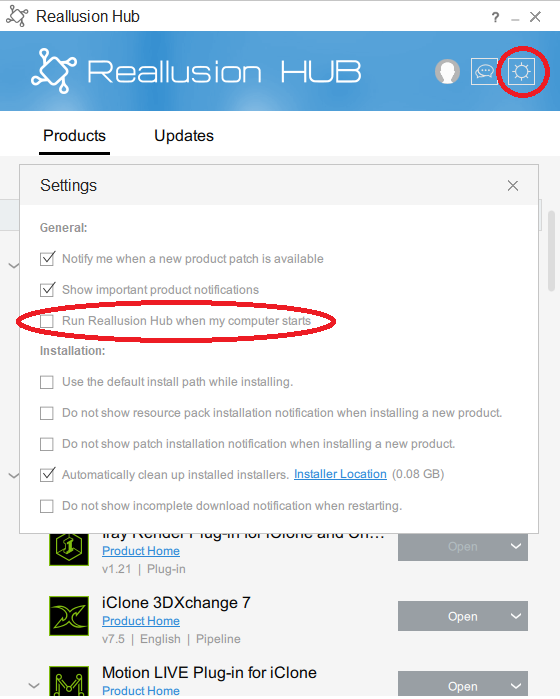
The Reallusion Hub doesn't need to run all the time. You can turn off in the Hub settings. Just take the check out of "Run Reallusion Hub When Computer Starts". If you only use CrazyTalk 3 or 4 times a year those will be the only times the Hub will run.
|
|
By Rockoloco666 - 7 Years Ago
|
Is there a way to stop it from autolaunching everytime i open rl software?
|
|
By blahblahhello - 7 Years Ago
|
it's not surprsing , most software nowadays has pervasive elements , in order to gather data , Adobe , probably the worst , i was unable to uninstall their products and had to go online and request a remove program tool from Adobe..
is this forum that bad that any comment posted needs to be moderated and the post shows up hours later ??? , kinda disrupts the notion of a forum where people can chat and help each other with ther animations or whatever...
|
|
By _RESERVED__65 - 7 Years Ago
|
Thanks. I launched Hub. Was FORCED to update, no option not to, and I did as you said. If Apple or Microsoft pulled these kind of stunts the EU would be issuing multimillion dollar fines!
|
|
By Peter (RL) - 7 Years Ago
|
|
_RESERVED__65 (10/25/2019)
If Apple or Microsoft pulled these kind of stunts the EU would be issuing multimillion dollar fines!
What kind of stunt?
Unless you have never installed any software in the last couple of years, almost every software company installs some kind of auto-launching updater including Microsoft and Apple. There is also Steam, Origin, Adobe, Autodesk the list goes on. However just like we do, you have the option of turning off the auto launching so I'm not sure what exactly the problem is. :ermm:
|
|
By animagic - 7 Years Ago
|
|
john.boyle1 (10/25/2019)
is this forum that bad that any comment posted needs to be moderated and the post shows up hours later ??? , kinda disrupts the notion of a forum where people can chat and help each other with ther animations or whatever...
We had a lot of spam problems, so initial posts of new members need to be moderated.
|
|
By Peter (RL) - 7 Years Ago
|
|
john.boyle1 (10/25/2019)
it's not surprsing , most software nowadays has pervasive elements , in order to gather data , Adobe , probably the worst , i was unable to uninstall their products and had to go online and request a remove program tool from Adobe..
is this forum that bad that any comment posted needs to be moderated and the post shows up hours later ??? , kinda disrupts the notion of a forum where people can chat and help each other with ther animations or whatever...
I have used Adobe software for years and never had a problem uninstalling their software. I think you had some other issue going on there.
Regarding forum posts, it is only the first three posts that need approving. After that you can post directly to the forum.
|
|
By Peter (RL) - 7 Years Ago
|
|
raxel_67 (10/25/2019)
Is there a way to stop it from autolaunching everytime i open rl software?
Only by uninstalling it.
When you launch a Reallusion program the Hub will auto launch to check for any updates. But you can close it down afterwards.
|
|
By justaviking - 7 Years Ago
|
Although wasn't much of a fan of the Hub when it first appeared, I've actually become relatively pleased with it.
a) It has never behaved badly and become a problem. Oh, maybe when it was brand new (maybe), but it has quietly done it's job for quite a while for me.
b) I do like the way it handles multi-product updates. So many times in the forum we see people who applied patches in the wrong order, etc., and things didn't work right. The Hub takes care of that for you. I confess I've pushed the "Update All" button several times now. There's no shame in that, is there? It worked.
I'm not saying it's perfect. There are some changes I'd like to see.
c) I'd like options to save the download/installation files to a directory, and use them again in the future.
d) I wish the Hub could also handle "Content" that I've bought too, not just the applications. Sometimes updates to content are released. And it should be able to check my PC and my account, and highlight any content I've purchased buy haven't downloaded. This is especially true because I have Reallusion products on both a Laptop and a Desktop, and I might not install purchases on both machines right away, and later I have to sort of self-audit to see what I may or may not have installed on each of the machines.
|
|
By animagic - 7 Years Ago
|
|
justaviking (10/25/2019)
c) I'd like options to save the download/installation files to a directory, and use them again in the future.
The Hub saves to a specific folder so you can reuse, but you cannot change that directory. You'll find a link to the location under the Hub's Settings.
|
|
By Rockoloco666 - 7 Years Ago
|
And that sucks big time, a downloader that has no option to change download location is like an alarm clock that doesnt let you set the time
Is it seriously too much to ask to keep the check for updates website working? And adding the possibility to check for plugin updates? I like updating manually, for me it keeps errors to a minimum and gives me more control
|
|
By wires - 7 Years Ago
|
|
raxel_67 (10/25/2019)
Is there a way to stop it from autolaunching everytime i open rl software?
I've posted the solution to this several times already, but here it is again.
Go to C:\Program Files (x86)\Common Files\Reallusion\LiveUpdate and simply rename Reallusion Hub.exe to something like X-Reallusion Hub.exe. This prevents any RL software from launching the Hub due to the exe being renamed. If, and when, it is required to run the Hub then just run the renamed exe and everything works as expected.
NOTE: If the Hub reports that it requires an update due to a newer version being available the X-Reallusion Hub.exe must be changed back to Reallusion Hub.exe before it can be updated.
|
|
By _RESERVED__65 - 7 Years Ago
|
Peter (RL) (10/25/2019)
_RESERVED__65 (10/25/2019)
If Apple or Microsoft pulled these kind of stunts the EU would be issuing multimillion dollar fines!
What kind of stunt? Unless you have never installed any software in the last couple of years, almost every software company installs some kind of auto-launching updater including Microsoft and Apple. There is also Steam, Origin, Adobe, Autodesk the list goes on. However just like we do, you have the option of turning off the auto launching so I'm not sure what exactly the problem is. :ermm:
Stunts as follows:
1) Software permanently running in the background for no good reason
2) Unable to even detect it was running, apart from the fact that my battery monitor was showing it
3) Unable to quite the software or even force quite it from the finder, I atually had to open a utility to quite it
4) The issue isn't just the fact that it auto-updates. If it was CrazyTalk (the only piece of software that I want from you) that was updating, that would be fine (but only just). But no, your force updating the thing I don't even want on my machine.
If your only excuse is others are doing it too. Then you already know that this is a problem.
I'm not wasting anymore time dealing with this nonsence!
|
|
By Rockoloco666 - 7 Years Ago
|
Since when did "everybody is doing it" become a valid argument?
|
|
By animagic - 7 Years Ago
|
On Windows running of the Hub is indicated with an icon, which has a Quit option.
|
|
By Peter (RL) - 7 Years Ago
|
|
_RESERVED__65 (10/26/2019)
Stunts as follows:
1) Software permanently running in the background for no good reason
You clearly are not reading the replies to your own questions. I say again auto-launching can be turned off in settings.
|
|
By Peter (RL) - 7 Years Ago
|
|
raxel_67 (10/26/2019)
Since when did "everybody is doing it" become a valid argument?
When somebody else claims no one else is doing it.
|
|
By Rockoloco666 - 7 Years Ago
|
Not a valid argument for shoving people unwanted software, not to mention that wasnt even the point. You should get some vacations, support is clearly making you overly sensitive. Also don't delete posts that make you angry if you were the first one to be passive aggressive to a COSTUMER.it reflects poorly on the company you represent
|
|
By Rockoloco666 - 7 Years Ago
|
Peter (RL) (10/28/2019)
_RESERVED__65 (10/26/2019)
Stunts as follows:
1) Software permanently running in the background for no good reasonYou clearly are not reading the replies to your own questions. I say again auto-launching can be turned off in settings.
Nope, the hub will launch everytime rl software is launched, there is no setting for that. And renaming the exe or deleteing is not a solution just a work around. Please let users have control over the hub
|