|
By vidi - 7 Years Ago
|
I get this messages
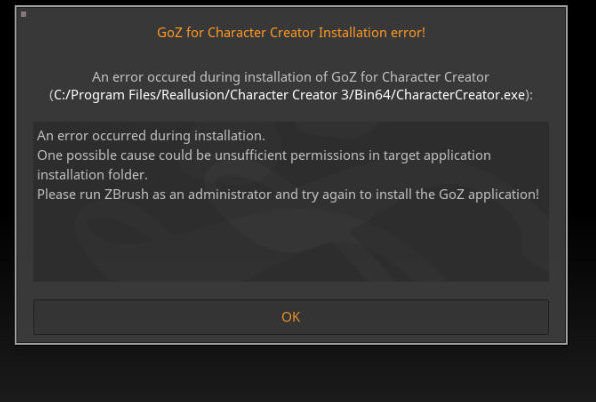
I'm trying for hours, but nothing works . Running as administrator or new install is not the key. Remapping give this message All others program that support GOZ have not problem with GOZ. I think because I updated Character Creator, it is broken , it had worked before. Any Idea what I can make ?
|
|
By vidi - 7 Years Ago
|
Finally, I have need Uninstall CC with Revo to remove everything .The unstalling funktion from RL HUB is not enough
many hours later ... it works again :doze:
|
|
By Dan@3DIM - 7 Years Ago
|
|
How? I have same problem as your.
|
|
By vidi - 7 Years Ago
|
i use revo to clean the install complete on my system and install all new
https://www.revouninstaller.com/de/revo-uninstaller-free-download/
|
|
By Dan@3DIM - 7 Years Ago
|
|
Just did it three time in row. Don’t work. Bahhh
|
|
By sylwester.hejduk - 7 Years Ago
|
Anyone had any luck with that? Without GoZ CC 3.2 is not worth buying for me. I'm on Zbrush 2020, but it seems with 2019 it didn't work as well...
I've been wondering, why GoZ_Info file data looks so weird:
GOZ_OBJECT_LIST = "../../GoZBrush/GoZ_ObjectList.txt" GOZ_OBJECT_PATH = "../../GoZBrush/GoZ_ObjectPath.txt" MAKEOBJECTPATH_COMMAND = "../../GoZBrush/GoZMakeObjectPath.exe"
plus, batch file GoZLocateCC also mentions weird path: \GoZBrush\GoZLocateApp.exe
What the heck is GoZBrush\GoZLocateApp.exe ? I doubt there's such thing in Zbrush 2020. There was however, in 2018, I think. This is the key I guess - whenever I force Zbrush to update paths to CC, it works untill it runs the goddamn batch file looking for non-existing GoZLocateApp.exe.
Can someone from the devs let us know how to clear this out? I guess this batch process for CC 3.2 has not been properly updated to use with Zbrush 2020.
Please help!
Thanks.
|
|
By vidi - 7 Years Ago
|
|
Anyone had any luck with that?
Like I say in my post above , it works for me now
|
|
By sylwester.hejduk - 7 Years Ago
|
vidi (12/8/2019)
Anyone had any luck with that?
Like I say in my post above , it works for me now
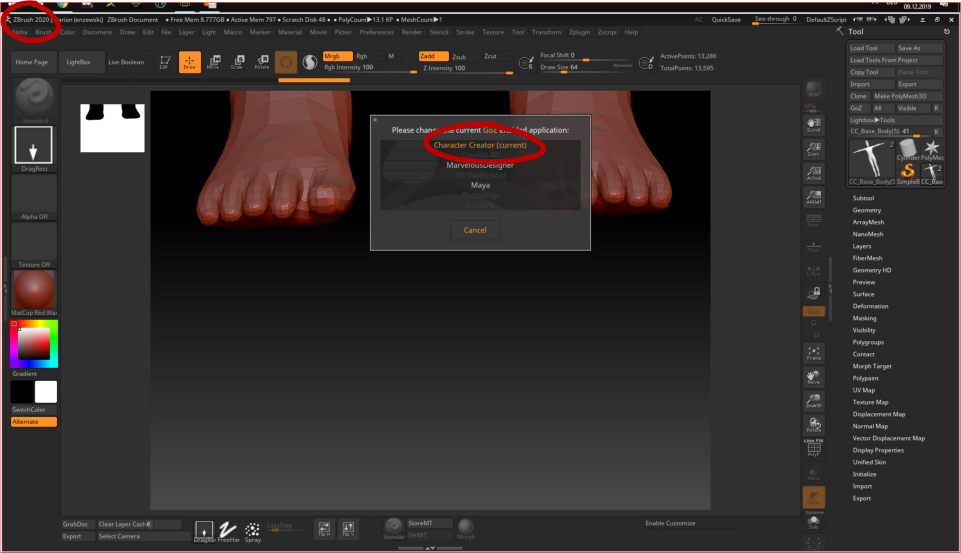
Have you upgraded Zbrush to 2020? Regardless of that, please kindly share the contents of your folder:
C:\Users\Public\Pixologic\GoZApps\CharacterCreator
And maybe the contents of the presumably wrong batch file, GoZLocateCC (if it's still there, in above mentioned folder).
Thanks!
|
|
By vidi - 7 Years Ago
|
|
|
By Peter (RL) - 7 Years Ago
|
sylwester.hejduk (12/8/2019)
Anyone had any luck with that? Without GoZ CC 3.2 is not worth buying for me. I'm on Zbrush 2020, but it seems with 2019 it didn't work as well... I've been wondering, why GoZ_Info file data looks so weird: GOZ_OBJECT_LIST = "../../GoZBrush/GoZ_ObjectList.txt" GOZ_OBJECT_PATH = "../../GoZBrush/GoZ_ObjectPath.txt" MAKEOBJECTPATH_COMMAND = "../../GoZBrush/GoZMakeObjectPath.exe" plus, batch file GoZLocateCC also mentions weird path: \GoZBrush\GoZLocateApp.exe What the heck is GoZBrush\GoZLocateApp.exe ? I doubt there's such thing in Zbrush 2020. There was however, in 2018, I think. This is the key I guess - whenever I force Zbrush to update paths to CC, it works untill it runs the goddamn batch file looking for non-existing GoZLocateApp.exe. Can someone from the devs let us know how to clear this out? I guess this batch process for CC 3.2 has not been properly updated to use with Zbrush 2020. Please help!
Hi...
Sorry to hear you are having problems.
Please do ensure you have installed and are using ZBrush with an Administrator account. Most problems stem from this issue, but if you continue to have this issue please contact our Technical Support department using the link below. They will be able to advise you further. Thanks.
https://www.reallusion.com/CustomerSupport/UserEx/QForm.html
|
|
By 3Divo - 5 Years Ago
|
I know this is an old post, but I have now encountered exactly the same after problem after upgrading to 3.32 and ZBrush 2021 (I upgraded both at the same time - stupid me:crazy:). I hadn't used this workflow for more than a year, but it worked fine as far as I remember.
What was the outcome of this , sylwester? Or has anyone recently had the same problem?
@ Peter: I am using my administrator account...
|
|
By Dan@3DIM - 5 Years Ago
|
Same! I just start use goZ. Its broken again after update to 2021
|
|
By lianchiu - 5 Years Ago
|

try this
Dan@3DIM (3/24/2021)
Same! I just start use goZ. Its broken again after update to 2021
|
|
By ruscular - 5 Years Ago
|
I also have revo uninstaller, so I did delete my CC3.4 and reinstall everything and it still shows up not activated on my account page, and Zbrush still says that it cant find CC3.4
But just out of curiosity I try using it and everything works. morph the object and sent it back to CC3.4 and it took. ?!?!?!? what can I say? Maybe Zbrush2021 is still too new and haven't work everything out? or that there is a bug in somewhere?
|