|
By e1_scheer - 7 Years Ago
|
Hi all,
I'm running into a bit of a problem when exporting a cc character to unity. I'm exporting an fbx file with two LOD levels,
but when I go into the settings window, the open mouth option is greyed out. While this is totally acceptable for the two
created LOD levels, I would like to have the option to add the open mouth blendshape for the original avatar.

Is that something that can be changed or fixed quickly, as I have about 50-60 characters waiting to be exported.
Thanks in advance,
Iwan
|
|
By Scyra - 7 Years Ago
|
I tested LOD export a few weeks ago and confirmed that using LOD means you won't be receiving any Blendshapes. I see you made a Feedback Tracker post about the issue. That's good. People should vote for this if they want talking NPC's.
|
|
By e1_scheer - 7 Years Ago
|
Thanks for the confirmation and the vote Scyra :) (3 votes so far !)
In fact you do get blendshapes on the highest level character if you check the "include the original character" option,
but for some obscure reason that does not include the mouth open blendshape.
We bought the salsa unity plugin with this feature in mind and are now unable to use realtime lipsync in our sim.
|
|
By Scyra - 7 Years Ago
|
Oh! I did not know that the Include Original Character option did that. Thanks for the info!
There is a way to get by with just Game Base without the need for LOD's. The Game Base head is 2000 vertices, the rest of the body adds another 5000. I've experienced more than a few wildly successful clothing Polygon Reductions in the >95% range. With the "Delete Hidden Mesh" export option combined with low-poly clothing covering most of the body, I think a (hairless) Game Base character close to 5K verts is possible (realistically more like 7K), plus you'd cut the overhead from the LOD distance checks.
One more thing to try — this was in the patch notes:
General for Unreal Engine & Unity- Added: Mouth open is now a FBX export option. Jaw, lower teeth and tongue bone animations can now bake into morph targets.
- Limitation: InstaLOD Merge Material function is incompatible and not permitted with FBX export option Mouth Open as Morph enabled.
So, try without that option.
|
|
By Miranda (RL) - 7 Years Ago
|
Hello Iwan and Scy,
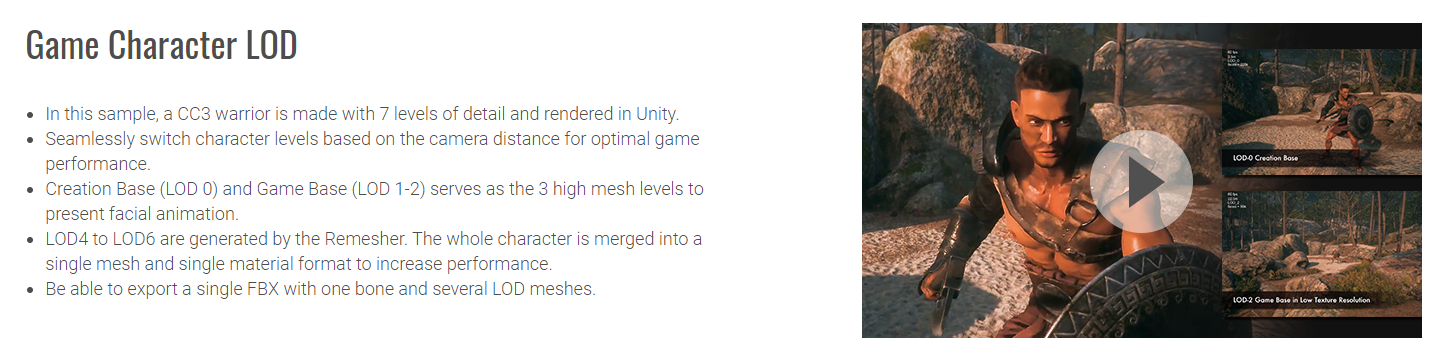
The mechanism of remesher function is combining multiple meshes into one, so keeping the blendshapes is not possible at the present. Remesher function is to quickly generate models in multiple LOD, but it doesn't mean that you can only use remesher to create characters for LOD. For example, the showcase in our webpage consists of Creation Base (original base without any polygon deduction), Game Base, Remesher, etc.
|
|
By e1_scheer - 7 Years Ago
|
Thanks for the replies both of you!
I will defininetly look into the multi-level option when I get back to work on monday.
and maybe need your help to get this to work
Have a good weekend :)
|
|
By e1_scheer - 7 Years Ago
|
Ok, So I've had a closer look at this and I think the solution you're proposing is one where I export several seperate LOD characters
and then link them in Unity through the LOD group component. I know this works as I've tried it before, but the problem is that I then
have a seperate skeleton and avatar for each LOD level.
However what I want to achieve is having different LOD levels on the same skeleton. I thought that's what the CC 3.1 update promised
to achieve. I've tried the new "one skeleton" pipeline and it does work. I can even include the original unremeshed character, including
all blendshapes, except for the "mouth open" one. I don't see why there isn't a way to include this morph shape into the original character
LOD mesh.as it's not being remeshed.
I really need to get this to work so any ideas are welcome!
|
|
By e1_scheer - 7 Years Ago
|
So no-one has a solution for this?
Just to sum up, what I'm trying to achieve is :
export a character to unity with the original character checked and two LOD's.
1. original level with blendshapes/including an open mouth blendshape that combines lip and jaw motion
2. first level remeshed
3. second level remeshed
All LOD levels need to use the same skeleton
Thanks in advance,
Iwan
|
|
By Miranda (RL) - 7 Years Ago
|
Hello e1_scheer,
I haven't got response from Reallusion Dev Team.
Since you've submitted this request to the Feedback Tracker, we will evaluate it afterward.
Any update information can be shared there too.
Miranda
|
|
By e1_scheer - 7 Years Ago
|
Hi Miranda,
Thanks for the update, it definitely helps to know they're looking at this.
I'm currently prepping our serious game characters (50-60) ready to export as
bx files. That will probably take me a couple more weeks.
Would it be possible to include this in a "non official" patch within that timeframe?
Thanks again for your help,
Iwan
|
|
By e1_scheer - 6 Years Ago
|
It's been months since I first raised this issue and several character creator updates have been released since.
The fact that I raised this issue as urgent in my case has made no difference and registering these issues
in the feedback tracker (besides several other feedback issues I have taken the time to list and document in
the feedback tracker).hasn't changed anything either
To me the whole support system at reallusion, where support members are always prompt and polite with
a reply feels more like a PR exercise than true support, with no real follow up on the actual issue at hand.
I'm not expecting this mail to make a difference, but I've taken the time to follow up on this issue just in
case this info gets past the PR department.
Iwan
|
|
By Miranda (RL) - 6 Years Ago
|
Hi Iwan,
I'm sorry that you feel this way (I will be upset if I were you) , and thank you for letting us know.
We've highlighted your request to Dev Team and the team in charge of Feedback Tracker yesterday.
The alarm mechanism doesn't work, so we are not aware that you've been requesting for an update for a long time.
In my point of view, all suggestions are precious. Even we are unable to satisfy each demand, nor give you quick response, we shall show our respect to you.
Again, thanks for reporting this. I hope it will make some changes this time.
Miranda
|
|
By dave_656710 - 6 Years Ago
|
Added my vote as well to the tracking issue.
It makes sense that the "Mouth Open as Morph" check box is disabled when using Remesher, but it when you select "Keep Original Avatar" it really should re-enable the "Mouth Open as Morph" check box.
|
|
By CCUnityUser - 4 Years Ago
|
|
Bumping this, why isnt this available when merging materials? I'm not creating LOD's
|