|
By zenyaz - 7 Years Ago
|
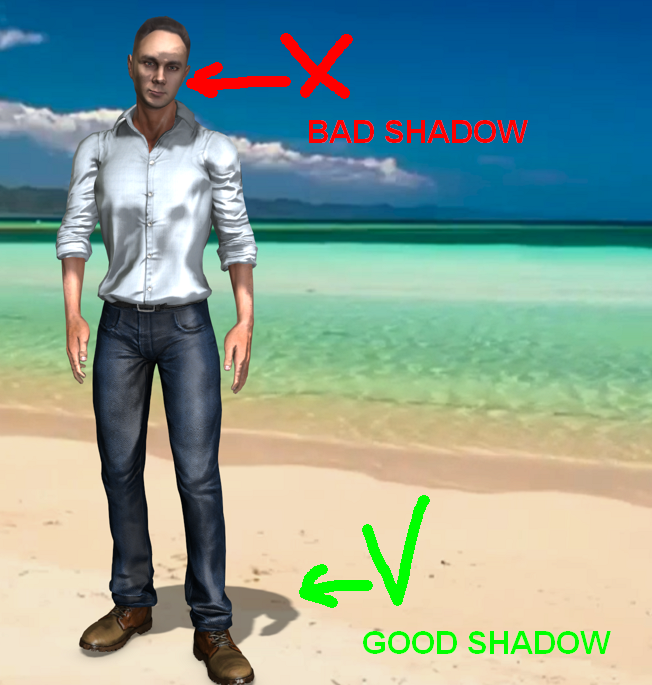
I have a character, and i want him to cast a shadow.
I add light, and shadow cast perfectly on the ground but ugly to face of character.
I can add another light for casting directly to face, but it didn't solve the problem. It overbright the face but didn't remove face shadows.
I need only ground shadow, and i needn't shadow on the face (or avatar).
How to realize it?
|
|
By 4u2ges - 7 Years Ago
|
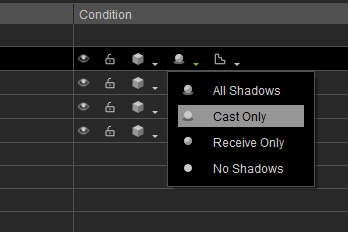
In scene manager select "Cast Only" for shadow settings
|
|
By Rockoloco666 - 7 Years Ago
|
Select your avatar in the scene manager, there are 2 circle like icons to the right, one of them is for shadows, click on it and select cast only, this will prevent the avatar from receiving shadows but it will still cast shadows
|
|
By mark - 7 Years Ago
|
You also might check the Bias adjustment under the Visual/Shadow Map tab sometimes that helps with the problem.
|
|
By toystorylab - 7 Years Ago
|
Yo, Bias on 0 instead of -5, esp. when character wears a hat...
Any reason why this is set to -5 on default??
|