|
By MatCreator - 7 Years Ago
|
Me again =P
So I used this method to import my Daz Monstrosities into CC3: https://www.youtube.com/watch?v=uuhCCgJQHYk
process went well, no issues detected or that I was aware of, but all 3 get this deformed hump neck issue =/
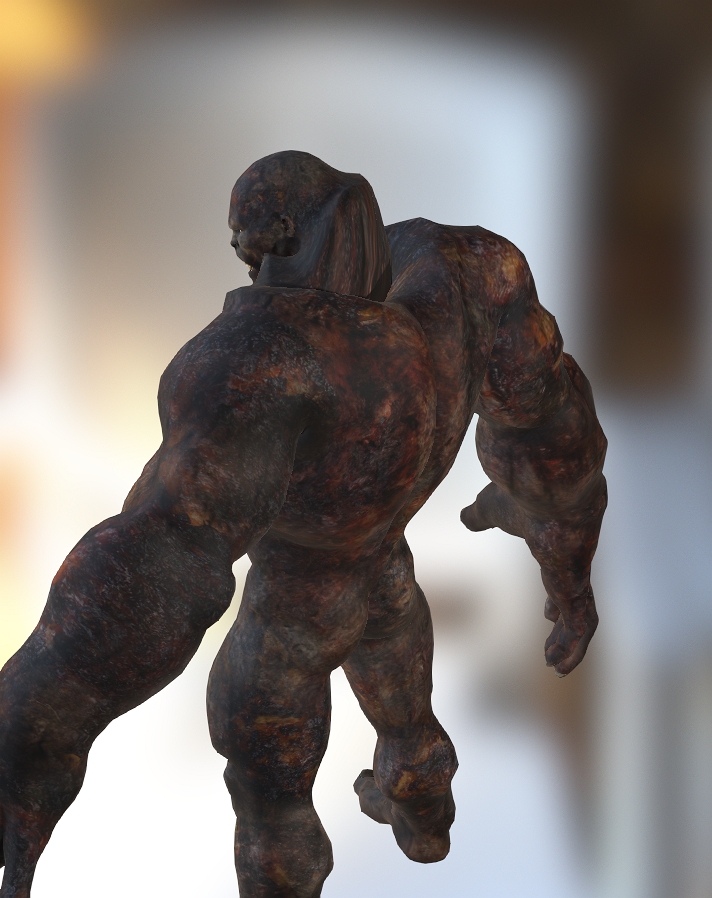
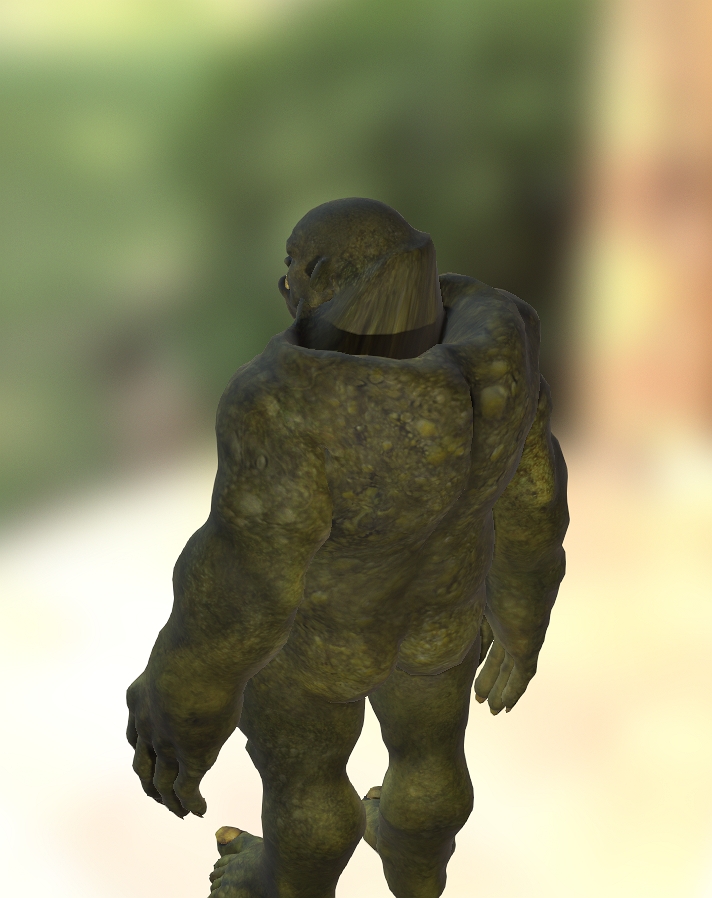
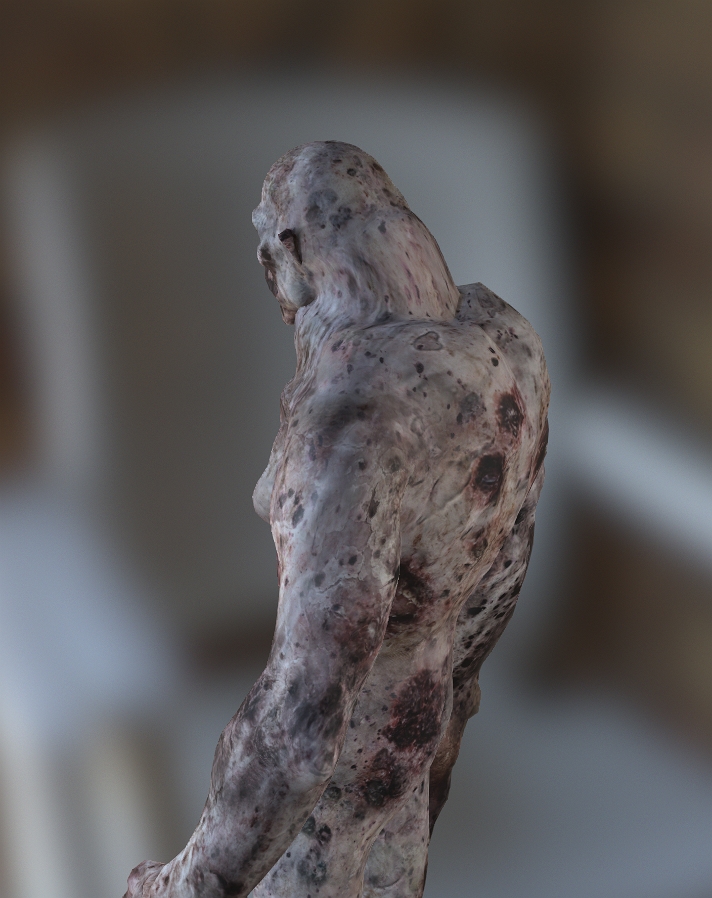
The Daz Monstrosities are based off the Genesis character, if this has already been addressed my apologies for my ignorance, but if someone could point me in the right direction it would be greatly appreciated =)
|
|
By Kelleytoons - 7 Years Ago
|
|
What specific Daz characters are these? Can you post a link to the Daz site?
|
|
By Scyra - 7 Years Ago
|
DAZ Monstrosities: Infernal Behemoth
DAZ Monstrosities: Skullcrusher Ogre
DAZ Monstrosities: Undead Fiend
I brought up this issue a few days ago in the thread Fat Man / Muscle Man Problems. It is the same problem the George character has.
|
|
By Kelleytoons - 7 Years Ago
|
As a very general rule I stay away from Genesis based figures -- not only are they not nearly as detailed as later versions (particular Gen 8) but they do have mapping issues like these.
They also tend not to have any Daz morphs that can be dialed back (or brought in separately). The good news is there are some really good alternatives to these in the Gen 8 line (Orc brute is a good sub for the Ogre here, but there are others as well). I also tell folks to ask me before they buy and I'll let them know what does and doesn't work.
|
|
By Scyra - 7 Years Ago
|
Ok, I have a solution.
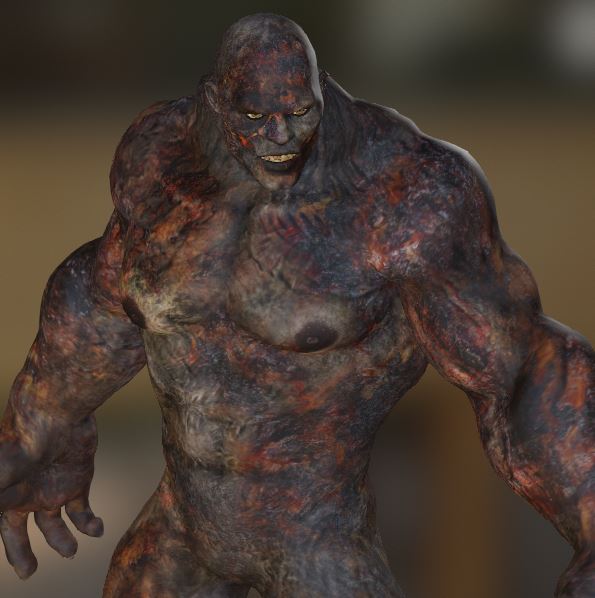 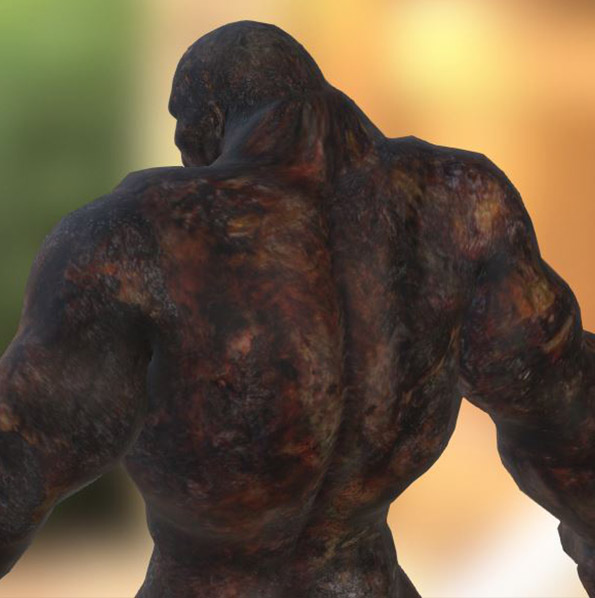 You need to dial down some morphs in Daz, then dial them back up after using Transformer. I could not get the FBM Behemoth morph to export for whatever reason, but I had already saved a Brute 8 morph to CC3 so I just used that along with a couple of morphs from the Essentials pack. Note that I turned off Limits on the Neck Size & Traps Volume Daz morphs to get them to go negative. 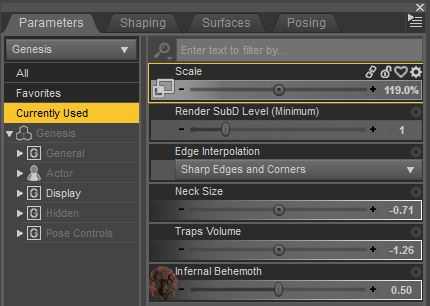 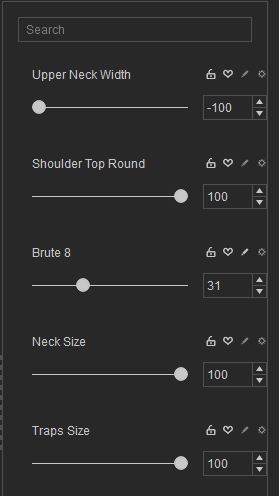 This entire process took literally less than 5 minutes, so view it as a proof of concept rather than exact settings you need to follow. Maybe you can get away with the Behemoth morph at 70% and no adjustment at all to the Neck Size/Traps Volume, for example—I don't know.
|
|
By Scyra - 7 Years Ago
|
One more thing—the back of the neck hump is easily fixable in ~20 seconds with Edit Mesh > Sculpt > Smooth...
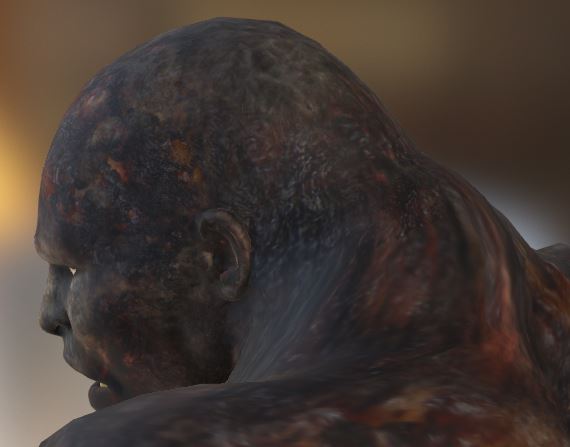 Textures look crappy because I did not bother to import Normal/Bump & Specular maps.
|
|
By MatCreator - 7 Years Ago
|
Thanks for all the fast responses and advice...
Because Carrara is my main program, we tend to use Genesis more because they work in Carrara, whereas the others do not, or not with such ease or use of outside tools.
Will keep in mind all spoken here, again, many thanks =)
|
|
By Kelleytoons - 7 Years Ago
|
Scyra (7/21/2019)
Ok, I have a solution. You need to dial down some morphs in Daz, then dial them back up after using Transformer. I could not get the FBM Behemoth morph to export for whatever reason, but I had already saved a Brute 8 morph to CC3 so I just used that along with a couple of morphs from the Essentials pack. Note that I turned off Limits on the Neck Size & Traps Volume Daz morphs to get them to go negative. This entire process took literally less than 5 minutes, so view it as a proof of concept rather than exact settings you need to follow. Maybe you can get away with the Behemoth morph at 70% and no adjustment at all to the Neck Size/Traps Volume, for example—I don't know.
It looks good but I'm wondering if you are then using morphs in Daz not everyone will have. I didn't see any particular morphs for those Genesis figures other than the base ones (then again, I didn't look too closely at it -- I'll check again).
|
|
By Scyra - 7 Years Ago
|
Thanks, Mike, it's a good point. I went ahead and ran another test and I can confirm that you definitely need those Daz morphs—dialing back the character morph alone doesn't quite cut it. Fortunately, it appears the neck and traps morphs are part of a free bundle: Genesis Starter Essentials
|
|
By Scyra - 7 Years Ago
|
For anyone not familiar with Daz...
|
|
By Scyra - 7 Years Ago
|
Hey, you can even do a "good enough" George if you dial him back 50% in Daz, then Transform and apply "Heavy" morphs and a few others...
|
|
By Kelleytoons - 7 Years Ago
|
Scyra (7/21/2019)
Ok, I have a solution.
You need to dial down some morphs in Daz, then dial them back up after using Transformer. I could not get the FBM Behemoth morph to export for whatever reason, but I had already saved a Brute 8 morph to CC3
Unfortunately, after trying what you were doing, I see where your problems lie (sorry but I didn't read closely what you wrote the first time out).
You seem to imply that you can dial down the Daz morph and then bring it back up in CC3. You cannot. You cannot export ANY morphs from Daz to CC3 for an avatar, only clothing and props. What happens is that the morph is baked in irregardless. So your solution is only as good as finding some kind of morph inside of CC3 to bring the character back up to his size.
IOW, dialing down the character itself to a percentage allowing it to come in to CC3 correctly is fine, but you will never be able to "dial it back up". The best you can do is use this new avatar with any other morphs you might have exported. I wouldn't call it a solution, or even a workaround, just the fact that some Daz avatars can't be exported properly.
|
|
By Scyra - 7 Years Ago
|
To be clear, when I say I am dialing it back up in CC3 I mean that I am using the CC3 Essential Morphs pack and nothing else (with the exception of the Brute 8 morph used for the Behemoth...but I probably could have used the Bodybuilder morph in the Essentials pack).
|
|
By Kelleytoons - 7 Years Ago
|
Right, but my point is you aren't getting "George" or any of the monstrosities -- you are getting 50% of them and then from there you are putting other morphs on which may or may not make them look more like the originals (most likely not -- they are unlikely to be confused with the originals).
It's a fine compromise, but you shouldn't be misled (or, more importantly, mislead anyone else) into thinking what is happening. It's not a "fix" or even a workaround. It's just a way of getting *something* useful out of the Daz morphs.
|
|
By Scyra - 7 Years Ago
|
I haven't misled anyone. I have mentioned over and over that I am using the Essentials pack to do this, always capitalized for effect. I also suspect there is more to it than just 50/50; the 50% in Daz sets up the vertexes at such angles that by simply dialing a full body morph in CC3, an approximation of the 100% character can be achieved in seconds. I am able to achieve a close approximation of George in one minute, whereas if I were to attempt to eyeball it from a CC3 base I'd easily spend 20 minutes or more.
|
|
By Kelleytoons - 7 Years Ago
|
Okay, but you're missing my point. Let's stipulate you get a good looking George (which is to say, one that looks very much like the one in Daz at 100% -- note, I'm not saying that *I* think you do, but I'll allow it): that doesn't mean this is a general or even good approach for ANYTHING else.
Again, we have a lot of tools and the basic idea here raised by the OP is that some morphs in Daz don't come in well through Transformer. This is correct and nothing can really be done to fix it. It's great that you have George looking better, and perhaps one of the monstrosities you did will also satisfy the OP, but if I were him I'd say "Hey, that's not close at all -- it's still broken" and I think he has a good point.
This isn't to denigrate what you did -- some people might want EXACTLY this and be satisfied (heck, some folks might even think it's better). But this misled is to lead folks down the path of trying to fix a broken morph coming into CC3 in this manner (my gut tells me it will mostly fail -- which is to say, it won't end up looking much like the 100% original). I guess the real bottom line is that folks will need to adjust their expectations when one of these does fail and be satisfied with whatever they can achieve.
|
|
By Scyra - 7 Years Ago
|
Fully agree on that point, Mike. And I hope that Reallusion will address these problems. If I seem to be enthusiastic about "tolerable" work-arounds it is because I found these Transformer-fails to be very discouraging and I am happy to be able to salvage something of these Daz models which I have paid a considerable amount for (I seem to own, like, half their library now).
|
|
By Kelleytoons - 7 Years Ago
|
I'll take up these for sure (and George :>) with the developer (unfortunately right at the moment he's neck deep in alligators but he's usually very responsive so we'll see).
And I understand perfectly about your Daz library -- sometimes I think I have every single thing they've ever done (for sure I will NEVER use all of it).
|
|
By One Small Dream - 7 Years Ago
|
I've been working on moving my figures to CC3 and ran into this issue. Weirdly, these seem to import fine in 3DXchange and apply fine to iClone, but CC3 crashes when trying to import the resultant iAvatar, and fails with an error that the source and target don't match if trying to add the iAvatar as a morph.
I'll also note that although I've gotten it to load fine in iClone, it loses all the face keys. It doesn't lose the face keys in CC3, but has the hump problem.
|
|
By Kelleytoons - 7 Years Ago
|
|
The hump problem *can* be mitigated with morphs -- we have done so with shoulders and there are now (with Headshot) a ton more morphs that can help.
|
|
By One Small Dream - 7 Years Ago
|
|
Kelleytoons (12/19/2019)
The hump problem *can* be mitigated with morphs -- we have done so with shoulders and there are now (with Headshot) a ton more morphs that can help.
Yes, I'm playing around with this right now actually. One thing that seems to be working is to export at a lower morph percentage from DAZ, save the character, export to iAvatar and make a custom morph, then load back in and overmorph the original using itself.
It kind of works, but adds a ridge to the neck. Probably good enough for a quick and dirty, although I may play more to see if I can get more out of it.
The issue seems to be with the topology and how it's getting triangulated during conversion.
|