|
By Walvince - 7 Years Ago
|
Hello !
I'm having an issue with a character I created using Character Creator 3.
When I use the look at feature, only the left eye is looking at the object, the other is always looking forward.
I imported my character in 3DXchange to see if eyes had correct positions and everything seems ok.
I tested to manually move eyes with face puppet in Iclone 7 and everything works fine.
Have you ever had this kind of issue and is there something to do to solve this ? (I tested the look at feature with a standard Iclone character and it was working fine)
|
|
By Walvince - 7 Years Ago
|
Nobody ?
I don't understand, in the 3DXchange expression editor, defining a maximum position for the eyes only seems to work when manually moving the eyes in Iclone and not when using the look at feature. Wich makes no sense, if I manually animate the eyes I don't want any limitations. On the other hand, if I use an automatic feature (as the look at feature), I want this limitations to be taken into consideration.
Well my main problem is still that my character use only one eye with the look at feature but I thought it could be solved with 3DXchange...
It's more than strange as some other characters I created have no problem despite the fact that they are based on this problematic one.
|
|
By Peter (RL) - 7 Years Ago
|
Is the problem restricted to versions of this one character or are all CC3 characters affected by this issue?
And what happens if you change the eyes, does it resolve the problem?
|
|
By Walvince - 7 Years Ago
|
Only this character has this problem but nothing that I tried solved this.
I tried to change the eyes but it didn't change anything.
I just noticed something, I supposed it is linked : when I replace my buggy character with the same bad one, the "look at" is reset, and it is removed from the timeline.
If I replace the buggy character with a correct one, the look at configuration is keeped...
|
|
By Walvince - 7 Years Ago
|
Well, to answer to the spammer :hehe: , no I didn't reinstalled CC because it's a problem with a specific character.
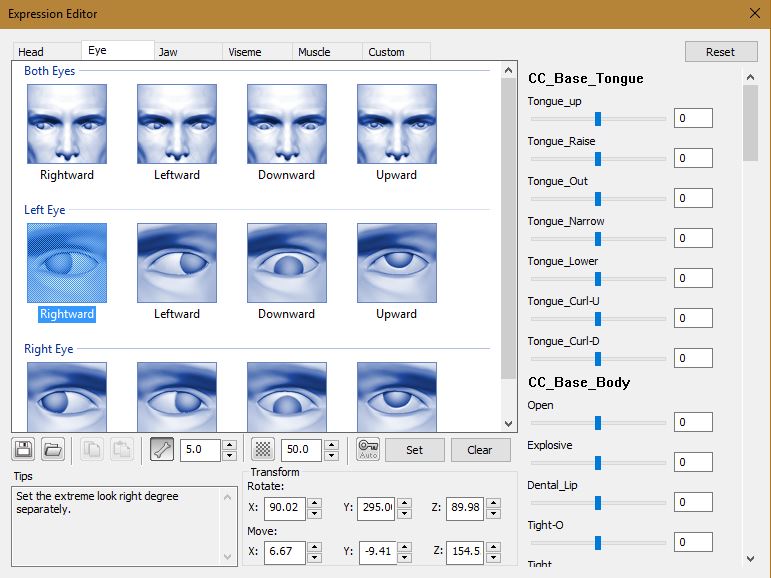
About that, do someone knows how limitations defined below works ? It seems to only be taken in consideration when we manually move the eyes. How can we define this limitation for the "look at" feature ?
|
|
By TopOneTone - 7 Years Ago
|
|
I’ve also experienced the same problem and it has only developed recently as the same character was previously not exhibiting this problem.
|
|
By Walvince - 7 Years Ago
|
|
I wonder if it could be caused by any mesh modification in CC3. I had to adjust some vertex with the sculpt tool around the eyes. Did you also do this ?
|
|
By vidi - 7 Years Ago
|
|
When I use the look at feature, only the left eye is looking at the object, the other is always looking forward.
I have the same behavior . looks like a bug
|
|
By Peter (RL) - 7 Years Ago
|
Hi Walvince,
Thank you for explaining more.
Could you please let us have the problematic character so we can test this issue. You can send me a private message with a download link if you would rather not post it publically. Thanks.
|
|
By Walvince - 7 Years Ago
|
|
Thank you Peter, I sent you a PM !
|
|
By Peter (RL) - 7 Years Ago
|
|
Many thanks. We will take a look at the problem and I will update again when we know more.
|
|
By vidi - 7 Years Ago
|
I recognized that happen only if I save the avatar as Project . But if I create a Avatar preset from my Character then tis issue is gone.

|
|
By Walvince - 7 Years Ago
|
|
Oh it's good to know, thanks for the tip. I tried but I couldn't obtain exactly the same character with the preset, I'll try again if there's no other solution.
|
|
By Peter (RL) - 7 Years Ago
|
Hi Walvince
Just to give you an update, the development team have confirmed the "Look At" issue and will try to fix in the next available update. We do apologise for the inconvenience this issue is causing.
Regarding your point about limitations when manually setting the eye position, we have to set limits to prevent the eye from turning inside the head (see below).

|
|
By Walvince - 7 Years Ago
|
Great, thank you very much !
Peter (RL) (7/29/2019)
Hi Walvince
Regarding your point about limitations when manually setting the eye position, we have to set limits to prevent the eye from turning inside the head (see below).
Well I understand the logic but find it strange to have a limitation when we manually set something. It's like if we couldn't rotate the head at 180° because we can't do it in real life : it can be useful for some cases (well mostly horror movies I guess :P )
But I was mostly talking about that because the "look at" feature seemed to have its own limitations, not depending on 3DXChange configuration, which was weird.
|
|
By vidi - 7 Years Ago
|
|
Seems it is not fixed yet
|
|
By vidi - 7 Years Ago
|
|
It seems happens with Character which geted a new 3D xchange Morphs List. as soon as it passed CC it get this bahavior . In my screen above do it only work because the character has no passed 3D xchange. He has not get new Facial Morphs e.g. closed eyes ...
At this point, I ask me how can I create new Character with optimized Facial Morph? Also I ask me why need I use 3d Xchange for this task? It would make more sence CC have solch funktion
conclusion, it is not possible to create a CC Morh slider , because you would always loosing the new improved Facial Morphs for the new Character . There is no Option to save a Morphlist Profile.You can only create a Character but he has then a right side Eyeproblem . every time I want create some new i run in new problems.
Please fix it !
|
|
By Peter (RL) - 7 Years Ago
|
|
vidi (9/4/2019)
Seems it is not fixed yet
I did mention in my previous reply it would be fixed in the first available update. Sadly it didn't make it into the 3.1 update as this was already finalised but hopefully in the next.
|