|
By candlelight2007 - 7 Years Ago
|
I'm sure some of you already know this but since I had been struggling with it for six months before I finally figured it out I thought I'd post this to help some of the new folks who use Affinity Photo as their external editor.
I am not a PhotoShop guy and as great a tool that it is, Adobe subscription model just doesn't sit right with me so I went with Affinity Photo (AP) as the external editor for CTA/CA. (Note: I'm on CA4 Pipeline; previously CTA3 Pipeline). For the longest time it was a constant hassle because whenever I'd launch AP from CA/CTA it would work great but then I had to export it as PSD and then go back to CTA/CA and re-load the character from that saved PSD file. Not fun at all, if you have to do it every time you edit your character. Made me envy PS users who were enjoying full integration of CTA/CA with Photoshop (and I imagined they were probably laughing at us, non PS users, too :-)).
Until I eventually got tired of it and stumbled across a very simple solution. Here it is. (I assume that you already have AP set up as your external editor).
1. Open your Affinity Photo and go to Preferences.
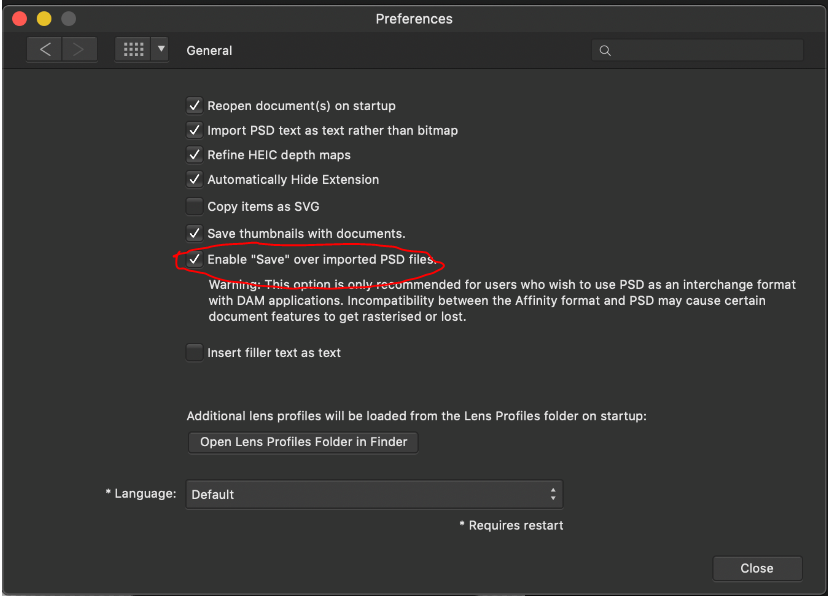
2. Go to General tab and check "Enable Save over imported PSD files" option. (see screenshot)
Then suddenly everything magically fell into place! CA would launch AP. And after making some edits all I need to do is to hit Save and your character in CA composer gets updated automatically! It truly feels like magic, I tell ya. You'll appreciate it even more if you had struggled with it like I did.
|
|
By johnb78 - 7 Years Ago
|
Hello , I use Affinity Designer , so my process has been Create in Affinity , then go to photoshop with my file and the PSD character Template
to rig character and add the mouth
once i am using CA 4 if i need to change anything i need to go back to my affinity file and change it , then take that file to photoshop and replace the mistake , then re- import the PSD
to CA 4 and update the character
The only part Photoshop plays in this process for me is to merge layers that are parts and rig the charcter through the template . I appreciate Photoshop is excellent but it seems a lot of people want to , do use Affinity instead , any chance of an Affinity character template Reallusion ?
|
|
By candlelight2007 - 7 Years Ago
|
johnb78: I may be missing something but why do you need to go to Photoshop instead of opening a PSD template right in Affinity and working there entirely? Affinity does a decent job with PSD files so all PSD templates work great in it for those of us who do not have/use Photoshop. It works for me anyway.
|
|
By vepop - 7 Years Ago
|
Thanks for the tip.
I use AFFINITY DESIGNER for my CA4 characters.
|
|
By candlelight2007 - 7 Years Ago
|
Ok, just to put this one to bed.
I do have Affinity Designer also but I have been using Affinity Photo as the external editor in CA4, although I was pretty confident that it would work just as well.
So I just tried AD and sure enough it worked like a charm. Meaning same steps as I described earlier for Affinity Photo apply to AD as well. Character opens and saves as PSD without a hiccup.
|
|
By johnb78 - 7 Years Ago
|
Hello , i have been doing it this way as i did not know any other way , i thought i had to use Photoshop with the template , once i had a process , i just stuck to it , can i use the PSD tmplate to rig my charcter in Affinity instead ? I hope so ..
CA 4 PSD Template , in the past week i have rigged animated and lip synced about 30 different characters at least , The way the template works with Photoshop means characters can be rigged quite quickly once you know what you are doing.. what goes where... I had got to the stage where you could bring a characters file into Photoshop , open the Front Facing PSD template and rig the character in less than 10 minutes. After making a quick cup of Tea , CA4 would be open and 5 minutes after that the character would be animated and speaking whichever Audio file i synced to his mouth...
After spending a long time getting nowhere i was astounded to see what could be done in this program..
The Bone shift situation is strange , it did work , now it does not , i could live with that and work around it , no big deal...
|
|
By candlelight2007 - 7 Years Ago
|
hmmm... interesting. So when you say "interactivity" you mean that you can actually click on a body part in CA4 Composer and it will take you directly into the matching folder in Photoshop? If so then I was not aware of that; it sounds very cool indeed. For me rigging has always been (and still is) a hit and miss with a lot of hours spent on trying to make it work. Still now that I have Affinity set up as external editor, it makes it much easier but my workflow is different. I never had Photoshop so I would usually open a template or a similar character in CA in Composer mode, then click Launch PSD in external editor and the make necessary modifications in Affinity and when done, save back into the character. That's it. It works for me.
Having said that, let's draw the line here. If you wish to discuss it further feel free to PM me or you can open a new topic with your particular issue. My intent behind this post was to help those who are trying to get Affinity to work with CA.
Cheers,
Vlad
|
|
By johnb78 - 7 Years Ago
|
I am grateful to have read this post and discovered that i can use Affinity instead of Photoshop , I uninstalled Photoshop and will now use Affinity with the PSD template and see how i get on... my earlier rant is frustration about programs not doing what they say they can , one day something works , the next day it does not ...
I take offence at your draw the line comment..
I do not wish to discuss this further and i do not want to send you a message either , if i did want to discuss further , i will write in this thread , If i want to
Why don't you and your other veteran and distinguished members try helping out in the thread where someone is asking questions about this program not doing what it is meant to , but is being ignored or met with answers like " go to the manual "
|
|
By candlelight2007 - 7 Years Ago
|
:) it seems like miscommunication to me. It was never my intention to offend you in any way or invalidate your experience or downplay your frustration with some of the features not working as you would expect. And I'm sorry if it made you feel that way. I was simply trying to keep the discussion relevant to the topic of the post, that's all. The post was intended as a quick tip for those who need it. If I had that tip 6 months ago myself it would have saved me a lot of frustration, so I was trying to help the community.
On a side note, I am in the same boat as you are and I too have been banging my head against the wall for weeks on end and still am wishing there was a clear and easy to find breakdown of some of the key features readily available rather than a bunch of isolated morsels of wisdom scattered all over the place. I often feel like I am trying to read between the lines browsing through manuals and tutorials over and over again, which more often than not are scratching the surface or giving you bits and pieces leaving you pretty much on your own to figure it all out. And I too hate it when I hear answers like "here's the link" to a tutorial that I have read/watched a dozen times before posting my question and I agree that it does make you feel under appreciated sometimes. But at the end of the day we are all trying to make this tool - which does have a lot of potential - work for us.
|
|
By johnb78 - 7 Years Ago
|
I apologise for my rudeness and taking offence when i probably shouldn't have .... you've written a very concise and clear text there and it reads very well , i very much agree .
I uninstalled Photoshop and tried using the Front facing PSD template in Affinity to rig my most recent character , So far so good , when imported to CA 4 the skeleton needed rigged even though the bone labels / markers were put in place on the template in Affinity , characters neck dissapeared too , made some changes in AFF then re-imported , characters face now missing , characters mouth and neck also missing , Conclusion : If using the PSD template to rig characters it has to be done in Photoshop and not Affinity , obviously Adobe have paid a few quid to Reallusion in order to be the software of choice for users of CA 4 , thats fair enough , i've no problem with that .
needless to say i have re-installed Photoshop... i will be content to use Affinity as the external editor...
Earlier in the thread when i spoke of the ease of rigging a character with the PSD template , I tried to describe the process , but not very well , after you have placed all the parts of your characters head and body in the appropriate folders , RL Image for the body , RL Talking Head for the head , you need to place the bone markers in place , with the MOVE tool selected its a case of clicking and dragging each bone marker to its correct location , now imagine instead of just clicking and dragging each marker , instead , you had to first locate each marker in its folder before being able to place it in its location , if you had to do that it would take a while to rig a character... well thats what happened in my Photoshop the other day , instead of 10 minutes to rig a character it became almost impossible , WHY , who knows.... What was the Answer = Uninstall Photoshop , re-install Photoshop , hey presto normal working order is back , rig a character in less time than it takes to smoke a cigarette.... https://vimeo.com/348054813
|
|
By johnb78 - 7 Years Ago
|
Having just re-read this thread I noticed you said : johnb78: I may be missing something but why do you need to go to Photoshop instead of opening a PSD template right in Affinity and working there entirely? Affinity does a decent job with PSD files so all PSD templates work great in it for those of us who do not have/use Photoshop. It works for me anyway
Today i used the PSD template in Affinity , brought it into CA4 and my characters neck was missing , went back to Affinity make sure no mistakes made , then re-imported it again ,
now the face and the mouth is missing , So i dont think its possible to use the PSD template in Affinity and i am not surprised , i would guess the template is set to corrupt itself and not work correctly if it is not used in Photoshop , Adobe not making this template for the benefit of Affinity users and again i dont blame them ...
So i learned something important , if the template is not working correctly in Photoshop , just uninstall and then re-install Photoshop...
excuse the audio on below clip...
https://vimeo.com/348054711
|
|
By candlelight2007 - 7 Years Ago
|
|
Well I can only speak based on my own experience. And I cannot compare Affinity with PS because I don't have the latter. All I know is that Affinity is working for me the way I expect it to: meaning it opens the character in PSD format with all the folders intact and then reimports back into CA without a problem. If you would like to send me your CA project with this one character that is not working for you in Affinity but is working in PS I will be willing to take a look.
|
|
By desupero - 7 Years Ago
|
|
I'm not sure whether it's a recent update or something else but I followed the PSD template video using Affinity Designer and ended up with lots of body parts missing. There seems no sense a to why. I made sure all layers were checked as visible, looked to see if any were further in the hierarchy than others, but no joy! It looks like it's only taken the very top layer in each group and left the others out. I really hope that they put together an A.D character PSD template video (or simply design one for A.D.), as A.D. is now been used by so many people instead of Photoshop. Any ideas as to why my body parts may be missing when I open it in C.A. please?
|
|
By vepop - 7 Years Ago
|
No problem on my part.
Just need to tick a certain folder and lock it.
The content inside the folder needed to be checked.
For Mask, untick the folder while the content is ticked and checked as well.
|
|
By willemsince1977 - 7 Years Ago
|
|
Thank youso much for this. I have been working in Affinity Designer for the past 2 years,but could never figure this out until coming across this post.... It does feellike magic now :-) !!!
|
|
By denise.wilson1 - 7 Years Ago
|
|
I am responding to your comment, “that it should be clear and easy to find breakdown of some of the key features readily available rather than a bunch of isolated morsels of wisdom scattered all over the place. I often feel like I am trying to read between the lines browsing through manuals and tutorials over and over again, which more often than not are scratching the surface or giving you bits and pieces leaving you pretty much on your own to figure it all out.” I so agree with this and although many tutorials are titled ‘beginner’ or ‘basics’ – they don’t deliver. I have been struggling with this software (CTA) for over 3 years and still don’t feel I have a handle on how to create characters. I would like to think that CTA4 pipeline would be my salvation – but my more practical and rationale side knows this is just self-delusion. These are some of my unanswered basic questions: · If you don’t have photoshop (for all the tutorials refer to photoshop) can you really do anything in CTA? (I can’t afford photoshop, can barely afford CTA) I now realize from this post I can use AD - thank you for that. · Can you only get the templates if you have the Pipeline edition? If so, why even offer a Pro edition, let alone a standard. · And then, when you go to the manual, they talk about Flash! What is Flash? It seems it is critical to the process. So, should you import into CTA in .swg, .psd or .png? Someone needs to explain when you do which – I’ve seen tutorials where they tell you to export in .png to CTA – or do you export into CTA with .psd. So confusing! And what about Flash?? · And how do you make sprites for your characters? All the tutorials have them ready-made – but they are not the parts I would need for my characters. Where can you get(buy) sprites? · And the templates – if you can get them – do you have to go to your outside editor to use? – or can you use them in CTA to make a character? What’s the difference between these psd templates and the templates they have under G3 characters in CTA, or the G2 ‘Simon’ Template? Also, what’s the difference between the ‘motion bone’ templates and the ‘dummy’ – what’s the dummy used for? Believe me, the questions I’ve listed here are only the tip of the iceberg - reflecting only my most recent struggles. And I’m sure some of these questions are naïve or, in fact, stupid. But I don’t have an animation background and I had hoped I would be able to learn how to do it with CTA. Well, 3 years later and I still can’t create my own character and animate it without the head falling off. However, I can attach props on G3 characters, but not on G2 – does G2 use a different process? You see my dilemma – I would need tutorials that explained what would appear obvious to more experienced animators. CTA for Dummies.
|
|
By vepop - 7 Years Ago
|
Agreed. The manual is somehow confusing.
Flash is used for the creation of the G2 characters.
You can use AD to create the G3 + 360 Head Degree turn.
When you are keen to create your own characters, I bet the best choice is the Pipeline version.
|
|