|
By Tony (RL) - 7 Years Ago
|
iClone Plug-in Marketplace
Dear iCloners,
Reallusion is more than excited to let you know that the iClone Plug-in Marketplace is now available for everyone.
We finally have a dedicated place where you can download free plug-ins, share your own plugin design, and be able to sell your plugin to the world of iClone users in the near future.

Besides sample scripts provided by Reallusion, please check Motion Clip Sizer, the first plug-in made by community member - Andreas, aka the-any-key.
Python of the Month
To give iClone users a steady learning path on iClone Python scripting, Reallusion introduces "Python of the Month" - themed python samples each month, including description over API that is being used and how the program works.
1. Sample Script - Smooth Camera Follow
Download the Smooth Camera Follow plug-in from the Marketplace.- To explore how it works, please link the Python wiki
- To get its source code, please visit GitHub
Important Notice: Special Version of iClone is Required
This sample plug-in is developed with the Beta version of the iClone Python API. To make this plug-in work, please be sure to: 2. Unzip the folder into a designated location of your choice. 3. Execute the Special Version in \Python_API_073_for_iClone_741\Bin64\iClone.exe 4. This version won't overwrite and affect your existing iClone application.
PS: if you have any questions about the plug-in and its code, please feel free to let us know by replying to this post 2. Fundamental Courses
Please be sure to start from the fundamental courses if you are interested to know how this sample program works
Course 1: List All Props - how to get the prop list from the iClone scene, and place them into the list box (UI)
Course 2: Look At - make a simple look-at routine using a Python script
Course 3: Transformation Key - how to translate, rotate and scale your object
For more courses, please visit here
---------------------------------------------------------------------------------------------------------------------------------
Start to Create Your Own iClone Plug-in
Interested in customizing and expanding iClone features by yourself? Check out iClone OPEN for related links and resources.
|
|
By makeurmark - 7 Years Ago
|
I just downloaded six of these great looking plugins.
Apologies, I'm really confused.
Where do I store the plugins?
I just read this post and got even more confused - "Download the special version of iClone (zip.)".
Is there any documentation that explains why you need to download another version of iClone, a bit more detailed than this post.
I have taken a look, but just getting more and more confused.
Thanks
|
|
By TopOneTone - 7 Years Ago
|
|
Sorry to say this, but I just watched the “motion clip sizer” video and could not follow it at all. Everything flashed by far too fast, the graphics don’t work for a tutorial and with no commentary I’m afraid I have no idea what was actually going on and therefore why I need this plug-in. Normally I’m pretty good at following tutorials, but this was beyond me. Given RL normally do a great job with tutorials I’m surprised they would kick-off this new feature with this, even though it was obviously not made by them. Sorry to sound so negative, but....
|
|
By Alien Maniac - 7 Years Ago
|
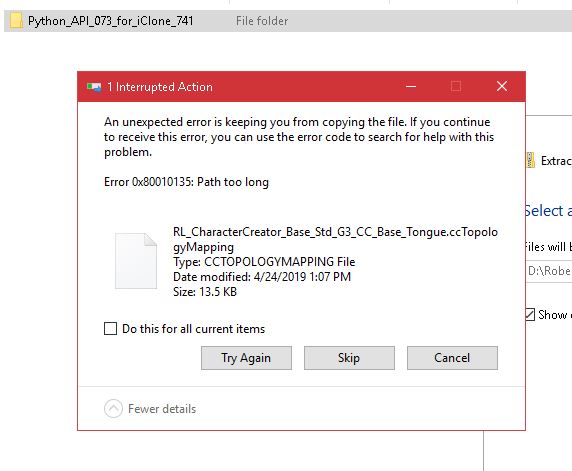
Just downloaded the special version for python. Tried to unzip it and I get these error/s. Unable to unzip it at all.
*Special Version of iClone Required:
This sample plugin is developed with Beta version of the iClone Python API. To make this plugin work, please be sure to:
1. Download the Special Version of iClone (.zip)
2. Unzip the folder into a designated location of your choice
3. Execute the Special Version in \Python_API_073_for_iClone_741\Bin64\iClone.exe
4. This version won't overwrite and affect your existing iClone application
|
|
By Zeronimo - 7 Years Ago
|
Space Rider (4/30/2019)
Just downloaded the special version for python. Tried to unzip it and I get these error/s. Unable to unzip it at all. *Special Version of iClone Required:This sample plugin is developed with Beta version of the iClone Python API. To make this plugin work, please be sure to: 1. Download the Special Version of iClone (.zip) 2. Unzip the folder into a designated location of your choice3. Execute the Special Version in \Python_API_073_for_iClone_741\Bin64\iClone.exe4. This version won't overwrite and affect your existing iClone application
I encountered the same problem and resolved it as follows:
1 - create a folder with a short name at the root of your disk (ex: pyzip073)
2 - download or copy the file Python_API_073_for_iClone_741 in this folder
3 - now you can unzip the file without any problem
4 - Execute the Special Version of iClone in \ Python_API_073_for_iClone_741 \ Bin64 \ iClone.exe
|
|
By The-any-Key - 7 Years Ago
|
|
TopOneTone (4/29/2019)
Sorry to say this, but I just watched the “motion clip sizer” video and could not follow it at all. Everything flashed by far too fast, the graphics don’t work for a tutorial and with no commentary I’m afraid I have no idea what was actually going on and therefore why I need this plug-in. Normally I’m pretty good at following tutorials, but this was beyond me. Given RL normally do a great job with tutorials I’m surprised they would kick-off this new feature with this, even though it was obviously not made by them. Sorry to sound so negative, but....
That video is an ad. Quick tutorial here: https://m.youtube.com/watch?v=qrHY2wEXVDQ
Added subtitle on both videos to give a bit more information.
|
|
By The-any-Key - 7 Years Ago
|
Space Rider (4/30/2019)
Just downloaded the special version for python. Tried to unzip it and I get these error/s. Unable to unzip it at all. *Special Version of iClone Required:This sample plugin is developed with Beta version of the iClone Python API. To make this plugin work, please be sure to: 1. Download the Special Version of iClone (.zip) 2. Unzip the folder into a designated location of your choice3. Execute the Special Version in \Python_API_073_for_iClone_741\Bin64\iClone.exe4. This version won't overwrite and affect your existing iClone application
You can also enable long paths by Google:
enable long paths windows 10
|
|
By The-any-Key - 7 Years Ago
|
|
makeurmark (4/29/2019)
I just downloaded six of these great looking plugins.
Where do I store the plugins?
I just read this post and got even more confused - "Download the special version of iClone (zip.)".
Is there any documentation that explains why you need to download another version of iClone, a bit more detailed than this post.
Thanks
You store the plugins in "E:\Program Files\Reallusion\iClone 7 Dev\Python_API_073_for_iClone_741\Bin64\OpenPlugin"
Each plugin in OpenPlugin should have a own folder.
You need the special iClone dev version because it got the newest python API. Think of it like a Beta or developer version. The stable iclone 7 don't have access to that API yet. And the plugin that require it use features in the latest Python API. So if you try run the plugin in the stable iclone it wont work. So you need the beta/developer version to run the plugin.
|
|
By makeurmark - 7 Years Ago
|
Thanks the-any-key, got it...
Do I need to uninstall iClone 7, before installing the Beta?
|
|
By Tony (RL) - 7 Years Ago
|
|
makeurmark (5/1/2019)
Thanks the-any-key, got it...
Do I need to uninstall iClone 7, before installing the Beta?
You don't need. They are independent.
|
|
By The-any-Key - 7 Years Ago
|
Note that projects created in the dev version can not be loaded in the stable version.
You can however export things from the dev version and use it in the stable version.
|
|
By animagic - 7 Years Ago
|
Are there functions missing from API 073?
I am unable to run my viseme allocation script (based on Mike's initial one), which ran fine in API 072. Is there an updated list of which functions are currently implemented?
EDIT: To answer my own question, the function GetVisemeKeys() is missing.
|
|
By The-any-Key - 7 Years Ago
|
|
animagic (5/4/2019)
Are there functions missing from API 073?
I am unable to run my viseme allocation script (based on Mike's initial one), which ran fine in API 072. Is there an updated list of which functions are currently implemented?
EDIT: To answer my own question, the function GetVisemeKeys() is missing.
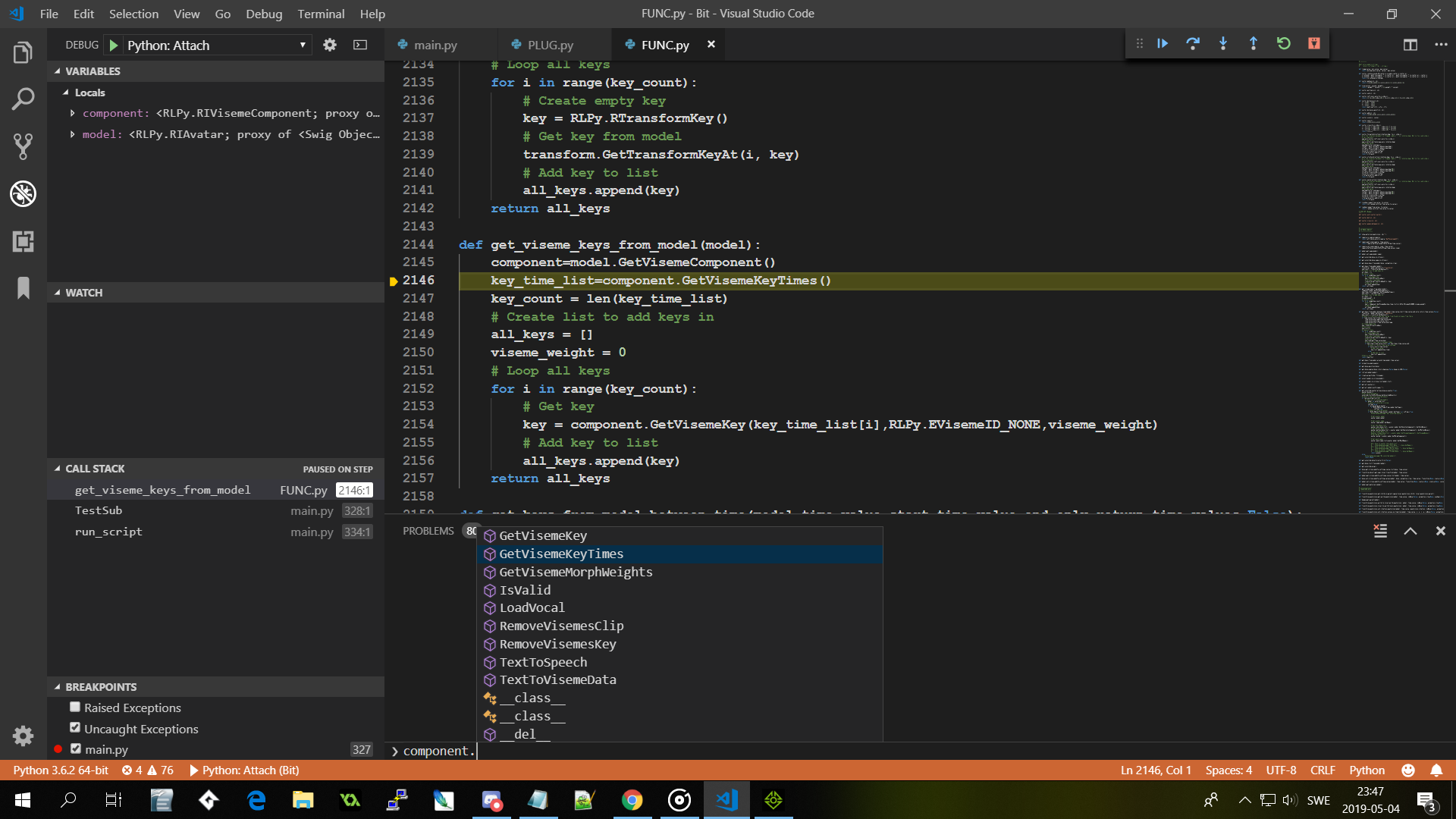
Think it changed name to GetVisemeKeyTimes.
|
|
By animagic - 7 Years Ago
|
Thanks, that was it. I checked the documentation, and it wasn't updated...:unsure: Just curious, how did you know?
I entered it in FT yesterday, serves them right...:crazy:
|
|
By The-any-Key - 7 Years Ago
|
|
animagic (5/4/2019)
Thanks, that was it. I checked the documentation, and it wasn't updated...:unsure: Just curious, how did you know?
I entered it in FT yesterday, serves them right...:crazy:
I just open Visual studio code. Into debug attach mode and ran a script. Got the viseme contoller object and checked what procedures it got.
|