|
By rowjlan - 7 Years Ago
|
Hey all! I have a scene where a character removes their shirt. Any suggestions on how to do that?
I opened the shirt in the timeline, but I couldn't twirl down the carrot and find a transform track or anything to try to put a keyframe in there for when I'd like it to disappear.
Any suggestions greatly appreciated!
|
|
By Walvince - 7 Years Ago
|
I don't know if there's a better solution but I would simply replace the actor with another without the shirt.
You could change opacity of the shirt to make it disappear but some part of the body would be missing I guess.
|
|
By Kelleytoons - 7 Years Ago
|
No, changing the opacity of the shirt won't make the body disappear unless you've hidden the body mesh behind it (which you can under some circumstances, but you can always unhide that mesh as well using various techniques). In any case, all you have to do is go to the materials and adjust the opacity for all of them in the shirt from 100% to 0% wherever you want it to go away.
But the bigger issue is -- how is the character removing his shirt? Is he a magician so he just goes "alacazam!" and it vanishes? Most people have to take a shirt off, which is a far different thing (and something I wouldn't even attempt in iClone. So I would just cutaway to where he's already taken it off and is hanging it up or something.
|
|
By Walvince - 7 Years Ago
|
|
Kelleytoons (3/20/2019)
No, changing the opacity of the shirt won't make the body disappear unless you've hidden the body mesh behind it.
Yes but isn't the body hidden by default ? For me it is the case. But I just tested and it works if I select the cloth, then go in "Conform" panel and unselect "hide inner mesh"
|
|
By Kelleytoons - 7 Years Ago
|
It depends on the shirt and whether you conformed it or not. As I said, there are all kinds of ways to unhide that mesh and you found one.
But I think the OP's bigger problem is how to deal with the shirt just "going away". Theoretically if you had the right morphs you *could* do a "man takes shirt off" but it's above even my pay grade.
|
|
By Walvince - 7 Years Ago
|
Oh yes, if it's the main question it could be doable with soft cloth simulation I think (it would never be perfect I guess), but even in professionals animation movies or video games, they avoid this and often use a camera trick.
You could for instance, film the start of your character removing his shirt, then film the feet and show a prop version of the shirt falling on the ground (with soft cloth simulation)
|
|
By Kelleytoons - 7 Years Ago
|
Yeah, my own preference would be just to cut to the closet (or wherever he's going with it) and show him hanging it up (but I'm a "hanging up" kind of guy :>).
Since the OP hasn't returned we can only guess (so far).
|
|
By Walvince - 7 Years Ago
|
:laugh:
Yeah that's maybe cleaner indeed !
|
|
By Postfrosch - 7 Years Ago
|
I do not know what you are looking for,
but shirt, pants or shoes lumbering works in IClone
But can sien that you mean something completely different
Greets from Germany
Postfrosch
|
|
By Kevin.S - 7 Years Ago
|
You can make anything invisible with opacity ether over time or instantly...
You can make clothes vanish body part props what ever you want its the easiest
and most effective way to do this...
here is a quick sample, quick tip video
|
|
By dogged2003 - 7 Years Ago
|
Maybe same thing like that:
|
|
By Kevin.S - 7 Years Ago
|
oops dubble post sorry
You can make anything invisible with opacity ether over time or instantly...
You can make clothes vanish body part props what ever you want its the easiest
and most effective way to do this...
here is a quick sample, quick tip video
|
|
By johnwarndt52 - 7 Years Ago
|
I'm going to be dealing with that dressing/undressing issue myself soon, doing something like I did with the girl's hair at approximately 1:40 in the video below in my first iclone animation. I simply animated the same scene twice, once with the long hair and once with the ponytail, then used the transitions effect in a video program called Video Edit Magic. I know it leaves a lot to be desired, but with enough experimenting and positioning I'm sure you could create the illusion of your character putting on a piece of clothing.
.
|
|
By rowjlan - 7 Years Ago
|
This is all excellent, thanks everyone.
As a total beginner, I had no idea that making the character remove his t-shirt within the shot was so challenging, even for professional animators. I had hoped to have the character pull his t-shirt over his head in the shot, but these workarounds are great.
I'm sure I'll have more questions in the future. Great to know there's such a depth of knowledge here. Thanks!
|
|
By rowjlan - 7 Years Ago
|
This is awesome- would you mind posting a tutorial, or just a screen capture, for how you created this? I'm a total beginner but it seems like it has something to do with turning on the physics of the shirt and blanket?
Great work!
|
|
By rowjlan - 7 Years Ago
|
|
dogged2003 (3/20/2019)
Maybe same thing like that:
This is awesome- would you mind posting a tutorial, or just a screen capture, for how you created this? I'm a total beginner but it seems like it has something to do with turning on the physics of the shirt and blanket?
Great work!
|
|
By dogged2003 - 7 Years Ago
|
|
rowjlan (3/20/2019)
This is awesome- would you mind posting a tutorial, or just a screen capture, for how you created this? I'm a total beginner but it seems like it has something to do with turning on the physics of the shirt and blanket?
Great work!
Yes, you are completely right. I will try to make an explanatory video. But now I have to beat the flu.
|
|
By dogged2003 - 7 Years Ago
|
|
rowjlan (3/20/2019)
skip
I had hoped to have the character pull his t-shirt over his head in the shot,
I am also looking for how to do this.
|
|
By rowjlan - 7 Years Ago
|
dogged2003 (3/20/2019)
rowjlan (3/20/2019)
This is awesome- would you mind posting a tutorial, or just a screen capture, for how you created this? I'm a total beginner but it seems like it has something to do with turning on the physics of the shirt and blanket?
Great work!
Yes, you are completely right. I will try to make an explanatory video. But now I have to beat the flu.
Look forward to watching it. Feel better!
|
|
By Walvince - 7 Years Ago
|
|
I made a little test, it's far from perfect but it was really quick to do so I guess we can do much better.
Basically, there is two clothes : the "real" one, set on the avatar, and the "fake" one with cloth simulation.
Here are the main steps : - First, I add the fake cloth with opacity 0 at the exact same position as the real one. (Don't know if there's a better way but to get the prop version of the cloth what I do is : load the avatar to 3dxchange, export it as .obj, load the obj and then only export the desired cloth as a prop) - I link it to one of the avatar's hand
- I activate physics for the fake cloth (you have to use a custom weight map in order to have one static side, the one being grabbed. If you don't do this, the cloth will fall on the ground) - Then I set the real cloth opacity to 0 when it is being grabbed. - At the same time the fake cloth is set to opacity 100 - If needed we can adjust the position of the fake cloth, and voilà...
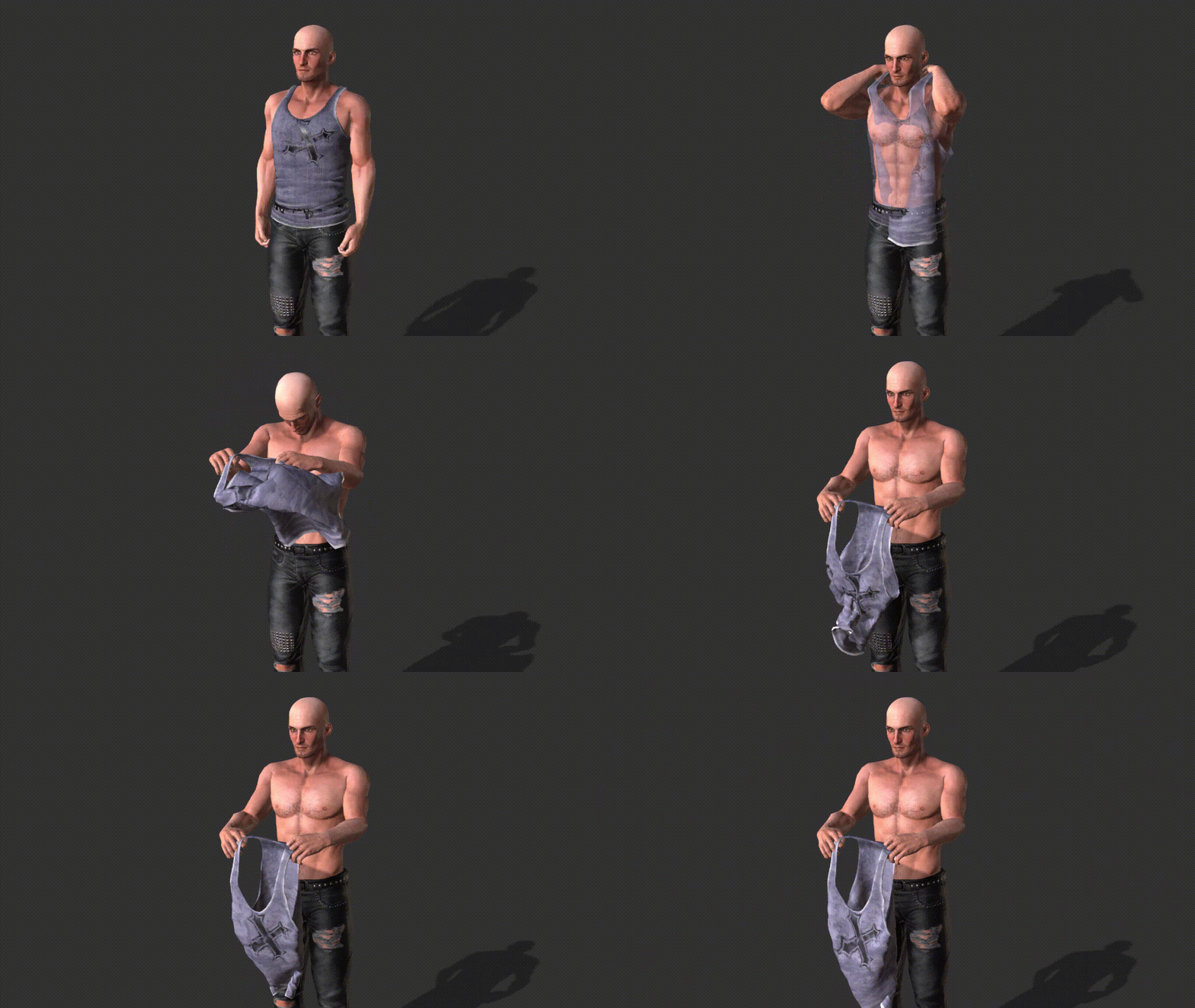
There's of course a lot to do to have something really good. But I think you can do this sort of thing.
|
|
By animagic - 7 Years Ago
|
|
@Walvince; That's a really nice solution. I learned something!
|
|
By dogged2003 - 7 Years Ago
|
You did an amazing thing!
And I tried to repeat the anchors on the material.
The material is stuck together. Usually it is necessary to turn on the drawing frame by frame. And the calculation of collisions of soft material to the material.
Once having achieved a good animation on the material, you can turn off the physics on the clothes, so as not to waste time on a permanent calculation.
|
|
By rowjlan - 7 Years Ago
|
Walvince (3/21/2019)
I made a little test, it's far from perfect but it was really quick to do so I guess we can do much better.
Basically, there is two clothes : the "real" one, set on the avatar, and the "fake" one with cloth simulation.
Here are the main steps : - First, I add the fake cloth with opacity 0 at the exact same position as the real one. (Don't know if there's a better way but to get the prop version of the cloth what I do is : load the avatar to 3dxchange, export it as .obj, load the obj and then only export the desired cloth as a prop) - I link it to one of the avatar's hand
- I activate physics for the fake cloth (you have to use a custom weight map in order to have one static side, the one being grabbed. If you don't do this, the cloth will fall on the ground) - Then I set the real cloth opacity to 0 when it is being grabbed. - At the same time the fake cloth is set to opacity 100 - If needed we can adjust the position of the fake cloth, and voilà... There's of course a lot to do to have something really good. But I think you can do this sort of thing.
Great work! Very clever solution. It's all about illusions, right?
thanks for sending!
|
|
By rowjlan - 7 Years Ago
|
dogged2003 (3/21/2019)
You did an amazing thing! And I tried to repeat the anchors on the material. The material is stuck together. Usually it is necessary to turn on the drawing frame by frame. And the calculation of collisions of soft material to the material. Once having achieved a good animation on the material, you can turn off the physics on the clothes, so as not to waste time on a permanent calculation.
Cool, thanks for this! Whenever you have time, I'd love to see a video of how you did it. As a beginner I think I understand some of this, but still have a lot to learn.
|
|
By toystorylab - 7 Years Ago
|
Walvince (3/21/2019)
Nice! ;)
Definitely will give this a try...
|
|
By 4u2ges - 7 Years Ago
|
I've been meaning to get to the bottom of this "taking cloth off" thing for a while now. Good job dogged2003 and Walvince btw :)
The way I was thinking to make it, is by the mean of morphs in combination with physics.
Extremely challenging depending on the type of cloth and desired outcome for the degree of realism.
There of course intent can be shown with camera movement out and in and other artistic tricks to get it done.
So here is my version combining all of the above.
Creating cloth morphs is not hard given some experience in Blender or such.
The real problem here is, that Morph Creator cannot deal with transitional/consecutive morphs.
That is making 2 consecutive morphs for the same group of vertices would screw up the outcome.
The only way I know to deal with it, is to use Morph Builder utility developed by Lord Ashes (big thanks to him!)
Blouse has 6 transitional delta morphs, plus 2 corrective (to cover pocking through).
I did not dare go all the way twisting long sleeves inside out. Only intent, camera movement and dumped copy with physics.
Skirt is a little different. It only has 3 morphs and then a copy with physics (made with alembic export > Blender > 3DX > iClone) is getting dumped to the rigid floor.
The hardest was to make a smooth transition between real skirt and a dumped copy. It is still not perfect, but pretty much close to real thing.
Bra... Oh well :w00t:
2 days of work including animation.
|
|
By toystorylab - 7 Years Ago
|
|
4u2ges (3/30/2019)
The way I was thinking to make it, is by the mean of morphs in combination with physics.
Great Job! :w00t:
I bought some cloth from DAZ a while ago with built in Morphs/Shapes to do that...
Been distracted and never tried it out.
Now i simply can't find them in my huge DAZ-Library :pinch:
So if someone knows cloth from DAZ with Morphs/Shapes to lift a shirt, give me a hint ;)
|
|
By 4u2ges - 7 Years Ago
|
Thanks Toystory. Please do share your experience when you find them. I curious how Morph Creator would handle them on.
|
|
By toystorylab - 7 Years Ago
|
Finally i found the shirt with morphs i meant (with some help on DAZ forums) and tried this frigging topic...
And i must admit it's very tricky, so not so impressive to what "4u2ges" achieved...
|
|
By 4u2ges - 7 Years Ago
|
|
toystorylab (4/6/2019)
Finally i found the shirt with morphs i meant (with some help on DAZ forums) and tried this frigging topic...
And i must admit it's very tricky, so not so impressive to what "4u2ges" achieved...
No, that is cool Toystory! :) I agree, this is tricky. I might be posting a small tut on making cloth morphs later on.
|
|
By 4u2ges - 7 Years Ago
|
Not sure if many people would be interested, but I was asked on Youtube to make it. So here it is.
Originally I completed 4 morphs in 30 min, but then speed up some boring parts "compressing" whole thing to 9 min.
Note: It only shows how to make transitional morphs to work for cloth.
Although I am displaying the routine in Blender deforming a mesh, it was not the goal here.
|