|
By Flav Creations - 7 Years Ago
|
I had CC3 installed yesterday. I ended up changing drive letters and that messed up some of the files. I decided to just reinstall and now, every single time I hit install, it gives me this: 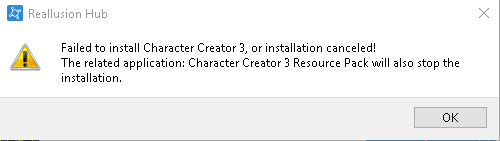
https://gyazo.com/cbd995d4ef8071eba6b7035578391452
Is there anything I can do to fix this?
|
|
By Flav Creations - 7 Years Ago
|
It is bugging me considerably that I have had to fix this issue by myself, (i had to completely reinstall windows just to get it to install)
I'm now having issues with installing my content, it keeps failing download
|
|
By Rampa - 7 Years Ago
|
If you still have your old content folders, just replace your newly created ones with old ones. Windows will merge them if they have any differences.
If you need to download your content again, you can find it in the order history page of your account. You can use the download links there.
|
|
By paradoxedone - 7 Years Ago
|
I had this issue today. I was able to download the installers but it was throwing this error when I tried to install.
I found the workaround was to browse to your "C:\Users\*YourUserName*\AppData\Local\Reallusion\RLDownloads\" folder and right-click on the installer and "Run As Administrator"
You will have to make sure to go to your folder view options and enable show hidden files/folders because the AppData folder is set to hidden by default.
Hope this helps!
|