|
By micabreen - 6 Years Ago
|
so i imported a .obj went to create accessory move,xfer skin weights, conformed. etc. have it the way i wish to keep and reuse for other characters. but when i select the obj and try to add to custom content it is greyed out and not allowing me to add there

i have the object selected in scene manager it has been imported correctly
matter of fact it appears i cannot add anything at all to custom no project,scenes anything
i am not sure if they changed how you do this i am still like 1 month new to character creator any help would be great thanks
|
|
By Peter (RL) - 6 Years Ago
|
Hi...
When you want to save to your custom library you have to first make sure that the object you are trying to save is selected (has a yellow bounding box around it). You then need to ensure you are in the correct folder in Content Manager to be able to save. When this is done correctly the ADD button should become active.
So as a test start CC3 with the default character loaded and selected. Then switch to Project > Character in Content Manager and the ADD button should be active ready to save.
|
|
By micabreen - 6 Years Ago
|
|
thanks i did that and still cannot save/add anything.. loaded default project ,clicked character tab and add button is grayed out in both template and custom tabs i have not been able to get this add button to show up with anything i try
|
|
By micabreen - 6 Years Ago
|
|
i guess adding your own content to your library is broke. for the life of me i cannot save anything at all to my custom folder it is annoying because i have some objects i have worked hard on and now can't fkn make my own item later use with it.another thing is that you cannot duplicate a item *(should be added)
|
|
By animagic - 6 Years Ago
|
Where is your Custom folder located on your system? This looks like an access problem with the folder.
One thing you could try is to run CC as administrator and see if you can save.
|
|
By micabreen - 6 Years Ago
|
i tried to run as admin and same thing i am gonna try to reinstall i guess cause this is really annoying i want fast access to the things i make
seems like a complete reinstall did the trick
|
|
By garidian - 6 Years Ago
|
I have the same issue. After reinstall it works for one day and than the same issue in Character Creator. If I export the Charakter to Iclone I be able to save there. I bought the pipeline Version of CC. With this bug it is complete useless for me. If this is not fixed very fast i must check for refund this useless CC.
|
|
By animagic - 6 Years Ago
|
|
garidian (3/30/2019)
I have the same issue. After reinstall it works for one day and than the same issue in Character Creator. If I export the Charakter to Iclone I be able to save there. I bought the pipeline Version of CC. With this bug it is complete useless for me. If this is not fixed very fast i must check for refund this useless CC.
If it were a bug it would affect everybody, which is not the case. I, for one, can save fine.
To get assistance for your particular situation, your best cause of action is to contact support at: https://www.reallusion.com/CustomerSupport/UserEx/QForm.html.
|
|
By Ricardo Pereira Filho - 5 Years Ago
|
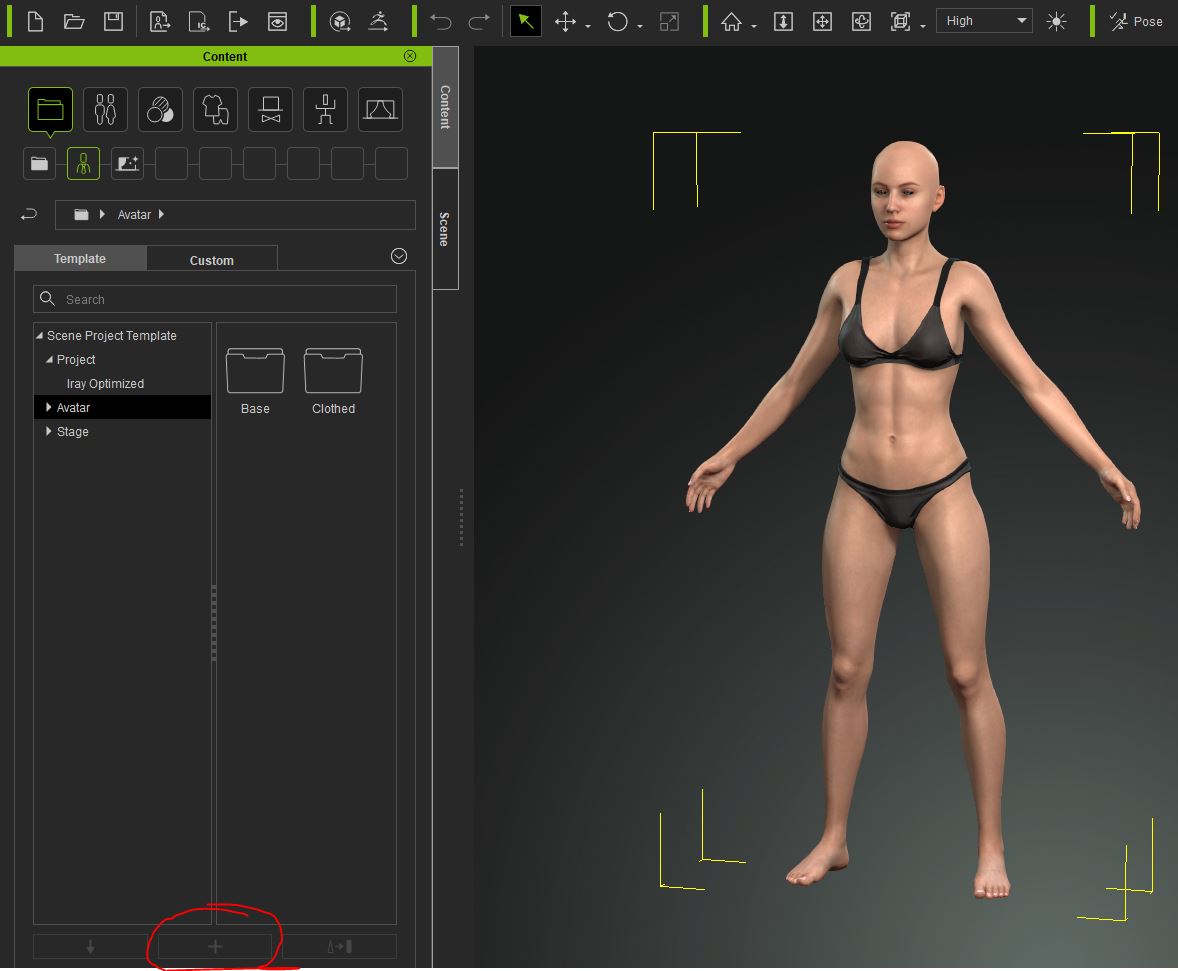
Hi guys! I have the same problem. Cant save my own contents. I have just update CC3.21.2423.1 Pipeline version.
My contents folders are in drive D:
Any suggestions?
|
|
By Galfridus - 5 Years Ago
|
ricardopereirafilho (1/2/2020)
Hi guys! I have the same problem. Cant save my own contents. I have just update CC3.21.2423.1 Pipeline version. My contents folders are in drive D: Any suggestions?
From your screen shot it looks like you are trying to save in the Content template folder.
Try clicking on the custom tab to see if this then allows you to save there.
Geoff.
|
|
By Zeronimo - 5 Years Ago
|
how to save custom cloth to CC3
See from 2'35 how to save the cloth
- you must first select your cloth (not the avatar)
- place yourself in the right directory (custom …)
|
|
By Ricardo Pereira Filho - 5 Years Ago
|
|
From your screen shot it looks like you are trying to save in the Content template folder.
Try clicking on the custom tab to see if this then allows you to save there.
Geoff.
Yes, I tried the custom tab also. Same problem.
I installed my Reallusion softwares in another computer, with the content folders in drive D: and the same issue happens with CC3
Spending some energy a few nights on this :doze:
|
|
By Peter (RL) - 5 Years Ago
|
ricardopereirafilho (1/2/2020)
From your screen shot it looks like you are trying to save in the Content template folder.
Try clicking on the custom tab to see if this then allows you to save there.
Geoff.
Yes, I tried the custom tab also. Same problem.
I installed my Reallusion softwares in another computer, with the content folders in drive D: and the same issue happens with CC3
Spending some energy a few nights on this :doze: The issue may be caused by a permissions problem accessing the custom content folders. Please try the following:
1. Ensure you are logged into your computer as an Administrator. To check in Windows 10 go to Start > Settings > Accounts.
2. Please check that you have read & write access the "Custom" content folder on your D: drive. Please refer to the page below for help on checking this.
Thanks.
|
|
By paulm_872026 - 4 Years Ago
|
I had the same problem and traced it back to where I'd pressed 'Convert to Accessory'. When you make it an accessory you can't...use it as an accessory?? When I didn't press that I could save it as..an...accessory? Not that I'm really confused now or anything.
|