|
By 0oseven - 7 Years Ago
|
Just seeking opinions though I will get the trial if a few fundamentals can be answered by users with experience.
1] Is Iclone a good "movie making Tool" what makes it so. I have no interest in exporting to game or other 3d applications for rendering
2] Why do Iclone and Character Creator need separate versions of Iray - as seen in the shop.
3] How good /easy to get realistic lipsinc results.
4] Is it correct CC3 can import Daz/Poser characters directly but you still need 3D Exchange for assets ?
5] How easy to manipulate Cameras and render out scenes.
6] Is it a good lighting system with easy to apply effects.
7] Is the particle system robust - ie plenty of features for creating particles.
8] ]Any liquid simulations ? ie flowing water, ocean waves etc.
9] Learning curve - is it reasonable ?
Many more questions but better stop here
|
|
By wildstar - 7 Years Ago
|
ok , i am using iclone since 5.5 , participate from iclone 7 beta and i trying to use it since now. so i believe i can help so lets go
1 - iclone is the best character animation tool in market actual in my opnion for the price, you can get the same results as Maya for a fraction of price ( i am a autodesk user ) in iclone you have director tools for "movie making" to control and animate physical cams. with correct lens apertures. this make it powerfull for telling stories, puttin maya - 3dsmax to eat dust. in this area. for character animation is a beast tool to use with motion capture. using xsens or perception neuron and edit /clean and correct mocaps on iclone is a breezee. better than autodesk motionbuilder ( my opnion )
2 - iray is a external plug in integrated to iclone. but for me.. ( i am come from . octane /iray/mental ray. today i undestand i can get the same results with vxgi , you just want to know what you doing. yes iclone vxgi is better than unreal lightmass and unity progressive gi ( i can show it to you if you as i am a unity user ) and you can get similar results from iray with vxgi , but its not easy.
3 - i getting nice results with faceware for iclone ,its most afordable price and almost same power than the full version , for me today is the best way to make
facial animations on iclone.
4- today you only need 3dxchange for import assets. custom characters made from scratch. and animated props. all export can be made from iclone or cc3
5 - its easy and powerfull like i said in point one , its make other 3dcc aplications like 3dmax and maya or c4d eating dust. (c4d not much it have a nice camera
director ) ,
6 - you dont need iray to get "realistic results" but the barrier to get "realistic results in iclone is the poor PBR materials but with careffull you can get it, the most
problematic thing is characters skin in my opnion. and answer your question , no , is not easy get good results with iclone , you need research and study it. now after 1 year + using iclone since beta i start getting results i have pride. and no, the light system its not the better you can find today.
7- is popcorn fx man , make a youtube search the particles are amazing.( its dont work with iray yet )
8 - you just have water asset and its limitated no liquid simulations just a plane with animated textures. me and some ppl from comunity asking for a alembic import for fluids simulation since iclone 7 beta.
9 - more easy than learn a game engine. or a 3d dcc tool like 3dmax maya c4d etc. its fun use iclone.
i hope it can be helpfull.
|
|
By Kelleytoons - 7 Years Ago
|
Most of your questions involve answers that are subjective. It's like saying "Is a Honda a good make of car?" Might be, might not be, just depends on what you want to use it for and your own style.
I, for example, would NEVER render with Iray. And for me, character animation is the most important thing in the world. There is nothing better on the planet than iClone for that. If you buy Popcorn FX it has great particles, but no water to speak of (you can fake it a bit). The native renderer, the great lighting, the ease of camera movements, for me it's a perfect system. I would never go outside the iClone universe for anything.
But for others? Not so much (including the previous Wildstar, who is a completely different animation guy). Who knows if it will be right for you? Try the demo, but better than that, look at the samples produced by others. That's the proof of the pudding.
(Just to give you a clue, though, I made this in less than a few hours AND rendered it in a few hours -- so perhaps a total of four. Now I did use Anima 3 for the people. And if you follow the link to my YouTube channel you'll see lots of lip sync stuff -- I won't dupe it here. But I use the iPhone X and Live Face with iClone. Hell, I'll also put a link to one of my animations done this way, although it took a bit longer to create and render -- let's say a total of a day or two):
https://www.youtube.com/watch?v=nV26q5ghGkk
https://www.youtube.com/watch?v=LxHgPdrvFMQ&t=31s
|
|
By animagic - 7 Years Ago
|
Wildstar gave you already some useful answers.
Just briefly about Iray: the store is confusing, there is only one plugin which is shared between iClone and CC, so only one plugin to buy. I like working with Iray, but the native iClone renderer can also give good results if you spend time with it.
I have been using iClone for movie-making since 2010 and every version has brought improvements. I like it a lot, but as with everything you have to give yourself time to learn the application.
|
|
By justaviking - 7 Years Ago
|
I will not contradict what the previous people said. All were excellent points. The only thing that's really missing from your list is "water simulation," as Wildstar pointed out. If you want to model a waterfall or a flood going around buildings, you'll need to get creative. There are ways to work around it, but the better results you want, the more work it will be. But there is a "water plane" as already mentioned. It won't let you go surfing, but is great for a lake and stuff like that. Other than that limitation, iClone will do a great job for you.
I do not have any reasonable experience with other animation applications, so I cannot compare iClone to others.
Leaning curve? That's up to you. I will say, it never ends. In addition to animation, there is quality lighting, camera placement, lens selection, editing, character creation, wardrobe, hair, sets and props, story, voice acting, sound effects, music... and then you get into the technology of modeling, textures, and the nuances of how they make things better and easier, or more difficult. You don't need it all on day one, but there is always something new to learn or a skill to hone. That's what makes it a great hobby for me.
Lastly, it's a fantastic community. Very noob friendly. We were all beginners once upon a time, and have not forgotten it.
What I can say, is my greatest limitation is... Me. Not iClone. It's me.
|
|
By akuei2 - 7 Years Ago
|
Well done Wildstar.
Addition:
IC7 is fun and powerful, but IC7 also had a limit on rendering.
VGXI not a god, some stuff like mirror, volume light, sss or water, IC7 can't achieve now.( maybe in future with custom shader on open python)
Also the precision work like hair/cloth physic is limitation.
Soft-body totally impossible in IC7.
Please consider IC7 as a pipeline work to other 3D program, it will bring IC7 life again.
|
|
By sonic7 - 7 Years Ago
|
Hi Mybiz ....
I'm a 'noob' myself (been here 12 months) - and still learning for sure (and s-l-o-w-l-y --- yeah, it's just me :blush:).
But I do agree with Dennis when he says that the learning curve never ends - and that's partly because so much is being 'added' to iClone all the time. But if you can *keep up* with this and 'assimilate' it, it's undoubtedly a great software. And Dennis made a very relevant remark, namely, 'we were all beginners once upon a time, and have not forgotten it'. I think that is what makes this an outstanding forum - it's not driven by 'egos' (not by enlarge), and that makes for a nice atmosphere where (and I'm still learning this), - where we can have 'no fear' in admitting our limitations or shortcomings, and call out for help when needed, - other forum members will be there for us .... it's great in that regard. And as Dennis also implied, it's sort of a matter of 'going with' what iClone can do - sure it's not 'perfect' - but if you work within it - (or go with it) - you can realize great results ....
|
|
By charly Rama - 7 Years Ago
|
|
Yeah, there are many things told by everyone, as it was said, it depends on you, what do you like or dislike. One thing is : I think that you couldn't find another animation software "fast" and with affordable price like Iclone. Blender is free but learning Iclone and learning Blender mmmhhh... huge difference in my opinion. Iray is a very good tools for rendering with his "limitations" (rendering time, no particles, no water, no fog...) but in a difference with other users, I can no more render without iray, excepted when I need to use the "limitations" elements I've told about. So...You have to test it yourself and juge if it 's ok or not for you
|
|
By wildstar - 7 Years Ago
|
|
akuei2 (2/12/2019)
Well done Wildstar.
Addition:
IC7 is fun and powerful, but IC7 also had a limit on rendering.
VGXI not a god, some stuff like mirror, volume light, sss or water, IC7 can't achieve now.( maybe in future with custom shader on open python)
Also the precision work like hair/cloth physic is limitation.
Soft-body totally impossible in IC7.
Please consider IC7 as a pipeline work to other 3D program, it will bring IC7 life again.
Flat mirrors are not a VXGI feature or problem this is not the objective of the tech, is a GI feature
like Unity - progressive lightmapper dont generate reflections like mirrors. as along with unity realtime cache gi. GI is not the
same as "MIrrors" . perfect flat reflections(mirrors), are generated in game engines using a screen space effect called "screen space reflections" and its not perfect on unity and unreall. so say vxgi is bad cause its dont generate "mirrors" show how much you dont know what you talking about. same goes to volumetric lights ( a shader trick on game engines ) SSS -FAKE ( is another shader trick ) about sofcloth simulations i want to remember you iclone and unity at low level are using the same technology. is Nvidia gameworks. so you wrong about cloths too. i make tests with unity cloth and iclone cloth and looks at same for me.the advange to make it on unity is for dont need to export a alembic from iclone for that.
dont blame VXGI for iclone limitations on screen space effects. VXGI is better than all lightmapp solutions . and the game comunity knows that .
|
|
By animagic - 7 Years Ago
|
I would just like to point out that hyper-realism is not the only acceptable look for animation. Things would be very boring otherwise.
Whichever way you choose to go, iClone is a good start. I would advise to give yourself time to learn the application well before worrying too much about the "look".
|
|
By 0oseven - 7 Years Ago
|
Thank you all for replying - your information/ opinion is very helpful.
I should have said I am not new to 3d but I'm only a hobbyist looking for the holy grail in animation software :)
I started with Daz Studio 3 and have dabbled with Maya,C4d ,Lightwave, Modo and some others . Daz Studio has evolved into very capable animation tool [ but often requiring expensive add ons ] The interface has become complicated and I am loath to use it. What I do use is Daz's 'CarraraPro' which you may not know about because Daz no longer supports it and NEVER promotes it.
This is not a software sell but after looking at so many programs I keep coming back to Carrara which is amazingly capable for the asking price even though it has not been updated for over 5 years. So maybe take a look , dial up CarraraPro on youtube.
Carrara then is my kind of bench mark and I need Iclone to do things it cant or at least provide a more convenient way of doing it.
I was surprised therefore to learn that a graph editor and particles are extras [ Curve Editor Plugin and Popcorn Plugin ] not cheap.
I know the learning curve question Is related to how much there is to learn but I wondered how 'steep' it might be - Does Iclone and its interface make it easy to grasp how to do things..
Someone mention VGXI - What is it and is it found in Iclone
Is "Facial animation and speech" 3dmesh based ? CrazyTalk as I understand just manipulates a 2D image.
I'm assuming there is Facial animation with phonemes built into basic Iclone7.Not sure as people referring to add ons like Motion Live and the Face App.
[ By the way is Face App Apple technology. ? Is there android version - I don't have iphone ]
I guess Iray is a personal thing ! Some recommend, others don't.
I have many other thoughts but better these dealt with in aother post.
Sincer thaks for all you comments
.
|
|
By animagic - 7 Years Ago
|
|
To answer one of your questions: iClone does have built-in lip sync, which will provide speech animation for a 3D figure. You can edit/refine the lip sync result manually. The quality is similar to that of CrazyTalk.
|
|
By akuei2 - 7 Years Ago
|
wildstar (2/12/2019)
akuei2 (2/12/2019)
Well done Wildstar.
Addition:
IC7 is fun and powerful, but IC7 also had a limit on rendering.
VGXI not a god, some stuff like mirror, volume light, sss or water, IC7 can't achieve now.( maybe in future with custom shader on open python)
Also the precision work like hair/cloth physic is limitation.
Soft-body totally impossible in IC7.
Please consider IC7 as a pipeline work to other 3D program, it will bring IC7 life again.
Flat mirrors are not a VXGI feature or problem this is not the objective of the tech, is a GI feature like Unity - progressive lightmapper dont generate reflections like mirrors. as along with unity realtime cache gi. GI is not the same as "MIrrors" . perfect flat reflections(mirrors), are generated in game engines using a screen space effect called "screen space reflections" and its not perfect on unity and unreall. so say vxgi is bad cause its dont generate "mirrors" show how much you dont know what you talking about. same goes to volumetric lights ( a shader trick on game engines ) SSS -FAKE ( is another shader trick ) about sofcloth simulations i want to remember you iclone and unity at low level are using the same technology. is Nvidia gameworks. so you wrong about cloths too. i make tests with unity cloth and iclone cloth and looks at same for me.the advange to make it on unity is for dont need to export a alembic from iclone for that. dont blame VXGI for iclone limitations on screen space effects. VXGI is better than all lightmapp solutions . and the game comunity knows that .
Nice advice & I agree with you, but IC7 had limitation also is true.
Make it clear will aid new comer.
Nice VXGI 2.0, hope unity apply it too.
Reallusion may require it in IC8 ( little bird said ).
|
|
By AutoDidact - 7 Years Ago
|
" Daz Studio has evolved into very capable animation tool [ but often requiring expensive add ons ] The interface has become complicated and I am loath to use it. What I do use is Daz's 'CarraraPro' which you may not What I do use is Daz's 'CarraraPro' which you may not know about because Daz no longer supports it and NEVER know about because Daz no longer supports it and NEVER promotes it. promotes it. This is not a software sell but after looking at so many programsThis is not a software sell but after looking at so many programs I keep coming back to Carrara which is amazingly capable for theI keep coming back to Carrara which is amazingly capable for the asking price even though it has not been updated for over 5 years."
asking price even though it has not been updated for over 5 years." The problem with Carrara Pro is that it only natively supports the Daz genesis 2 Era figures or earlier (There is a user created "hack" to get G3 into Carrara) Daz wont be updating it as their focus is selling Daz studio Store content.
Indeed you need the graphmate& keymate plugins to Make Daz studio useful for Character animation along with the included nonlinear motion clip system.
However at around $20 USD each, I would not consider them "expensive" relative to the $99 USD cost of Curve editing for Iclone. on top of the cost of Iclone itself.
Also No ....there is Not an android version of the Live face app for Iclone. so factor in the cost of buying an $$Iphone$$$ if you plan to go that route. or use the built-in lipsinc function in iclone.
If the creation and editing of Character motion in realtime is your objective then Iclone is far superior to both Carrara& Daz studio in every respect... if you can afford it.
|
|
By mark - 7 Years Ago
|
And I'm sure you know there is no "Holy Grail" of animation software. There are great tools to work with though and each has a plus and a minus.:D
iClone has met my needs for around 10 years, I've had great fun with it and even made a few bucks with it as well!:P
|
|
By 4413Media - 7 Years Ago
|
I have been using it since version 4.
It's improved quite a long ways since then.
Compared to others, it's a powerful little animation tool in itself and I too am a bit dissatisfied that the curve editor came as a extra.
As for lip syncing, you can go quite far with the default. Keep in mind that it takes quite a bit of work to do. But in any practice in anywhere you go, the product will reflect how much work you put into it and how willing you are to invest time into it.
The program itself is not too bad to pick up and learn. It takes a bit of time, but best thing to do is try and make something with it at the start.
You don't exactly need to render with iclone in itself,there are other tools that you work alongside.
|
|
By 0oseven - 7 Years Ago
|
Once again -thankyou everyone for your inputs and making time to do so.
My last two days spent following links, checking out suggestions and watching a few tutorials so have increased my knowledge of IC a bit.
Remembering I set out to get help in deciding not only whether to buy but also what to buy - I think I have learned.
I don't 'need' IRAY for good results. I can buy later if necessary.
I don't ' need ' POPCORN because I have HITFILM which has very good particles to be added as after effect.
I don't ' need " LIGHTHSTUDIO " if IC7 has good lighting system for me to light the scene ie spot, bulb, distant, sunlight, environment etc.[I still have to investigate actual light options and effects available ]
I MIGHT need CURVE EDITOR but can be purchased later so I don't have to decide right now.
I MIGHT need content pack - see comment below.
I MUST have 3Dexchange to bring in assets with the understanding Character Creator can bring in Daz characters without 3Dexchange.
A couple more questions which I couldn't find answer from web.
On facial animation - I have to choose FaceApp for IPhone but is it better to buy " Konect " ? I understand IC7 already has the mocap software built in to drive it?
What about a webcam - would that be any good ? One way or another I will have to buy some hardware.
Can IC7 physics "fracture ' objects ? For instance "shatter glass" Blender just got a great plugin for this.
How good or necessary is the "Content Pack" which includes all sorts of facemaps and morphs to use in CC3 ? Isn't CC3 basic good enough to produce High Quality characters ?
Regards Carrara - as was mentioned, yes it was only updated for genesis and G2 - one of the reasons I am looking into Iclone.
Meanwhile I explore Iclone video tutorials to learn more but this is time consuming so I do appreciate you answering my questions because it is a quick but from users I also learn the " truth" - not what the promotional videos want me to believe ha ha !
|
|
By AutoDidact - 7 Years Ago
|
Can IC7 physics "fracture ' objects ? For instance "shatter glass" Blender just got a great plugin for this.Blender just got a great plugin for this.
Iclone cannot actually fracture geometry at least not in the way a true modeling or 3DCC application can.
Not sure about how good the rigid body physics are in Icone as I always render Finals in C4D which has a very good rigid body dynamics system.
Also ,unlike Maya/Motionbuilder, Iclone has no ragdoll solver for realistic hits and falls involving Characters .
. This is one of the areas where the program could use improvement as even the vestigial Poser application has a Python base ragdoll solver for over decade.
|
|
By ultimativity - 7 Years Ago
|
I am fairly new to animation. I did try Daz for a graphic novel and it worked okay. I found it to be horrible for animation. After wasting lots of time and some money, I went to Unity game engine. Much easier to work with, but the cameras have a weird distorting effect on the geometry. The human characters look misshapen. I purchased iClone 7 pipeline bundle. It has been really easy to work with so far. I have not yet mastered animating characters yet. But so far it so exponentially less frustrating to work with than Daz.
I still find Daz characters to be the best I have ever worked with as far as detail and realism. I can import the FBX through 3DX and then drop in the Daz maps. To me, they look better than importing through CC3 pipeline (which I recently purchased and am considering returning.)
Uncertain whether this answers any of your questions. However, I am hoping a newcomer's perspective might be helpful. Good luck in your endeavors.
Nathan
|
|
By Kelleytoons - 7 Years Ago
|
Nathan,
If you don't like the look of Daz characters through CC3 pipeline you are doing something wrong. They will come in with EXACTLY the same Daz maps as through XChange if you do it right.
Let us know and we can walk you through the right steps (better yet, tell us how, exactly, you are doing it and we'll tell you what you need to do differently. Include images if you can).
|
|
By ultimativity - 7 Years Ago
|
I will research and post images. Perhaps it is because I was exporting characters applied to G3M (M7), but the face maps are pretty f@#ing far from exact. Like the tongue is set in a different location in the Daz UV than in the transformed iClone character. So the transformed character's face has tonsils on the nose. If you have a way to fix that, I'd love to see it.
Nathan
|
|
By animagic - 7 Years Ago
|
|
That's certainly not normal, but Mike will be able to help you out.
|
|
By planetstardragon - 7 Years Ago
|
if you have a great story and innovative ideas, iclone is perfect....if you have a specific vision to look like everyone else ....then you want next tier softwares.
the reason i say this is that iclone is very powerful, but doesn't look like regular mainstream tv / film animation engines ...such as maya....it looks more like unity and most popular game engines - that's their own genre / look.... then you have toon shading ...etc
then add to this iclone has a simple learning curve ....but a very deep rabbit hole ...so you can get moving on a great looking idea quick ...and if you want to take it up a notch pipeline that sketch out to other softwares....
While the fancier engines, such as maya, lightwave, c4d, modo...even blender, have a mainstream look, their complexity makes the simplest tasks extremely time consuming. So if you want to compete with that look, then you want those softwares.
Iclone lets you spend more time on your story because it's simple to learn the basics and unrestricted to take it as far as you want..., and has a clean / unique look even vs it's tier peers. But it looks more soho than broadway which can be very powerful in the right hands. all iclone needs at this point is a picasso to put his / her signature on it, and i'm coming close!! so are a few other members on the forum I been keeping my eyes on! The question is who will win netflix with iclone first!!
|
|
By AutoDidact - 7 Years Ago
|
.it looks more like unity and most popular game engines....... While the fancier engines, such as maya, lightwave, c4d, While the fancier engines, such as maya, lightwave, c4d, modo...even blender, have a mainstream look,their complexity makes the simplest tasks extremelytheir complexity makes the simplest tasks extremely time consuming. So if you want to compete with that look, then you want those softwares. then you want those softwares.
Hi Iclone's native render does have its own "game engine" look however it does not approach the Realism of Unity or Unreal.
TonyRL has posted that Reallusion is already testing their live link to unreal.
Both those game engines are getting quite close to matching the final quality rendered output of Lightwave,C4D etc except they are exponentially faster or even in Realtime.
The NVIDIA IRay Brute force, path tracer engine in Iclone looks great for stills, portraits & product shots but very slow for animated films of any real length.
|
|
By Grimhilda - 7 Years Ago
|
Reading this thread and noticing that the OP uses Carrara, I thought it might be worth showing a small video of DAZ characters exported from CC3 Pipeline into Carrara.
I have a thread on this in the Carrara forum at DAZ.
I don't have Iclone7 and need a more powerful computer first but I took the plunge and bought CC3 Pipeline along with the Skins and Morphs add-on.
I do have Iclone versions 4-6 and I found I could export from CC3 Pipeline to .fbx and could incorporate some motion from my Iclone asset libraries.
There is some interest in what I've done (over at DAZ) and I would be pleased if anyone could answer a question for me? Is it possible to buy CC3 Pipeline without owning Iclone and buy export versions of motions without having Iclone to install them to? The motions would simply exist in a folder on a hard drive.
Anyway, here is the video:
https://youtu.be/rdg7B1bwucM
|
|
By AutoDidact - 7 Years Ago
|
|
Hi I read your posts on the Daz forums, like yourself I still run version Iclone 6.5 (for Different reasons).
However I have the full pipeline/3DX bundle and full export/import of BVH to Daz studio &Alembic,FBX to My Lightwave& C4D thus have Zero need for CC3 in my specific pipeline.
Being that CC3 can grab Imotion files for export to FBX , indeed you may have an "alternative" ,of a sorts,to buying 3DXchange to get your older ver 6 Imotion animated CC3 Avatars out to Carrara
. However it seems you wont have access to any newer imotion data without the export licenses as you stated in your Daz post.
In your case CC3 seems to have been a good investment nonetheless.
|
|
By Grimhilda - 7 Years Ago
|
Hi Autodidact,
Thanks for your reply and for reading my long, garbled posts over at DAZ. Also (having seen quite a few of your own interesting posts) thanks for overlooking the fact that my short video was made using the practically default young females! I don't know, it just happened! I do intend eventually to cover my characters more with my own home-made (and in my case, simple) clothing for historical scenes once I get round to being serious.
From what I can tell, but may be wrong, there are different flavours or generations of iMotion files in Iclone. One iMotion will suit one character but not another? Usually with these things it is the older character generation that can't take the iMotions of a newer generation but often the newest generation has backward compatibility with the old.
Without the latest Iclone, I can't check this out fully for myself (other than getting export licenses for the motions I bought) but I will try at some point to put together a few custom motions to see whether they can be added to CC3 Pipeline characters and from there on to Carrara.
I'm not averse to buying more of Reallusion's motions and paying for the export licence if I can see a good use for them. Which brings me to a question I thought to ask you several times in reading of your workflow. You often praised Iclone's animation tools over Poser's, Carrara's and DAZ Studio's and as an Iclone 4, 5 and 6 owner I wondered what ease-of-use in Iclone you were primarily referring to. Let's leave DAZ Studio out of this as a non-starter. With Carrara, I attempt to animate by going pose-to-pose and editing the resulting keyframes. There is also the Puppeteer tool.
In Poser I also try pose-to-pose and timeline editing as well as the walk-designer. I'm not too successful in either program but in Iclone, unless I buy motions, I find myself doing much the same. Or should I be making much more use of Motion Puppet, Face Puppet or Mixmoves (which I haven't studied). Isn't all animation hard in any program?
I have to say that I like all the software I bought and am not at war with any. But at the rate I work, I'll never complete any of my hoped for animations in my lifetime.
I know you're a busy man and very productive so I wouldn't want you to give up much time replying to this question. It isn't being asked as any kind of challenge but I do know that you have gone down paths that you abandoned in favour of better ones and that Iclone for animating suits you best, it seems.
|
|
By AutoDidact - 7 Years Ago
|
|
Hi Iclone ,for a single man operation, has more built in tools tool for creating and editing Original motion for Characters in realtime. Motion puppet, Mix moves, the abilty to store actions/motions on a character via"persona" files and many tools to correct foot sliding. The speed at which you can quickly create a smooth seamless complex series of motions In realtime ,In Iclone ,is not matched by any other program except the Autodesk tools.
(Iclone persona files- NO pose to pose key framing- video)
Poser is long DEAD...its "animation" tools remain entombed in the 1990's and they were rubbish even back then.
Daz studio has some decent tools for the price and the aniMate 2 system is very good for nonlinear motion mixing and the spline graph editor is only $20 USD. The puppeteer pose to pose recording is useful in many situations. also make sure you get the free keyframe culling script by "Mcasual" as well as his free "Cycler" plugin for auto creating repeating motions such as bouncing bellies etc.
But alas Daz no human IK system for foot and hand contact with objects & terrains. so unless you are bringing in BVH motion from Iclone( As I do) or motionbuilder. Creating locomotion or squating motions in daz studio will result in unfixable foot skating. And most of the useful animation tools are not updated for G3/G8.
I create my "base layer" bodymotion very quickly/easily /predictably
in iclone 6.5 and export BVH to Daz studio for final editing with the graphMate plugin.
All of my lipsinc and facial animation is completed in daz studio as Genesis in DS has better facial expressions than the imported,shape projected CC3, Avatar versions I have read recently.
|
|
By animagic - 7 Years Ago
|
|
Grimhilda (2/18/2019)
From what I can tell, but may be wrong, there are different flavours or generations of iMotion files in Iclone. One iMotion will suit one character but not another? Usually with these things it is the older character generation that can't take the iMotions of a newer generation but often the newest generation has backward compatibility with the old.
Older motion files will work with newer characters, except that some adjustment is needed, primarily because the position of the arms is too close to the body.
So you could test with older motions by importing one into CC3. I just tried this and it works with a Trinity (G3) motion. It just need some arm adjustment at the beginning. (You'll see the first frame pose of the motion in CC.)
When exporting as FBX you can add a motion file (which can also be an older generation). I tried this with the same Trinity motion and reloaded the FBX in 3DXchange and the animation is there, but the arms need to be adjusted, as expected.
I would be interested to know how you make out. I have tried to get stuff from iClone into Carrara years ago because I liked the renderer, but I wasn't too successful.
|
|
By Grimhilda - 7 Years Ago
|
Thanks very much, Autodidact, for your full reply and video demonstration.
I'm paying attention because I am still very much well disposed to using Reallusion products in my 3d hobby and I thought well enough of Iclone to buy earlier versions and to even get a new PC when Iclone 6 came out. I'm also paying attention because you are speaking from experience and from comprehension of the bigger, high-end software such as Max and Maya.
I got it wrong, clearly, when I put DAZ Studio out of the discussion. I only use that program in the most basic way of loading up the odd figure and posing it. Obviously the animation tools in it and for it can accomplish more than is commonly thought - often in DAZ discussions Studio is dismissed as an animation platform and I took that view from just one or two looks at it.
I'm not feeling so hard against Poser for animation because I've seen some results that I admire such as this recent one:
https://youtu.be/Bw0UENe-P6I
What I find, though, is that if I make a small adjustment to a limb's position somewhere in the middle of a 60 frame clip, the limb might do what looks like a 180 degree swing through the body for the remaining frames, or things like that, which I can't understand or repair easily. So, I get what you're saying.
(In the clip I linked to above, I like the step back in appearance it takes from realism which is very suitable for many animations yet it still has a reasonably realistic look).
Whether I get anything made in Iclone or Carrara, I'm not seeking absolute realism. I'd just like better trees and vegetation!
So, thanks again and good luck with your work.
|
|
By Grimhilda - 7 Years Ago
|
Thanks, also, Animagic, for your help.
Without having looked at lip-sync/facial expressions in any of the characters either in DAZ Studio, Iclone or CC3 Pipeline export I can say that there is a definite workflow possible for CC3, DAZ and other figures to be exported to Carrara (as .fbx).
The lip-sync/facial expressions side of things is something I haven't gotten into. I don't know what it would take to get them exported from CC3, I just haven't researched any of that.
Using CC3 Pipeline I can, at the export of .fbx stage, navigate to motions in my Iclone content libraries and incorporate them in the .fbx. As you know, I can't preview how they work in CC3 apart from the first frame pose. So arm or other adjustments would be slightly hit and miss - for me - because I don't have the latest Iclone.
I don't get a huge amount of 3d stuff done these days but I will certainly try to explore this workflow further. I'm very happy to have bought CC3 Pipeline along with the Skins and Morphs add-on. I'm hoping to make a few simple clothing meshes to try out.
In Carrara it is possible to use a third-party Hair and Clothes Draping program called VWD to get excellent cloth and hair physics effects.
In case you missed it (which I doubt, but anyway...) I did provide a video link in my post above to the CC3 female and DAZ females animated from CC3 Pipeline in Carrara.
I can add that, although I'm discussing these things on the DAZ Carrara forum and here, I've only used CC3 Pipeline a handful of times so far, so I'm not any Guru!
|
|
By animagic - 7 Years Ago
|
Briefly, because I need ti go shopping, but iClone has a Motion Plus option, which includes facial expressions besides motions. So that might be an option to explore.
I will try later if that indeed reimports as FBX into 3DXchange.
|
|
By 0oseven - 7 Years Ago
|
Time for another comment from me but thanks for all those posts people have made posts since my last one.
Trying to absorb the pros and cons of what has been said I am still confused by Iclone's various offerings.
I downloaded the trial but realised couldn't do much without learning so I have been watching a lot of video to try and get a grasp on the software - this is time consuming so I think the trial will expire before I get to know much.
Therefore my advice to anyone considering buying is to watch a heap of videos THEN get the trial software.
Whilst I understand IC7 includes a lot of motion clips I haven't been able to see examples where I can key-frame my own animation which presumably could be saved as a motion clip. Video link anyone ?
So far I have to say I am not comfortable with the drab interface and haven't found options to customise it. [ Love Blenders option to resize fonts.]
So, still do not know WHAT to buy though every corner I turn seems to lead to spending more money ! ha ha ! Now to return to watching tutorials.
|
|
By animagic - 7 Years Ago
|
I'm sure there is a video somewhere (there is also a manual! :cool: ), but saving a key-framed animation clip is quite simple:
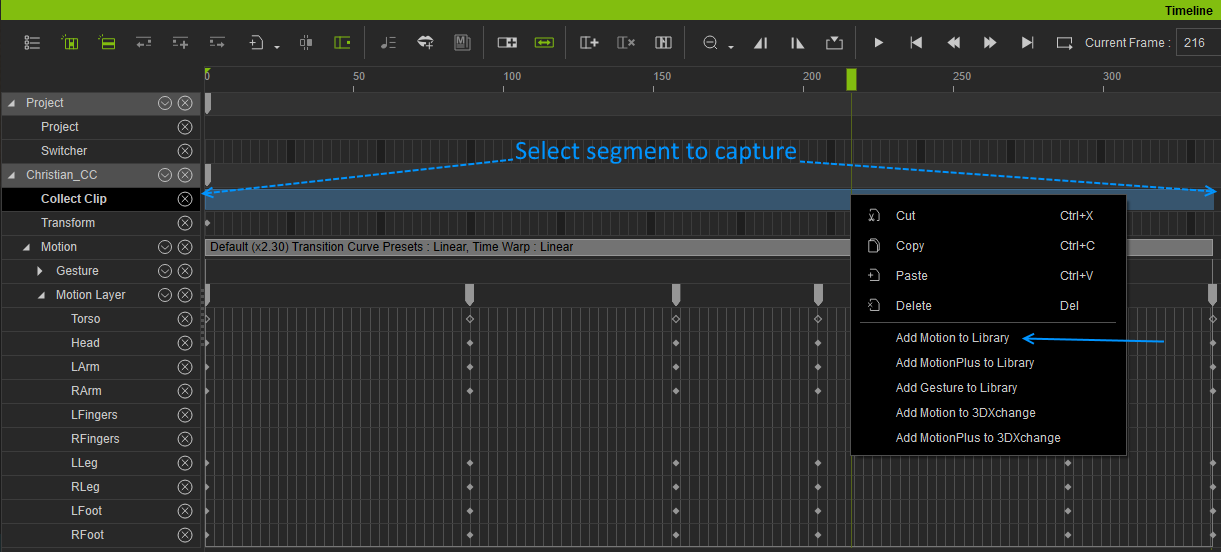
After you have created your animation, open the timeline and drag your mouse in the Collect Clip track covering the part of the animation that you want to capture. (I believe the length of the resulting clip will be the project length, so to avoid that set your project length temporarily to the area you want to capture.)
Right-click the selection (shown in blue), and an option menu will open. For a motion, select Add Motion to Library. You will then be prompted where to save your motion.
If your animation includes facial animation, you would select Add MotionPlus to Library.
|
|
By 0oseven - 7 Years Ago
|
Animagic Thanks for that info which I will keep in reserve.
My first effort at doing something was to import Daz G8 which failed spectacularly. I found a video explaining the process and it seems there are files which must first be installed into Daz Studio.
Danged if I can find these files to copy and paste. They are not where the video suggests. Does the 3dxchange Demo actually include the G8 extension ?
https://www.youtube.com/watch?v=9EXDvs5uyyk&t=286s
I have run out of data so could not download the content of which there are 3or 4 gigs to come. Would the genesis extension likely be in that ?
|
|
By 0oseven - 7 Years Ago
|
Just been watching topic " buy out Daz" https://forum.reallusion.com/405610/Reallusion-Why-not-buy-out-Daz?PageIndex=2
Bringing in Genesis is apparently not as simple as RI makes out OR should I now be using Character Creator 3 for that.
My confusion grows !!!!!!!
|
|
By Kelleytoons - 7 Years Ago
|
Bringing in almost any Gen figure is a piece of cake IF you use CC3 Pipeline. You can do it with XChange, but I wouldn't bother nowadays.
Takes less than five minutes and looks tremendous. Works with clothing, hair, accessories, etc. I have brought in literally hundreds of avatars and thousands of pieces of clothing without a hitch.
|
|
By Grimhilda - 7 Years Ago
|
Animagic expressed an interest in any progress I made with bringing animated (.fbx) characters from CC3 Pipeline to Carrara for rendering.
Here is an example I made today using DAZ Genesis 2.
Post Reply
|
|
By animagic - 7 Years Ago
|
|
Grimhilda, I think that looks very nice. I don't know what kind of renderer Carrara uses, but it has a nice quality.
|
|
By Grimhilda - 7 Years Ago
|
Thanks, Animagic, my work is generally poor because I mainly just try this and that but I was quite pleased with this.
I used just one prop - something called 'Hidden Grotto' which I bought a couple of years ago and only installed today! I buy extremely few assets for one reason or another but on that occasion I bought about half a dozen things from Renderosity and this is the first one of them I've looked at. I just didn't get round to them before!
I used one bulb light and one spotlight (which had some ivy in front of it to cast a few shadows). The background is a plane with a photo of trees in the mist which I took earlier this year.
The hair and clothing could (I believe) be given physics simulation with the VWD program for cloth and hair. I use it in Poser but need to buy a plugin for Carrara.
So perhaps there is a viable workflow from CC3 Pipeline to Carrara rendering.
Some Carrara users render in Octane or in Luxrender, neither of which I know anything about. Plugins are needed and I think Luxrender was updated recently. I don't know whether the Carrara plugin is out of date now??
|
|
By FrankGarrett316 - 7 Years Ago
|
Making movies with iClone is my life's biggest passion, I just wish I could somehow do this full time and make money from it.
Still hoping that one day my channel/videos go viral.
|
|
By Grimhilda - 7 Years Ago
|
|
Since I showed my Carrara animation with a CC3 animated figure, I've made a quick video in Iclone using the same motion and scenery item.
I gave myself a very quick crash-course in using Iclone's lights (I'm only on version 6 BTW) and rendered the video below.
It was dashed out just to get see a sample of effects and lights and to make a hasty comparison with the Carrara video (which I took more care with).
|
|
By 0oseven - 7 Years Ago
|
Impoert Daz chars. Piece of cake ? Not for me
I followed the video about importing daz chars as fbx but get errors all the time .Pretty sure I used the same fbx settings on a G8male naked and applied the T pose before export Here is a typical result. Any suggestions as to what is wrong ?

|
|
By 0oseven - 7 Years Ago
|
Forgot to say the figure in the screen shot is the default loaded when starting CC3 - Deleting it doesn't seem to be a piece of cake either.
Have spent last few days trying to get to grips with the demo software which stopped working for while after an update - help desk advised me on that.
Thanks for posting the videos guys however I'm thinking the learning curve is a stiff one. I'm running out of demo days now but unfortunately my experience so far has not been good. A $400 spend [ 500odd in my Australian dollars ] for IC7,CC3 and the resource pack is a lot to fork out for an unknown quantity !! Maybe they will extend the demo.
|
|
By 0oseven - 7 Years Ago
|
|
One other thing and sorry I'm lazy to ask and not search for answer - I know 3Dxchange imports objects but Is CC3 good for importing 3d models and what format ? I tried fbx from Daz Studio but that didn't work.
|
|
By animagic - 7 Years Ago
|
It seems you used the regular import function for the FBX file, which will not work for this.
What you need to use is the Transformer option. This is only available in the CC3 Pipeline Extension. It doesn't work with the basic CC3.
Here are the steps:
1. Click the Transformer button. At the dialog that opens, browse to the FBX file of the Genesis model, and then click Open. CC will start loading the FBX file.
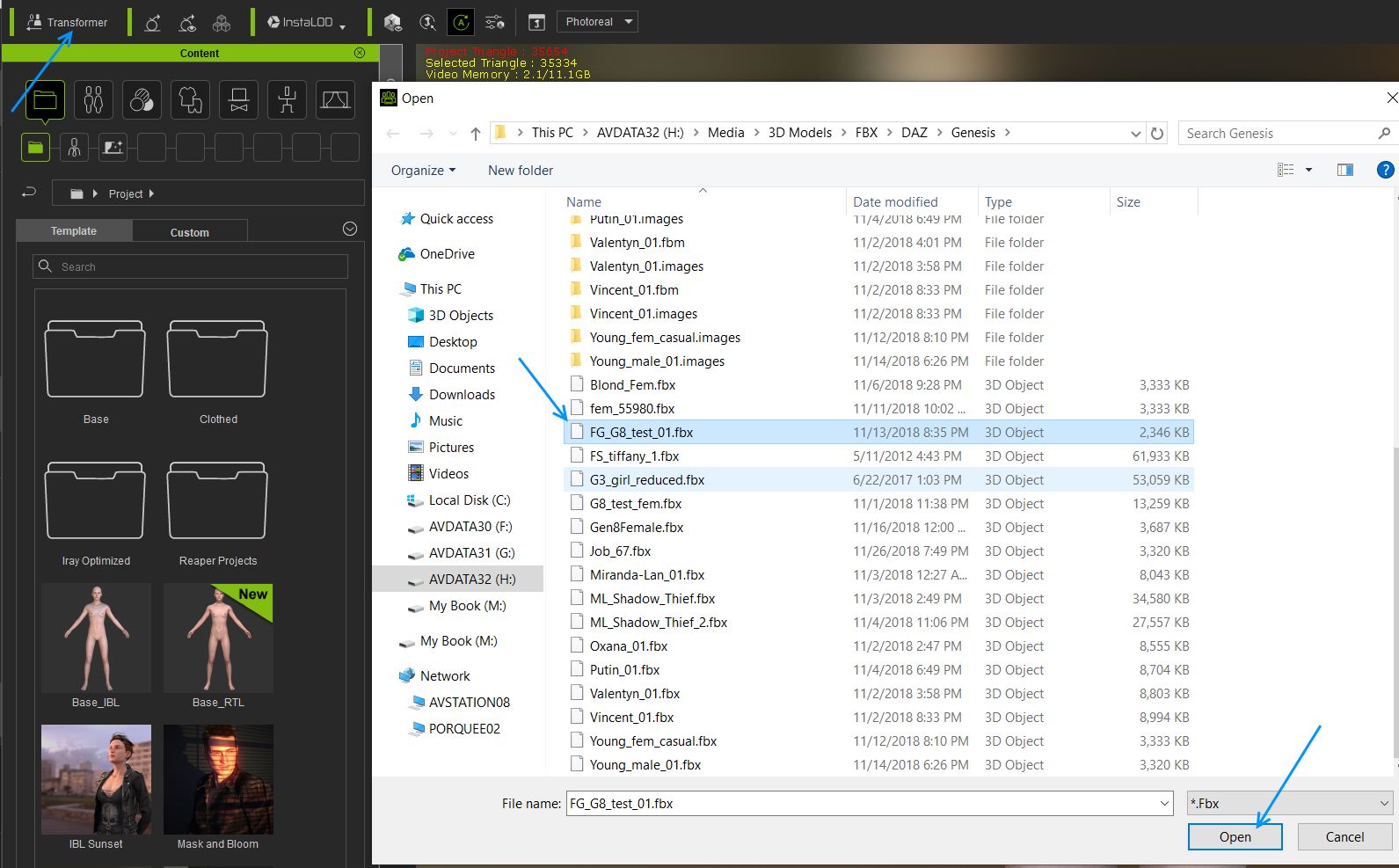
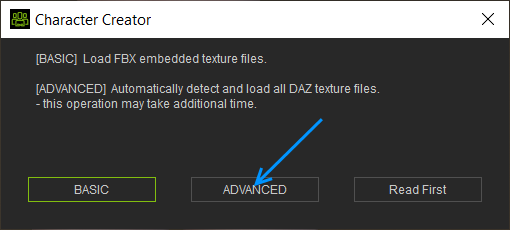
2. At some point, dialog box opens, showing texture loading options. Click Advanced. CC will continue loading the model.
3. Another dialog box opens. Check Bake Body Texture, select a Bake Max Texture Size (or leave at 1024) , then click OK.
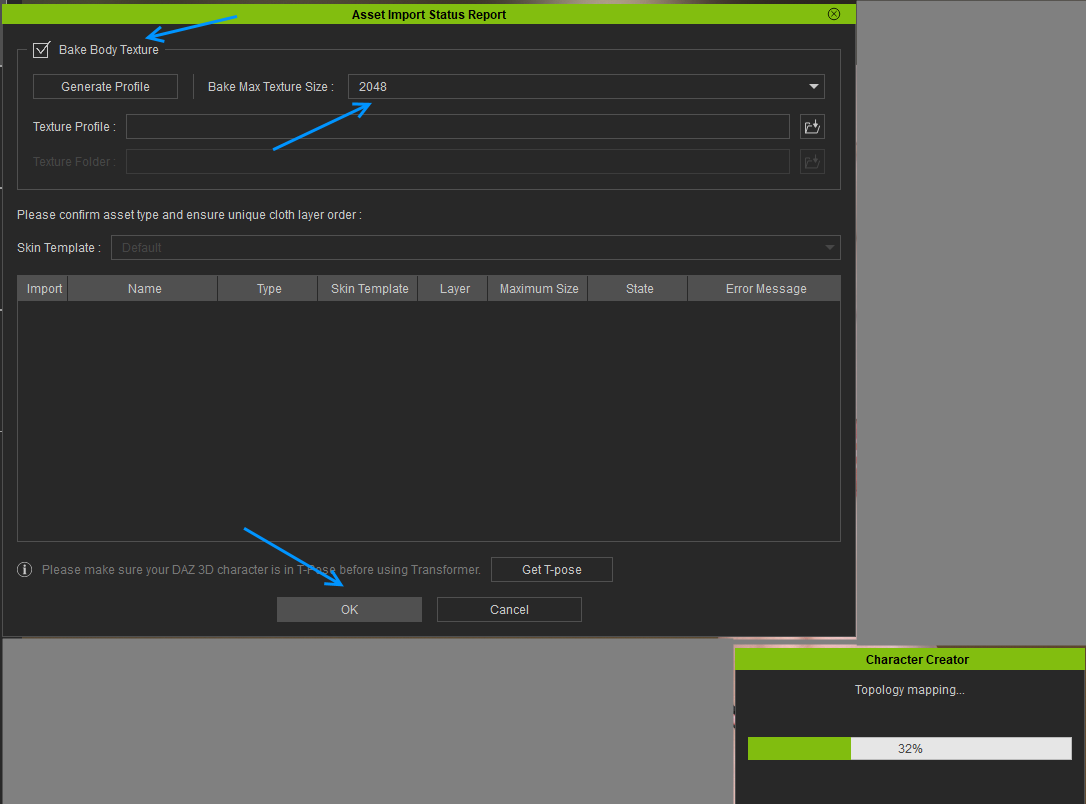
CC will continue loading and baking the textures for the model. The transformed model will replace the default model (so there is no need to remove it).
|
|
By animagic - 7 Years Ago
|
|
To add to this: the Transformer function can be used with DAZ (Genesis), Poser, and Hivewire models. There must be a list somewhere as to which generations are supported.
|
|
By 0oseven - 7 Years Ago
|
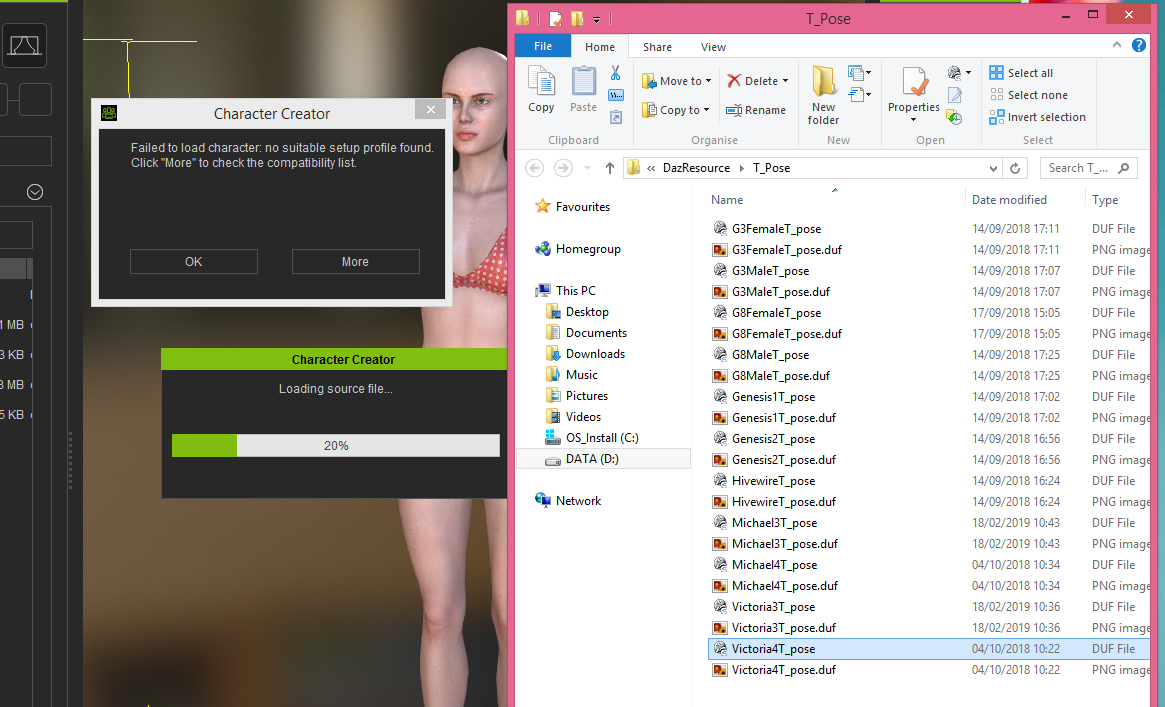
Thankyou - Yes I was using the Transformer but to be sure, I just repeated the exercise both withG8male Base and V4 Base with morphs ++ .
Slightly different result this time as per screen shot attached which includes the list of profiles and as you see G8 and V4 are there and are the ones I used.
baffled !
I'm wondering if a recent "update" to CC3 has anything to do with it. A few days ago when HUB started it said to download update which I did then CC3 stopped working altogether. Help Desk identified that as being two versions installed so I uninstalled the oldest - "clever update installer LoL "
|
|
By 0oseven - 7 Years Ago
|
|
|
By Rampa - 7 Years Ago
|
The current version of both CC3 and the CC3P extension is 3.04.
You should try downloading both directly from your account
|
|
By 0oseven - 7 Years Ago
|
|
My install is CC3 3.04.1422.1
|
|
By Rampa - 7 Years Ago
|
|
Could you provide the FBX DAZ export you're using?Through support is probably better, unless it is just the embedded free DAZ content.
|
|
By animagic - 7 Years Ago
|
@0oseven: The steps I showed were done with the latest version of CC3, so something must have gone wrong with generating the FBX file from DAZ.
|
|
By 0oseven - 7 Years Ago
|
Sorry I did not respond to last posts but my TRIALl ran out of time and my enthusiasm along with it although I have continued to watch various videos to get to know iclone and the forum is providing valuable info/comment but right now not convinced its for me.
I am unsure of the rendering quality of Iclone. Watched quite a few animations but haven't seen anything much outstanding.Few looked sharp and lighting rather flat. That maybe inexperience on part of animator and I dont criticise for that. I have seen several posts in forum that underline my impressions and some of course refer to Iray as solution but I suspect rendering animation with Iray is a "lengthy" process. In my world any thing more than 30sec/frame would be unacceptable. Comments gratefully received and if any one has links to HQ animation [ real scenes more than 2 mins and not solo dancing ha ha ] would appreciate seeing them.
Thankyou again for reponses.
|
|
By 0oseven - 7 Years Ago
|
found something interesting on Vimeo
https://vimeo.com/211287596 I have Hitfilm so combination is interesting [though not limited to Hitfilm of course ].
What impressed me is the picture quality which kind of negates what I was saying about rendering.:Whistling::blush:
|
|
By mtakerkart - 7 Years Ago
|
@0oseven
May my videos test can helps you to choose:
3 years ago (no facial mocap) :
2 years ago (no facial mocap)
One year ago with some popcornfx particles (no facial mocap )
Few months ago , facial mocap test :
Character creator 3 extreme test :
As you can see my render quality goal is AAA video game look not ultra realistic. Ultra realistic MUST use the "raytracing" tech.
|
|
By animagic - 7 Years Ago
|
@0oseven: Iray rendering is indeed a lengthy process, and although I like the look, there are still certain things missing or not working correctly, so I went back to the iClone native renderer for my latest project. It is more than 2 minutes and there is no dancing, I promise...:P
I hope to have it completed pretty soon, and then you can judge if the quality is to your liking. Like mtakerkart, I'm not aiming at hyper-realism. However, working with the Iray renderer was still useful, because it inspired me to emulate certain aspects of the Iray render that I liked in iClone.
During discussions here at the forum, various useful tips have come up. You've already noticed the flat lighting in some of the animations, and iClone is certainly able to do better than that. It just takes time to set it up properly. The way I work is that I render a scene, critique it, and then make improvements. That is not very feasible with Iray. I timed rendering one project and for Iray it came to 96 sec/frame, as opposed to 2.6 sec/frame for iClone.
|
|
By 0oseven - 7 Years Ago
|
Thank you for response - Some good animations here and renders too - making me reconsider !
I think I learned I don't NEED Iray I think too that maybe in Iclone one is encouraged to use gobal illumination or IBL - maybe it is over used and could be the reason some scenes look flat.
I use Carrara Pro8 and generally rely on lights such as spots ,distant, bulbs and area etc with adjustments to shadow strength, falloff , colour etc
I tend to think in terms of real life, placing lights in the scene where I want and use gels, shutters, bounce[ reflection ] to get a "look" and adding effects such as glow, cones and perhaps animating something over time. - no doubt all of this is available in Iclone too ? Still checking tutorials.
I think I saw "fracture" used in a video of a building being destroyed - is fracture available in Iclone physics ?
Once again thanks for information.
|
|
By Dragonskunk - 7 Years Ago
|
1] Is Iclone a good "movie making Tool" what makes it so. I have no interest in exporting to game or other 3d applications for rendering
Lots of handy tools for making quick walk cycles, lip syncing, adding assets and props. A real time saver.
2] Why do Iclone and Character Creator need separate versions of Iray - as seen in the shop.
Its existing real time render is nearly the same, it can get good results but is 80% of what you can render with Ray Tracing so it's an extra cost if you want extra realism.
3] How good /easy to get realistic lipsinc results.
You can get 70% accuracy with just an audio file but it has a very comfortable interface to edit the lip sync.
5] How easy to manipulate Cameras and render out scenes.
There are many techniques to make all kinds of camera motions super easy.
6] Is it a good lighting system with easy to apply effects.
Not gotta be wanting much for anything to do with lighting, it's covered.
7] Is the particle system robust - ie plenty of features for creating particles.
Cost extra for 3D particles but you can do alot with flat emitters, sparks, fire, snow, smoke, etc.
8] ]Any liquid simulations ? ie flowing water, ocean waves etc.
Only calm slightly wavy waters, yeah that one sucks.
9] Learning curve - is it reasonable ?
Yeah! Easy to use and notice that here, many like nothing better than to help a fellow iCloner.
|
|
By rgreenidge - 7 Years Ago
|
Dragonskunk, I've been using iClone since iClone 3, and it's been improved in a lot of ways. I bought it, because I could afford it. I made 90% of my own scenery using sketchup and iExchange, Editing photos, faces, and touch-up I used photoshop. I haven't used any other 3D programs. If your going to be really detailed and are that picky get you a good computer. Lighting is not easy, but can be simple, and is limited to you imagination, it started off with only 4 light sources, but now it's almost limited to your computer power. My disco scene when updated to the real light sources, took days to do since I was still working, the florescent lights in the subway, had to adjusted because they over lapped and were too bright. There is no magic wand and you have to be patient. Everything you do can be saved. I spent a average of $40 or more to buy the things I couldn't make every two weeks. There's a good amount of water accessories, and particles. I have a beach scene, with people taking showers, waves, water, under the title; "U.S. Bear Teaser", which shows multiple scenes I used. To me it's only up to your imagination, of how good you want your scenery and lighting to be. Sometimes you have to fool with, colors and strength of extra lighting to get the effect you want. My videos of most of my scenes can be seen on YouTube, under "rioleo8". I've never used any other program, but I can tell you with iClone, just about everything I wanted to do, I've been able to do. I have a lot of things I done that may amaze, but I won't show until I release the full movie. https://www.youtube.com/results?search_query=rioleo8
|
|
By kungphu - 7 Years Ago
|
With GI and PBR, I’ve found that I just turn off the stock key and rim lights and just use an IBL set very low. Then I’ll use practical lighting for scenes. If there’s a lamp or lights on the ceiling I’ll put a spot light or use one of the built in light props. If the shadows are too bad on the character’s face I’ll add another light to take them away. There’s an art to lighting no matter what software you choose. I’ve only scratched the surface of lighting.
There’s a guy on here you can look up Small Wonder studios on YouTube. Mark has some very well lit Film Noir shorts. I’ve always been impressed with his lighting and overall work. The last film I have posted on my YouTube doesn’t look as good in the lighting dept as the ones I made for festivals this past yeAr. If you keep making films, you’ll constantly be learning something with iclone. I had zero experience like most of the guys here and made a film in no time. It really is easy with iclone. Amazing set of tools for the price.
You can go super deep and use the curve editor with mocap for your motions, key frame with the curve editor, or just tweak stock animations chaining them together with different transition curves. It’s really up to you how deep you want to go with iclone. There are plenty of people on here that make crazy stunning vids and I wonder if I have the same Rev! Lots of talented folks really pushing the limits of the software. No matter what software you choose, you’ll have to put in the time.
What’s really nice is that the talented folks on the forum are super willing to help and answer questions. Many of the guys that chimed in here on this thread have great animations they made and they’re open books on techniques. They certainly helped me out a time or two million! That’s pretty tough to beat.
|
|
By mark - 7 Years Ago
|
Thanks for the kind words kung' but I still have a long way to go to learn about lighting that lighting thang :D:P
|
|
By kungphu - 7 Years Ago
|
|
Anytime Mark! There’s a bunch of crazy talented folks in this forum, I literally wonder if they have a different version of iclone! The stuff that you guys on this forum make shows how much you can really do with iclone. Keep in pushing the envelope folks! We’ll b watching :)
|
|
By nikofilm - 7 Years Ago
|
Here's a movie that is only rendered with iClone. And it does not look so bad.
|