|
By corinaverminetti - 7 Years Ago
|
Hi, I do not know if it's the right place in the forum, but I need some template to create a G2 actor that is similar in structure to the Digidings. Since I tried to do it with a human but has a lot of problems taking it from the Flash to the Pipeline. Thank you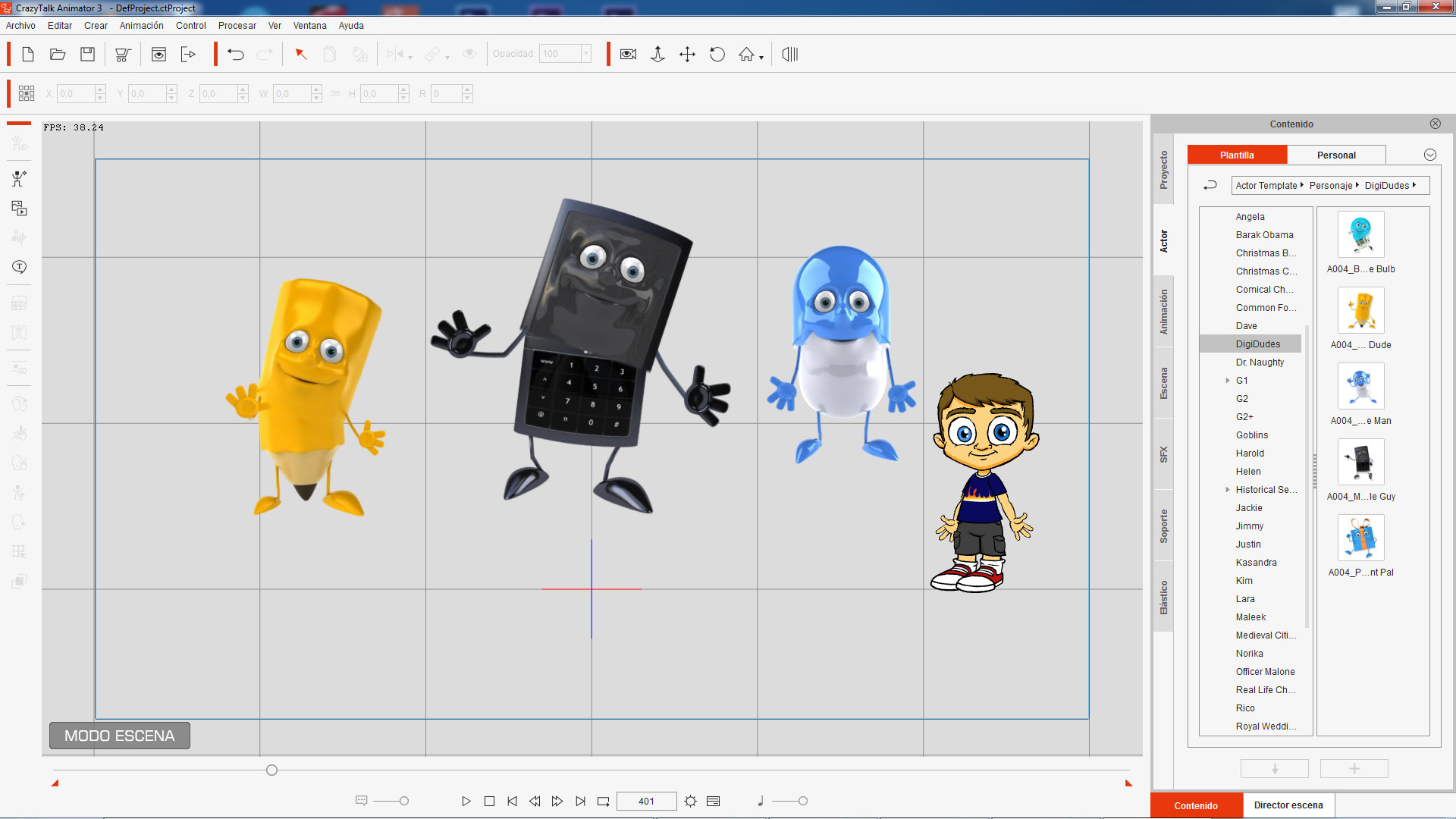
|
|
By Peter (RL) - 7 Years Ago
|
|
Hi... If you have Crazytalk Animator 3 Pipeline then all the available templates can be found in your Member Account by going to the Registration page and clicking the Download link for CTA3. You will find G2 Templates for Adobe Flash and Serif DrawPlus plus G3 Templates in PSD format for Photoshop, Illustrator or other compatible image editors that fully support Photoshop PSD files.
|
|
By corinaverminetti - 7 Years Ago
|
|
I have not been able to realize the character that I need, that has no human morphology. It is more similar to the characters that I sent you in the previous photo. By creating the character by modifying the templates' hubs, the parties change places. I'm in serious trouble since I bought the program to perform this character and I can not fix it
|
|
By Peter (RL) - 7 Years Ago
|
Characters like those shown in your screenshot can be created using the PSD Templates. Try spending a little time with the tutorial below and I think you will get the idea. It really just takes practice.
https://youtu.be/AIQ8ArWQiYc
|
|
By corinaverminetti - 7 Years Ago
|
when importing a G2 character from a flash made with the template "dummi" he tells me that he has these errors (and the character looks very bad)
Etiqueta SWF no soportada.
Resultados conversión pueden variar.
Etiquetas no soportadas:
Font tag: (44)
Text tag: (41)
Error nombre Sprite :
Neck_0
Lower_torso_0
Nose_0
Left_ear_0
Right_ear_0
Front_hair_0
Back_hair_0
Neck_45
Lower_torso_45
Nose_45
Right_ear_45
Front_hair_45
Back_hair_45
Neck_90
Lower_torso_90
Nose_90
Right_ear_90
Front_hair_90
Back_hair_90
Neck_135
Lower_torso_135
Back_hair_135
Neck_180
Lower_torso_180
Back_hair_180
Neck_225
Lower_torso_225
Back_hair_225
Neck_270
Lower_torso_270
Nose_270
Left_ear_270
Front_hair_270
Back_hair_270
Neck_315
Lower_torso_315
Left_ear_315
Right_ear_315
Front_hair_315
Back_hair_315
Por favor, volver a comprobar nombres y posición de las partes.
|
|
By Peter (RL) - 7 Years Ago
|
You appear to have lots of errors in the setup of your character. Please watch the video tutorials below very carefully. If you follow these guidelines to the letter you should be able to eliminate the errors.
CrazyTalk Animator 2 Tutorial - Basic Character Creation in Flash Part 1
CrazyTalk Animator 2 Tutorial - Basic Character Creation in Flash Part 2
|
|
By Ibis Fernandez - 7 Years Ago
|
All those characters except for the last one can be done using the G2 worflow. There's a bit of a trick but it should work perfectly fine. Ive doen it with vegetable bodies.
Edits the g2 template, only focusing on the limbs, Hands, feet, and facial features. Don't worry about the neck,upper,or lower torso.
Make your main body as a separate graphic, feel free to make as many angles as you needs, 0,45,90,180 etc.
Once you import your character into cta. You can remove or hide the upper/neck,and lower. You just replace the upper with the big body such as the pencil, front, back, 45 etc as needed, And adjust the facial features so they fit better. Fairly easy.
That last character, hes bipedal. You can provably do it by modding the basic RL template. He seems like a basic bipedal character.
If you need very specific bipedal characters you can build them from scratch. The white paper explains how they work. I have a tool at my website that helps dramatically speed things up, though if you don't mind the extra manual work, then you realistically don't need it. I also have several custom templates available for sale. A bit more advanced the Reallusion provided default one.
https://toontitan.com/item-category/source-files-templates
|
|
By Ibis Fernandez - 7 Years Ago
|
|
corinaverminetti (2/12/2019)
when importing a G2 character from a flash made with the template "dummi" he tells me that he has these errors (and the character looks very bad)
Etiqueta SWF no soportada.
Resultados conversión pueden variar.
Etiquetas no soportadas:
Font tag: (44)
Text tag: (41)
Error nombre Sprite :
Neck_0
Lower_torso_0
Nose_0
Left_ear_0
Right_ear_0
Front_hair_0
Back_hair_0
Neck_45
Lower_torso_45
Nose_45
Right_ear_45
Front_hair_45
Back_hair_45
Neck_90
Lower_torso_90
Nose_90
Right_ear_90
Front_hair_90
Back_hair_90
Neck_135
Lower_torso_135
Back_hair_135
Neck_180
Lower_torso_180
Back_hair_180
Neck_225
Lower_torso_225
Back_hair_225
Neck_270
Lower_torso_270
Nose_270
Left_ear_270
Front_hair_270
Back_hair_270
Neck_315
Lower_torso_315
Left_ear_315
Right_ear_315
Front_hair_315
Back_hair_315
Por favor, volver a comprobar nombres y posición de las partes.
the error:
Etiqueta SWF no soportada.
Resultados conversión pueden variar.
that shows up cause there's script and tags not supported by the reallusions swf interpreter. This is normal. Even if you dont use any scripting of fancy stuff. You are provably using a version of flash that is not supper old. Anything that is not an ActionScript 2 document will have AS3 headers in it so that error will show up. Just ignore it.
The other ones you just gotta look at your character. Review those body parts in your template and see if either they are spelled correctly or whether or not you even need them. Some errors like the 45 ones you can provably ignore as long as the mirrored angles are there.
For example it says...
Lower_torso_0
just look at your template and see if that sprite is there. Is it missing anything, Is it missing the pivot? Is is spelled correctly? Do you have multiple instances of that same sprite? just review and fix those.
|
|
By a_olartunde - 7 Years Ago
|
|
Hi, can I get a download link to the g2 character template for drawplus, I don't have member account , I really need your help on this please.
|
|
By Peter (RL) - 7 Years Ago
|
|
a_olartunde (4/30/2019)
Hi, can I get a download link to the g2 character template for drawplus, I don't have member account , I really need your help on this please.
The G2 DrawPlus Templates are only available to those who have purchased the Pipeline version of CTA. If you have purchased then you will have a Reallusion account and can download from there. If you haven't purchased then you need to do so if you want to use the templates.
|
|
By jitsamanta2020new - 6 Years Ago
|
|
Hello Sir. I'm Biswajit Samanta. I need G2 Character Swf template for study. Sir please help me [Email Address Removed By Moderator]
|
|
By Peter (RL) - 6 Years Ago
|
|
If you have CrazyTalk Animator 3 Pipeline or Cartoon Animator 4 Pipeline version you can find the G2 Templates by going to your Reallusion Account > Registration page and clicking the Download link for CTA3 or CTA4. The Templates are in the Bonus section.
|