|
By webmaster_916720 - 7 Years Ago
|
Hi,
I want to start with 3D animation and everything that is involved and I am checking out the different softwares.
I really like the first impression of iclone.
I also checked out blender.
What is the reason to spend money for iClone, when I can have blender for free.
Please make me buy iClone!
Thank you
Thomas
|
|
By Kelleytoons - 7 Years Ago
|
We don't have to "make" you buy anything -- buy what you want.
For character animation there isn't anything close to iClone. For other -- there are lots of 3D packages out there, and some are far better than iClone at doing specific things. But if you want to animate characters, you can't do it anywhere else as easily and quickly.
|
|
By AutoDidact - 7 Years Ago
|
|
Hi if you wish to begin animating Characters immediately then iclone will be a much better option than blender, as it installs with Character ready to load and motion clips ready to use.
Blender will require you to either model and rig your own human figure or acquire them from some external source.
If find Iclone beyond you current budget parameters, there is Daz studio It is a Free program that comes with nice base characters and a nonlinear motion clip system similar to iclone's but not quite as advanced.
It also has the IRay render engine for bundled in free.
IMHO you will need a graph editor to create truly refined motions the Daz optional graph editor has Multiple interpolation methods Cubic ,Spline linear and tension & continuity controls.
It is $20 USD there a free( third party) key frame culling script for cleaning up mocap for editing Spline grraph editing in Iclone will cost an addtional $99 USD on top of the price of Iclone The major..MAJOR!! short coming of Daz studio is that it has no Maya human IK foot & hand contact solving.
Still for an initial investment of $20 USD (for graphmate )you can at least get started right away with Daz studio and if you later decide to invest in Iclone you can easily use your Daz figures & content in Iclone Character creator
And of course you can always tinker with blender at no cost whatsoever.
|
|
By davidmaximo - 7 Years Ago
|
Coming from a longtime Maya user, I find iclone to be a breath of fresh air, and the next step for those lone wolf types who want to do everything themselves. Traditional 3d softwares like Blender, Maya, and 3dsMax are so GRANULAR. Every single polygon and keyframe must be accounted for. Not only do you have to build these assets from scratch, but you need to engineer your own production pipeline so it all works sustainably and with modularity. It's too much work and experimentation for one person.
The entire reallusion pipeline is figured out. It's quite genius, I think, that you have ONE topology to base all your characters off of so it's easy to fix EVERYTHING down the road. The same UVs, the same rig, the same animations, the same morphs- it's all modular and sustainable like a world where everything is recyclable with few landfills. Not only that, but Reallusion products are WAY more stable than autodesk. I cannot tell you how how many goddamn times Maya will crash on you just to tweak a mesh with a sculpting tool. Stuff like that rarely happens with iclone.
What you trade off for simplicity, you lose in modularity. This can be annoying. You have very little control over materials for instance. Everything is pretty much a phong shader. The Iclone toon shader is more like a weird blanket compositing filter for the scene, than something you can control per character. But at least you can export from iclone and port it to other tools.
I think the best analogy to choose between the two: do you want to make a movie using a box of GI Joes, or a cube of clay?
|
|
By Delerna - 7 Years Ago
|
Which is better iClone or Blender?????
I think its an impossible question to answer because I believe it is entirely dependant on individual people.
I have seen people make videos with Blender some hate it and some love it. I have seen people make videos with iClone some hate it and some love it
I have tried making video's with Blender and I hate it in comparison to making them with iClone. iClone almost totally suits how I do things.
iClone does enable us to make models but only to a limited degree, its not really a modelling software although it is improving its capabilities.
I use Blender for making models that don't come by default with iClone or I haven't bought from iClone store or marketplace. But anything to do with making video's I for one will most likely never be moving away from iClone.
Suggestion
Download the trial version of iclone and seriously check it out and also do some searching for video tutorials for Blender and try doing some there too.
Which you end up preferring will be your own workflow preference. I for one certainly see iClone is much easier to work with for making videos.
|
|
By Geoffrey James - 7 Years Ago
|
The idea that iClone is more expensive than "free" software is ridiculous. If you go the blender route, you'll spend weeks trying to do something you can do in iClone in a day. Time is money. Iclone is a bargain because its GUI and pipeline saves you time. Enough time, in fact, that you can, with iClone, create your own studio. I recently had a discussion with one of the top real-time animators--a guy with experience with Unreal/Unity, Lumberyard, etc. He was fascinated by the iClone approach because he could see how it could save so much time. Using iClone, I've been able to enter and win multiple film festivals working in my spare time. As somebody who's been doing animation since 1965 and computer animation since the early 1980s, it's 100% clear to me that iClone is the most powerful single-person-studio animation tool ever developed. There's nothing like it anywhere.
That being said, I sure would love to have motion-blur...
|
|
By Kelleytoons - 7 Years Ago
|
|
gj_20140318100407764 (1/23/2019)
That being said, I sure would love to have motion-blur...
+1. Sigh.
|
|
By Dragonskunk - 7 Years Ago
|
Why not both.
I don't like Blender for all the add-ons you have to get and some have no support and Blender has no teachable manual and it's difficult to find good help online for some queries.
But what I do like is using both, I make content in Blender and then use iClone to stage and animate characters.
|
|
By billgucci2 - 7 Years Ago
|
|
webmaster_916720 (1/21/2019)
What is the reason to spend money for iClone, when I can have blender for free.
What makes iClone remarkable is it's many, many "Scripted Tools" that takes the pain away from animation.
Physics, Constraints, Camera enhancements, Curve Editor and much, much more.
Such as, Lip Sync.... You add audio and text... the iclone speech engine animates "For you."
Good audio produces very nice results with minimal clean up.
If you advanced 3d animation skill and know how to "Script 3d Tools"... stick with Blender.
Easier said than done.
If you don't have required "Advanced Animation Skill"... Produces animated clips super fast with iClone, CC and 3dxchange.
...because Blender, Maya, Max, Houdini and many others "WILL" produce Fast and Accurate results.
"IF"... you can script the tools to speed up the entire process... Like iClone does.
|
|
By webmaster_916720 - 7 Years Ago
|
Thank you for all these elaborate answers.
They helped me a lot.
Even I have not yet decided.
Of course using both tools would be the best solution ... but they are both not easy to control and unfortunatelly both totally different in their interfaces.
Two additional questions:
1. How easy and stable is it to import content from blender to iClone (rigging, file formats, other contents ...)
2. What does the price of iClone buy you? Is it a lifetime price or do you have to pay again for each new version? How many additional plugins you need for a real start?
Thank you
|
|
By billgucci2 - 7 Years Ago
|
|
webmaster_916720 (1/24/2019)
1. How easy and stable is it to import content from blender to iClone (rigging, file formats, other contents ...)
Reallusion has made importing characters, props and accessories from 3rd party software very easy.
Daz for instance...There is "Special Duf Key" that simplify's the entire process.
"It automatically recognizes Daz's bones, morphs and animations"
Without this key.... you'd have to do it manually. Many, many steps involved.
|
|
By justaviking - 7 Years Ago
|
|
webmaster_916720 (1/24/2019)
2. What does the price of iClone buy you? Is it a lifetime price or do you have to pay again for each new version? How many additional plugins you need for a real start?
You pay for each "Major" Release.
5.0.... 6.0.... 7.0....
You get "Patch" updates for free.
7.1.... 7.2.... 7.3....
Historically, at least one patch release has included significant new functionality, in addition to bug fixes and minor enhancements. That's not a guarantee. Each major release cycle seems to run for at least two years, even more.
You OWN the software, so even if you don't upgrade to the next major release, the old version will continue to run, and run, and run...
|
|
By AutoDidact - 7 Years Ago
|
Two additional questions:
1. How easy and stable is it to import content from blender to iClone (rigging, file formats, other contents ...)
2. What does the price of iClone buy you? Is it a lifetime price or do you have to pay again for each new version? How many additional plugins you need for a real start?
If you plan to import content from Blender you must have the Full pipeline version with 3Dxchange Check the main store page for detailed description of the various versions.
|
|
By nabakiafrika - 7 Years Ago
|
Hi Geoffrey,
I'm in the deep water of a major animation project, and have invested in iclone and cc to help me speed up and add some variety to the process. I use blender for my project but when finished plan to devote some time to iclone and its workflow. I'm finding exporting fbx with animation from iclone, importing to blender, hit or miss. I fiddle all the settings, and when I find the settings that work, in the next attempt they don't work. So weird, or I have to try multiple times and eventually the import works. That's my issue now, but I am really interested in discovering your animated works; I found you on Idmb but it doesn't yet have your animation work listed. congrats anyway, and please share links if you have them. here's a screenshot from a recent shot I was working on.
thanks!
Warren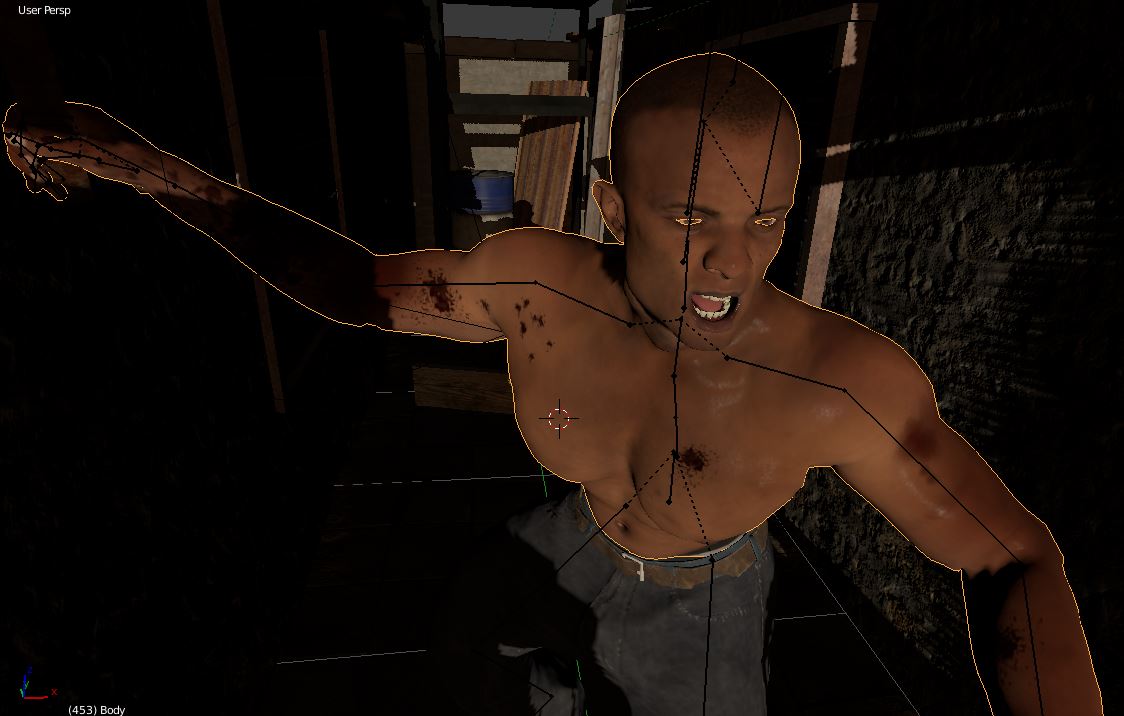
|