|
By hi_022884 - 8 Years Ago
|
PFA: link of the screen recording (Issue 3 and Issue 3.1)
Issue 3
Here in crazy talk animator 3, I tried to animate a character using bone tool. Here as you can see I can't edit the movement of R Forearm and other body parts.
https://www.dropbox.com/s/7ovw5udpvhcifve/Issue%203.mp4?dl=0
Issue 3.1
I can't make the movement of bones here
https://www.dropbox.com/s/c5gh9k4yeyap4s8/Issue%203.1.mp4?dl=0
|
|
By jlittle - 8 Years Ago
|
Animation is done on the stage, not in Composer Mode.
On the Stage use the Various tools on the left menu to create animation.
Jeff
|
|
By hi_022884 - 8 Years Ago
|
|
But for movement of character poses when use bone tool, we have to switch to composer mode... then?
|
|
By Hoorthoughts - 8 Years Ago
|
nice tutorials, thank you
|
|
By jlittle - 8 Years Ago
|
No, ALL animation is done on the Stage.
Composer Mode allows you to build/adjust/setup the character, not animate it.
Any poses or animation is done using the tools in Stage Mode.
What is it that you are trying to accomplish that you think you need to use Composer Mode?
Jeff
|
|
By hi_022884 - 8 Years Ago
|
|
I need to make my custom poses of a character using bone tool
|
|
By jlittle - 8 Years Ago
|
Are you saying that you want to "pose" a character for a still shot? or what?
For a G3 character use the 2D motion Key Editor in Stage Mode.
For a G2 character, in Stage mode, use any of the Motion Editor tools.
ALL Animation is done on the stage, that includes poses and any movement.
Composer Mode only builds the character, not animate it.
I still don't see what the problem is.
Give an example/pictures of what you are trying to accomplish if you want further help on this.
Jeff
|
|
By hi_022884 - 7 Years Ago
|
Okay let's take an example, I placed a character on stage. I want to show its side pose, 3/4th and back. For this we need to switch composer mode right? PFA: Screenshot.
I changed the front pose to side one in the composer mode. (See screenshot). Now when I go back to sage, I get the front pose again and not the side one, which I recently changed.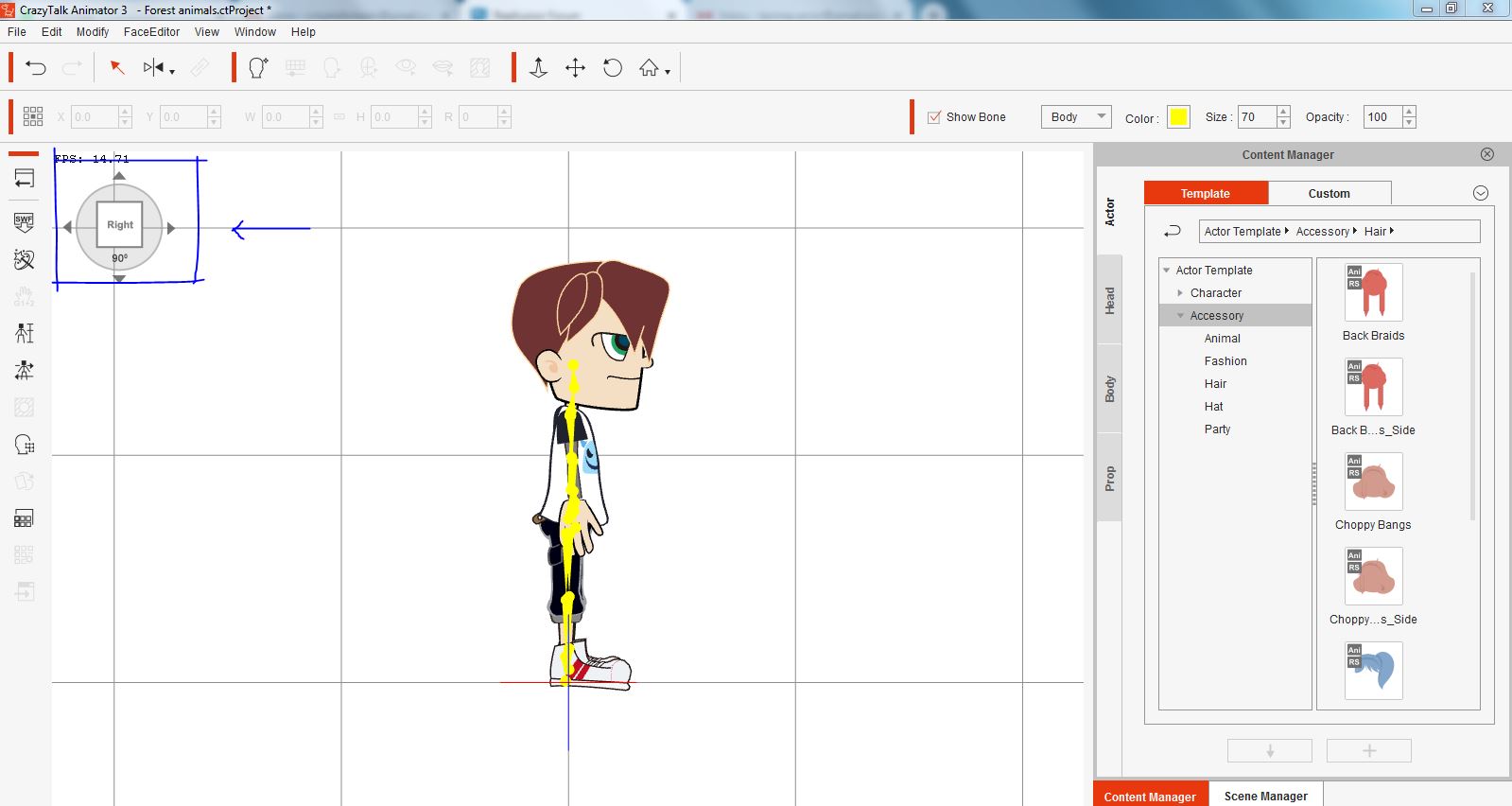
|
|
By vidi - 7 Years Ago
|
For this we need to switch composer mode right? No, the composer mode is only for creating and adjust your Character and Sprites and these direction thing is for checking your Character.setup .
|
|
By hi_022884 - 7 Years Ago
|
|
Then if I want to make animation using the side pose of the same character then what should I do?
|
|
By vidi - 7 Years Ago
|
|
if it is a G2 Character use the 3D Motion key editer
|
|
By hi_022884 - 7 Years Ago
|
|
Otherwise? If it is G1, G2+ or G3 then?
|
|
By vidi - 7 Years Ago
|
|
Seems you need still some basic programm infos .
|
|
By hi_022884 - 7 Years Ago
|
|
Thanks I'll check it out
|
|
By hi_022884 - 7 Years Ago
|
One more thing... I am not able to change poses of G2 character in the composer. Each time I try to rotate, it comes back to original position. Why?
https://www.dropbox.com/s/c5gh9k4yeyap4s8/Issue%203.1.mp4?dl=0
|
|
By Peter (RL) - 7 Years Ago
|
Composer Mode is for the creation and setting up of your characters. It's not for posing or animating them. You should do the posing and animating in Stage mode. Just select your G2 character in Stage mode and click the 3D Motion Key Editor (M) from the left side toolbar. Then you can pose your character and rotate as you wish.
|
|
By vidi - 7 Years Ago
|
|
My suggestion rereading the tread, because this is a spinning in a circle . you ask always the same question and get the same answers.
|
|
By jlittle - 7 Years Ago
|
|
hi_022884 (1/4/2019)
One more thing... I am not able to change poses of G2 character in the composer. Each time I try to rotate, it comes back to original position. Why?
Composer Mode is only for creating/changing/modifying a characters base body parts. It has NOTHING to do with Stage Mode or the position/transformation/animation of the character on the stage.
Consider Composer Mode as a separate program that you send your character to for editing of the body parts, There is No Animation in Composer Mode.
When exiting Composer Mode your character is sent back to Stage Mode where you would animate it.
ALL animation/posing/rotation/transformation/etc. is done in Stage Mode.
Jeff
|