|
By ultimativity - 8 Years Ago
|
Hello,
I am searching for a way to increase the font size for the CC3 interface. I do not see it in Preferences.
Thanks,
Nathan
|
|
By Peter (RL) - 8 Years Ago
|
Hi Nathan
Character Creator 3 supports 4K and other Ultra HD screens but doesn't offer a user changeable icon and font size unfortunately.
|
|
By wires - 8 Years Ago
|
|
Peter (RL) (12/18/2018)
Character Creator 3 supports 4K and other Ultra HD screens but doesn't offer a user changeable icon and font size unfortunately.
And this unfortunate oversight is expected to be corrected when? :blink::Whistling::ermm:
|
|
By Peter (RL) - 8 Years Ago
|
wires (12/18/2018)
Peter (RL) (12/18/2018)
Character Creator 3 supports 4K and other Ultra HD screens but doesn't offer a user changeable icon and font size unfortunately.
And this unfortunate oversight is expected to be corrected when? :blink::Whistling::ermm:
It's not an oversight. CC3 automatically detects the screen resolution and adjusts accordingly so it supports SD, HD and 4K Ultra HD.
|
|
By ultimativity - 8 Years Ago
|
|
Thanks very much for the response. Appreciate it.
|
|
By alienorbit - 7 Years Ago
|
The issue is, that on many 4k screens, the UI is unusable, because the fonts and icons aren't scaled appropriately to match the pixel density.
Are there any plans to address this still serious issue?
|
|
By animagic - 7 Years Ago
|
|
alienorbit (3/12/2019)
The issue is, that on many 4k screens, the UI is unusable, because the fonts and icons aren't scaled appropriately to match the pixel density.
Are there any plans to address this still serious issue?
It works for my 4k 43" screen. All depends on your screen size.
|
|
By connor.fabiano - 7 Years Ago
|
|
I downloaded the software to test it out and I was planning on buying it because it looked awesome, but I can't read any of the text in the application. I understand if it works fine for people with particular set ups, but I side with "wires" and I find it to be an oversight. If the company is not concerned about attracting amateurs and semi-pros then it isn't an issue, otherwise I echo the suggestion to allow font size to be adjusted. I can only speak for myself and as a potential customer I cannot use the software.
|
|
By Peter (RL) - 7 Years Ago
|
|
connor.fabiano (7/15/2019)
I downloaded the software to test it out and I was planning on buying it because it looked awesome, but I can't read any of the text in the application. I understand if it works fine for people with particular set ups, but I side with "wires" and I find it to be an oversight. If the company is not concerned about attracting amateurs and semi-pros then it isn't an issue, otherwise I echo the suggestion to allow font size to be adjusted. I can only speak for myself and as a potential customer I cannot use the software.
Hi...
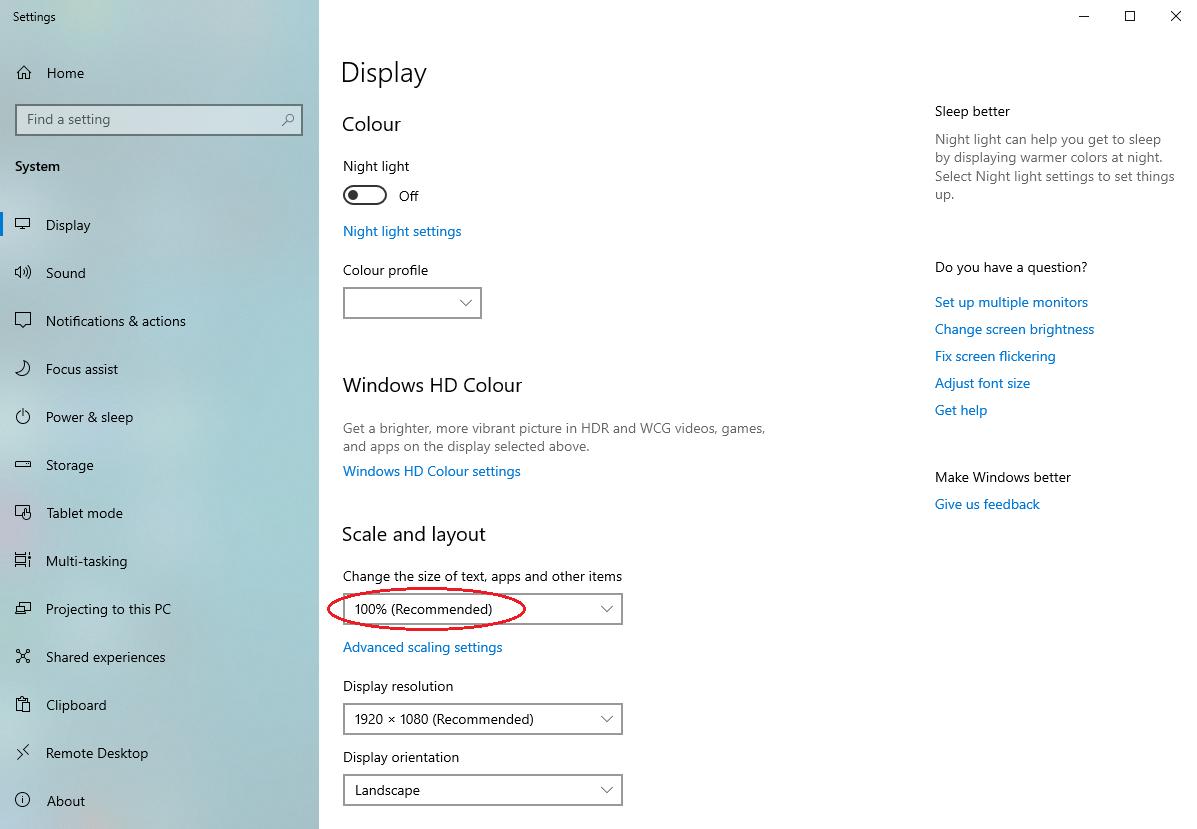
Are you using the recommended scaling settings on your computer? Normally the recommended settings should allow CC3 to display correctly on a 4K screen (but you can up it to see if it helps).
You can check your scaling by right-clicking the Desktop and choose Display Settings.
I will also pass on your feedback to the Character Creator team for review. :)
|
|
By solarmanJc - 7 Years Ago
|
will it must not be working ..you might want to check it out ... My CC3 is so big on my screen I am unable to us CC3
time to get my money back
:-(
|
|
By juliein3d - 7 Years Ago
|
right click on the application shortcut, go to properties, compatibility tab and click the button for: change high DPI settings,
then on that drop down select system or system (enhanced) instead of application. This worked for my system and I can see it now on my big monitor
|
|
By ObjOri - 6 Years Ago
|
I have a similar issue. In the "Content" browser, for example, the tiles/thumbnails all show "CC1. . . " or "CC2. . ."
Yes, I know I can hover over them and get the details, but that's not the point. It's all about speed, right? So, I must hover over every tile to see what it is?
That takes forever when you have a lot of tiles under a given section, like AvatarMorphPresents/Full Body.
In other programs, like UE4, you can simply click in the tile/thumbnail filed, click and hold "alt" for example, and scroll your mouse wheel to increase the size of the tiles/thumbnails.
Moreover, and quite ironically, I'm going blind. I have an eye disease called RP (retinitis pigmentosa), and I see through a narrow, dimmed field of view. Time is something I need to save at every turn due to everything taking me three times as long to accomplish. A little help on the UI would be a godsend.
|
|
By animagic - 6 Years Ago
|
|
Did you try enlarging the tiles? Cntrl-1 lets you toggle through different tile sizes as well as a textual list version of the content.
|
|
By R Ham - 5 Years Ago
|
I just spent two days fooling with every display scaling option W10 has, but I have not succeeded in getting RL software to be readable on a 27 inch screen. The problem is real and the many users that have brought this up are not mistaken in any way. There's nothing subtle about it. I see it's been around a few years too.
I've seen talk that this "manifest" option can compensate for it. I'm going to try to find it today. So far no luck, but I have not given up.
|
|
By BrotherShamus - 5 Years Ago
|
I'm on a 55" 4K TV and this is maddening. I'm invested in the Reallusion pipeline now (having spent over $1000 on the various software packages) but can't seem to make CC3 readable. As pointed out earlier... I have to hover over every icon just to know what it is. Going to try changing the DPI settings... pray for Mojo.
edit: System Enhanced is marginally better.
|