|
By Lord Ashes - 8 Years Ago
|
I am trying to import an iClone iAvatar file into Crazy Talk via the provided import option but when I try to use this feature it tells me that the "iAvatar" file is not a supported format.
Any issues how to resolve this? I am using iClone 7.3 and (Trial Version) Crazy Talk 8. I need to resolve this for one of my marketplace customers who is trying to use my CC content (converted to iClone) in Crazy Talk.
|
|
By Rampa - 8 Years Ago
|
|
It has to do with versions. A CC1.5 character will import into CT8.
|
|
By forestkelley - 7 Years Ago
|
I'm having the same issue. I'm new to Reallusion but I created a CC1 character (CC1 Base_Substance) in iClone. I made no changes to the character, then exported the iAvatar, but I get the same error. It won't import. What is wrong? How can I make sure my iClone iAvatar export will work?
I have Crazytalk 8 Pipeline.
|
|
By Peter (RL) - 7 Years Ago
|
|
forestkelley (1/21/2019)
I'm having the same issue. I'm new to Reallusion but I created a CC1 character (CC1 Base_Substance) in iClone. I made no changes to the character, then exported the iAvatar, but I get the same error. It won't import. What is wrong? How can I make sure my iClone iAvatar export will work?
I have Crazytalk 8 Pipeline.
Unfortunately, the problem is the file formats used in Character Creator 3 and iClone 7 are not compatible with CrazyTalk 8.
If you have Character Creator 2 you can install this alongside CC3 and this will allow you to export characters in CC 1.5 / iClone 6.5 format which are compatible with CrazyTalk 8.
|
|
By Apollonius - 7 Years Ago
|
Buying the pipeline edition of CT8 is a total waste of money for me, until this issue is resolved.
Further, exporting heads from CT8 to either iClone or CC3 doesn't work, either.
Why should I buy the pipeline edition? I won't be able to use it.
One last thing, why should I have to buy CC2 when I already own CC3? That is ridiculous.
ALL of this is a big mess...
|
|
By Peter (RL) - 7 Years Ago
|
|
Apollonius (1/23/2019)
Buying the pipeline edition of CT8 is a total waste of money for me, until this issue is resolved.
Further, exporting heads from CT8 to either iClone or CC3 doesn't work, either.
Why should I buy the pipeline edition? I won't be able to use it.
One last thing, why should I have to buy CC2 when I already own CC3? That is ridiculous.
ALL of this is a big mess...
Hi...
Exporting CrazyTalk 8 heads to Character Creator 3 (and iClone) does indeed work. You just need to load a CC1 Base Character in Character Creator 3 first, then you can apply the CT8 head to it. Once the CT8 Head is applied, you can then convert the CC1 character to a CC3 character if you wish and send it to iClone 7.
Also, you do not need to purchase Character Creator 2. CC2 was available FREE with iClone 6 Pro or iClone 7.
|
|
By Apollonius - 7 Years Ago
|
Yes, that is the reason why I went ahead and got the pipeline edition of CT8. ...Grudgingly. I do not own iCLone 6, I once had the demo and it came with CC1.4, I believe.
I own CT8, and CC3.
While I can still get around the limitation (gratefully), the ease and convenience of the pipeline editions, which makes up most of the reason why people pay that cost, is severely lessened by the fact that you cannot import directly from one to the other. CT8 will only let you import iAvatars that are based on very limited CC1 characters, and the "send directly to CC3" pipeline that I paid for is broken. That functionality is why it's called a "pipeline edition". Without it, what you're left with is simply an "export edition".
PLEASE update CT8 so that it can use new characters!
I will more than likely purchase iClone 7 when this is the case, but not before.
|
|
By Peter (RL) - 7 Years Ago
|
|
Apollonius (1/24/2019)
and the "send directly to CC3" pipeline that I paid for is broken. That functionality is why it's called a "pipeline edition". Without it, what you're left with is simply an "export edition".
While you are correct that the CrazyTalk 8 option to "Send Head to Character Creator" doesn't work with Character Creator 3, you can just choose the "Export RLHead" option instead. While not quite as convenient as the former option, it really only adds a few seconds to the pipeline process so the overall feature isn't really "broken" as you say.
|
|
By Apollonius - 7 Years Ago
|
Why even call it a "pipeline"?
That means the fastest, most direct route. That's the idea that you use to sell your software. That's why people get upset when that function is broken/doesn't work, however you want to phrase that.
My intent is not to sit here and argue about semantics, my intent is to beg Reallusion once again to PLEASE make their pipeline useable for me again, and catch up CT8 with CC3.
I cannot change the body of any characters that I make in CT8. I can use the heads from CT8 in CC3 in a manner of speaking, but I cannot take those changes back into CT8, at all, period.
CC3 only exports as CC3 iAvatars, no matter what base you use, so there's no backwards compatibility there, at all.
Those things are ALL supposed to be made possible by the "pipeline" system.
The end result is lost functionality for me, and tons of frustration, even after spending hundreds of dollars. Nothing works with anything else except for dragging and dropping RLheads, and even that results in heads that MUST be skins only after they are converted to CC3 characters, because they are all "missing slider information", and cannot be used to contain morph data any longer. Is that a rule, or did I do that wrong? I have since tried again, and gotten the same result. You can convert a morphed CC1 character to CC3, but if you save that head to be used by other characters, the morph data is lost. I just keep finding things that don't work like they are supposed to...
Don't get me wrong, I still love using both programs that I own currently, but the really exciting part was the cross-functionality, and that only exists by a thread these days, however you want to look at that.
|
|
By Peter (RL) - 7 Years Ago
|
Thank you for the feedback. I do understand the frustration you feel over this issue. For sure using workarounds is not ideal.
Unfortunately, at this time CrazyTalk 8 is no longer receiving further updates so there are no plans to make it fully compatible with iClone 7/CC3. However, I will pass on your feedback for the development team to review. If I have any further news to share about this issue I will update again to let you know.
|
|
By Apollonius - 7 Years Ago
|
Thank you very much for that.
However, I went ahead and bought iClone 7 because I wanted CC2, which iClone 6 & 7 came with.
[EDIT] Okay I just found a download link for CC2, but it says I have to buy it.
I had no idea that it was even there, but since it was a free download if you bought iClone 6 or 7, and I just bought iCLone 7, can I download it and register it? I'm going to try, wish me luck...
[EDIT 2} Nope, it's making me pay for it before I can even test out import/export functionality. :(
Can I please get a full download for this?
|
|
By Postfrosch - 7 Years Ago
|
Hi Apollonius
No, no you have to pay for CC 2 and CC 3 NOTHING - they are at IC 7 for free.
Can you even publish the link where you should pay for the download of CC 2 something
How come you now to the free CC 2 and 3 parts
1. Go to your RL Uskerkonto
2. There in the part "Registration"
3.There you should see something (depending on what you bought)
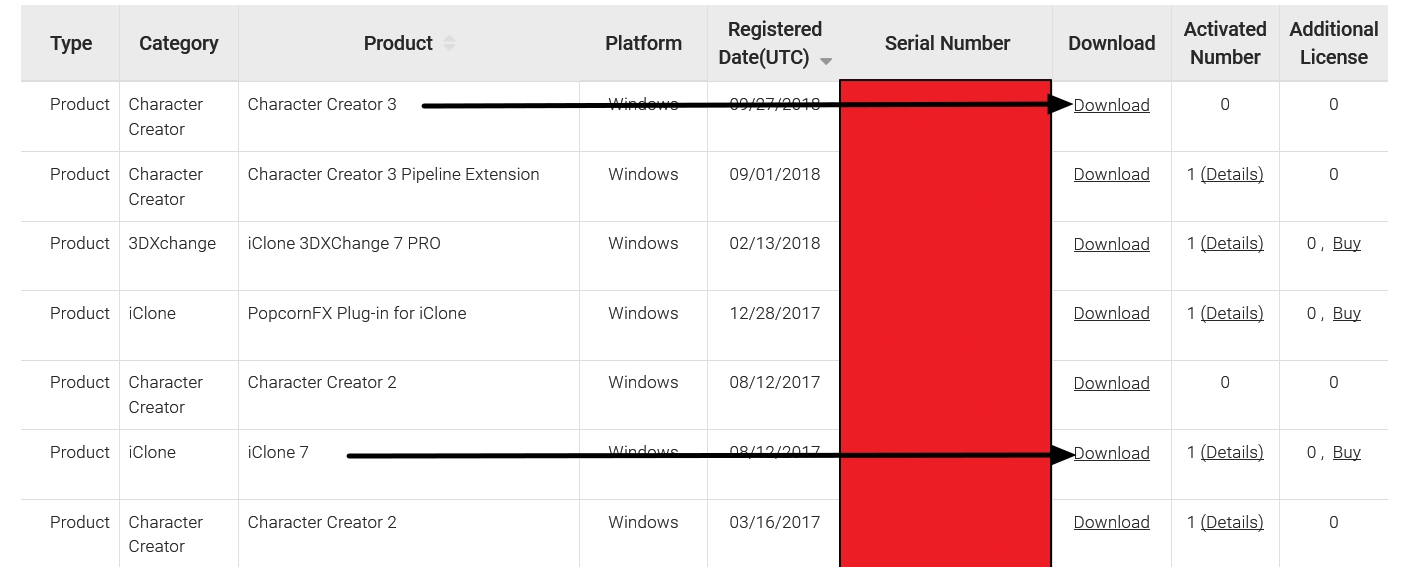
4. Click there on CC2 on Download
5. The installation program will be downloaded (free of charge)
If you no longer have the installation key, you can also download it there
By the way, you can not (directly) export heads from Ct8 to CC 2 (read here)
https://forum.reallusion.com/359052/Cant-Export-from-CT8-to-CC2#bm379264
It went though. Only after an update, the function was gone. It has also changed from CC 2 to CC 3
Greetings from Germany
Postfrosch
|
|
By Peter (RL) - 7 Years Ago
|
|
Apollonius (1/28/2019)
Thank you very much for that.
However, I went ahead and bought iClone 7 because I wanted CC2, which iClone 6 & 7 came with.
[EDIT] Okay I just found a download link for CC2, but it says I have to buy it.
I had no idea that it was even there, but since it was a free download if you bought iClone 6 or 7, and I just bought iCLone 7, can I download it and register it? I'm going to try, wish me luck...
[EDIT 2} Nope, it's making me pay for it before I can even test out import/export functionality. :(
Can I please get a full download for this?
You do not have to pay for Character Creator 2. It was never available as a standalone product and only came free with iClone.
If you can't find the download link in your Member Account, please contact Customer Support and let them know you would like it for use with Crazytalk 8. They will be able to supply you with the link and serial number.
|
|
By Apollonius - 7 Years Ago
|
|
Peter (RL) (1/23/2019)
Also, you do not need to purchase Character Creator 2. CC2 was available FREE with iClone 6 Pro or iClone 7.
Peter (RL) (1/29/2019)
You do not have to pay for Character Creator 2. It was never available as a standalone product and only came free with iClone 7.
The reason why I ask about a full version of CC2 is because the download that I have right now has "LITE" in the title, and apparently I can only export 10 times. This is NOT the full version of CC2.
|
|
By sghrn1 - 7 Years Ago
|
Is there already a way to import models to crazy talk 8?
Or is there an alternative to create talk animations by sound files?
|
|
By Peter (RL) - 7 Years Ago
|
|
sghrn1 (8/12/2019)
Is there already a way to import models to crazy talk 8?
If you have CrazyTalk 8 Pipeline you can import avatars from iClone 6. Sadly CrazyTalk 8 is not compatible with avatars from iClone 7 or 3rd party formats like FBX.
|
|
By ken_1171 - 7 Years Ago
|
I just came across this issue when I was considering purchasing additional avatars for CrazyTalk 8.1, and noticed I had already purchased the same ones for CC3. Not only the avatars, but I already own the same clothing and accessories for CC3. I was following the CT8 manual, where I was just supposed to import "iAvatar" from CC, but got the same error message, claiming the format is invalid. First of all, the path mentioned in the manual doesn't exist in CC3, so that was a hint that something was wrong.
Perhaps Reallusion should update the manual to reflect the fact that this won't work anymore. I still have CC2 but it's no longer installed. Reallusion programs cannot share runtime folders between versions, so reinstalling CC2 would result into considerable content file duplications in my rather modest hard drive. I am also not sure if the clothing and accessories installed in CC3 would work if drag'n'dropped into CC2. Would have to try and find out.
Maybe the manual should mention this, instead of leaving me trying over again, thinking I am doing something wrong. For the record, I own Character Animator 4, but it doesn't support 3D avatars, which forces me to keep both programs installed.
|
|
By Peter (RL) - 7 Years Ago
|
Hi Ken
Thank you for the feedback about the CT8 manual. I will pass this on and we will try to get the manual updated to make clear that iClone 6 and/or Character Creator 2 are required.
Apologies for the confusion caused.
|
|
By r78zj99 - 6 Years Ago
|
hi peter
I am an owner of cc 2 & cc 3 also crazy talk 8.13 all the products are pipeline.
i would be very grateful, if the converter included cc 2 would also made available cc 3 with it drop down list.
so import the avatar above the waistline into crazy talk 8.13 pipeline
it works very well in cc 2 but not in cc 3 because the default setting of cc 3 on it's output format.
it appears to be a subroutine piece of code that can be added to the body of the program in cc 3
see drop down list from cc 2
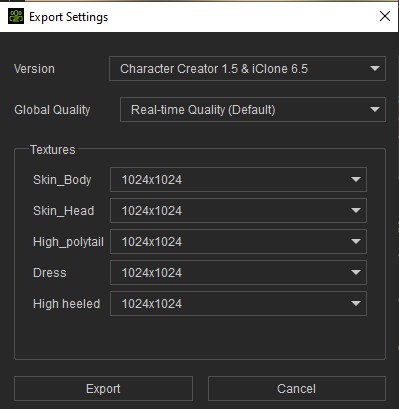
maybe a rethink on this would be helpful all your customers
more detail in today's latest update cc 3.3 see video below
showing in full detail from cc 2 to cc 3 using the same model!
I had to make it in zip format open it to see it
from Alan
moving forward to help all maybe
the rest is up to you
|
|
By Peter (RL) - 6 Years Ago
|
Hi Alan
To be able to make CrazyTalk compatible with CC3 Base characters would require a major update because the CC3 Base is vastly different from the older CC1 Base. Unfortunately this is not in our plans as CrazyTalk 8 is currently not receiving any further updates as we concentrate our efforts on our other product lines. Should this change we will certainly let everyone know.
I'm sorry I can't bring you better news but of course you can continue to use CC1 base characters with CrazyTalk 8.
|
|
By r78zj99 - 6 Years Ago
|
thank you, for the reply peter
I am one of the luckily ones that understands how programmes work!
unfortunately for others it is not the case because your merchandise or content is still for sale even as I type this reply.
even now content (crazy talk) is not exchangeable from one application to another even when this is on sale.
so the question, I ask all of you is can crazy talk content be integrated into another application
like headshot because it is only seen from the waistline!
from Alan
not all is lost if you can think outside the box
|
|
By Peter (RL) - 6 Years Ago
|
Hi Alan
I think it's important to remember that CrazyTalk is primarily a standalone program that doesn't require any other software to create realistic talking heads. In fact most CrazyTalk customers use it exactly this way which is why CrazyTalk is still a very popular program and hasn't been discontinued. However, for those that do wish to import/export characters with iClone and Character Creator we still support this functionality but only with iClone 6 and Character Creator 2 as I explained previously.
Regarding using CrazyTalk content in iClone, this isn't possible because they use different file formats. However, most of the 3D content used in CrazyTalk 8 came from iClone so versions of that content are available for use such as the same clothing and hairstyles.
So really if you are looking to work exclusively with 3D Heads created from photos, and you want ultra realistic characters, then an iClone, Character Creator 3, Headshot bundle will be the way to go going forward.
|
|
By ken_1171 - 6 Years Ago
|
I believe iClone can do most of what CrazyTalk 8 does, like facial puppeteering, expression keyframe and presets, automatic lip sync, timeline editing, and so on. Even they way these things are done is very similar, using interfaces that will look familiar to CT8 users. Sometimes it could be challenging to mask the hair or head features from the background in CT8, but we don't have that problem in 3D, and can still benefit from dynamic hair, and customizable lighting.
Don't take me wrong, I still have CT8 installed, but if the animation uses 3D characters, I'd rather do it in iClone instead, where we have much more control. :)
|
|
By r78zj99 - 6 Years Ago
|
I am sorry for the misunderstanding
I am very pleased that the product line is still being continue.
as you have said it is a standalone program that is quick & easy to use.
the tts is no longer available as a service
but the good news is Microsoft have left us all to use their engine for different voices should we wish to load them.
they are hard to find now days.
and yes, there is a greater control in the other programs.
from Alan
|
|
By r78zj99 - 6 Years Ago
|
extra information on the TTS
see pictures to see what is possible
picture 1. taken from crazy talk
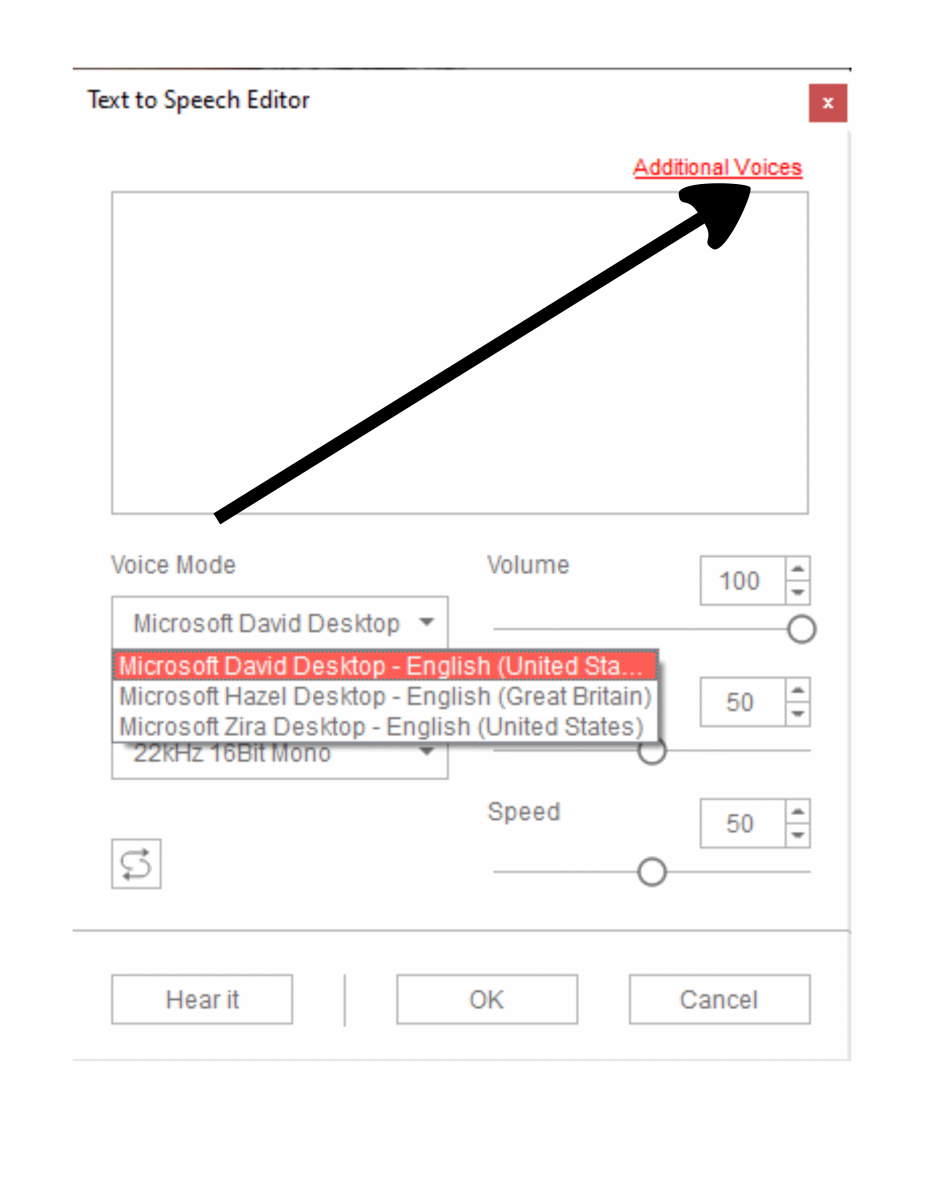
picture 2. from an very old programme
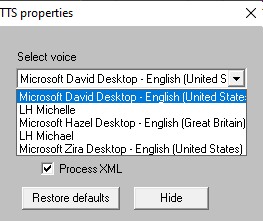
common link MS
from Alan
|
|
By rfbindl - 6 Years Ago
|
I worked this out today and didn't want to forget all the step, so I made a short video showing the steps of starting with a CC1 character in iClone7, Generating a head from photo using CrazyTalk 8, Exporting that as an RLHead, Opening the CC1 character in Character Creator 3, Importing the RLHead to the character, converting the CC1 to CC3, then exporting back to iClone7. It was a lot easier with iClone6, but this works. The Headshot plug-in would probably work much better, but for the few heads I'd create a bit of overkill.
Here's the video... https://youtu.be/5leqnWGe6H4
|
|
By ken_1171 - 6 Years Ago
|
|
Thanks for sharing. Very good info. ^___^
|