|
By inash - 8 Years Ago
|
|
I have no idea how to do this? And can you import poses for Props in CC3?
|
|
By 3dtester - 8 Years Ago
|
Okay, right now i have a similar question.
But i don't know if it is really related to CC3.
In iClone, i want to apply different poses to my CC3'ed DAZ character.
Somewhere i saw in a tutorial that you can import DAZ poses / morphs via 3DXChange.
As far as i can remember, only the bones were imported, and then applied to the iClone character.
Unfortunately i neither can find the tutorial video, nor do i have a clue what the trick was to get only the skeleton (with the morphs) of the FBX file.
Maybe someone can enlighten us regarding that procedure.
I really want to be able to use the DAZ poses with my characters.
|
|
By larryjbiz - 8 Years Ago
|
I guess and I'll check it out later. You could load poses in Daz.. Save each pose out as a obj.
Then load them back in as morph for your character. Save out the character in fbx with morphs. Then you convert in xchange and send to iclone.. You can load character into morph creator. It should reconized the morphs automatically Then morph your character into each pose in iclone through morph animator. And save each morph pose out separately. I have saved out morphs from Daz with the character that way and used morph creator as described . Just haven't tried to save the poses
|
|
By larryjbiz - 8 Years Ago
|
|
One thing I haven't checked is if the pose suffix is the same in iclone as in cc3. If so.. Once poses are saved in iclone just copy them over to cc3 pose folder
|
|
By larryjbiz - 8 Years Ago
|
|
Oops.. Almost forgot . When you bring character with morphs to 3dxchange and it ask if you want to convert genesis to character.. Say no..
|
|
By 3dtester - 8 Years Ago
|
Sounds good. Maybe the trick is to save them out as OBJ files. I tried with FBX and were confused.
Stumbled upon that question "convert genesis to character...) also. Figured it out already ;)
Thanks so far, i will get back into it later.
|
|
By 3dtester - 8 Years Ago
|
|
larryjbiz (10/3/2018)
Then load them back in as morph for your character. Save out the character in fbx with morphs.
Could you please explain that a bit further? How does that 'load back as morph' work?
Thanks.
|
|
By larryjbiz - 8 Years Ago
|
Here are the 2 videos I used
https://youtu.be/ikl_qAo9240
Worked the same for genesis character that I used, so I'm guessing the same procedure for the other characters.
https://youtu.be/VPxOIi1Fulw
The only thing I changed in mike kelyl's export was the export rules.
I think it works fine for an object with minimum morphs, but when I used anything with the character, it exported every associated morph the character had (a lot)
I found if I gave my morphs a unique name like " say for poses ...pose1 , pose 2 or pose sitting, pose standing etc. and then under export rules , instead of "anything" I'd input "pose"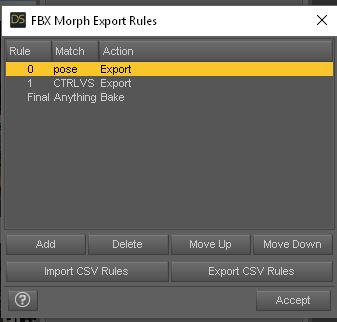 see below see below
|
|
By larryjbiz - 8 Years Ago
|
|
I was able to drag a pose from iclone pose directory ".imotion" into CC3 directory and it loaded to character fine.
|
|
By 3dtester - 8 Years Ago
|
Pretty cool, thanks for explaining that larryjbiz!
Going to test that workflow :)
|
|
By larryjbiz - 8 Years Ago
|
|
I'll run it myself to insure no problems and I didn't leave anything out
|
|
By 3dtester - 8 Years Ago
|
I've gone through that process and it kind of worked.
I think it is a very good way to bring in DAZ morphs to iClone / CC.
Very useful. Thanks again, larryjbiz.
But for full body poses, there is another method.
I just found a video tutorial that shows the process. It seemed pretty straight-forward, at least to me.
It helped me to create my first pose (iMotion) for use in iClone within a few minutes.
|
|
By larryjbiz - 8 Years Ago
|
Okay cool, that was just an idea.
I'll check out the video. I'm always looking for a better way, and easier.
Thanks 3D
|
|
By inash - 8 Years Ago
|
|
3dtester (10/4/2018)
I've gone through that process and it kind of worked.
I think it is a very good way to bring in DAZ morphs to iClone / CC.
Very useful. Thanks again, larryjbiz.
But for full body poses, there is another method.
I just found a video tutorial that shows the process. It seemed pretty straight-forward, at least to me.
It helped me to create my first pose (iMotion) for use in iClone within a few minutes.
I tried this method but it didn't work for whatever reason. Tried this method 2 different ways. I'm going to try the morph method.
|
|
By larryjbiz - 8 Years Ago
|
So I tried the video. I followed it pretty much as far as saving poses from Daz in BVH and bringing them into exchange under the motion library.
Like in the video I converted the T pose to a non standard character and then used the Dazgen profile in the drop down menu, I guess if you use a character other than the base genesis you'll have to load that characters profile..
But instead of saving the poses out as an animation. I loaded a character into iclone, made sure it was selected, and the sent each pose to the character with apply to iclone option from the motion library in 3dxchange.
Once the pose was loaded to the character in iclone, I just saved it to my custom folder under poses in a folder I created and then sent over the next pose in the list from exchange and so on..
|
|
By larryjbiz - 8 Years Ago
|
|
It also worked fine for sending motions
|
|
By 3dtester - 8 Years Ago
|
Larry, your method of sending each pose seperately from 3DX to iClone sounds good.
i tried it, but the 'apply to iclone' button in the motion library is greyed out here.
Don't know what i did wrong.
|
|
By larryjbiz - 8 Years Ago
|
3D,
let me run it again tonight to get all my steps.
And I'll post them.
|
|
By larryjbiz - 8 Years Ago
|
3Dtester, So here are the steps I use.
DAZ
You will need to have genesis in the T position.
I would save this pose for reuse in 3Dxchange, this will be the starting pose so that the other poses position correctly.
1)So I load Genesis into the scene. Genesis seems to do well with most of the poses , even ones not made specifically for it.
** Note:If you go to the scene manager in Daz and unhighlight Genesis, it will fill the content manager with everything available under a category , not just items created specifically for that character. So you will get a lot more poses available than just the ones made for Genesis.
2) With Genesis in the T pose I export as a BVH file.
** Note: I didn't mess with any of the option in the export settings for the BVH
3DXchange
3) I loaded the BVH file into 3Dxchange. By default the BVH showed up in the motion and perform libraries.
4) I then went to translate under move, and changed the vertical position to 103 (as we saw in the video)
** Note: The Option under Translate.... move on the far right (with the arrows going up and down).
5) I then converted bones( BVH ) to a non standard character and chose DazGen in the drop down menu for presets
6) then choose active and convert
Note: Should get an all files updated alert.
Then under the the motions library, you can use import to bring in other poses in the BVH format if you wish
7) Then highlight the pose you want to send to iclone in the motions library (not the perform) and you should see the send to iclone option activate when a pose is highlighted.
Iclone
Insure you have your character in Iclone activated, then click send to iclone from motion library in 3DXchange.
Your Iclone character should take on the new pose.
Let me know how it works for you.
|
|
By 3dtester - 8 Years Ago
|
I've done it exactly as you described, but i still can't click the 'apply to iclone' button.
Maybe it's a limitation of the trial version. I only bought CC3 yet, not iClone and 3DX.
Anyways, thanks for the guidance. Well done!
|
|
By larryjbiz - 8 Years Ago
|
Yes, that might be it, thanks, good luck
|