|
By Data Juggler - 8 Years Ago
|
I watched Gerry in a video and his preview window updated to 500 (whatever that means) in 1 second, and mine would take about 5 minutes to do the same thing.
CC 3 also seems slower opening stuff than CC 2.3.
I only have 2 Gig GPU (NVidia GTX 950), but the IRay is is so slow it is not useable.
So I just saved $179 once I get my refund, I can use that towards a new graphics card (Only #1,021 to go + $100 tax).
|
|
By justaviking - 8 Years Ago
|
|
As you proved, your graphics card is way underpowered for ray tracing, and is actually well below what most of use would suggest for iClone.
But even with a very good card, ray tracing rendering will be much slower than the iClone native renderer.
|
|
By sonic7 - 8 Years Ago
|
I can report that I've obtained some promising results from my initial testing of iRay.
I've achieved acceptable quality renders at 150 iterations even without denoising.
On my ordinary GTX-1070 card, the render times have been anywhere between 40 seconds and 1m 30 (depending on the scene).
This is for a 1920 x 1080 frame and using the default setting of 16 Max GI Bounces.
I'm cautiously optimistic regarding short time animation.
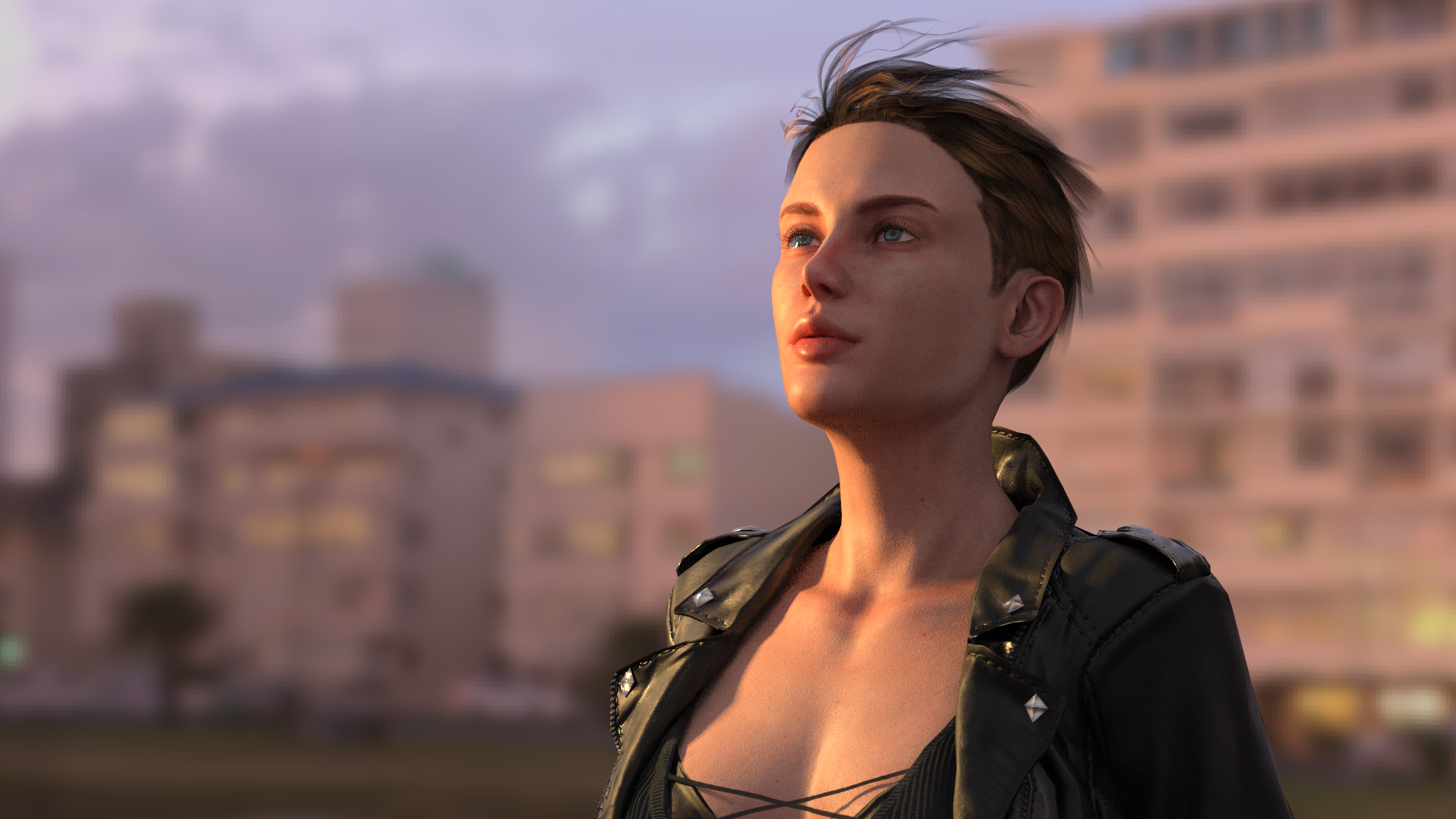
This frame (150 iterations), took 52 seconds.
It's by no means 'perfect' - but I'm happy with this quality for animation....
The iClone 'native renderer' below:
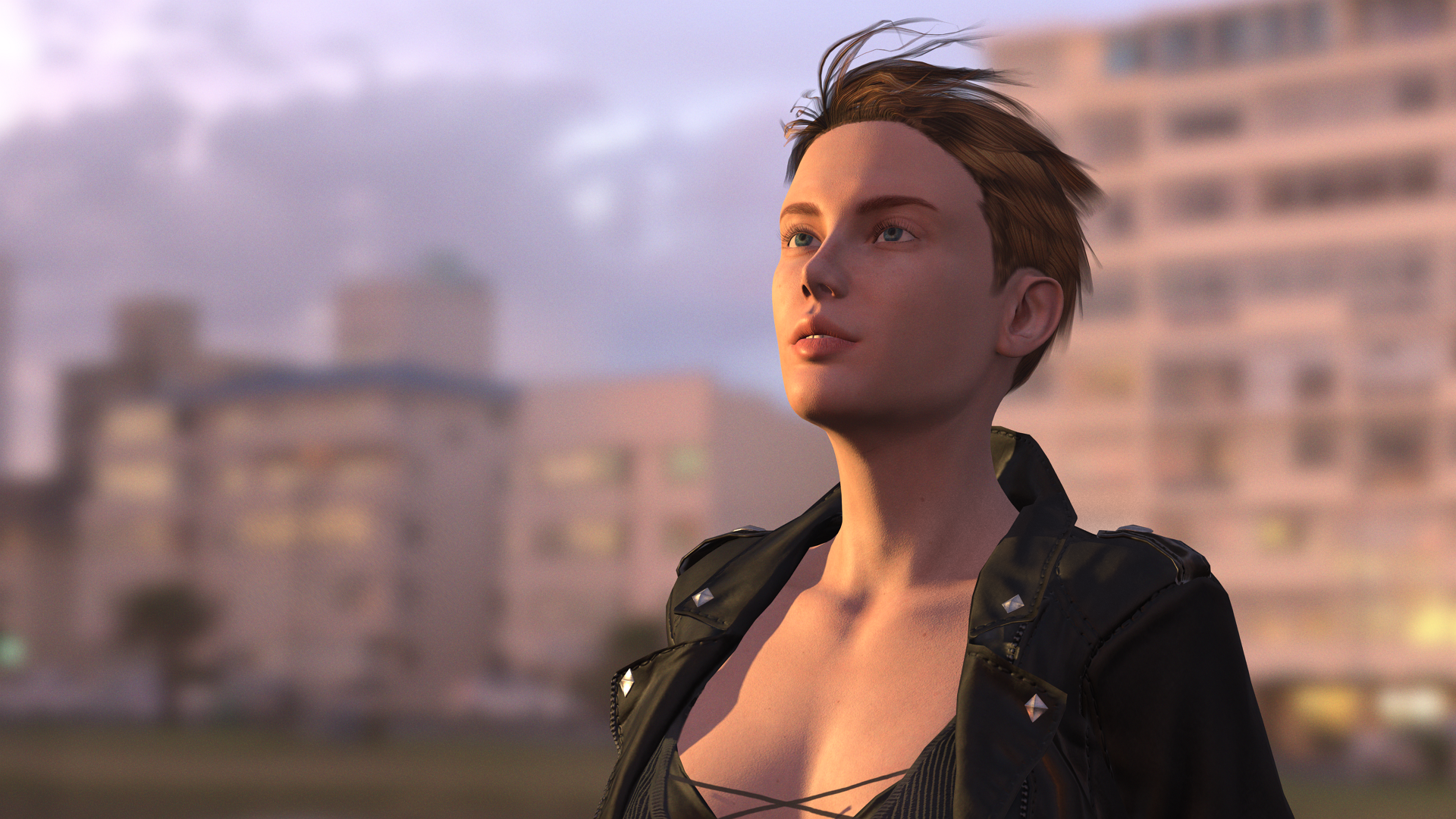
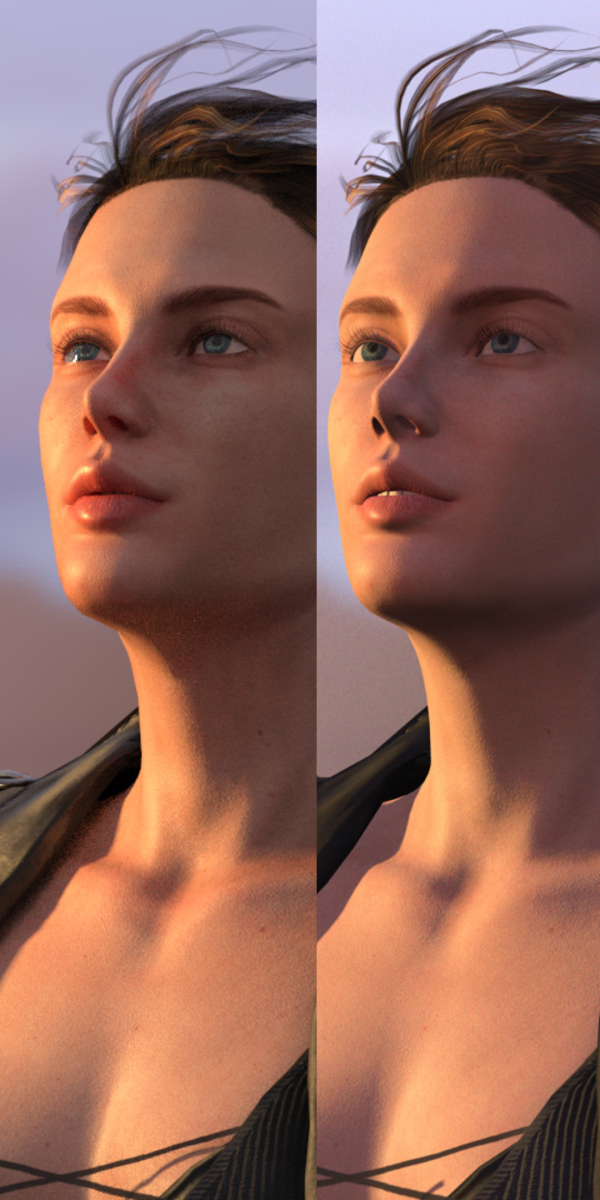
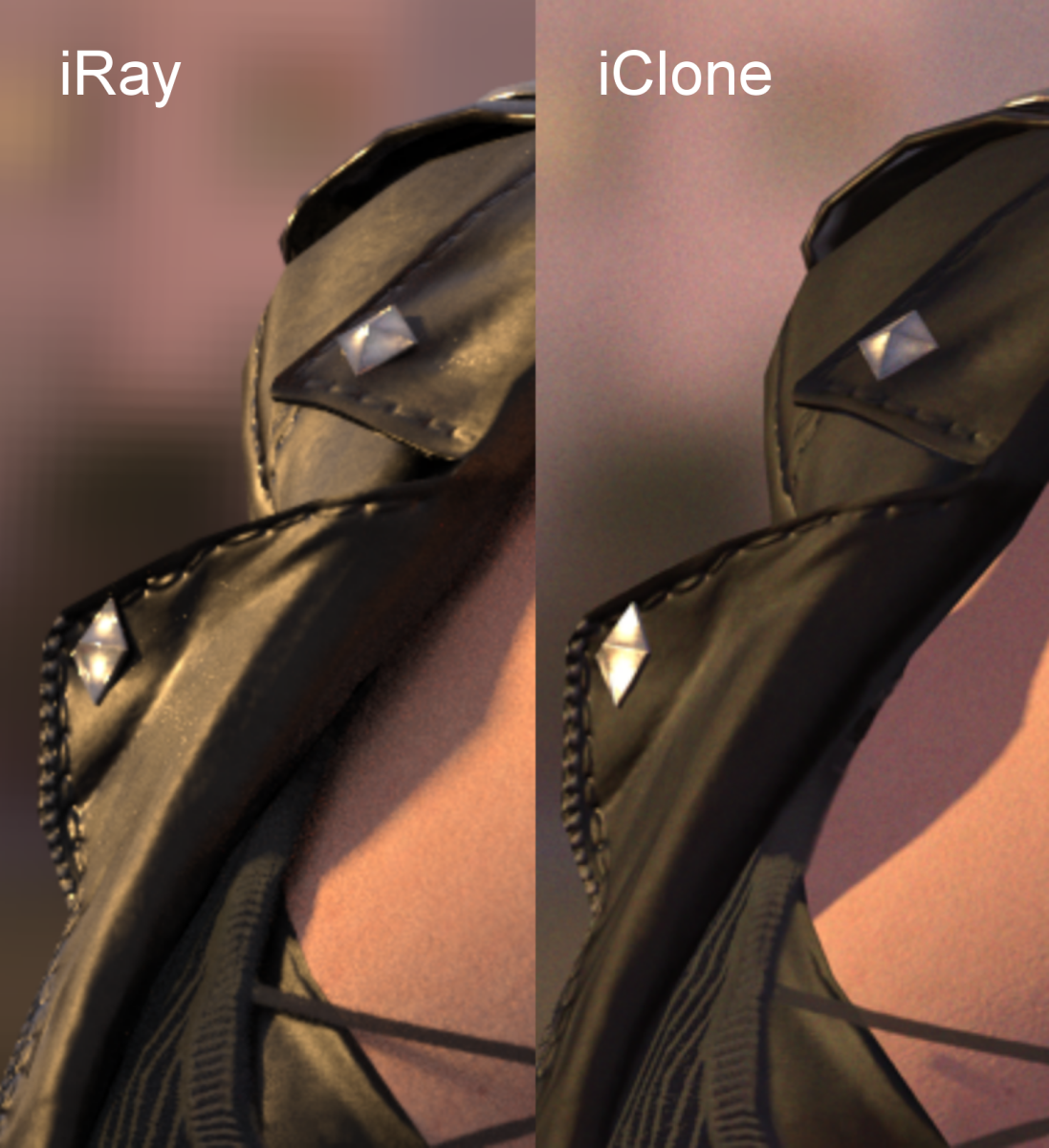
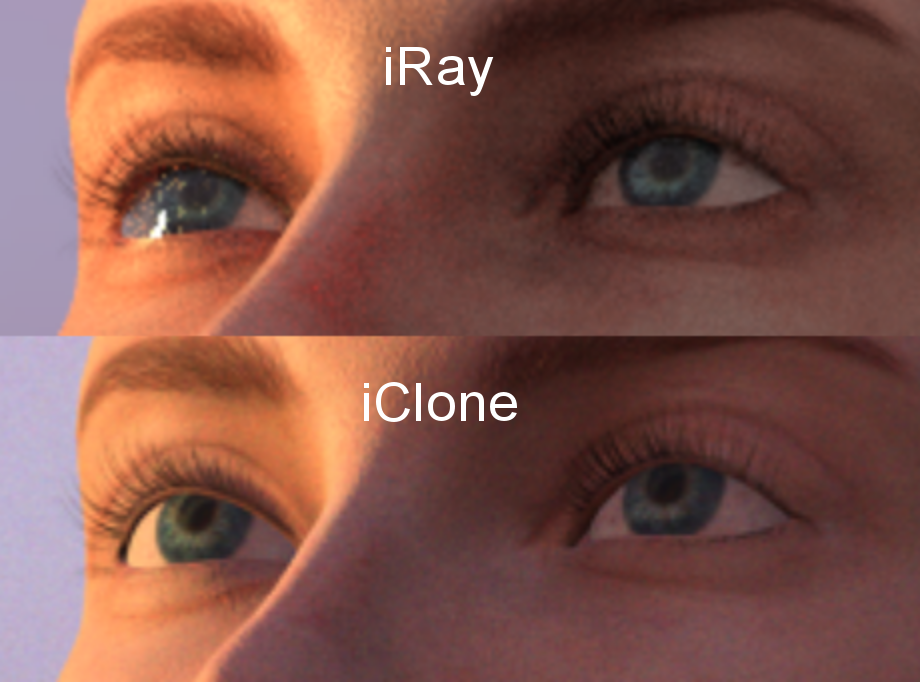
This last pic is hugely magnified, since it's merely cropped out of a 1080p frame. All images are cropped from the same *first* frame above. The left eye on this last pic shows iRay 'life' and the 'speckled look' is simply due to the render being terminated at just 150 iterations .....
|
|
By Data Juggler - 8 Years Ago
|
I was just referring the IRay preview window in CC 3.
It just seems strange results would be 1 second vs several minutes even with 5 times the GPU.
|
|
By justaviking - 8 Years Ago
|
|
Data Juggler (9/29/2018)
I was just referring the IRay preview window in CC 3.
It just seems strange results would be 1 second vs several minutes even with 5 times the GPU.
Are you comparing Iray time so iClone's native renderer?
They are totally and completely different animals.
|
|
By Data Juggler - 8 Years Ago
|
No, I am comparing my IRay Preview time, versus Gerry's in this video:
https://www.youtube.com/watch?v=QHShVA2zBzM
Every time he moves, the preview window refreshes instantly. I am not using the same character, but it takes forever for me, and his are instant or near enough.
|
|
By brand468 - 8 Years Ago
|
Hi, i tested my rendering times with different setting
Iray background render, same scene, same Max Gi bounces 16, De Noice on, 150 samples
4CPU+1070+1070 = 42 sek
1070 only = 52 sek
1080 only = 51 sek
1070+1080 = 41 sek
p/s Iray preview is so slow that i cant use it, very strange.
| |
| |
|
|
|
|
|
Text-to-speech function is limited to 200 characters |
|
By brand468 - 8 Years Ago
|
I think the initialization of Iray rendern takes time, so it takes more time to compare the times.
When I tested the same scene with 1000 samples iterations I got the time 128 seconds.
128 sec / 1000 = 0.12 sec per sample compared to 42 sec / 150 = 0.28 sec per sample. There will also be different times depending on how much the image is zoomed in or zoomed out.
The question is whether an initialization for each new rendering is necessary for an animation or not?
| | | | | | | | |
Text-to-speech function is limited to 200 characters |
|
By sonic7 - 8 Years Ago
|
Good points Brand ...
Yeah - I've found that zooming in to a closer shot of 'actual mesh' can x3 the render time.
I've also just discovered I can get away with even lower iterations - I've experimented with 30 - and it CAN be OK. (probably not facial Close Ups)
Another trick - render at UHD (3940 x 2160) - with NO de-noise and at 30 iterations.
Then resize to 1080p (this being for animation / movies) ....
(of course we can only test single frames at the moment).
I'm surprised that the 1080 didn't do better (compared to the 1070 in your tests) - I actually thought there'd be a bigger difference ....
And yeah - I'm getting just under 10 seconds for 'loading' time.
Don't know about you, but I find the de-noiser a bit 'savage' - I'm wondering if there's a separate adjustment other than just on or off....
On close-ups of skin textures it can totally smear out the pores in *some* parts but then not on other areas, making it a bit 'blotchy'.
I guess it just works to a 'threshold' value.
If there's no fine adjust on the de-noise - I don't think I'll use it to be honest.
UHD doesn't take that much longer - and then resizing to 1080p is sort of a de-noiser in itself and it leaves a nice amount of texture (without smearing it out) ....
|
|
By brand468 - 8 Years Ago
|
Yes, it is strange that 1080 is not so much faster than 1070 and that it does not increase more together.
Have now found something very interesting about the fact that iray preview goes much faster than background render on my computer!
I have a 40 inch 4K screen with 3840x2160 resolution + 2 with 1920x1080 resolution.
I have now discovered that if I move Character Creator 3 to a lower resolution screen, the rendering progresses much faster, so screen resolution affects the time of preview but not on background render ..
p / s Seeing that they are using 2x1080 in Gerry's video, maybe they are 1080 Ti?
Have used Iray denoice in DazStudio 4.11 and the sharpening increases if you run more samples, think it's the same here. | | | | | | | | |
Text-to-speech function is limited to 200 characters |
|
By sonic7 - 8 Years Ago
|
I'll have to look into that screen size / preview scaling method you mentioned...
In the meantime here's a *relative comparison* (all things being equal):
The following 3 renders were all iRay rendered at 3840 x 2160
The ONLY thing that was altered was number of iterations (hence render time).
I'm quite amazed at this. (By the way there was NO denoising applied).
These are *Real* - Home Studio results.
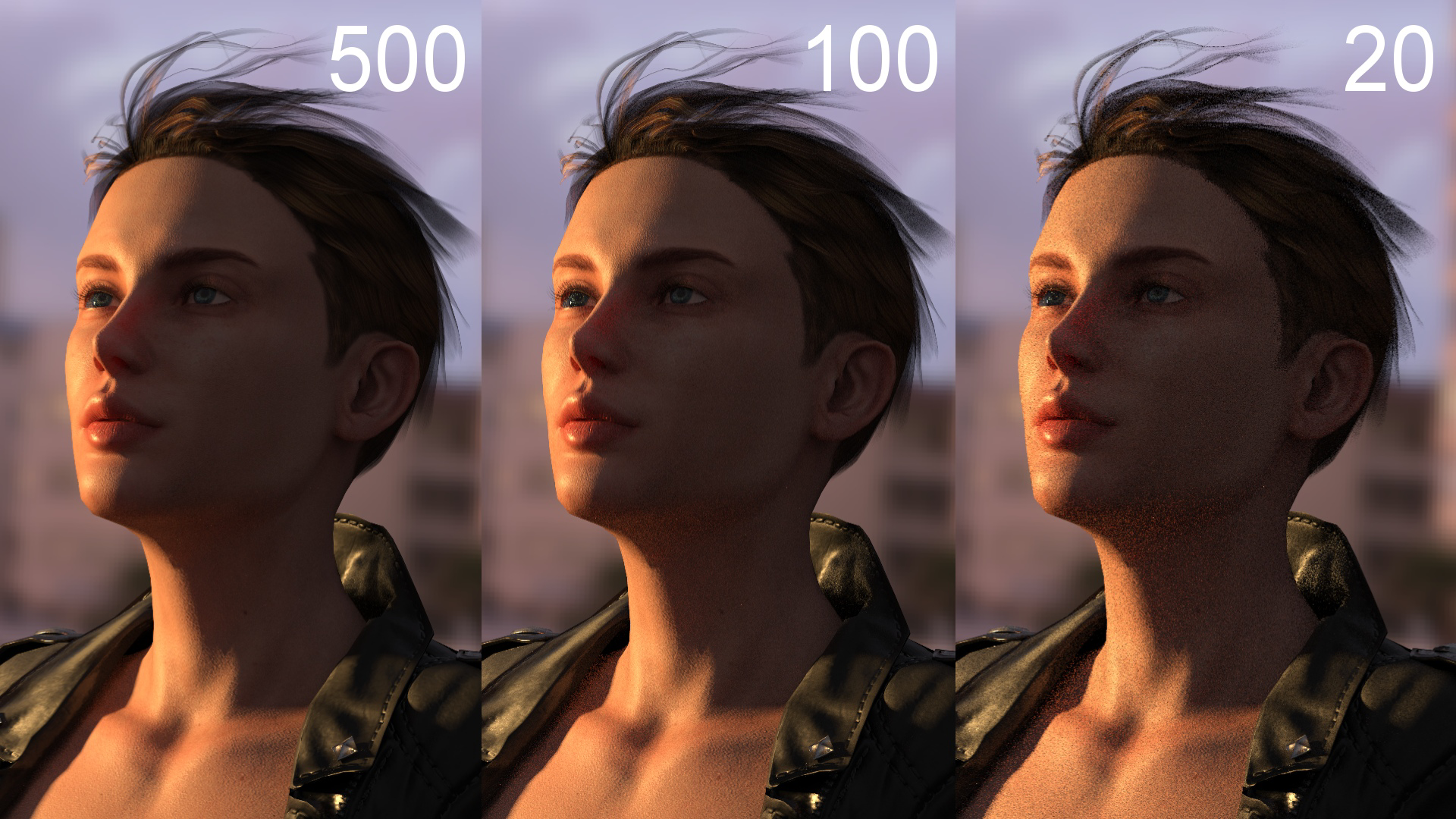

These have been made to show a large contrast range to see how different levels respond.
The higher the number of iterations the *smoother* the skin.
20 iterations is an extremely low number - I'm amazed that it gave this result ....
|
|
By brand468 - 8 Years Ago
|
Looks good :-)
Personally, I think the AI denozing is fantastic especially on scenes where there is bad light with a lot of noice. Has tested both Octane and DazStudio's denozing and it dramatically reduces the rendering time. | | | | | | | | |
Text-to-speech function is limited to 200 characters |
|
By sonic7 - 8 Years Ago
|
Brand ... Do you know how the denoiser is meant to work? - Because it's a mystery to me .....
|
|
By brand468 - 8 Years Ago
|
sonic7, i set start iteration to 10 but im not shure if it is better to wait some more samples.
Some more info here:
https://www.fxphd.com/blog/whats-the-story-behind-nvidias-new-iray-ai/
http://podiumwalker.com/denoise-overview.php | |
| |
|
|
|
|
|
Text-to-speech function is limited to 200 characters |
|
By brand468 - 8 Years Ago
|
After many tests, Iray preview is simply too slow to use it in practice.
It is also problematic that scenes with only 1 person take 5-6 GB of video memory.
Wondering how it will work with more complex scenes in iClone. I guess i need new graphics cards with more memory like 1080ti 11gb.After many tests, the Iray preview is simply too slow to use it in practice. It is also problematic that scenes with only 1 person take 5-6 GB of video memory. Wondering how it will work with more complex scenes in iClone. Will be buying new graphics cards with more memory 1080ti has 11gb.G M T | | | | | | | | |
Text-to-speech function is limited to 200 characters |
|
By sonic7 - 8 Years Ago
|
Brad - yes, that nvidia article mentioned what you said:
This is by design, as the Iray API to the host application provides the ability for the user (or app) to set the number of render iterations before the denoise algorithm is applied. It makes sense, as the first progressive render displayed has far too much noise, so if a denoise was used at that point it would result in a smushy watercolor image. According to Miller, the denoise can become effective after only five or six iterations.
I'm starting to get the impression that the de-noise is perhaps more useful for very high quality *still* images (hence high iteration). It may not end up being suitable for low iterations per frame ie: animation.
If I use denoise - it ADDS time to each iteration - so the overal render will be longer ....
If you were doing *heaps* of iterations, like say 2,000 or more, then it might be worth using the (more time consuming) de-noise *IF* you can get the same quality with say 500 iterations instead.
eg:
2000 iterations at 1/2 second each (no de-noise) = total 1000 seconds.
However 500 such 1/2 sec iterations 'denoised' (so adding say 1/2 sec for each iteration) = 500 seconds.
You end up with the same Quality; in 1000 secs (no de-noise) OR 500 secs (WITH de-noise).
So the 'de-noise' approach wins out because of rendering only 1/4 the number of frames (even though taking double the time per frame).
(talking a *Single* image render here - not animation).
Plus, I get the impression that the de-noiser needs quite a lot of frames in order to *work out* what is noise.
|
|
By brand468 - 8 Years Ago
|
Sonic7, Yes, it's possible that you're right, i will do some tests later :)
|
|
By Data Juggler - 8 Years Ago
|
|
How do you turn denoise on or off?
|
|
By sonic7 - 8 Years Ago
|
Hi Data .... (did you know this was actually YOUR thread .... lol - so sorry - I got carried away ... :blush:
But - the de-noise is found:
Plugins > iRay Render > Render Settings > the LAST tab (RHS) > De-Noise (NVIDIA GPU Only)
|
|
By illusionLAB - 8 Years Ago
|
|
Hey guys, a tip to try is turning down your GI bounces... this is 'theory' based as I didn't get the IRay plugin - simply, if you haven't got other geometry in the scene for light to 'bounce off', then 16 should be overkill. You do still need bounces to get the shadows and eye reflections, so maybe test out a few renders at 8 GI bounces - it should speed up your results without affecting the look.
|
|
By wires - 8 Years Ago
|
@ Data Juggler,
The person presenting the Reallusion iClone Tutorials is called Kai, and not Gerry.
|
|
By sonic7 - 8 Years Ago
|
You're spot on Mark ... I gave 8 bounces a try, and it was still adequate - and of course, like you say, too few (I tried 4) - and the whites of the eyes darken considerably.
But yeah - I think there was a slight time advantage going from 16 down to 8.
I'll give it another test now ....
|
|
By 4u2ges - 8 Years Ago
|
Mark is right, 8 is an optimal number (was default for Indigo). You can go lower and it would speed up the render even more. But depending on lights complexity, types of materials used in the project and the desired level of realism it might or might not be satisfactory.
|
|
By sonic7 - 8 Years Ago
|
@4u2ges gotcha ... yes makes sense.
I just did a quick comparison on this *same* recent avatar (previous page), and on 100 iterations (at 1080p) 16 bounces came in at 39 secs, whereas 8 bounces clocked 38 secs.
But this is a very simple scene, so yes, I can appreciate that a *much bigger* time saving could be had on more (full) complex scenes.
Actually, I just had a thought ...
Those skin *textures* from the previous page - look too "porous" to my eye.
Since the de-noiser doesn't work well on short runs, I was wondering if was possible to *reduce* the pores on the skin textures ....
What are your thoughts on those skin textures - are they too exaggerated or not?
|
|
By brand468 - 8 Years Ago
|
|
illusionLAB (9/29/2018)
Hey guys, a tip to try is turning down your GI bounces... this is 'theory' based as I didn't get the IRay plugin - simply, if you haven't got other geometry in the scene for light to 'bounce off', then 16 should be overkill. You do still need bounces to get the shadows and eye reflections, so maybe test out a few renders at 8 GI bounces - it should speed up your results without affecting the look.
Yes, it made a big difference on preview render when I pulled down GI bounces to 6, thank you :)
|
|
By 4u2ges - 8 Years Ago
|
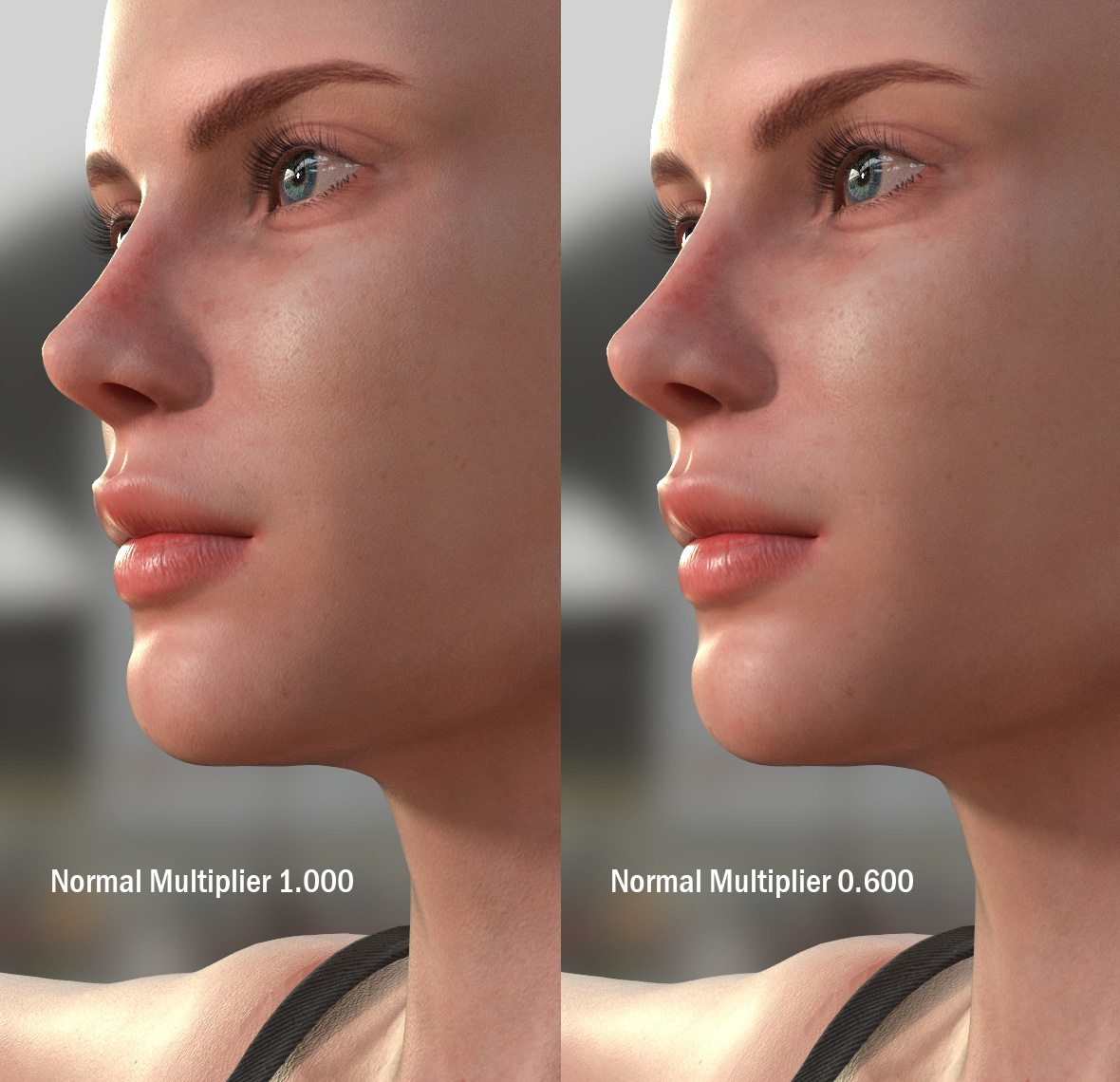
@Sonic7 To diminish pores you may play with Normal maps strength in Multiplier
But what bothers me most is that Iray in iClone implementation has less than satisfactory handling of anti-aliasing. You can even see it by closely inspecting the model on screenshots (neck and cheeks).
It's been reported, but has not been fixed yet. Hopefully with the next update....
And here is a closeup of some object, where you can see the problem right away

|
|
By wires - 8 Years Ago
|
4u2ges (9/29/2018)
@Sonic7 To diminish pores you may play with Normal maps strength in Multiplier But what bothers me most is that Iray in iClone implementation has less than satisfactory handling of anti-aliasing. You can even see it by closely inspecting the model on screenshots. And here is a closeup of some object, where you can see the problem right away
Iray in iClone????
|
|
By 4u2ges - 8 Years Ago
|
lol Gerry, not necessary. You can still bring props to CC3.. Remember? :P
I just used general term iClone, though I should have said RL implementation:)
|
|
By sonic7 - 8 Years Ago
|
--- yes, understand - I will have to deal with that in Post. (I might have to render-out at a higher resolution to allow for some filtering). Thanks for that.
Edit: Sorry, what did you mean by " You can still bring props to CC3 "
Oh --- got it ....
|
|
By Data Juggler - 8 Years Ago
|
|
Thanks Gerry, didn't mean to say the wrong name.
|
|
By brand468 - 8 Years Ago
|
|
sonic7 (9/29/2018)
Since the de-noiser doesn't work well on short runs, I was wondering if was possible to *reduce* the pores on the skin textures ....
Made a new quick test, 150 samples and start to denoice at 125 samples = about the same time but significantly less noice.
| | | | | | | | |
Text-to-speech function is limited to 200 characters |
|
By 4u2ges - 8 Years Ago
|
Here is pores reduction with Normal Bump map multiplier
|
|
By sonic7 - 8 Years Ago
|
Ahhh 4u2ges! That looks great! - I've never done that before (I must learn how!) - And those eyes look great! - so clear! Thanks - heaps ...
..... meanwhile - I've just tried the settings Brand suggested - and it's the best I've seen with the de-noise settings so-far!
and for reference: the 'De-noised' render took 58 seconds while the NON De-noised render took 54 seconds.

|
|
By Data Juggler - 8 Years Ago
|
I wish I knew what denoise from frame 125 meant.
What are you two talking about, and where do you set what frame to switch?
|
|
By sonic7 - 8 Years Ago
|
Data .... It just means that the 'speckled' grain and 'roughness' (visual noise) is filtered out.
The de-noise setting allows you to set the 'start' frame where you'd like the de-noising to commence ....
So in the above image, the 'de-noise' control (I showed you where that is found) - had a 125 value entered in.
And in the 'Render' pane, the box (lower right) had a value of 150 entered in.
|
|
By brand468 - 8 Years Ago
|
|
Data Juggler (9/29/2018)
I wish I knew what denoise from frame 125 meant.
What are you two talking about, and where do you set what frame to switch?
As Sonic7 wrote earlier, you'll find the setting in Iray render settings :)

| | | | | | | | |
Text-to-speech function is limited to 200 characters |
|
By sonic7 - 8 Years Ago
|
Ah ... Good one Brand .... yes ....i
In that pic Brand just posted, once the denoise box is checked - it will become 'active' - you can see faintly that it's set to 125.
At frame 125 the de'noiser will 'kick-in' and do it's thing! (from frame 125 to the end).
So, you'll get a render with the first 125 frames having NO de-noising, followed by the final 25 frames with the speckles being removed (de-noised)....
|
|
By brand468 - 8 Years Ago
|
Yes, i guess some more test to try out the best denoice setting.
I also have discovered that preview render resolution uses CC3 window size, in my case 3049x1942 so when compared with Background render you have to use preview size | | | | | | | | |
Text-to-speech function is limited to 200 characters |
|
By Data Juggler - 8 Years Ago
|
Thanks for the explanation.
Character Creator 3 keeps crashing on me, so I think I may end up back with 2.3 or just the free CC.
|
|
By sonic7 - 8 Years Ago
|
Hey Data .... Are you able to identify at what point you get the crashes? - the 'task' you were performing?
If you can *identify* it, then you might try (after re-startng CC3) repeating the exact steps to see if it crashes in the same manner every time.
|
|
By Data Juggler - 8 Years Ago
|
I don't remember. I may have been impatient with the UI when it wasn't responding and tried to click something else when it wasn't done with the first thing I asked it to do.
Once the shelves restock with RTX 2080 TI's I will have one and that will probably cure most of the problems. I am sure all their beta testers are professional animators who have some graphics cards with some horsepower.
Compared to CC 2.3 it is much slower opening the same project.
|
|
By brand468 - 8 Years Ago
|
I agree with CC3 takes a lot longer than CC2 to start, and I have also had some crashes when I used Instalodd.
It takes a very long time and takes so much resources that I initially thought the computer was hanging out.
I'm also thinking about getting new graphics cards. I have the GTX 1080 and GTX 1070 on my computer. These have 8 gb video memory and it feels like I will need more.
Do not know if I will jump on the RTX cards yet, they are too expensive yet, so maybe I will buy 2 used GTX 1080 ti 11Gb. | | | | | | | | |
Text-to-speech function is limited to 200 characters |
|
By kmitchell.12catblackstudios - 8 Years Ago
|
I have an I7 16GB GXT970 and I'm not really having issues with IRay But I did change settings based on previous settings on 3ds max and Substance:
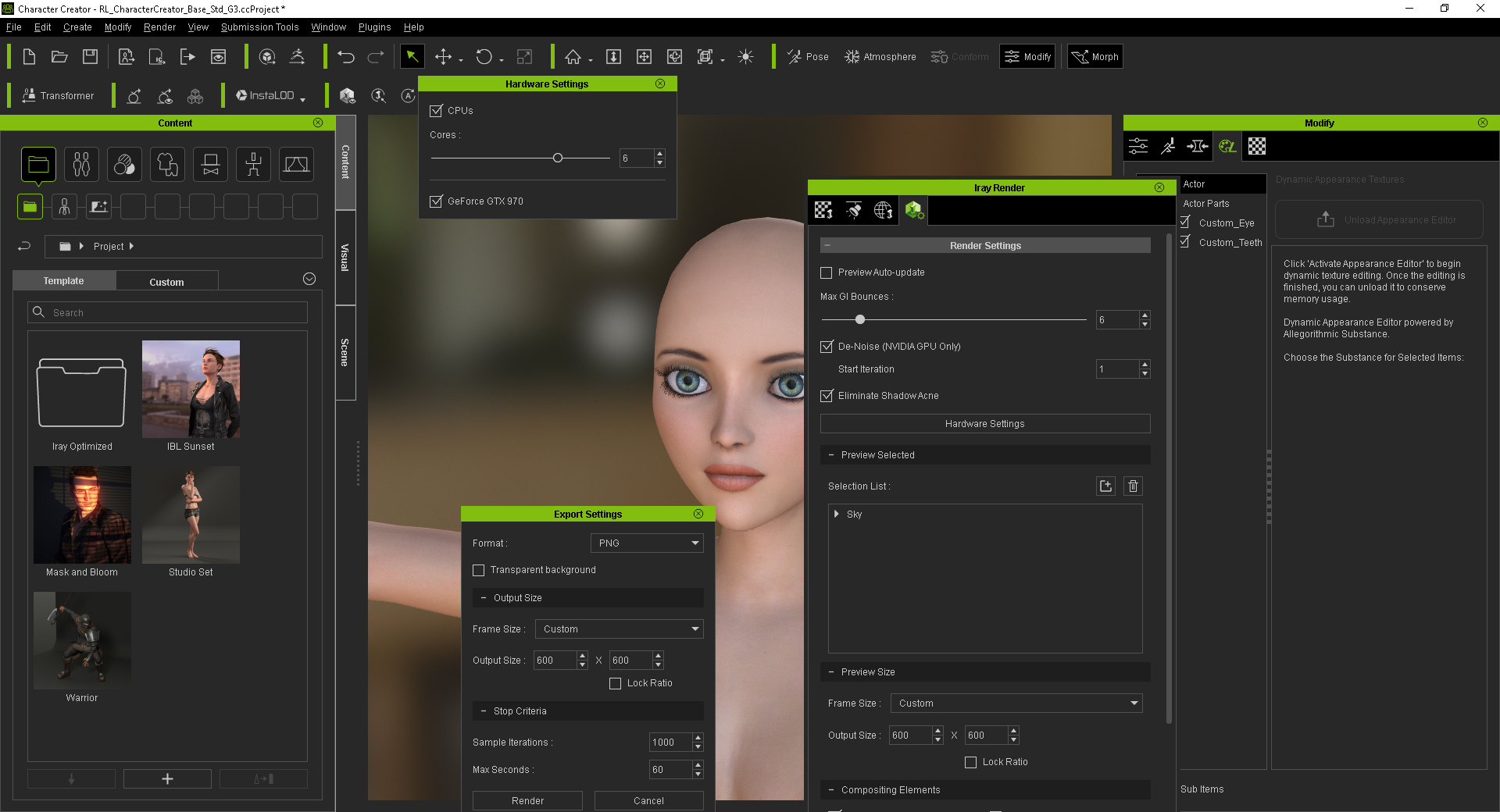
I also use batch render for a faster preview render which is faster than the viewport render.

So far I can get good test results with these slightly modified. 60 second test render at 600x600 gives me ok fast results. And if i increase my res I"ll have to go to a 120 second render rate. But thats what im using thus far.

|
|
By sonic7 - 8 Years Ago
|
kmitchell .... that's a brilliant image there!
It's funny how you increased your CPU cores to 6. I tried the same on my 4 core machine, and I thought it actually rendered faster !! (strange).
And yes, reducing the bounce cycles ... I got a 'small' speed gain dropping from the default 16, down to 8. When I tried 4, the 'whites' of the avatar's eyes darkened due to not enough bounces...
|
|
By kmitchell.12catblackstudios - 8 Years Ago
|
|
sonic7 (9/30/2018)
kmitchell .... that's a brilliant image there!
It's funny how you increased your CPU cores to 6. I tried the same on my 4 core machine, and I thought it actually rendered faster !! (strange).
And yes, reducing the bounce cycles ... I got a 'small' speed gain dropping from the default 16, down to 8. When I tried 4, the 'whites' of the avatar's eyes darkened due to not enough bounces...
Thanks, I increased it because I'm not sure if they are using the actual cores or the logical processors. So it was worth a try lol.
|
|
By sonic7 - 8 Years Ago
|
You might have a good point there .....
|
|
By sonic7 - 8 Years Ago
|
Hey kmitchell .... What setting do you have under Modify > Smooth Mesh?
This is what I've found in CC3 ..... (under Modify > Smooth Mesh)
* Original ..... Quickest Render (but Avatar geomety 'boundaries' are 'squared off' and look 'chunky')
* Tessellation .... Second Quickest (smooths the skin boundaries - but in *some* cases is inaccurate, causing distorted mesh)
* Subdivision .... Slowest Render time - (takes longer but has the BEST smoothing on Avatar's geometry)
The above is based on "Preview Renders' - not "Background Renders"
Preview Renders seem to produce the SMOOTHEST most pleasing geometry.
For these settings to work, the Avatar needs to be 'selected', then under Modify > Attribute - 'Smooth Mesh' needs to be checked, and 'Level for Real Time/Iray Preview Render needs to be slid to '1' or higher.
|
|
By rollasoc - 8 Years Ago
|
|
Data Juggler (9/29/2018)
I watched Gerry in a video and his preview window updated to 500 (whatever that means) in 1 second, and mine would take about 5 minutes to do the same thing.
I dream of 5 minute renders. Having a AMD card on my laptop, I have to IRay using the CPU. My last Daz render took 9 hours. I wasn't happy with the very noisy 2 hour render, so upped it to 9 hours.
Time to build a new PC I think....
|
|
By charly Rama - 8 Years Ago
|

This was rendered in 65 secondes with the settings that you proposed, with my poor PC i7 GTX 1050ti
|
|
By charly Rama - 8 Years Ago
|

and here we are with the famous black eyes, so I have to increase up tu 8
|
|
By sonic7 - 8 Years Ago
|
Hey Charly .... did you have to increase up to 8 'bounces' of GI ?
|
|
By charly Rama - 8 Years Ago
|
|
I've increased to 20 but still have a black eyes . I'm looking for another solution to avoid that
|
|
By charly Rama - 8 Years Ago
|

With this charming lady, just one eye is black, but the time render is about 60 70 sec, and bounces at 20, and i have some noises, it's complicated Sonic :-)
|
|
By charly Rama - 8 Years Ago
|

My problem is now this "maudit" black eye because I think that 60 sec of render time is correct if I consider my config ( I don't have the GTX 1080)
|
|
By sonic7 - 8 Years Ago
|
Yeah Charly ....
As far as I know, the 3 things that might help with dark eyes are:
● Better Lighting
● More GI bounces
● More iterations (render time)
Edit:
Charly - try this:
● set your GI bounces to 8 or higher
● set your de-noise to 148
● set to 150 iterations
Don't do any limit on time .... let it run the full 150 iterations ...
|
|
By charly Rama - 8 Years Ago
|
|
thanks Sonic but still dark :-)
|
|
By charly Rama - 8 Years Ago
|

I got it Sonic :-)
|
|
By brand468 - 8 Years Ago
|
Hi Charly, seeing that you seem to solve the problem already. Assuming you did not have IBL light on, got the same black eye with just spot on. | | | | | | | | |
Text-to-speech function is limited to 200 characters |
|
By charly Rama - 8 Years Ago
|
|
Yes Brand, i've got IBL on but too low, i 've just increased IBL and no more dark eyes,In anycase, thank you guys
|
|
By brand468 - 8 Years Ago
|
Now that I tested, I notice that the eye turns black when a light is directed directly to the face.
Perhaps something strange with the eye material or normal for Iray or maybe a bug? Got a lot better render without light, a little strange that you have to set up IBL in two places though. | | | | | | | | |
Text-to-speech function is limited to 200 characters |
|
By charly Rama - 8 Years Ago
|
In this test, I 've put a light directly to the face and I had to increase IBL light to avoid black eyes. Render time : 125 sec

|
|
By kmitchell.12catblackstudios - 8 Years Ago
|
|
sonic7 (9/30/2018)
Hey kmitchell .... What setting do you have under Modify > Smooth Mesh?
This is what I've found in CC3 ..... (under Modify > Smooth Mesh)
* Original ..... Quickest Render (but Avatar geomety 'boundaries' are 'squared off' and look 'chunky')
* Tessellation .... Second Quickest (smooths the skin boundaries - but in *some* cases is inaccurate, causing distorted mesh)
* Subdivision .... Slowest Render time - (takes longer but has the BEST smoothing on Avatar's geometry)
The above is based on "Preview Renders' - not "Background Renders"
Preview Renders seem to produce the SMOOTHEST most pleasing geometry.
Didn't see the notification. I was looking for that I'll try it on this next project.
|