|
By lobstermd89 - 7 Years Ago
|
Is this a bug or a feature? I've tried three different types of genitalia. Does it have to do with daz's geografting?
|
|
By Peter (RL) - 7 Years Ago
|
You will need to explain more about the problem for us to be able to help you.
Please tell us which Daz 3D figures you are using and post a screenshot of your export settings from Daz Studio (no screenshots of the genitalia please).
|
|
By lobstermd89 - 7 Years Ago
|
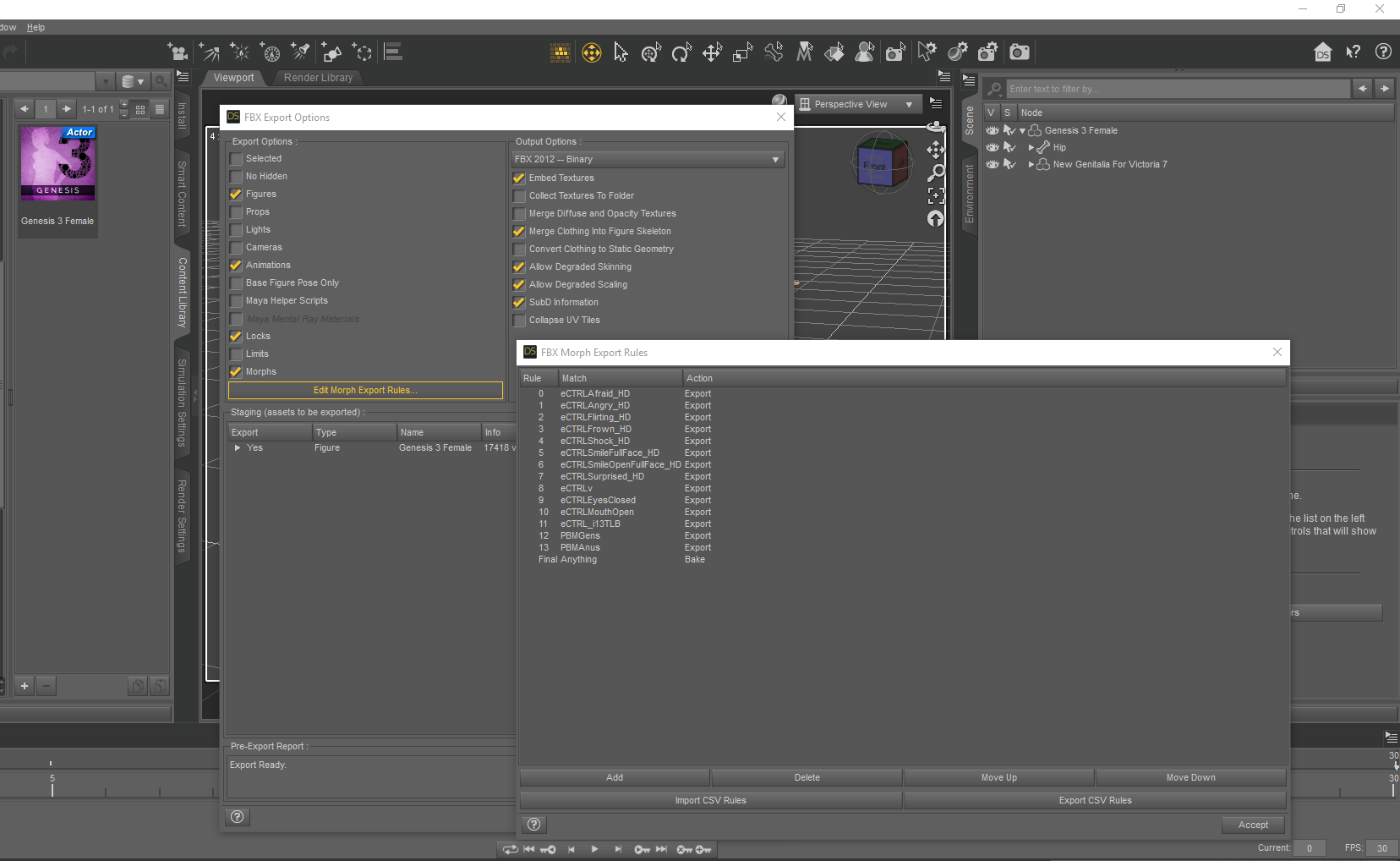
|
|
By lobstermd89 - 7 Years Ago
|
Using the base genesis 3 female, and this is the error I get.
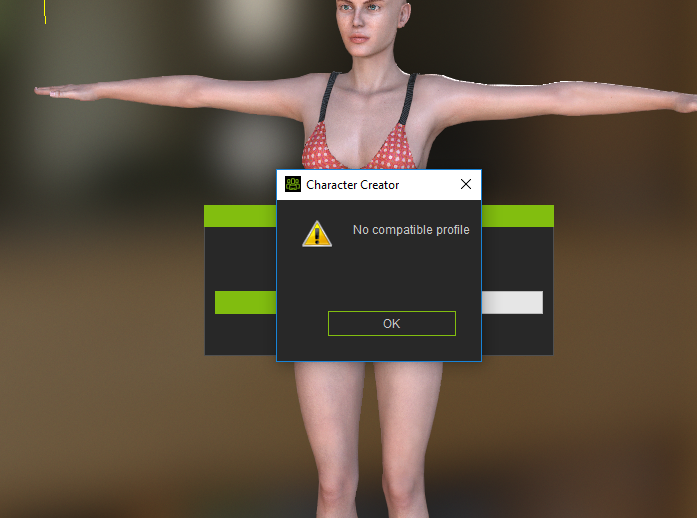
|
|
By Rampa - 7 Years Ago
|
Geografting will be the issue there. My understanding is that it hides some of the original body mesh. The graft itself is an "accessory". Hopefully CC3 can see it as an accessory or cloth on import. But CC3 needs for the entire body mesh to be visible when exported from DAZ.
So try showing all the mesh of the base body and then export your FBX.
|
|
By lobstermd89 - 7 Years Ago
|
I've tried that and I've googled around a bit, not sure if it's possible.
|
|
By francois2402 - 5 Years Ago
|
pour ceux que ca peut interesser: Pour un genital Male XY
Dans Daz vous Ouvrez le genital seul, sans l attribuer a un g8 male ou autre, vous l exportez en FBX avec comme options cochées : Figures, Animations, Locks, Limits, Morphs, choisir FBX 2012 binary, Merge clothing into figure skeleton, allow degraded skinning, subd information.
Dans Staging cliquer sur la petite fleche a coté de yes pour verifier que tous les morphs sont sur yes. Si ils ne le sont pas, il suffit de cliquer sur edit morph export rules puis add et sous rules il doit etre inscrit 0 ou autre si vous avez d autrres morphs, sous match vous inscrivez le debut de vos morphs, pour moi c etait XY et sous action vous choisissez export.
La tout devient YES
Ensuite vous cliquez sur accept et exportez
Puis vous ouvrez 3dxchange, open et vous allez chercher votre fbx genitalia ou le nom que vous lui avez donné.
Vous cliquez sur send to iclone
Dans iclone, le but c est de pouvoir intervenir sur les morphs de votre genitalia et les integrer dans une animation par exemple, pour ca il faut utiliser morph animator. On clique donc Morph animator et ...Pas de morphs...
On va donc cliquer sur Morph creator (en verifiant bien que notre genitalia est selectionné) A ce moment Morph creator nous indique que notre objet contient des morphs et qu il peut faire une auto conversion, cliquer sur Yes, et vos morphs s affichent à droite.
Il n y a plus qu a cliquer sur update morph to iclone.
Maintenant si vous allez a morph animator vous trouverez vos morphs.
Suffit de Sauvegarder votre genitalia dans vos custom content.
Bon j ai peut etre fait des erreurs dans les options d export etc, mais ca fonctionne et c est l essentiel, si vous avez des precisions a apporter elles sont bienvenues ;)
Bonne Journée
|
|
By pruiz - 7 Years Ago
|
Rampa (10/4/2018)
Good thing we can hide mesh in CC3! Rampa, The hide mesh w orks fine to get a clean looking import. Do you have any ideas on how to include the geograft in the mesh that's used for cloth skin transfer? Or can you refer me to a manual instruction or tut plz?Select your character. Click on Edit Mesh in the Modify panel.  Select the faces button and select faces by dragging a rectangle, or clicking. Holding Ctntrl while selecting lets you select multiple times. Then press the closed eye icon by "visible".   The different modes may be useful for adjusting the mesh. If you want to move vertexes, then coose that. If you want to move faces, choose that. The actual moving or scaling is done with the gizmo tools. The last mode it sculpting, with a simple sculpting brush.
|
|
By Samuraisouru - 5 Years Ago
|
|
WE CAN PROJECT REAL GENITALS IN SUBSTANCE PAINTER AND WORK IN TO THE MESH IN ZBRUSH ! Believe me will look better than daz originals ...
|
|
By rewinged28 - 5 Years Ago
|
|
I'm curious if anyone know how (if it's even possible) to assign a skin shader style to an imported geograft as an accessory? Using PBR gives bad results compared to the digital skin shader used for the regular skin
|
|
By tvwk2013 - 5 Years Ago
|
|
Hello, do anybody know how can I join the DAZ3d genitals with CC3 character so it can work nice in Unity? I can join them in Bleder, but then in Unity the character is broken (
|
|
By tvwk2013 - 5 Years Ago
|
|
Silviu Caraba (8/8/2020)
WE CAN PROJECT REAL GENITALS IN SUBSTANCE PAINTER AND WORK IN TO THE MESH IN ZBRUSH ! Believe me will look better than daz originals ...
Hi, I just was your post that you can make genitals for the CC3 characters. I am sorry if I misunderstood, but are you making a custom work? I was trying for 3 weeks to make nice genitals, but unfortunately my skills in ZBrush or blender are not enough. Can you help please?
|
|
By francois2402 - 5 Years Ago
|
Bonjour,
Avez vous trouvé une solution pour importer les parties genitales de daz vers iclone?
|
|
By pruiz - 7 Years Ago
|
|
Rampa (10/3/2018)
Choosing cloth would be best, as it will rig to the appropriate bones.
Thank you Rampa.
Do you know how spring can be added to pectorals in cc3 transformer import. In importing Daz G3/8 via 3dx it required selecting unused bones and activating spring.
Another question re high heel pose (foot and metatarsals etc. locked in Daz) in Tpose for FBX export from Daz/import to cc3 the pose does not stay in place (reverts to flat foot of Tpose. If corrected in edit pose in cc3 it will not carry through to iclone on export. Is there a way to lock high heel in either cc3 or iclone or both please?
|
|
By Rampa - 7 Years Ago
|
Not sure if the bones are already set up for spring, but check under the "Spring" heading in the iClone modify panel.
Here is how do high heels in CC3.
|
|
By pruiz - 7 Years Ago
|
|
Rampa (10/4/2018)
Not sure if the bones are already set up for spring, but check under the "Spring" heading in the iClone modify panel.
There are no bones setup in iclone after export from cc3. Is there a way of setting up without going through 3dx?
|
|
By lobstermd89 - 7 Years Ago
|
I finally got around to exporting with genitalia etc, but it doesn't really work. I've set export to hide mesh but nothing seems to work. The base mesh sticks out from under the gens, even after doing conform etc.
|
|
By Rampa - 7 Years Ago
|
Good thing we can hide mesh in CC3!
Select your character.
Click on Edit Mesh in the Modify panel.
Select the faces button and select faces by dragging a rectangle, or clicking. Holding Ctntrl while selecting lets you select multiple times. Then press the closed eye icon by "visible".
The different modes may be useful for adjusting the mesh. If you want to move vertexes, then coose that. If you want to move faces, choose that. The actual moving or scaling is done with the gizmo tools.
The last mode it sculpting, with a simple sculpting brush.
|
|
By lobstermd89 - 7 Years Ago
|
Dang, you're so helpful. Thanks again!
|
|
By Rampa - 7 Years Ago
|
I went and dug around a bit . Might have something.
Load your figure.
Select the Geometry Editor tool.
Right-click on your figure and select "Geometry Visibilitry/Show All Polygons"
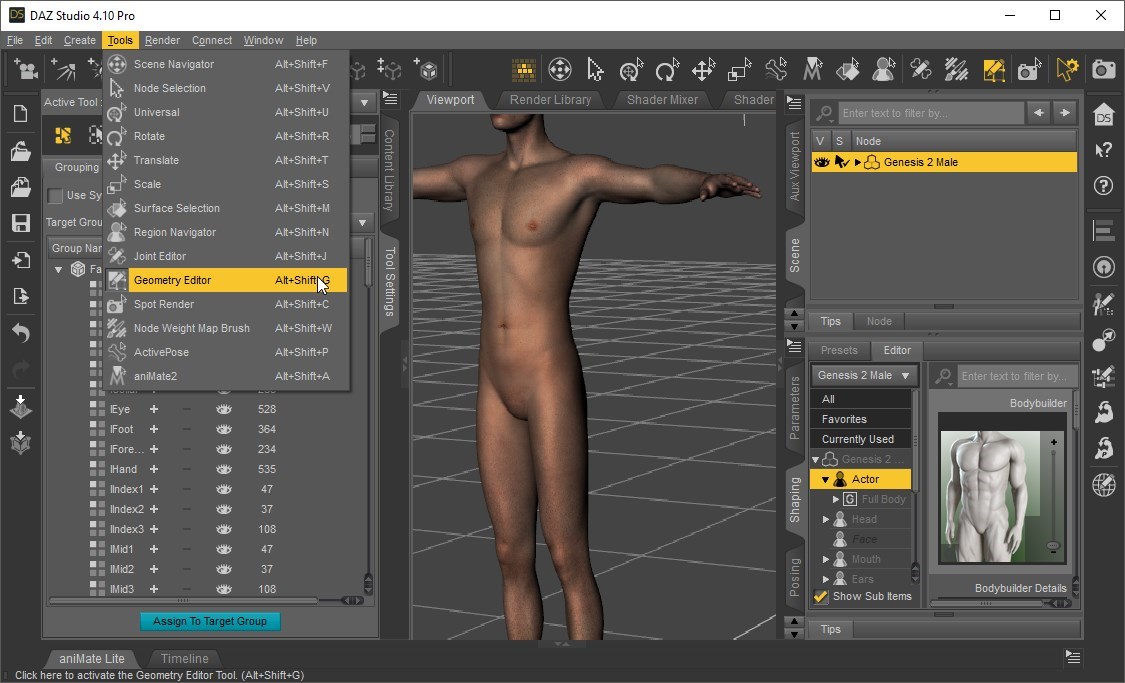
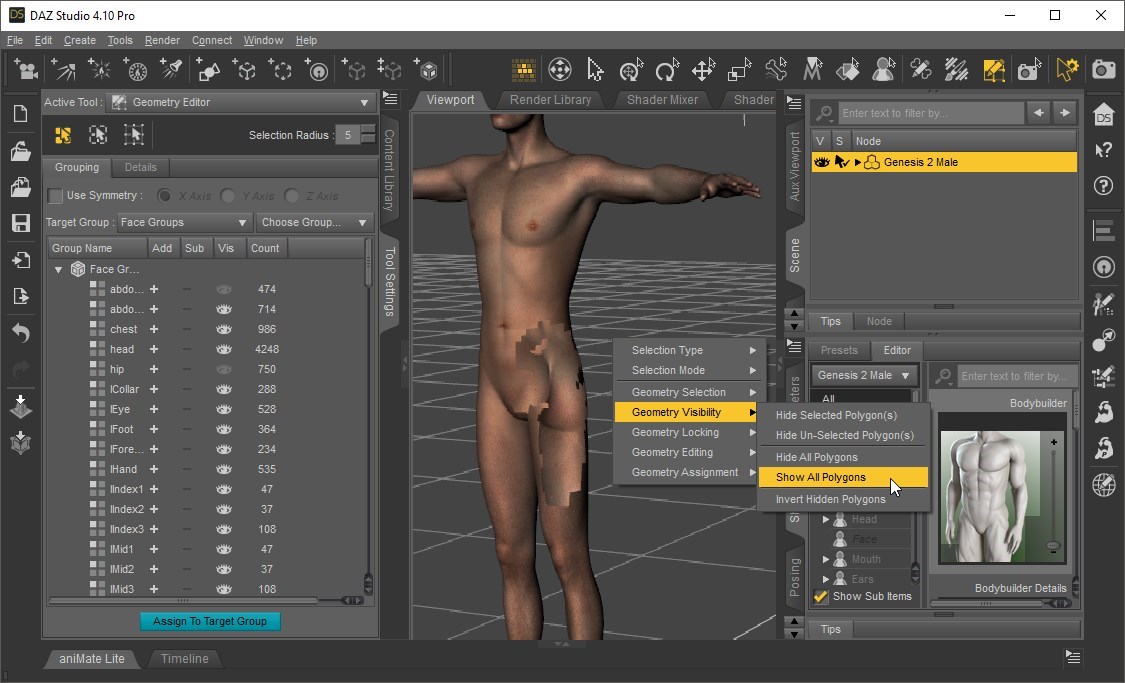
|
|
By lobstermd89 - 7 Years Ago
|
Heck yes, thank you!
|
|
By charleshoover885 - 7 Years Ago
|
Rampa,
You continue to be the absolute best issue solver. Thank you again for sharing your vast knowledge.
Charles
|
|
By AncientWire - 7 Years Ago
|
Thank you so much Rampa. I have been trying to import a DAZ character on and off for about 6 months and it just wouldn't work.
Her feet were turned off when the boots were added!
Thanks!
|
|
By pruiz - 7 Years Ago
|
utRampa (9/29/2018)
I went and dug around a bit . Might have something. Load your figure. Select the Geometry Editor tool. Right-click on your figure and select "Geometry Visibilitry/Show All Polygons"
Rampa - this works really well. But I have a question when I include a geograft of genitalia - on import to cc3 an option for type is given - hair, cloth etc. what should be chosen here please?
|
|
By Rampa - 7 Years Ago
|
|
Choosing cloth would be best, as it will rig to the appropriate bones.
|