|
By PRP1986 - 7 Years Ago
|
So far I’m enjoying all of the improvements for CC3 and everything seems to be working well. One thing that I can’t figure out is how to access the Appearance Editor in CC3.
When I got to Appearance Editor, whilst I can access it for the eyes, teeth, hair and clothing, I cannot do it for the skin/head, for example to edit makeup, scars etc.
Am I missing something or has the process changed for CC3?
Any help would be appreciated - thanks!
|
|
By J__s - 7 Years Ago
|
- Appearance Editor is currently not supported for the CC3 base .
However cloth & CC1 base in content manager should still work as usual.
|
|
By PRP1986 - 7 Years Ago
|
|
Ah great thanks for confirming, I’ll test out the CC1 base tonight after work
|
|
By Rampa - 7 Years Ago
|
That would be the way to do it!
Do your character skin on a CC1 with Appearance Editor base and convert it to a CC3 base.
|
|
By xenoblackinc - 7 Years Ago
|
|
Man this needs to be fixed I'm upset about this not working
|
|
By argus1000 - 7 Years Ago
|
|
Rampa (9/28/2018)
That would be the way to do it! Do your character skin on a CC1 with Appearance Editor base and convert it to a CC3 base.
I've also been having trouble with the appearance editor. It shows up with the CC1 characters, but as soon as I convert it to a CC3, everything I did disappears. Maybe I don't convert it the right way. How precisely do you convert a CC1 character to a CC3 character? Thanks.
|
|
By qbgroupapp - 6 Years Ago
|
Hi,
cc3 latest 3.2 version released Nov. 18th, 2019 (three days ago) still does not have appearance editor.
When will it be included? To use it (we use it a lot) the pipeline is complicated and much more long as we have to use cc2 in the middle.
A fix is really needed as soon as possible, can you let us know something?
Thank you!
|
|
By wires - 6 Years Ago
|
|
qbgroupapp (11/21/2019)
Hi,
cc3 latest 3.2 version released Nov. 18th, 2019 (three days ago) still does not have appearance editor.
When will it be included? To use it (we use it a lot) the pipeline is complicated and much more long as we have to use cc2 in the middle.
A fix is really needed as soon as possible, can you let us know something?
Thank you!
It has been posted several times by various Reallusion staff members that the release is to be expected sometime during Q1 2020, provided that there are no issues that could then delay it until later in the year. :unsure:
In the meantime you can use CC1 characters in CC3 with the Appearance Editor and then simply convert them to CC3 characters, just make sure that you save the modified CC1 character as such in case any changes need to be made.
|
|
By derrekrob - 5 Years Ago
|
Rampa (9/28/2018)
Here's how to use a CC1 base for now: Find the folder containing the CC1 bases, and load one.  Then launch the AE and do your customizing. When you're done, unload the AE (it's the same button you launched it with). Then select the first tab in the Modify panel and click on the convert CC1 to CC3 button. 
This might be an old post and I am sorry to bring out of retirement, but I've tried this and I still cannot launch AE but cc1 substance model female I can launch but its a we bit smaller then the cc3 models
Thanks
|
|
By Rampa - 5 Years Ago
|
The most likely culprit would be that you applied a CC1 morph rather than the "CC1_Substance" base. I actually made a video tutorial a few days ago. It covers using the AE with a "CC1_Substance" base and then converting to CC3 base to use the new Digital Human shaders.
|
|
By deidrereaystudios - 5 Years Ago
|
How the hell years lkater is this still not able to work in cc3?!?!?! Why all the wasted time. You Sell something it should work. Dont even upgrade to cc3 cc4 cc5 until you make something complete. its like leaving a game in alpha testing and moving on to your next game (more so beta testing because you are making so much money)!!!!!!!!!!!
|
|
By animagic - 5 Years Ago
|
|
deidrereaystudios (3/13/2020)
How the hell years lkater is this still not able to work in cc3?!?!?! Why all the wasted time. You Sell something it should work. Dont even upgrade to cc3 cc4 cc5 until you make something complete. its like leaving a game in alpha testing and moving on to your next game (more so beta testing because you are making so much money)!!!!!!!!!!!
This has been explained so many times that it becomes utterly boring...:doze: Since you seem to be a new user stating the obvious, you won't have to wait that long...:P
|
|
By Kelleytoons - 7 Years Ago
|
|
It's coming.
|
|
By Peter (RL) - 7 Years Ago
|
|
eduardo.carvajal.t (9/30/2018)
This need to be fix as soon as possible
Rest assured that CC3 base support for the Appearance Editor will be added as soon as possible. The team are working hard on it.
|
|
By LarryPlane - 7 Years Ago
|
I wasted so much time yesterday trying to figure out where I was going wrong trying to get this 'Forgotten' Feature to work in CC3.
You guys really need to shot these things a little louder so as not to antagonise new users who will be naffed off at time wasted on things like this.
Not supported just doesn't really cut it these days. Hold the product back until ALL the core features are working. That's my advice!
Also, the work around by using CC1 base characters would be fine if it didn't take ten minutes to load a CC1 character into CC3!
Another 'feature'?
|
|
By diana_385401 - 7 Years Ago
|
On a related note, I'm trying to convert an adult character into the child version of himself. Converting CC1 to CC3 then applying the Baby Luna morph works really well except for one little detail ... I can't get rid of the beard! I set beard in AE to "none" and it disappears. I save. I set the CC1 base male sliders to 0. I convert to CC3. And - PRESTO! - the beard is back. I can apply the Baby Luna morph to produce a child of the appropriate proportions, but he just doesn't look like an infant with the whiskers on his face.
Can anyone help?
|
|
By Jbowdoin - 7 Years Ago
|
Peter (RL) (10/29/2018)
eduardo.carvajal.t (9/30/2018)
This need to be fix as soon as possible
Rest assured that CC3 base support for the Appearance Editor will be added as soon as possible. The team are working hard on it.
will the Hivewire skins be supported ?
|
|
By Peter (RL) - 7 Years Ago
|
|
Jbowdoin (12/31/2018)
will the Hivewire skins be supported ?
Yes once converted to CC3 Base.
|
|
By Rampa - 7 Years Ago
|
Here's how to use a CC1 base for now:
Find the folder containing the CC1 bases, and load one.
Then launch the AE and do your customizing.
When you're done, unload the AE (it's the same button you launched it with).
Then select the first tab in the Modify panel and click on the convert CC1 to CC3 button.
|
|
By argus1000 - 7 Years Ago
|
I did exactly like you showed the first time I tried, but , after applying the in AE, the morphs wouldn't transfer to CC3.
Second time I tried, after reading your post, I couldn't only load a CC1 character.after 10 minutes wait, and I couldn't even have access to the Appearance editor. Something is seriously wrong here.
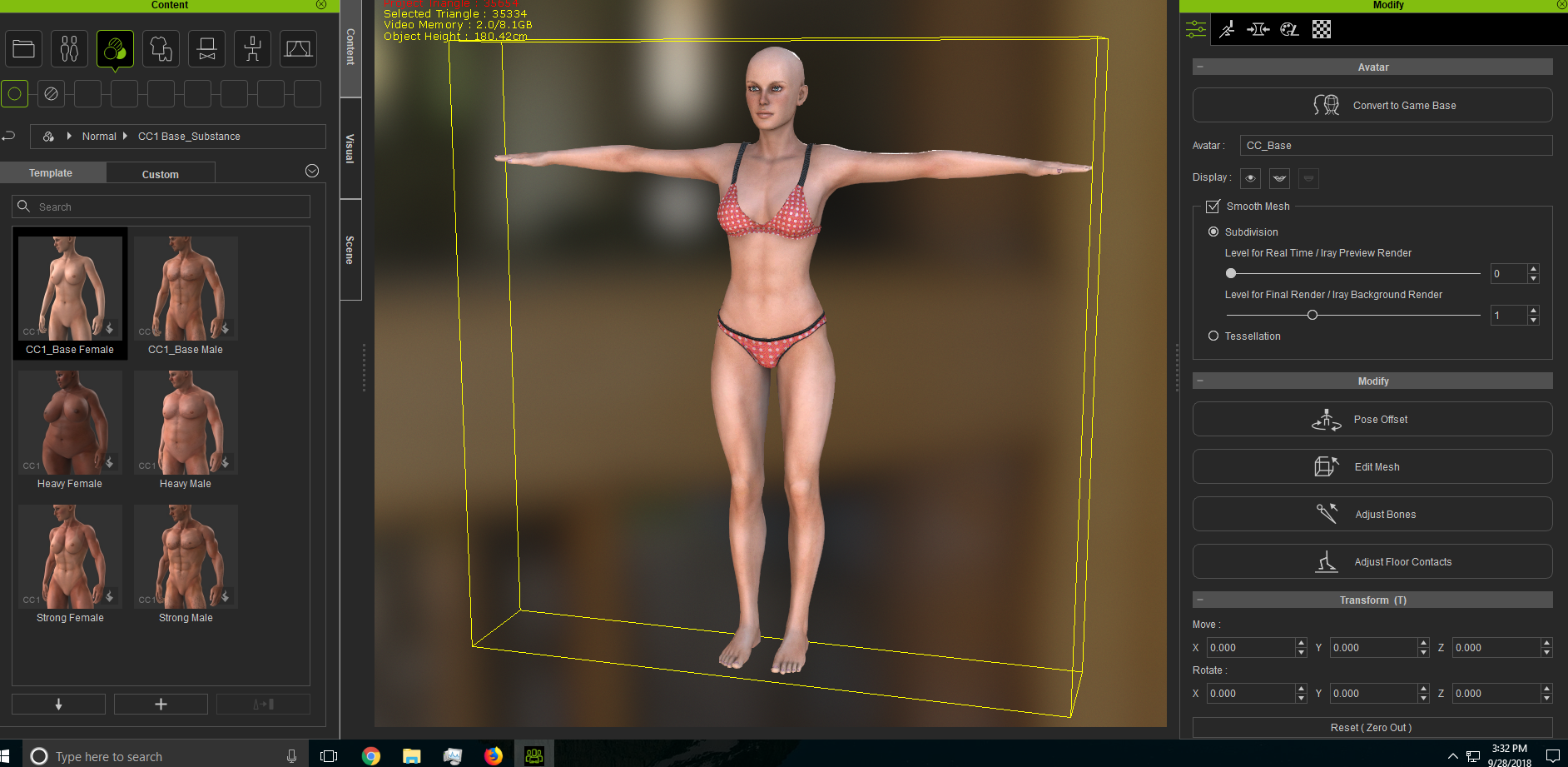 This is what it showed. This is what it showed.
|
|
By argus1000 - 7 Years Ago
|
Never mind. I was just taking my CC1 figure out of the wrong directory. Now everything is fine. I can use the Appearance editor, and then convert the figure to CC3. But it would still be nice to be able to work on CC3 characters directly.
|
|
By eduardo.carvajal.t - 7 Years Ago
|
J__s (9/28/2018)
- Appearance Editor is currently not supported for the CC3 base .
However cloth & CC1 base in content manager should still work as usual.
This need to be fix as soon as possible
|
|
By dante1st - 7 Years Ago
|
|
argus1000 (9/28/2018)
Never mind. I was just taking my CC1 figure out of the wrong directory. Now everything is fine. I can use the Appearance editor, and then convert the figure to CC3. But it would still be nice to be able to work on CC3 characters directly.
Don't forget though that when you do this (converting CC1 to CC3 in the method described), you don't have the option to have the "high res" 4K skin, if that matters to you.
In other words, a "normal" CC3 character will have 4K skin. Converting a CC1 avatar to CC3 will not upgrade/improve the skin, and you will not be allowed to apply this high res skin (error message). This may be obvious to most, but it wasn't to me, and I was disappointed.
The conversion I guess only changes their bone structure, poly count, facial structure (muscles?) to allow for more realistic movements that a CC3 character allows.
|
|
By LogicalWarrior - 7 Years Ago
|
|
argus1000 (9/28/2018)
Never mind. I was just taking my CC1 figure out of the wrong directory. Now everything is fine. I can use the Appearance editor, and then convert the figure to CC3. But it would still be nice to be able to work on CC3 characters directly.
I couldn't agree more with Argus1000! What if we want to actually edit/apply our own makeup scheme(s) to the CC3 Base skins, or even the Hivewire skins for that matter as well? It flags all CC3 Base characters, which is the primary inconvenience.
So, even with using the CC1 conversions, you're still only getting the CC1 textures, not the CC3 textures. You can use the morphs, but it still won't be the authentic skins. That's what makes the difference!
|