|
By Data Juggler - 7 Years Ago
|
This is going to sound like what my ex wife used to complain about, but it's too small!
I created a character in Character Creator, and when I exported him into my scene, he is about the size of a doll compared to a human.
The desk he is supposed to stand behind is twice as tall as my character.
Why is the Scale feature missing?
Thanks

|
|
By Delerna - 7 Years Ago
|
Maybe its not the character that is too small.
Maybe it is the plane that you put the image on that is too big?
Anyway, You can scale the character in CC with the morphs How big you will be able to scale him is a question? I have made them fairly big and fairly small but I have never needed to scale them that big.
Try reducing the size of the plane to fit the character rather than the character to fit the plane
|
|
By Data Juggler - 7 Years Ago
|
It's not just the character, it's the whole scene I have to resize.
How do I scale it in IClone in case that works, that seems faster than redoing the entire scene.
Thanks
|
|
By kungphu - 7 Years Ago
|
DJ,
Seems like you have quite the sense of humor. Hopefully you can make some vids showing it off! It’s weird for CC figured in iclone, but it is still there and actually quite better than the scale function for other figures. Kinda hard to see but if you go to th avatar page in the action for foot/hand contact, next to auto link is the body scale function. You can make the characters huuuuuuuge if you want. If your case I’d scale the character and leave the set alone (less work). Did you import the set via 3D exchange? If so there is a button to display a sample figure for scale. Be sure to scale your set to suit by using the yellow figure it helps! Best of luck.
|
|
By Delerna - 7 Years Ago
|
You shouldn't need to rebuild the whole scene.
This is what I would do. Might have explained it to detailed for you but thought it may help other people too
This scene is too small for the character so I attached all the props together
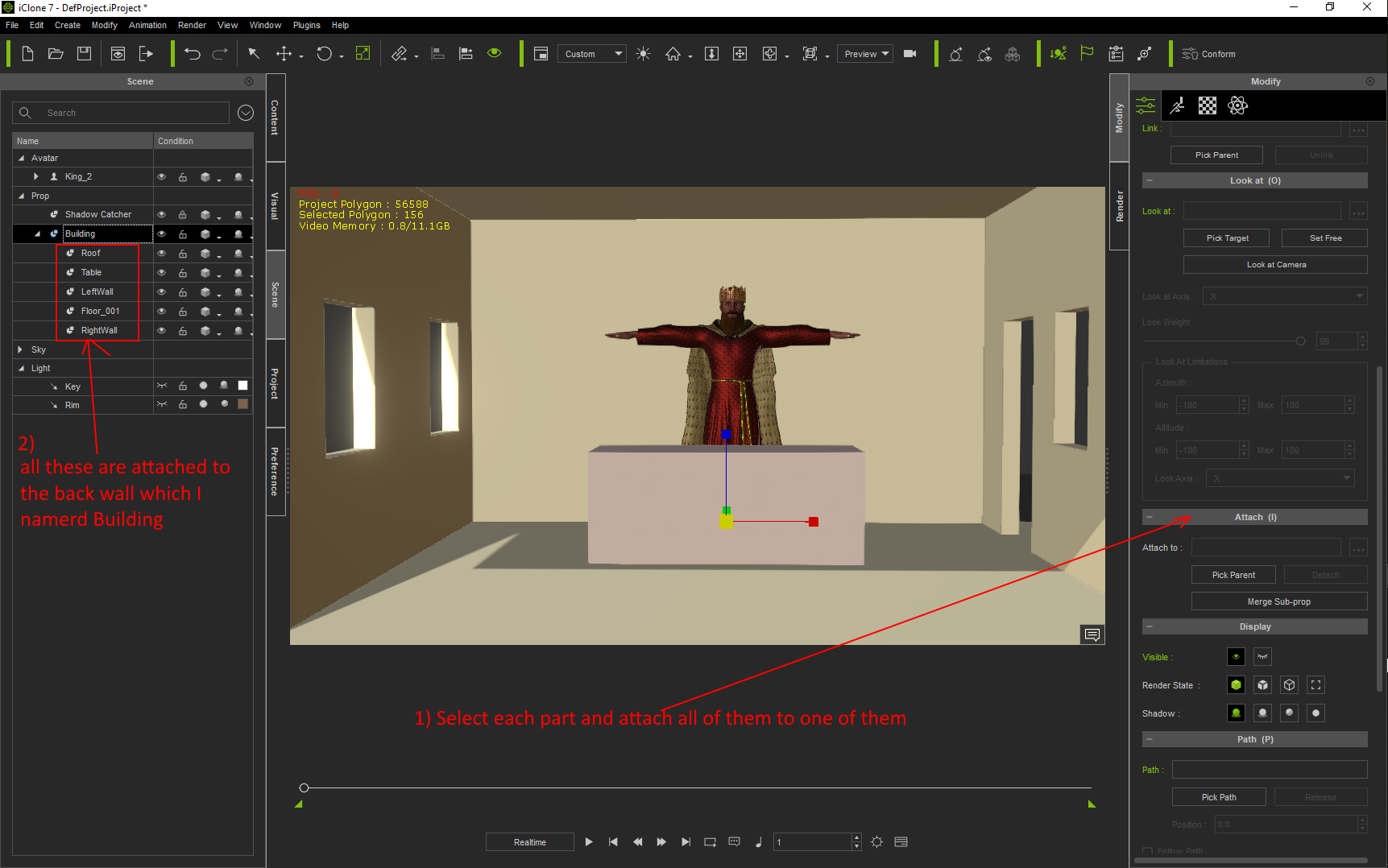
Now I can select the one all the contents are attached to and scaling it will scale all of them and keep them all positioned correctly
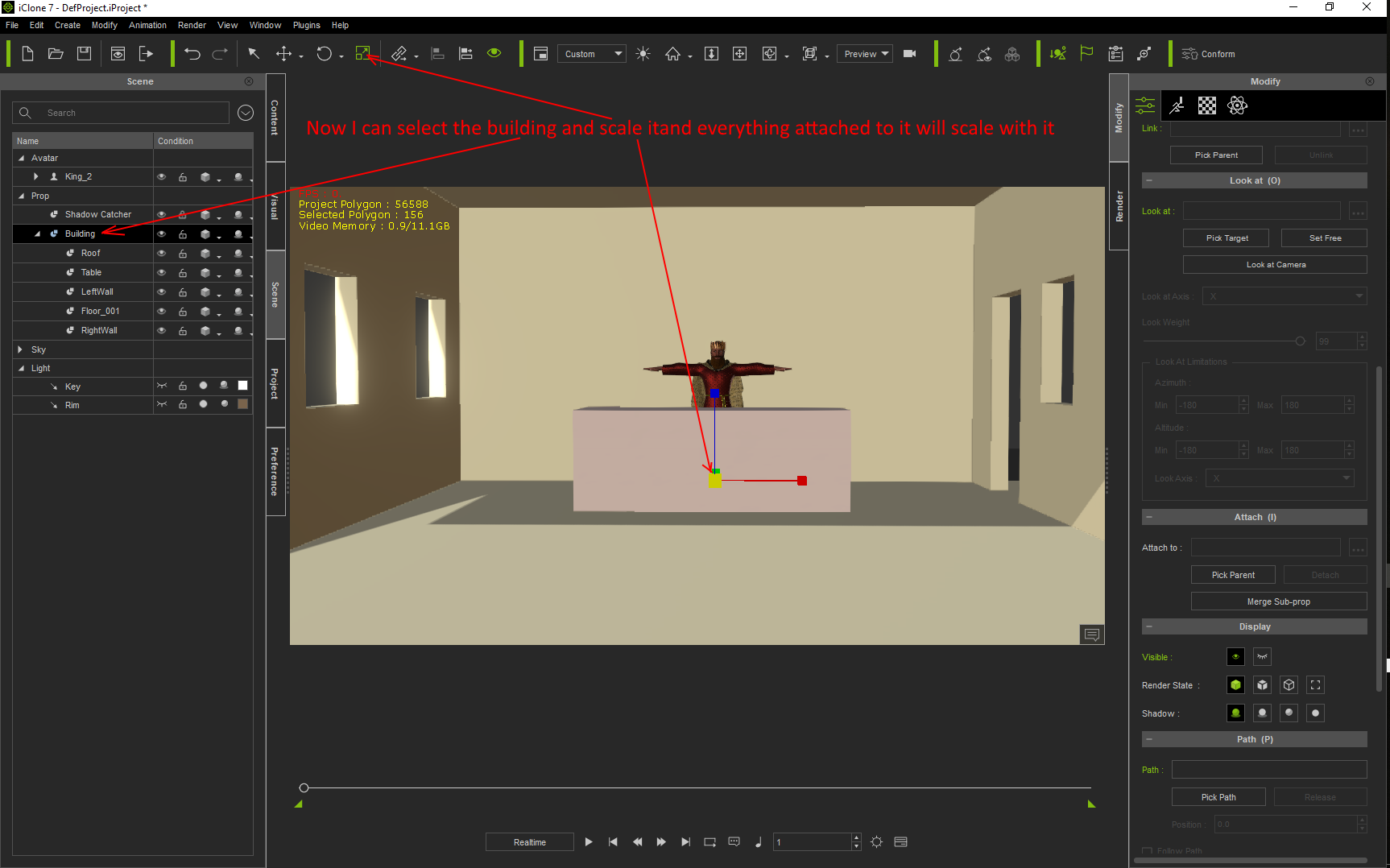
If you really want to scale the character then end him back to CC and leave him selected in iClone.
That way you can scale him in CC and send him back to iClone and because the original is still selected in CC he will get replaced by the rescaled one. Also any animations you had on the original character will still be there on the rescaled character.
However, that means to me that every character you add to the scene will now need to be scaled. Better off making the scene scaled to the default characters I think. But that's just my opinion
|
|
By Delerna - 7 Years Ago
|
|
I'm checking Kungphu post because if that's possible then I have learnt something
|
|
By Delerna - 7 Years Ago
|
Yep, finally found it but took a bit of searching to find what you said in the characters modify panel right at the top.
Never noticed that till you mentioned it.
Now I don't understand why reallusion just didn't allow the scale button to be enabled.
I guess its so we can only scale the character completely so they can't be scaled in width or height only?
|
|
By Data Juggler - 7 Years Ago
|
Thanks for all your replies. I had to finish another project for my programming hobby as I spent all last weekend on IClone.
I already resized my scene, but I will try KungPhu's suggestion so I know. His video is amazing, by the way. YouTube is so bad at recommending good content, that video should have way more views. Kind of discouraging to see better than I hope to achieve not get a lot of views.
[Being Self Plug]
I am not sure if animators will find this useful or not, but I am releasing a program to the Windows Store in the upcoming weeks. This program is called Transparency Maker,
if you ever need to make a background transparent or do some updates in a way that most graphics programs can not do, I would like some opinions on this if you think it seems useful to you.
I am looking for a few beta testers, or even just people to say 'That looks stupid' so I can move on to something else. Thanks
https://youtu.be/DYoLx7DYVu0
[End Self Plug]
|
|
By kungphu - 7 Years Ago
|
Yeah it's cray weird how the scaling tool is hidden. Forgot who helped me out with that. I didn't find it on my own! It was someone here on the forum that pointed me in the right direction. Many thanks for the compliment DJ! Honestly I'm still a newbie at iclone. I'm learning things everyday! Just force yourself to do a project and you'll learn all sorts of stuff when you hit a road block and wonder hmmmm how do I??? And this forum is full of helpful people that will point ya in the right direction. Best of luck and be sure to pblish your vid, we all love to see what people are doing!
|
|
By Data Juggler - 7 Years Ago
|
Kungphu, do you do your own voices?
That is the hardest part to me (not sounding like squeak squeak). I know a narrator I can pay, but I am surprised how poor quality text to speech narration software is in 2018 for sounding realistic. I have found a few female voices that sound ok for some text, but male voices come out sounding like the Anonymous voice or a robot.
This is why I am 100% against self driving cars until narration is indistinguishable from a human..
|
|
By animagic - 7 Years Ago
|
|
In case you are not aware of this: units (X, Y, Z) in iClone (and 3DXchange) are centimeters. This may help with scaling and determining dimensions.
As already mentioned, imports from 3D Warehouse may or may not be scaled correctly, so it's best to adjust the scale in 3DXchange if needed.
|
|
By Data Juggler - 7 Years Ago
|
|
Good to know about centimeters. I didn't have an issue due to a conversion error though; I just scaled everything bigger in IClone to give me more room, yet this didn't seem to accomplish anything.
If you woke up tomorrow as a giant, and all of your furniture and gravity all scaled the same, would be able to tell?
|
|
By kungphu - 7 Years Ago
|
|
Ha! Such deep thought. Wonder if you woke up a giant of your skin would feel tighter???:) yep I do my own voices. Oh! I do have a buddy that helps me too. We write the scripts then throw different voices out till we find one we like for each character. Fun stuff for sure!
|
|
By Data Juggler - 7 Years Ago
|
If you ever want to do some voices, or even some animation for hire, I have more money than I have animation skills.
Comedy writing is what I really enjoy. That is why I like animation so much, I can create a scene in a day or so and I am new at this, versus to create a set in the real world takes construction and permission to film and all kinds of effort.
Plus animated characters can be any age, or even immortal, and changing your appearance is a few mouse clicks.
|
|
By kungphu - 7 Years Ago
|
|
I'm always game for another project. I have two scores to pump out this week and that's about all until my next 48hr film festival. No sleep for two days! But what a rush :)
|
|
By Data Juggler - 7 Years Ago
|
Ok, let me finalize a script I am working on; next week I will be busy with my pesky day job (that pays all my bills and I am thankful to have it), but by next weekend I should have it finished.
Thanks,
|
|
By justaviking - 7 Years Ago
|
animagic (7/22/2018)
In case you are not aware of this: units (X, Y, Z) in iClone (and 3DXchange) are centimeters. This may help with scaling and determining dimensions.
As already mentioned, imports from 3D Warehouse may or may not be scaled correctly, so it's best to adjust the scale in 3DXchange if needed.
The grid (Ctrl-G) in iClone is displayed in meters, so that will quickly tell you if your character is 10x or 1/10x the normal size.
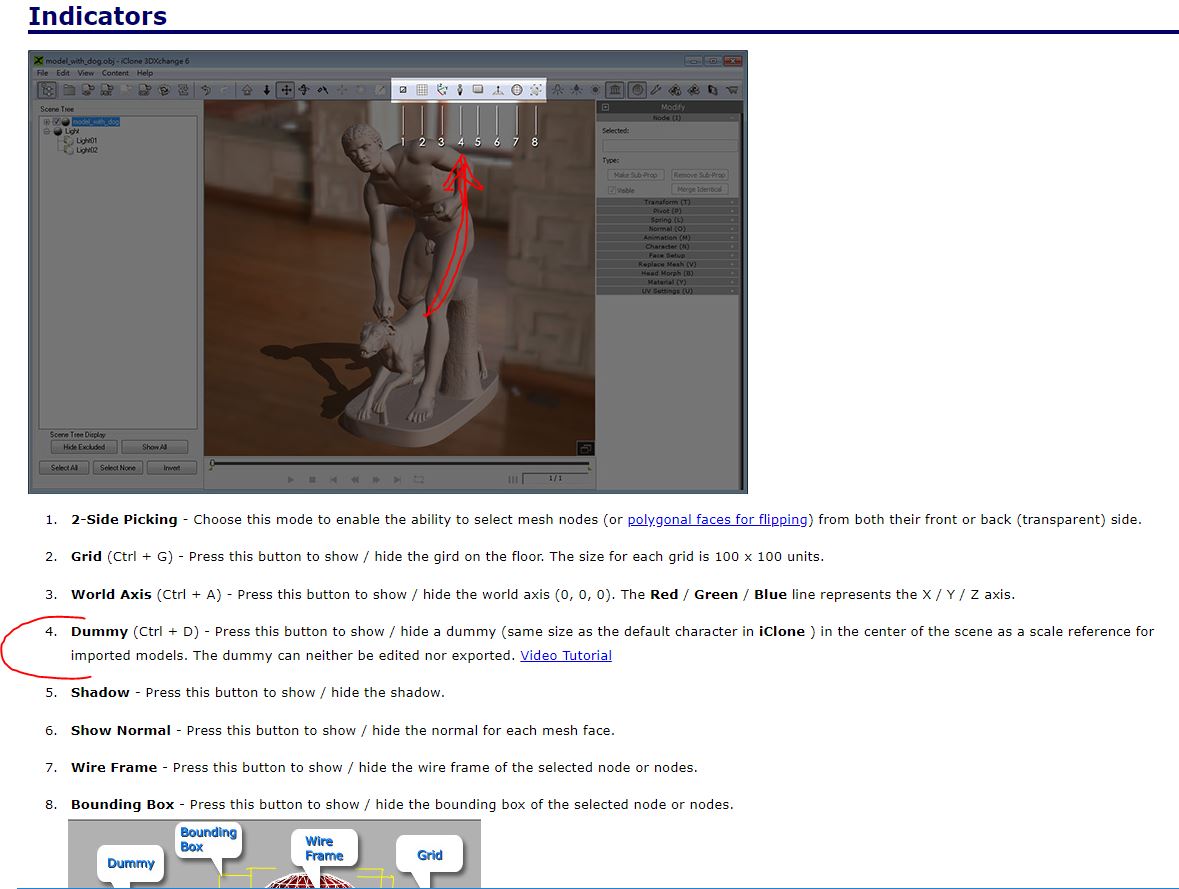
And as was mentioned earlier, you can turn on a "person icon" in 3DXchange to verify that things are at least approximately the right size.
Lastly, I too enjoy doing voice-overs and stuff, so you may put me on your list of candidates.
|
|
By Data Juggler - 7 Years Ago
|
|
Ok, more help is definitely welcome.
You can email me at corby@datajuggler.com
Please include rates, and samples if you have anything you want to share.
|
|
By Data Juggler - 7 Years Ago
|

Actually I created the set myself. I found the desk was the only thing I imported.
I purchased a Stock Photo for the walls, since I have to use my Shutter Stock credits or lose them. I love IClone for set creation. This is just what I needed.
Placing stuff just where you want is easier said than done sometimes.
I just found the Avatar Proportion Button, is this what you were talking about? This works exactly what I need, I just check the box at the bottom for Scale X Y Z so they all stay together:
It is strange; if I export a character from Character Creator, I only get the Body Scale as shown here:
The character I imported had an Avatar Proportions buttons, does anyone know why IClone treats these two differently?
Thanks

|
|
By 4u2ges - 7 Years Ago
|
The one that has an Avatar Proportion button is an older G5 character (from iClone 5 era). Suppose this is the one you have purchased from marketplace.
|
|
By justaviking - 7 Years Ago
|
This is the "size reference" in 3DXchange that I was talking about.
|
|
By Data Juggler - 7 Years Ago
|
I just checked and Character Creator Essential Clothing & Essential Morphs & Skin was included with my purchase, I just hadn't installed it yet.
I was logging into the store to buy, and noticed an add for the Pro version said included 'Character Creator Essentials Complete' or something, so I went and looked and the download is buried on the Order page, if you click View Details.
Saved me some money I was going to spend tonight! I also found a $20 when I put on a pair of shorts. It was always my money, but I still feel like I won something. People that are really organized never get to experience finding your own stuff.
|