Is there a plain pocket t-shirt available for CC


https://forum.reallusion.com/Topic373003.aspx
Print Topic | Close Window

By theschemer - 7 Years Ago
I was looking for a plain Hane's style pocket t-shirt with the round neck or collar but could not find one. I have a lot of t-shirts for the old version G5 etc but can't use them with the CC characters. Can someone make a regular pocket t-shirt and put it in the marketplace? Just a plain base would be fine.
Thanks,
TS
By Kelleytoons - 7 Years Ago
If you could settle for a v-neck I did find one at Daz that would work.

It's very odd that it's so hard to find any pocketed t-shirts (perhaps that has gone *way* out of style).  If you were artistic enough you could do this yourself with maps (I'd give it a shot but I'm so far from artistic it isn't even funny).
By gcshep - 7 Years Ago
you might find something here 
https://www.wilmapsdigitalcreations.co.uk/introduction.php
Best Regards
George.

By Kelleytoons - 7 Years Ago
I did this in about five minutes (from the Daz shirt):

https://forum.reallusion.com/uploads/images/ca770565-4a10-415e-906b-ceea.png
By Rampa - 7 Years Ago
You could use one of the decal pockets on the plain t-shirt.
By Delerna - 7 Years Ago
And some more options.
Load a Plain Base tShirt that comes will CC. Send the Diffuse map to a 2D tool. I used Kritta here. And Draw a pocket shape on a new layer.
Save it and it updates CC, move scale and adjust its colors until happy. Just need to change something and save it to update CC so you can see how it looks.
These 2 took me about 5 minutes (they are pretty simple)
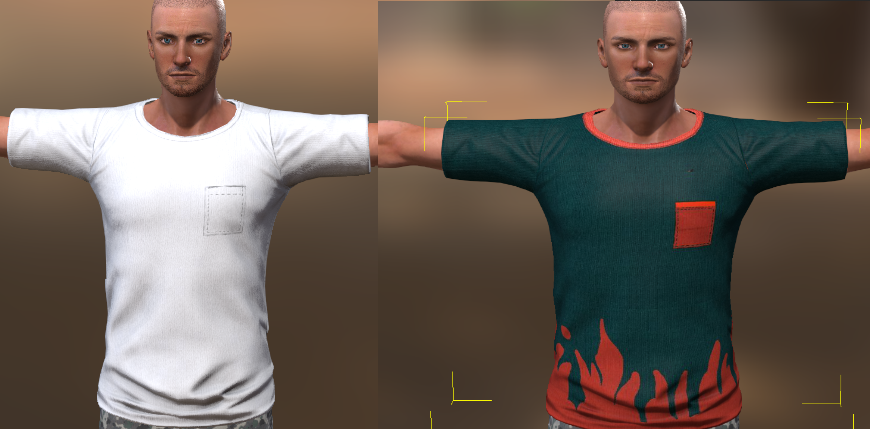
https://forum.reallusion.com/uploads/images/7ba96f69-1ff3-4d20-bc26-1978.png

and of course if you want something easy but looks good you can go to google do a tShirt pocket search and copy one you like.
Past it into a layer in the 2D editor. Use rubber tool to remove everything not needed. Scale and move it and save so it updates CC for checking.
This one took me 2 minutes
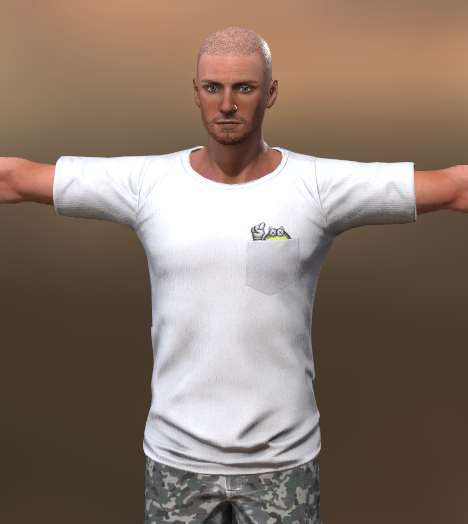
https://forum.reallusion.com/uploads/images/91afc691-9e4d-4658-ac31-b516.png


UPDATE
Of course cant sell that one gotten from google but fine for personal use.
You can use them as a guide for drawing your own though


By theschemer - 7 Years Ago
Kelleytoons (7/7/2018)
If you could settle for a v-neck I did find one at Daz that would work.

It's very odd that it's so hard to find any pocketed t-shirts (perhaps that has gone *way* out of style).  If you were artistic enough you could do this yourself with maps (I'd give it a shot but I'm so far from artistic it isn't even funny).


I thought it was odd too. :) I really want the round neck like the real t-shirts.
Thanks

By theschemer - 7 Years Ago
gcshep (7/7/2018)
you might find something here 
https://www.wilmapsdigitalcreations.co.uk/introduction.php
Best Regards
George.


Thanks but I didn't find any there. ;)

By theschemer - 7 Years Ago
Kelleytoons (7/7/2018)
I did this in about five minutes (from the Daz shirt):

https://forum.reallusion.com/uploads/images/ca770565-4a10-415e-906b-ceea.png


Look ok for a quickie but I don't like the v-neck. The pocket is a little small but that could easily be adjusted.
Thanks

By theschemer - 7 Years Ago
Delerna (7/7/2018)
And some more options.
Load a Plain Base tShirt that comes will CC. Send the Diffuse map to a 2D tool. I used Kritta here. And Draw a pocket shape on a new layer.
Save it and it updates CC, move scale and adjust its colors until happy. Just need to change something and save it to update CC so you can see how it looks.
These 2 took me about 5 minutes (they are pretty simple)
https://forum.reallusion.com/uploads/images/7ba96f69-1ff3-4d20-bc26-1978.png

and of course if you want something easy but looks good you can go to google do a tShirt pocket search and copy one you like.
Past it into a layer in the 2D editor. Use rubber tool to remove everything not needed. Scale and move it and save so it updates CC for checking.
This one took me 2 minutes
https://forum.reallusion.com/uploads/images/91afc691-9e4d-4658-ac31-b516.png


UPDATE
Of course cant sell that one gotten from google but fine for personal use.
You can use them as a guide for drawing your own though


Well that is what I needed. :hehe: I looked for the base shirt but missed it by this much...Now I look again and I find it. I can definitely do what I want with that. Every now and then I have trouble finding things in CC and IClone but in the end they are always there. Thanks for all the feedback and help guys.

By theschemer - 7 Years Ago
Rampa (7/7/2018)
You could use one of the decal pockets on the plain t-shirt.


Thanks Rampa, I will check that option out too. Now that I found the base t-shirt with the round neck I think my problem has been solved.