|
By bluebuxton - 8 Years Ago
|
Just discovered MakeHuman - it's great - but which are the best export settings (in MakeHuman) to get 3DXchange to accept the figure and convert it with the most animatable options - e.g. face and hands?
thanks
|
|
By hirospot - 8 Years Ago
|
|
@ bluebuxton Re: MakeHuman Export settings for 3DXchange Just downloaded the MakeHuman V1.1.1 and worked for your question.
Export settings for 3DXchange are practiced as shown below: 1. Go to Pose/Animation/
Tag filter: Facial Bones, Detailed hands, Detailed feet → Rig presets: Default (163 Bones)
2. Select Pose
Tag filter: Rest poses → T-Pose
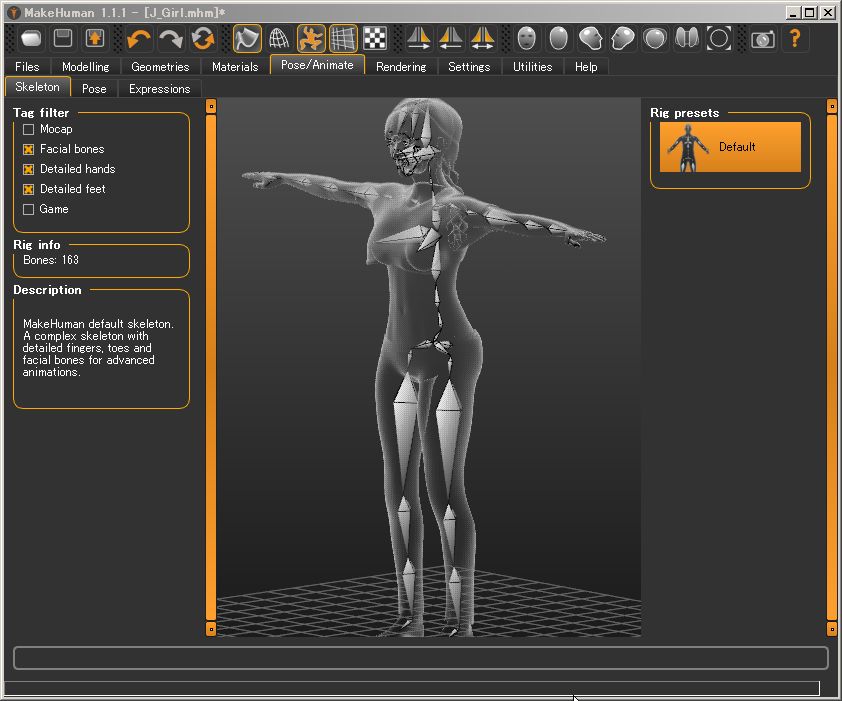
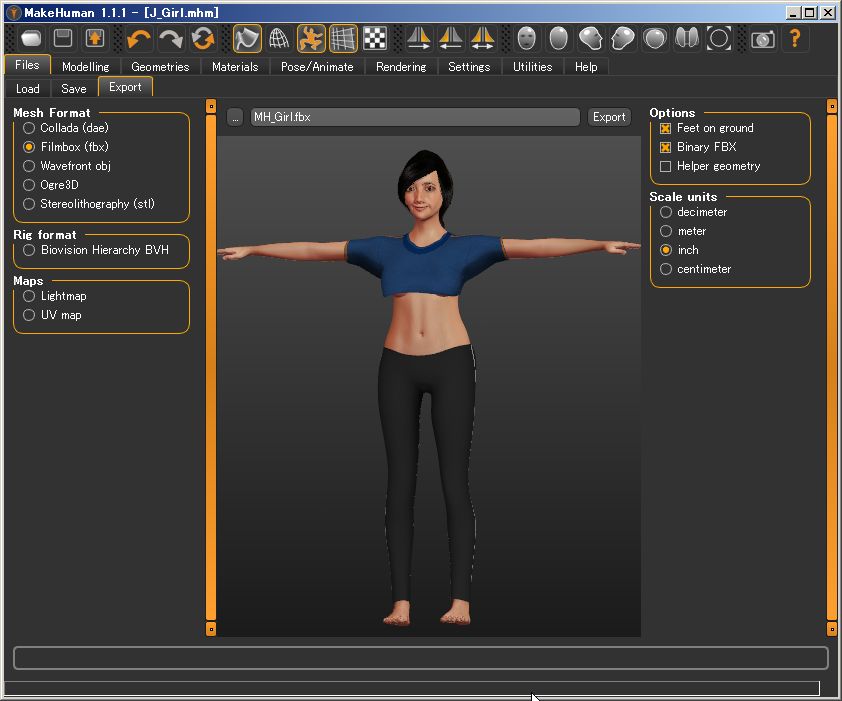
3. Reccomended Export Settings
Under [Export] tab:
① Mesh Format: Filmbox(fbx)
② Option: Feet on ground、Binary FBX
③ Scale Unit: Inch
Select folder and push [Export] button.
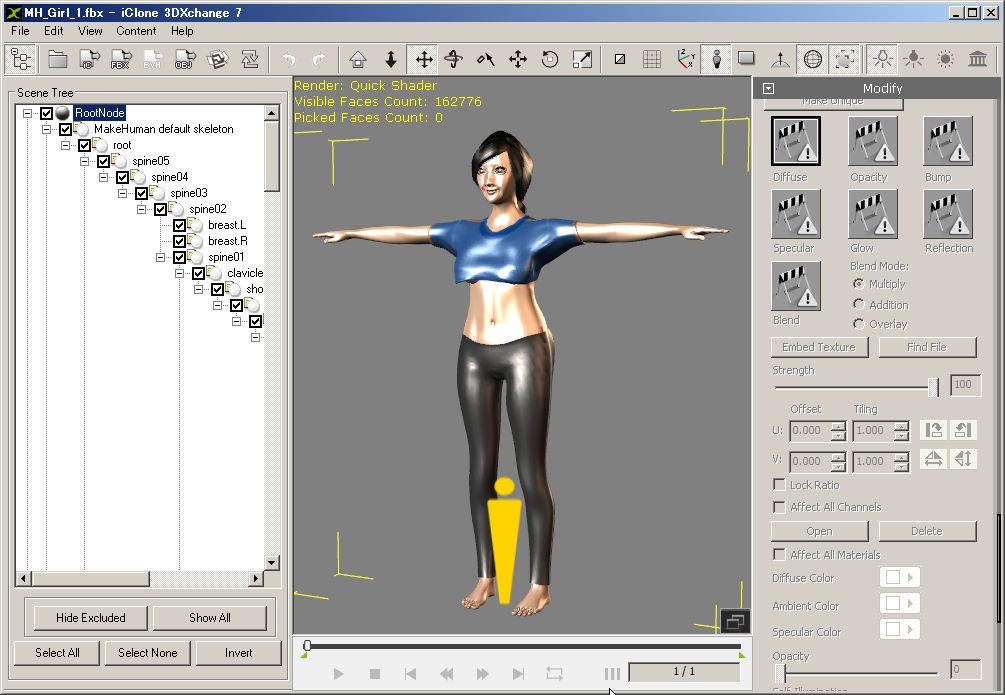
4. Open the FBX file at 3DXchange7:
Sample J_Girl=162,776 Faces Count
① Set the scale=28.5
② Adjust Specular and other parameters for all textures.
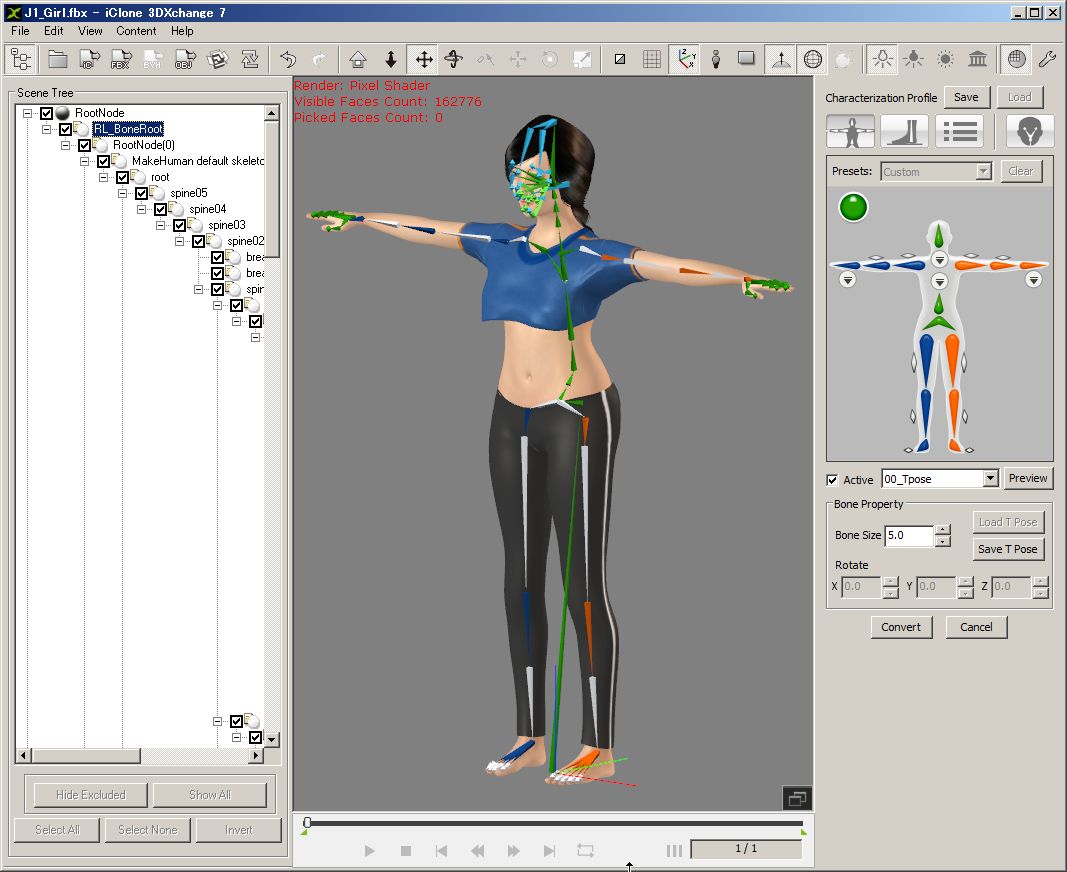
5. Bone mapping:
The mapping is shown below. Fig4 body, Fig5 hand , Fig6 face
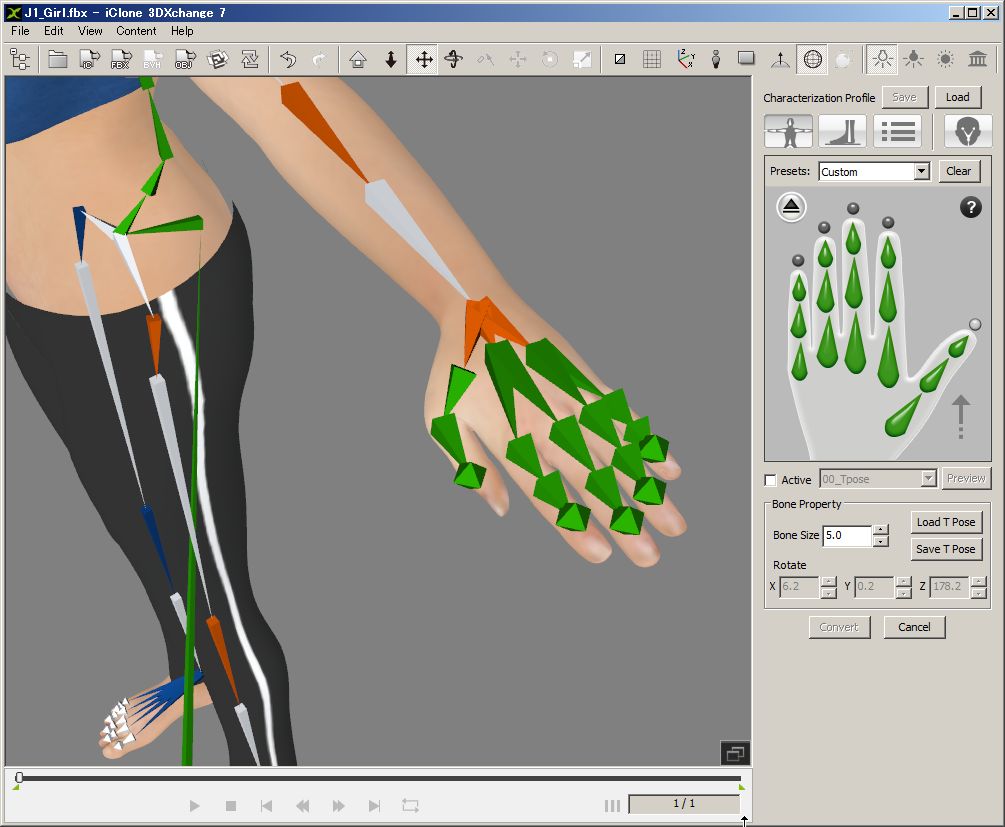
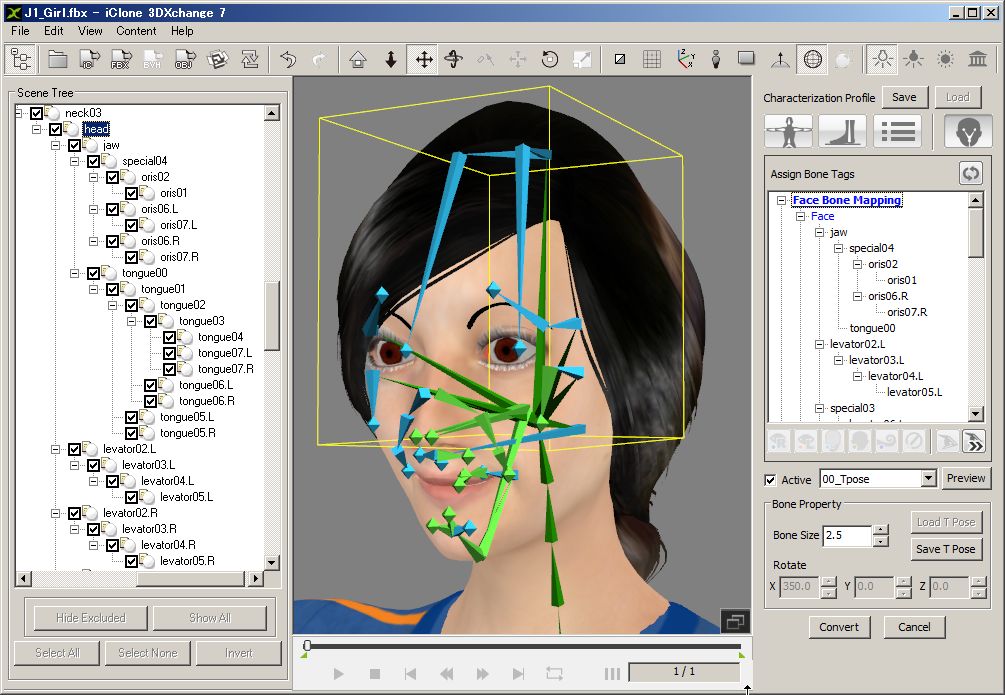
That's all for today.
Thank you, Hiro Nakazawa
|
|
By troycarpenter7 - 7 Years Ago
|
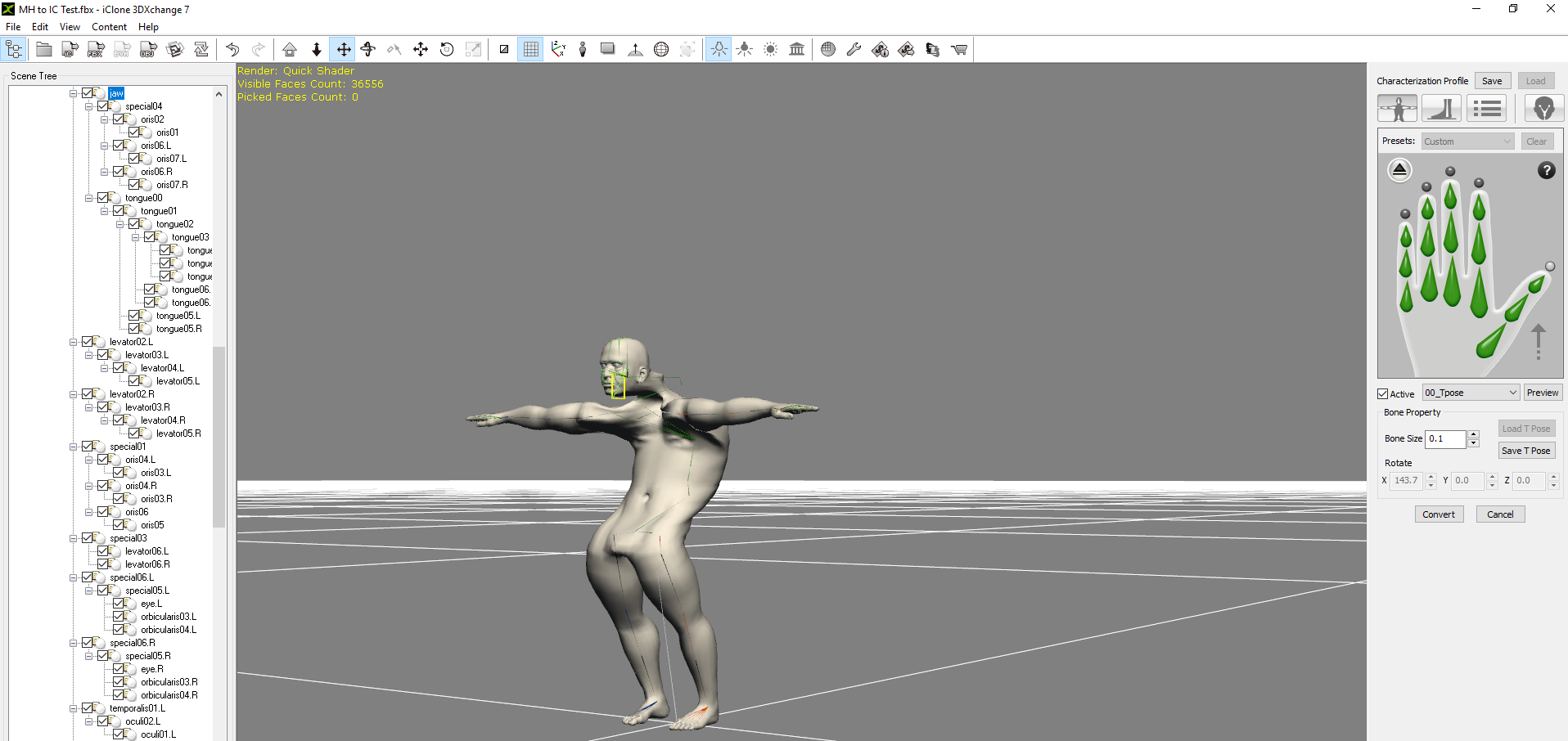
I seem to have a problem with my spine and neck. There are more slots for spine and neck in 3dexchange than MakeHuman. Could you please show the correct mapping for these two areas.
|
|
By The-any-Key - 7 Years Ago
|
troycarpenter7 (4/24/2019)
I seem to have a problem with my spine and neck. There are more slots for spine and neck in 3dexchange than MakeHuman. Could you please show the correct mapping for these two areas.
I can't stop laughing :-)
|
|
By troycarpenter7 - 7 Years Ago
|
|
It is like he tried lifting something against his doctor's wishes. BTW this issue has not been resolved.
|
|
By Rampa - 7 Years Ago
|
The pictogram has enough bone slots to accommodate all types of skeleton rigs. If your skeleton has fewer, and it usually will, start from the bottom in the pictogram and work your way up. Don't skip bones. You will end up with empty ones at the top of spine and neck, and it's normal.
Looks like you probably have the wrong bone for the hips or lower spine. The bone to assign as hips is the one after the one that comes up from the floor. You can click on bones in the scene manager panel instead of clicking on them in the main window, if you need to.
|
|
By troycarpenter7 - 7 Years Ago
|
|
Thanks, this solved some of my problems. You told me which bone to assign my hips to but not the the big spine slot available from the full body view. Also it doesn't appear the Make Human skeleton has just one bone for the toe base for each foot. The feet bend upward when the "active" checkbox is checked.
|
|
By hirospot - 7 Years Ago
|
|
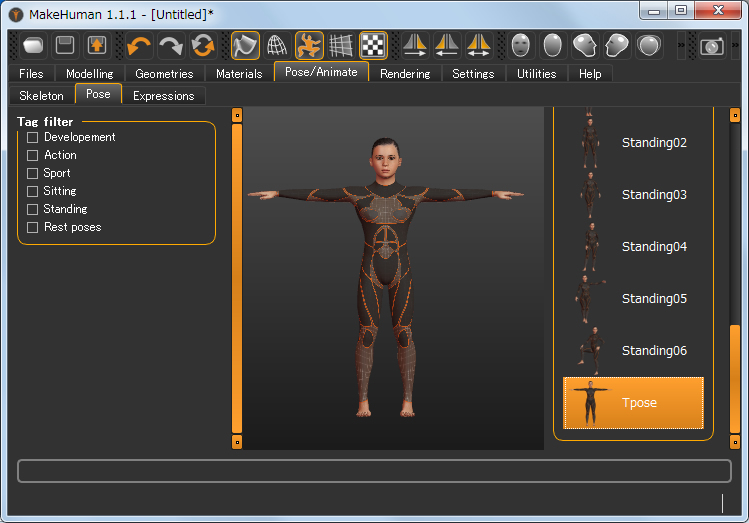
MakeHuman Model Test Please confirm my test, MakeHuman Model to 3DXchange7. Test Model at MakeHuman,
Fig1 Select Cmu mb for Rig preset
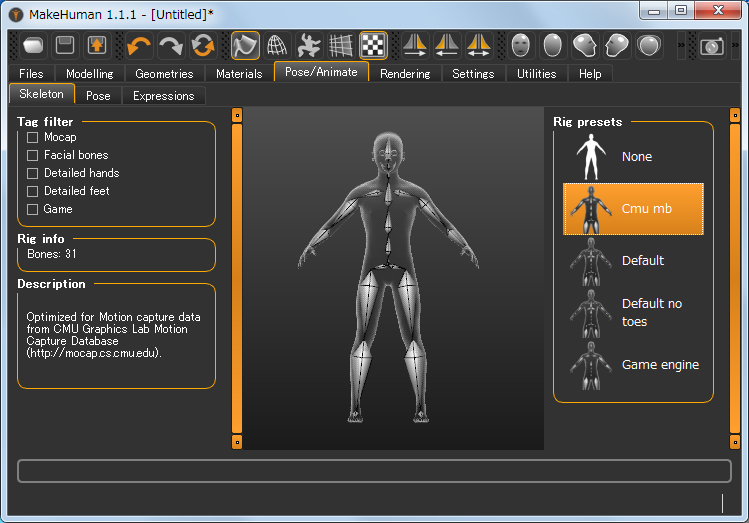
T-pose
Fig2 Set the Test model and make a T-pose
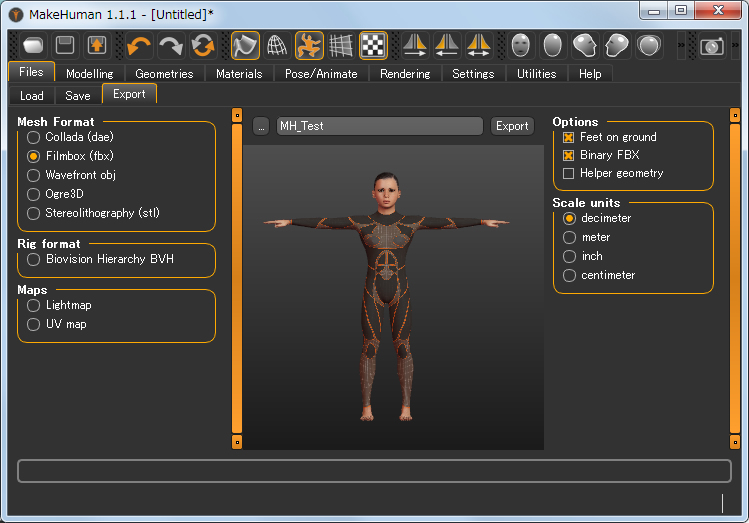
 Export
Fig3 Select FBX, Feet on ground and decimeter.
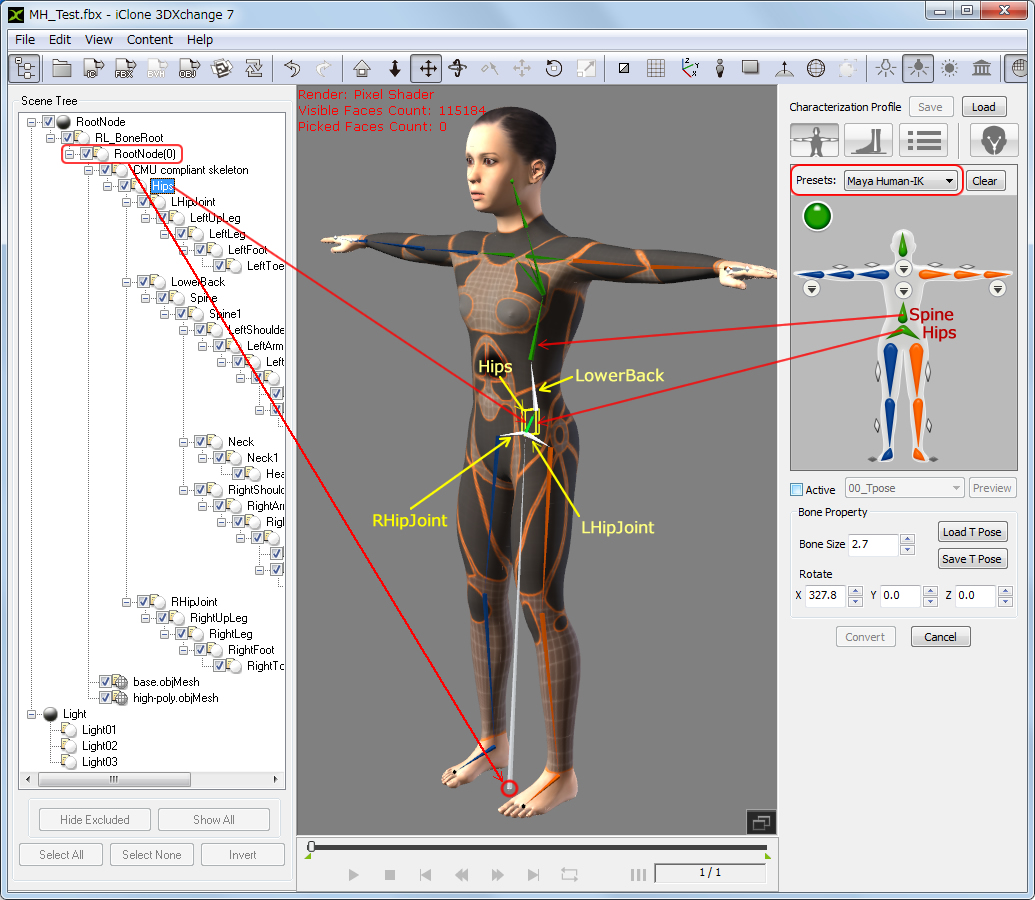
 3DXchange
Fig4 Select Maya Human-IK Presets at Characterization Profile or you can map manually:
Confirm the bone location of 「Hips」 of MH model.
Connect 「Hips」 of RL bone to 「Hips」 of MH model.
Do not map to 「L/RHipJoint」.
No need to map to 「LowerBack」
Big center bone is the 「RootNode(0)」 (No need to map this time)
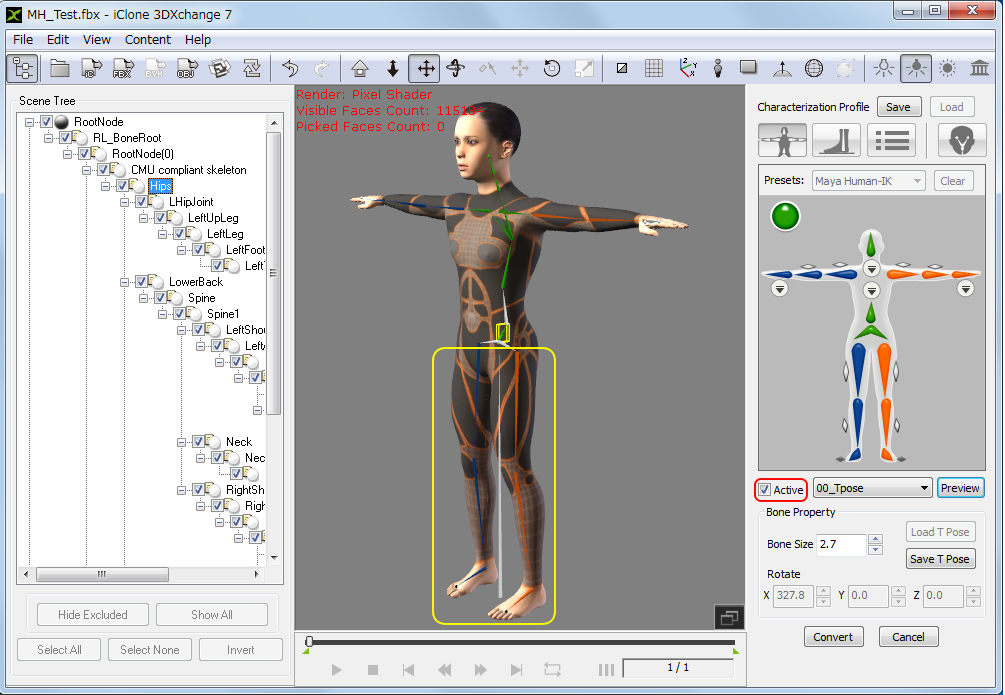
 Check in Active box
Fig5 Feet bend change does not happen.
Thank you,
Hiro
|
|
By charly Rama - 7 Years Ago
|
The-any-Key (4/25/2019)
troycarpenter7 (4/24/2019)
I seem to have a problem with my spine and neck. There are more slots for spine and neck in 3dexchange than MakeHuman. Could you please show the correct mapping for these two areas. I can't stop laughing :-)
Really great this avatar :D:D:D
|
|
By troycarpenter7 - 7 Years Ago
|
|
I notice the Cmu mb armature is missing some finger and facial bones. I need these for the lengthy animation project I am working on. Is there any way to include them?
|
|
By hirospot - 7 Years Ago
|
|
@ troycarpenter7 Please select「Default」at Rig preset which has finger and facial bones.
fig 1 MH Default Model: Use root bone for hips
fig2 Face Bone Mapping
fig3 Expression Editor: Use Rotate and Move Object tools
fig4 Eye Settings
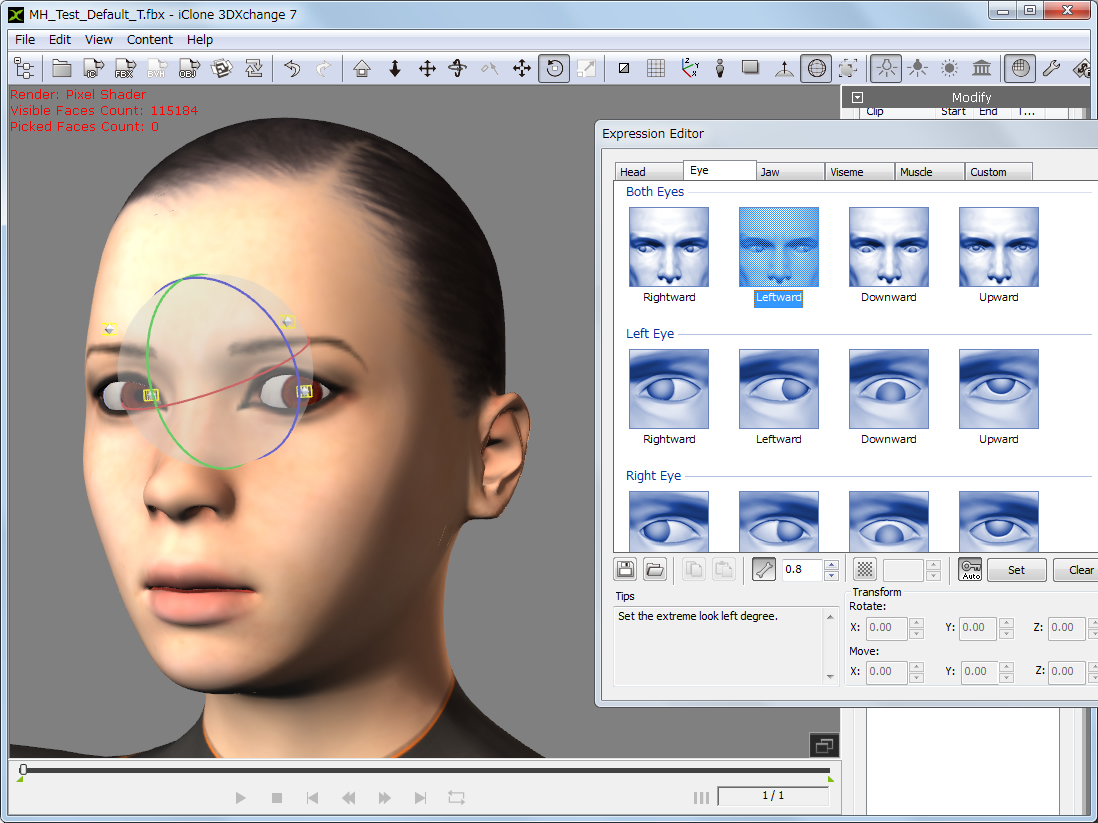
Thank you, Hiro
|
|
By troycarpenter7 - 7 Years Ago
|
|
Thanks this helps. I am now having trouble with the face bone mapping. Could you show more of the face bone mapping hierarchy please. My bones are also pyramids and not sticks like in your picture.
|
|
By hirospot - 7 Years Ago
|
|
Re: MH Sample model Head Mapping in 3DXchane7 Please check my MH head mapping step for your reference. This is one of the case and bone structure varies by models. The best way is to use the same model for mutual discussion. 1. Finish all the body mapping first. 2. Click on the ’head’ name in the Scene Tree (to find the head bone in the 3D view), then
push 'Head' in RL Bone, then push the 'head' name again to map.
3. Check 'Active' to make all bones in the head part active.
4. Click 'Face/Extend' icon to switch to the Face Bone Mapping mode, and select 'jaw' in the Scene Tree.
All head bones are organized in the right table of 'Assign Bone Tags', so no more need to look into Scene Tree.
5. Click 'Map to Jaw' icon as shown below and push 'reset' icon.
Jaw bone color changes to the blue.
6. Select jaw bone and rotate to confirm the jaw movement.
Proceed the similar process for the other head part in the Face Bone Mapping mode.
Please check the tutorial below [Mapping Facial Bones].
|
|
By troycarpenter7 - 7 Years Ago
|
|
Thank-you this worked. Now time for a lot of grunt work in the expression editor to make the visems and face muscle motions.
|
|
By animagic - 7 Years Ago
|
|
troycarpenter7 (5/8/2019)
Thank-you this worked. Now time for a lot of grunt work in the expression editor to make the visems and face muscle motions.
I don't know if you're aware of this, but once you have completed this for a MakeHuman character, you can save the configuration as a profile and apply it to other Make Human characters (assuming bone structure is the same).
Maybe somebody already mentioned this? :unsure:
|
|
By troycarpenter7 - 7 Years Ago
|
|
Even the visems and facial emotions? I am talking about moving the muscles in the expression editor not the bone hierarchy profile. Please do tell.
|
|
By troycarpenter7 - 7 Years Ago
|
I brought my makehuman character into iClone a started working with the motion puppet tool. With the walking it became apparent that part of the torso (breast level) isn't moving. It is like the bones aren't moving and thus the skin that is weight painted to them is staying still.
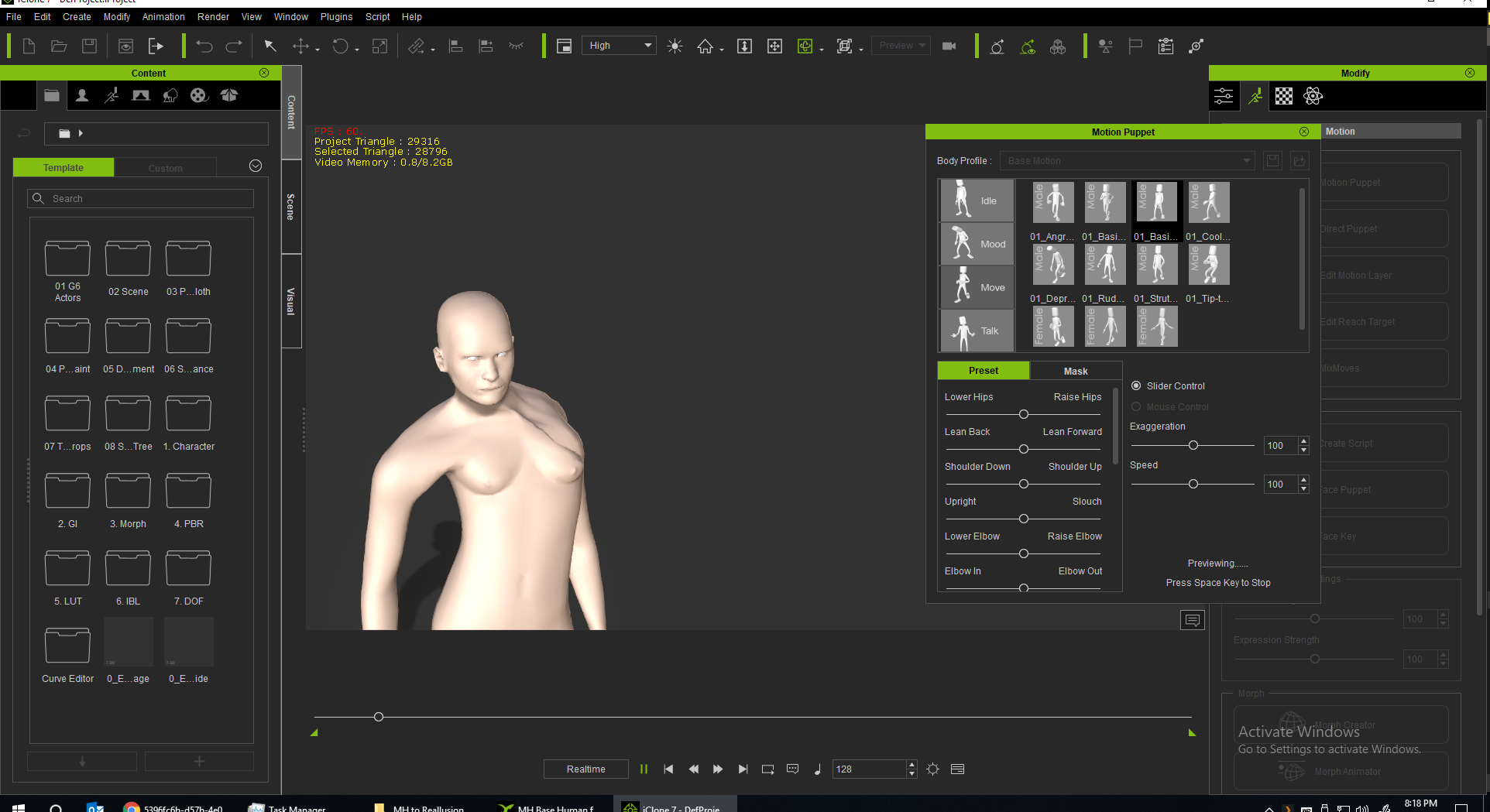
I don't think I assigned the bones correctly when converting from a non-standard human. How do I fix this.
Also don't forget I am still having this problem.
troycarpenter7 (5/27/2019)
Even the visems and facial emotions? I am talking about moving the muscles in the expression editor not the bone hierarchy profile. Please do tell.
|
|
By Rampa - 7 Years Ago
|
After you have set up which bones belong to the facial features in the characterization panel as Hiro has shown, you then adjust said bones in the expression editor for the visemes and facial expressions. See this tutorial for a general outline.
For the body not mapped right, the most likely is that you skipped a bone in the torso characterization sub panel. You always need to work from the bottom bone in the pictogram up. Never skip over one. It's fine to have additional blank slots above the ones that are green. You do set the collar bones though.
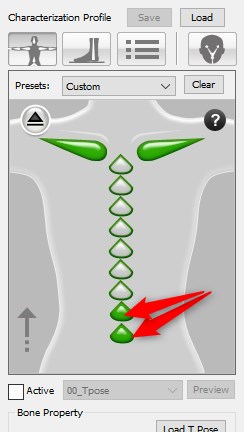
|
|
By troycarpenter7 - 7 Years Ago
|
|
I chnaged the spine but now I have a problem where I can't select the active checkbox or convert the character. On the full body panel what do I assign the spine bone to if I assign all the vertebrae in the sub-panel?
|
|
By hirospot - 7 Years Ago
|
Very sorry for the late reply.
Please check the following figs which indicate how to map the spine bones.
fig1: Map the Spine to the character spine nearest to the hip.
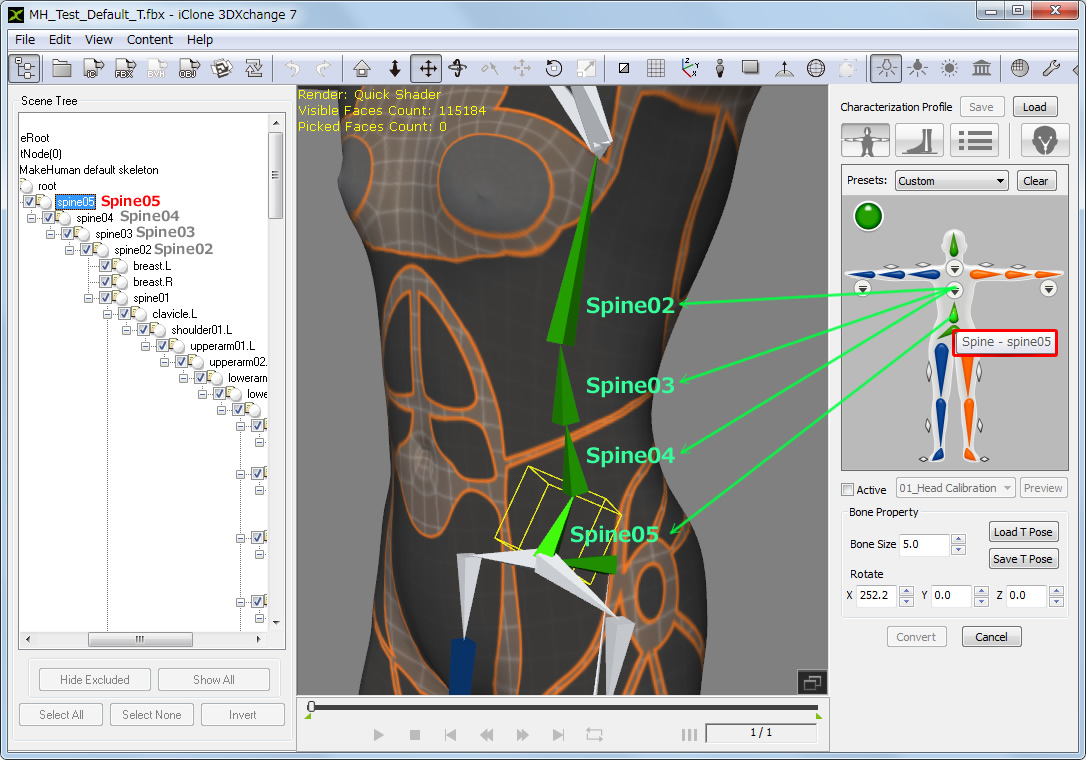
fig2: Open sub-panel and map the other upper spines one by one.
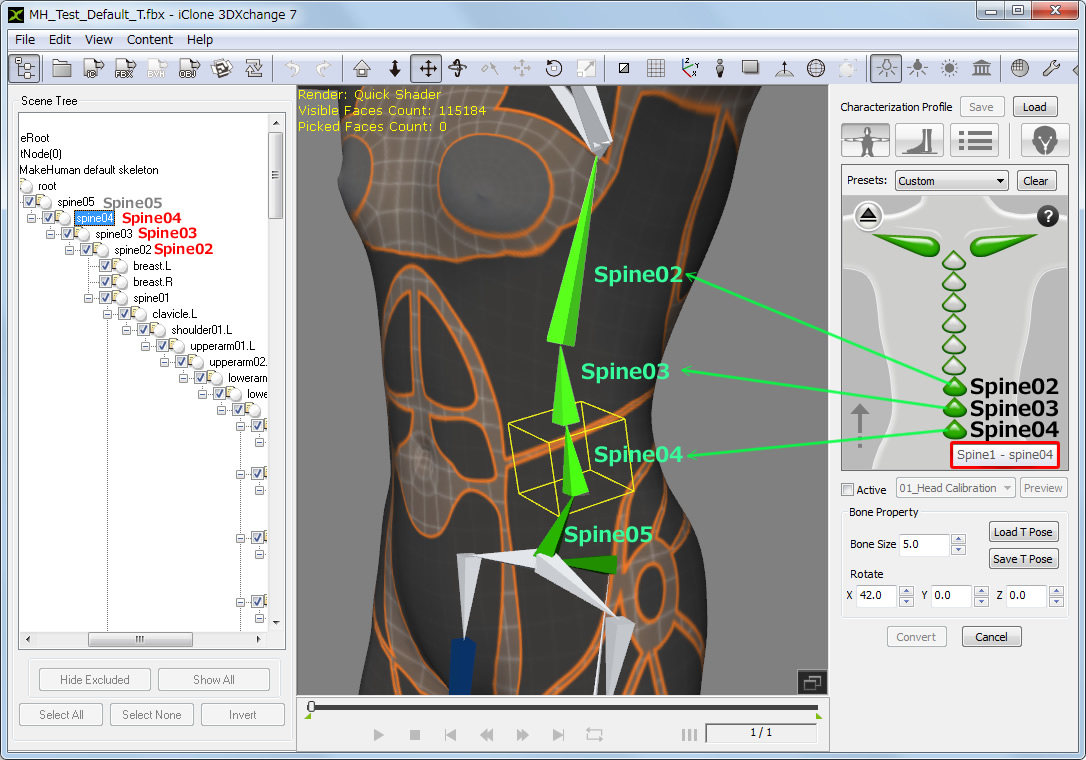
Thank you,
Hiro
|
|
By troycarpenter7 - 7 Years Ago
|
I figured out the spine. I seem to have an issue with the face.

mI know I can fix this by rotating the bones and making a new t-pose file. I want to know why this happens. Why does this happen that the bones rotate slightly upon adding a characterization profile?
|
|
By troycarpenter7 - 7 Years Ago
|
I was working with the expression editor and I was having trouble saving my expression editor profile. Below is the error message I was getting.

I don't understand why I am getting this message. I have not edited the geometry or changed the bone hierarchy. For a test I saved a profile then immediately tried to open it on the same model and still got this message. The exact meaning of it is unclear so I thought I would ask.
Also: I found something useful or this process.
If you export from Make Human as an MHX2 file. You can import this into blender with face shape keys by selecting that on import. You then export the model as an fbx from blender to import into 3d exchange. You can see in the picture above I have many sliders for the face shape keys.
|
|
By denclink - 7 Years Ago
|
|
Has anyone saved the make human preset in 3dx that is working. If so could your make it available for download. I just can't figure it out.
|
|
By troycarpenter7 - 7 Years Ago
|
I concur, good idea.
|
|
By troycarpenter7 - 7 Years Ago
|
|
I have waited for an answer to this for a week and it would help me to know the answer. Posting here to bump this thread back to the top.
|
|
By troycarpenter7 - 7 Years Ago
|
Why are my characters arms crossing when I select the basic walk? You can see with the orange and blue that none of the bones are tagged to the wrong side. I also checked the black ones.

|
|
By Rampa - 7 Years Ago
|
|
Make sure you set your character in the T-pose in Makehuman before you export. The arms crossed is because the character was no in a T-pose, so the animation offsets overshoot because it started with the arms in wrong pose. A-pose, I think.
|
|
By hirospot - 7 Years Ago
|
As Rampa san says, you need to make a T- pose first, then apply any motion.
How to make T-Pose:
1) Remove check mark in the Active box,
2) Select arms and rotate by using 'Rotate Object' tool to make arms in straight line.
3) Check the Active box and go to preview the walk motion.

Thank you,
Hiro
|
|
By MatCreator - 5 Years Ago
|
https://youtu.be/bWejESkENLA
This is an old post but Ive been trying to find a solution to this as well. The kid in that video seems to have a profile that works for Make Human figures, but unfortunately I cant grab the url for that link. Has anyone made a profile that works with Make Human figures with working fingers, eyes, mouth and facial expressions???
I know it may seem redundant to have Character Creator and still use Make Human, but it would have its benefits, especially for me and what i would like to do.
|
|
By Rampa - 5 Years Ago
|
I think Makehuman uses facial bones for expressions/visemes. See here for using facial bones in the Expression Editor.
|
|
By MatCreator - 5 Years Ago
|
|
So no one has made a working Make Human profile available for use yet?!?
|
|
By Rampa - 5 Years Ago
|
probably not. But it does not take long to make one. If Makehuman can export in a T-pose, that will make it even easier. Here is the workflow if it can export blendshapes. The body part is the same. You canactually mix bones and blendshapes for the facial stuff, if you have both in the model.
|
|
By MatCreator - 5 Years Ago
|
|
Played around a bit, it is fairly easy to do once you get the hang of it. I was saving profiles, seems you need one for male and female characters, but once you have the profile, its a snap. Pretty awesome actually, a few slight issues, but very workable the Make Human figures.
|
|
By MatCreator - 5 Years Ago
|
to bring this up again, and out of curiosity...
is it possible (not that i have the skill or knowledge to do so, but maybe one of the more experienced can) to make a rig >in and for< makehuman that could be applied to the figures there and then exported out of makehuman as a workable figure for iclone that wouldnt need to go thru 3dxchange? that would be an even holier grail than a profile no???
ive gone thru the process MANY times, and always find a need to adjust or fix something, or even just start from scratch every time. again, it doesnt take "that" long, but when you click on the piece to open the hands, you get this sense of dread... with saved profiles too often i get facial, spine and finger distortions.
also, when exporting, save out as meter, you get better scaling with the dummy.
|