|
By vepop - 8 Years Ago
|
Hi Peter,
I tried to follow this but was not successful.
Any help?
|
|
By Peter (RL) - 8 Years Ago
|
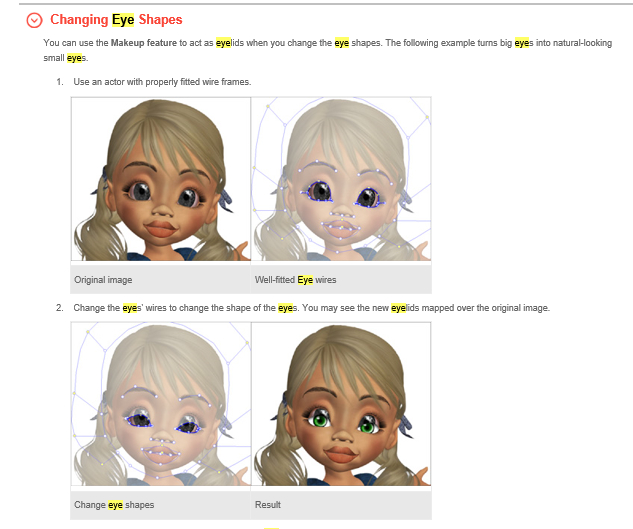
The process does indeed work but you will need to use the makeup feature to cover the part of the original eye that has been cut off.
So first add an eye template from the library as shown HERE, Then use the makeup option as described HERE.
If you then still have problems, please tell us in more detail at which step you are stuck on. Please also try to include a screenshot as this will help greatly. Thanks.
|
|
By vepop - 8 Years Ago
|
Peter,
Thanks for the reply.
Yes, I did use the eye template from the library.
Then applied the 'makeup' on the eyes.
The problem is there are no 'eyes wires' to do the change.
I believe the steps given in the manual are not complete.
Must I click something to activate the 'eyes wires'?
|
|
By Peter (RL) - 8 Years Ago
|
Hi Vepop,
If you send your morph based character to Composer mode, you can then select "FaceEditor > Face Fitting Editor" from the Menu Bar. This will allow you to change the wireframe around the eyes. Once that is complete you can go to "FaceEditor > Eye Settings" to make the required changes to the makeup around the eye. :)
|
|
By vepop - 8 Years Ago
|
Thanks, Peter
I think I got it. It is actually referring to creating a morph head from a photo.
|