|
By dovletka - 7 Years Ago
|
Hi, I have been unable to import V6 customized character with clothing to iClone 6. When I import the FBX to 3DXchange I get the dissected mess (please see below). Any ideas about why it would happen? Would it make more sense to import the figure and then the clothing? Should I export the clothing as an OBJ first? Thank you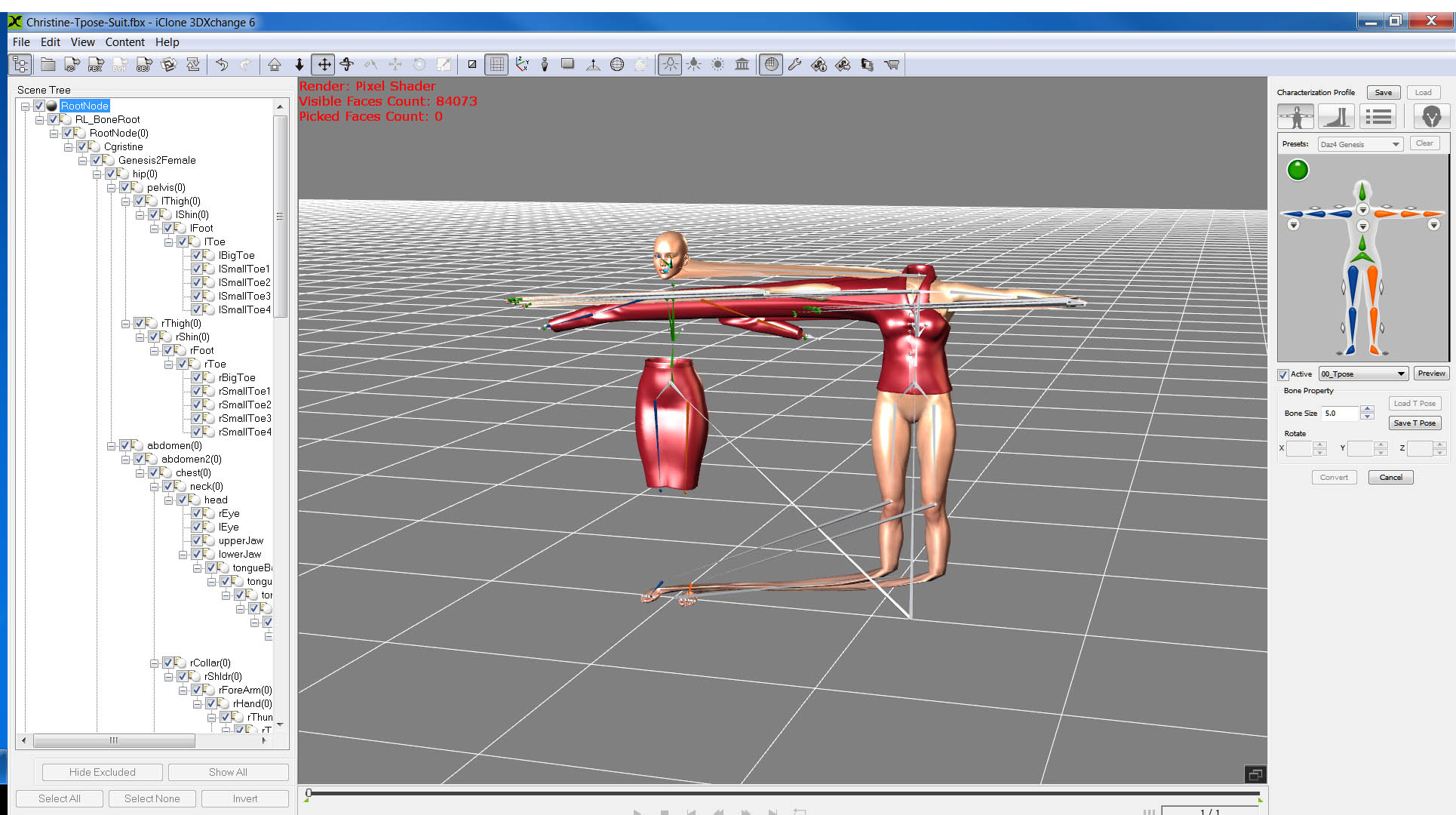
|
|
By tq.linux - 7 Years Ago
|
Hi!
A lot of ???(0) is the cause of the trouble in your picture. Confirmation of Cloth/Hair's "Fit To" in DazStudio is important. 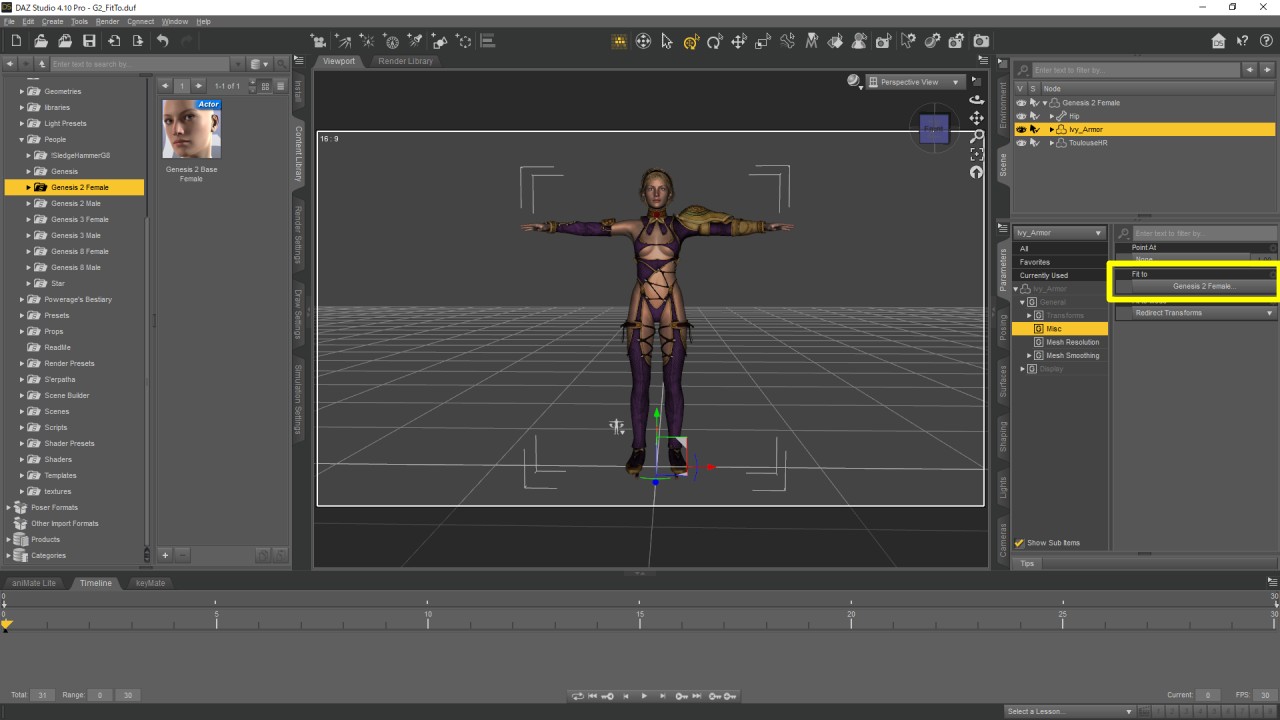 I'm waiting for your success. (^^)/ |
|
By Snarp Farkle - 7 Years Ago
|
dovletka (3/26/2018)
Hi, I have been unable to import V6 customized character with clothing to iClone 6. When I import the FBX to 3DXchange I get the dissected mess (please see below). Any ideas about why it would happen? Would it make more sense to import the figure and then the clothing? Should I export the clothing as an OBJ first? Thank you Just make sure you select each clothing item and re-fit them to the character before exporting, this usually fixes that issue.
|
|
By dovletka - 7 Years Ago
|
Thank you guys! I will try and see what happens
|
|
By dovletka - 7 Years Ago
|
Ok, here's the latest from the battlefield. I made sure the clothing items are fit to the figure and exported the FBX. When I tried to import it and hit YES to autoconvert and go the same drastic mess. When I hit NO, both items looked normal but separate from each other. Please see pictures. Could that be the problem with the figure being V6 ?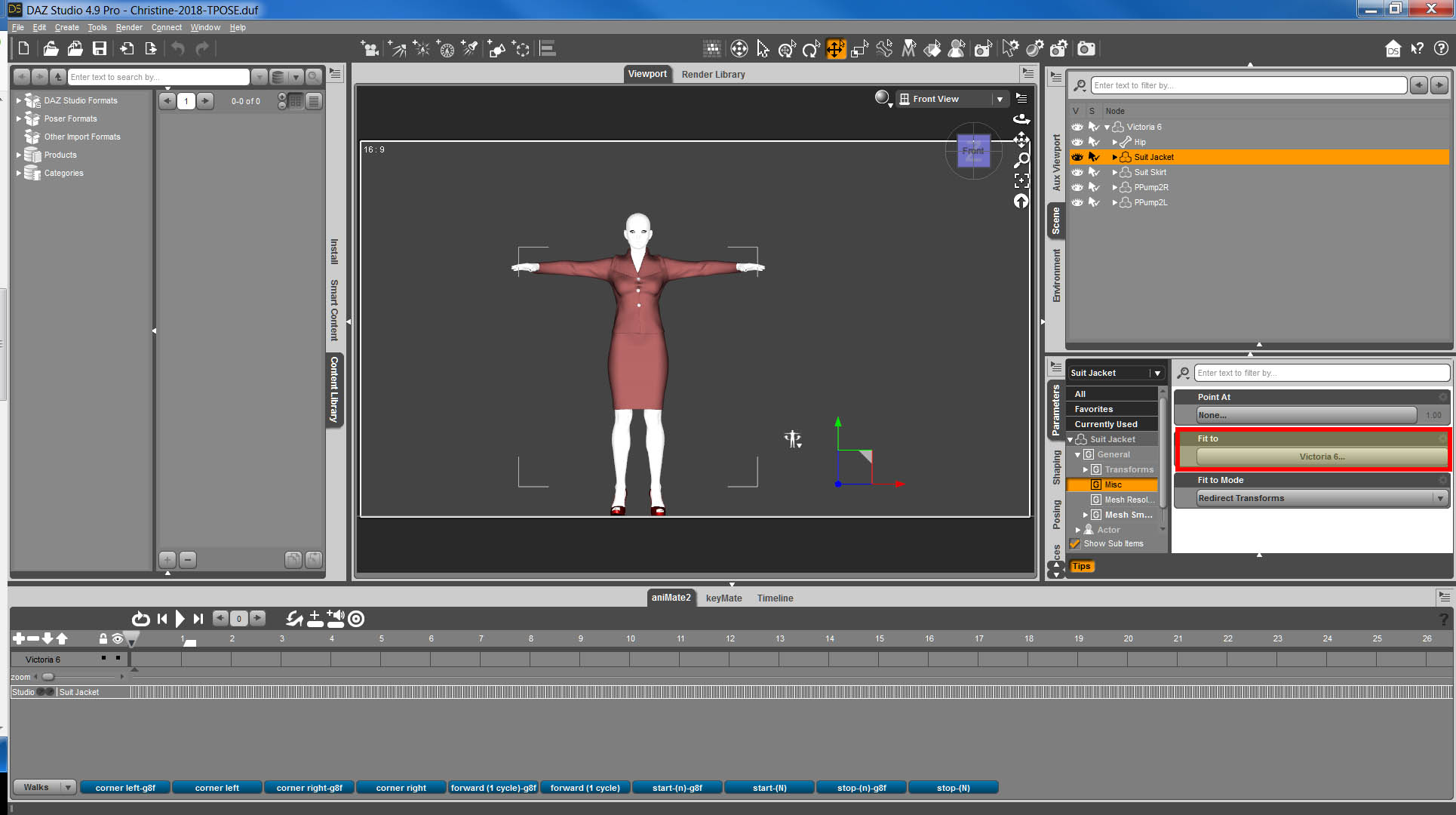 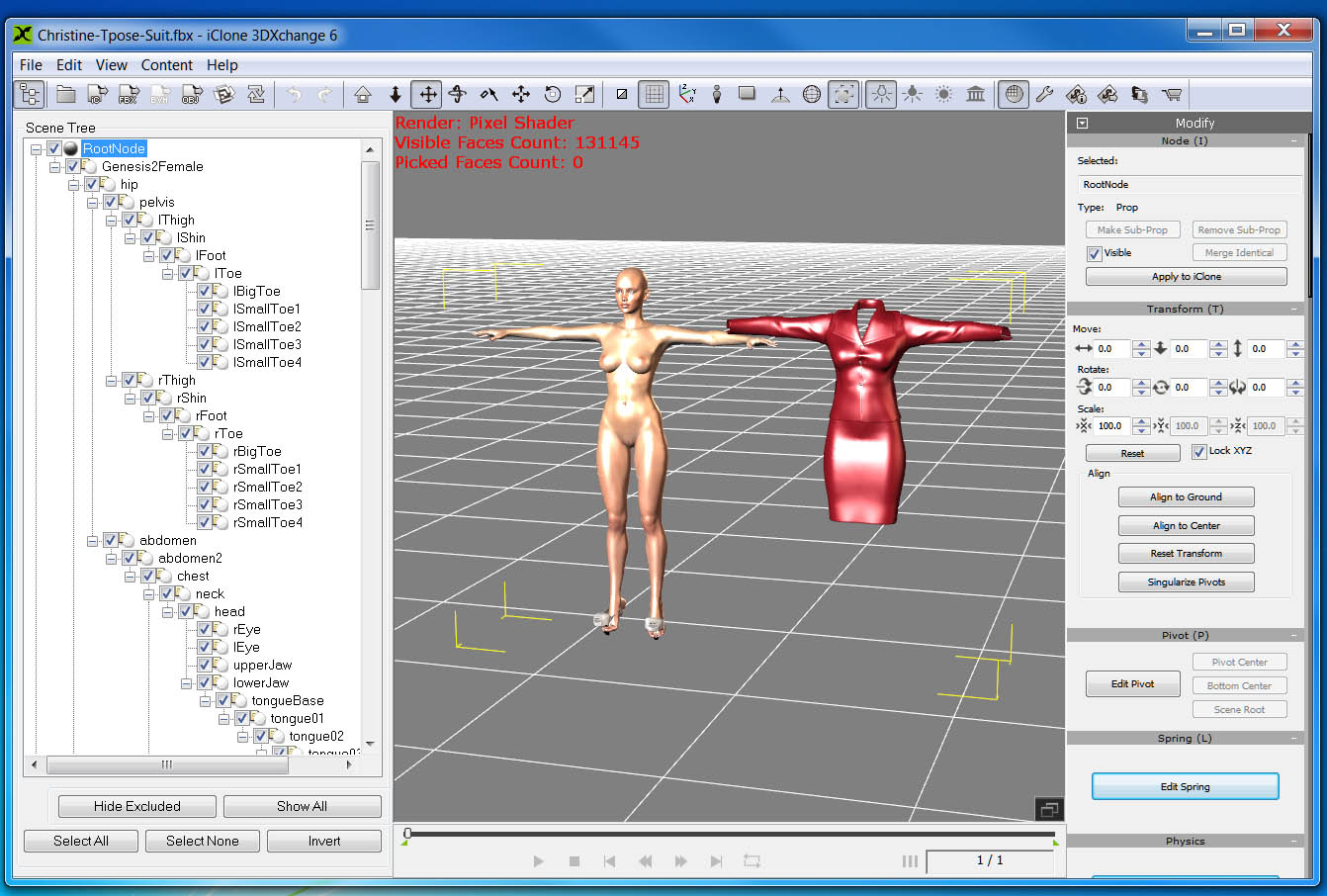
|
|
By Kelleytoons - 7 Years Ago
|
|
When you export as FBX from Daz, in the FBX export options you DO have Merge Clothing into Figure Skeleton checked, right? You must have that checked for this import to work.
|
|
By dovletka - 7 Years Ago
|
Hey Kelleytoons, NOPE, I did not have that checked! I did and it seems have worked! Thank you so much. Would you suggest to do the same with the hair? I saw some tutorials suggesting to export the hair a as an OBJ and then fit it to the figure in iClone.
|
|
By Kelleytoons - 7 Years Ago
|
Sorry I didn't comment on this thread earlier, then -- somehow I missed it the first few times around.
Using Daz hair in iClone is tricky -- there are MANY different types of Daz hair, each with their own peculiarities. Some hair can be made to work, and even quite well, and other hair is just impossible and/or worthless to try. My best advice for now is to use iClone hair on your figure until you get more comfortable understanding the differences (and, of course, ask here -- I think I have most of the Daz hair that is available, so if there is something specific you can ask and I can tell you if it's even possible).
|
|
By Snarp Farkle - 7 Years Ago
|
|
Kelleytoons (3/26/2018)
Sorry I didn't comment on this thread earlier, then -- somehow I missed it the first few times around.
Using Daz hair in iClone is tricky -- there are MANY different types of Daz hair, each with their own peculiarities. Some hair can be made to work, and even quite well, and other hair is just impossible and/or worthless to try. My best advice for now is to use iClone hair on your figure until you get more comfortable understanding the differences (and, of course, ask here -- I think I have most of the Daz hair that is available, so if there is something specific you can ask and I can tell you if it's even possible).
Hi Kelleytoons,
I have a question about using the Decimator for DAZ Studio that I was able to get it at half off, I was wondering how effective it would be on some of the DAZ hair that seem so high in poly count that they crash iC7, which has happened to me a few times now.
|
|
By Kelleytoons - 7 Years Ago
|
Decimator has its uses, but hair isn't one of them (I find Decimator *really* helpful on things I'm going to apply cloth physics on -- you have to keep the count to under 20K so it's almost a must. Otherwise it's often more trouble than it's worth, and it can even crash Daz as well).
The problem is that hair can come in so many different varieties we can't really talk about it as "hair", not the way all the current RL hair (which is polygon based) can be compared. *Some* of it IS polygon based, and if so it can be brought in very successfully and used in much the same way (trying to paint a weight map might challenge even the strong-hearted, though). Some of it is the fake "shell" of old (old iClone hair) and it, too, can be brought in and used as an OBJ, although it looks as crappy as the old iClone hair did.
But three forms of hair are neither -- one is shader based, and won't translate at all, and the other is detailed particle hair (think our own Popcorn "fur" except much more sophisticated). And the last is just insanely stranded hair, consisting of enough faces and verts to kill all but the strongest machine (in Daz they work it, I do believe, with some sort of render time substitution, but I'm no Daz expert and my knowledge about all of these last three is mostly cursory and based on just a passing failure to be able to use them in iClone). Decimator won't do you any good with any of these types -- assuming you *could* decimate the last one enough to be usable, it wouldn't look like hair (and thus not be usable).
You can kind of get a good idea what sort of hair it is by seeing if in the preview on the Daz page they show it in non-shaded mode -- the polygon hair (our own iClone hair type) shows as "strips" which lay over the head, and are then made hairlike with the appropriate transparency maps. I've had luck with these, sometimes even good luck, although I've yet to be able to weight them properly (but I haven't really tried so I'm not saying it's impossible, or even hard -- it just looked like more trouble than it was worth at first glance).
So the short answer is: no, Decimator isn't the answer here. Just like with a lot of detailed Daz clothing, once you start decimating it you lose what makes it great. Note: let me iterate once again this is just my opinion based on a very small sample size. I have a TON of Daz hair that I got back in the day, and I've tried some limited experiments with it, and will work more in the future to see what is what, but if anyone wants to correct me or add info here I will take zero offense (and would like to learn, myself). Also, if there is a particular hair that someone wants help with let me know and I'll be glad to try and test it out (right now my focus is on Daz clothing but I need to revisit the whole hair thing eventually, including going back and making my own -- that's my next rabbit hole).
|
|
By Snarp Farkle - 7 Years Ago
|
Thanks Kelleytoons,
I will play with Decimator on some hair to get a better understanding of the limitations but I really got it to help with some of the clothing items I've had problems with. I would be inclined to use Reallusion hair more if they would come with the ability to change hair color or slight style changes as the DAZ hair items I've bought over the years come with. As it is it takes me about a half hour just to change Reallusion hair colors using Merchant Resource hair textures that I have, the results usually give a slight style change, as in the actual hair texture, if I use one of the Resource hair opacity maps as a displacement map, but that's about all I can do with them. I'm going to play around with the Morph Editor to see if I can make some style changes when I get enough time to play with it, so many things to learn.
I'm still experimenting but wondering if the CC3 update will make it any easier to use DAZ hair, not enough info to make any assumptions if it will or not, as I understand things anyways, any thoughts on that?
|
|
By Kelleytoons - 7 Years Ago
|
RL is pretty committed to polygon hair, and I can't see how CC3 will do anything to change that. *Some* Daz hair will then work, as I said, but a lot of it (perhaps the majority?) will not.
And changing the RL hair (or any polygon hair, really)? Forgetaboutit. There's really nothing you can do that wouldn't involve creating your own, which you *can* do (I have a tutorial on doing just that posted here). It's not hard to create your own, but it will take time. That's a rabbit hole I've tried to stay away from.
|
|
By Snarp Farkle - 7 Years Ago
|
Hi Kelleytoons,
I have your tutorial on creating hair bookmarked and have watched it a couple times and will watch it again along with others that pertain to creating hair when I get time to devote to that project, I have the affordable motion capture project I'm working on now which keeps getting delayed by setbacks in getting some heat in my new office, but creating or modifying hair and clothing is next in line for me and I really liked your approach to using Blender as the creation tool.
I don't have zBrush and I am still a little intimidated by Sculptris, but that has been the only tutorials out there until I saw yours on using Blender for hair creation, and even though Blender is still a little intimidating to me as well, I feel more comfortable learning how to use it than I do Sculptris and I have used Blender several times now following tutorials from several of the very talented forum members here and appreciate the efforts of those who take the time to make tutorials that help us move forward.
One last note on DAZ hair, I have found that the V4 De Roca Hair converts better than say the G3 Fantasia Hair, the V4 De Roca Hair for instance works very well in iClone7 for me, it is an obj hair with styling morphs which I suppose could be enhanced using the Morph Animator, but I have not had much luck in converting fbx hair into obj hair and get the same results. I'm guessing that the amount of surfaces has something to do with it as the De Roca Hair only has three texture maps and the G3 Fantasia Hair has twelve, is there a way to combine these separate meshes within Blender into just two or three meshes or is that idea just going to be more of a time wasting hair pulling episode? :crazy: (Pun Intended)
|
|
By Kelleytoons - 7 Years Ago
|
I kind of doubt whether it's the texture maps. You *can* combine texture maps inside of Blender for surfaces that use the same UV, but I don't think you'd get very far with hair.
After I wrote what I did yesterday I played around with some Daz hair and got fairly good results with a couple of polygon pieces (Zarah for women and Heath for men) so I'm more hopeful than I was before about using it. But physics, as I suspected, is a rabbit hole you don't want to go down -- it's FAR above my pay grade to make work.
|
|
By Snarp Farkle - 7 Years Ago
|
This may be a silly question Kelleytoons but how can you tell which hair is polygon?
|
|
By Kelleytoons - 7 Years Ago
|
No silly questions, only silly answers <g>.
If the Daz Dev is friendly enough he or she will include an image with no textures (including opacity textures) which show you. Here's an example:
https://www.daz3d.com/paige-hair-for-genesis-8-females
Note that that hair has a lot of polygons, but even it's not as insane as this one:
https://www.daz3d.com/wild-wind-hair-for-genesis-8-females
which why *technically* a polygon based hair, is for all intents and purposes so small a mesh it might as well be fibermesh or particle hair. Which brings us to this:
https://www.daz3d.com/commander-hair-for-genesis-3-and-8-male-s
While it's *possible* you could get this into iClone, I suspect it would crash most folks systems (I've never actually tried fibermesh hair, but that would be my guess).
Now, they may also tell you in the description what is what. If not, and if they don't provide examples you can clearly tell, I wouldn't buy it.
|
|
By james_muia - 7 Years Ago
|
Decimator is necessary to bring the polygon count down, however sometimes it doesn't always work with certain clothing and you have to spend a lot of time re-sizing the clothing after it's been decimated. It's very time consuming.
Some things you can decimate 80% of it, and other things you can't really decimate at all. Hair is a must to decimate because it's so high poly.
My film is using a 250K polygon character fully clothed. In Daz, it was about 600K polygons. So we'll see how that goes. I wish I could decimate him more but I was having trouble with his clothing cutting through his body. It was driving me nuts, that I got it the best I could and moved on. I have a top of the line rig, so hopefully I can manage it. We'll see.
|