|
By Lamias - 7 Years Ago
|
Hey guys, this has been driving me crazy. I am sure there is a simple answer/fix, but I can't find it.
Sometimes when I double click on the motion layer track to create a key, it is created in between frames. It does not appear on the frame I clicked, but it does not appear on the previous frame either. It appears IN BETWEEN those two frames. One, how is this possible? and two, how do I correct this..?
See the screenshot? The key is not on the frame I clicked, but it's not on the next frame either. It's between those two frames.
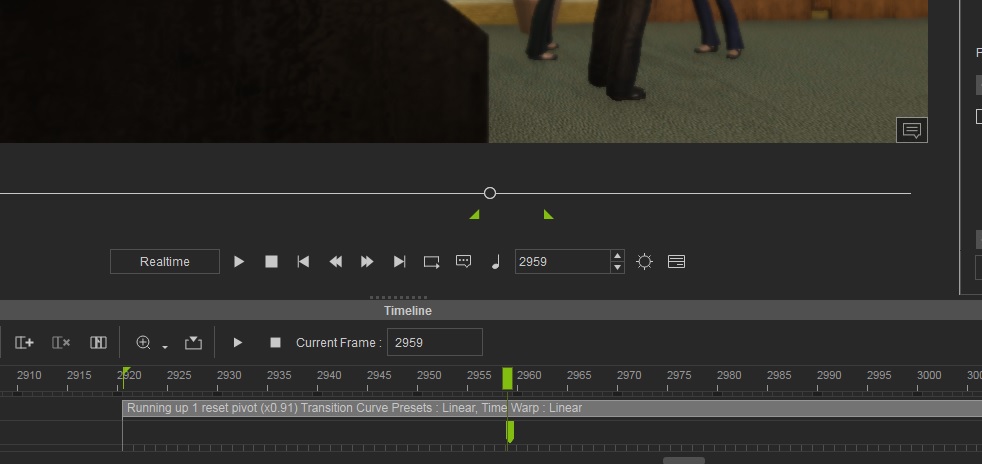
Any thoughts? :)
|
|
By mark - 7 Years Ago
|
Happens to me all the time...drives me crazy!!! I mentioned it but didn't seem to be a big deal. Didn't do a ticket though. Maybe should.
|
|
By Rampa - 7 Years Ago
|
It looks like your clip may be stretched a bit. The frames display within the clip will change as you stretch the clip. It will even be of varying size if apply easing, or things like that.
0:50 in this video shows the display scaling, and makes it pretty clear why it does it.
|
|
By Lamias - 7 Years Ago
|
Thanks Rampa.
I found that if I flatten the clip after having stretched it, the key positions go back to normal. Although further testing may be required of this (and I still can't see the reason why it happens).
Thanks!
|
|
By VirtualMedia - 7 Years Ago
|
Thanks for the head-up rampa that key jump got me to
|