|
By yoyomaster - 8 Years Ago
|
Hello everyone.
Has anyone been able to import demolition data(fracture) from Blender to iClone through FBX or any other means?
Here is a short Blender fracture tutorial to give you an idea of the process!
Blender Cell Fracture Tutorial
|
|
By animagic - 8 Years Ago
|
As we don't have Alembic import, it would have to be FBX. If the fragments are separate sub-props it should work, with each sub-prop having its own animation.
I'm not well-versed in Blender, so I have never tried this. Sounds interesting, though, if it works.
|
|
By Rampa - 8 Years Ago
|
Thinking about it, there are actually a bunch of shattering props that were created by Marketplace vendors. Reallusion also made a series of destructable props. So there is a way. Whether or not Blender can export its bake to FBX is the question, as that is what you would need for importing the animation.
You can also use use iClone's physics on your pre-fractured parts. That is the easy and known route.
|
|
By kurzal - 8 Years Ago
|
Use *.fbx. It works.
|
|
By mtakerkart - 8 Years Ago
|
I tested few time ago but give up du to certainly a missunderstand of what's going on. When I hit play with physic applied to the different cells
, all cells made a mess before hitting the ground , even if I go back to frame 0.
I think a tutorial will be veeery welcome du to the PopcornFx 2 ways collisons with give us the possibility to hit props with particles.
Make fractures in blender is relatively easy.
See my result , I applied physics only on 4 cells :
|
|
By Me3Dtoo - 8 Years Ago
|
This is one way:
Copy the object.
Break & Link pieces to original object
Bake sim, then export.
3dxch:
Shows the Parent and children
iClone:
Point of impact.... Hide the parent.
|
|
By Anaximander - 8 Years Ago
|
Check out the Nov 28th episode of the Iclone Film School around 2:17 after he has finished the clock.
I've done it a couple of times. The trick is to parent all the fractured cells to an empty before you export.
|
|
By mark - 8 Years Ago
|
|
kurzal (12/15/2017)
Use *.fbx. It works.
Been awhile.....Great to hear from you!!!!:D:D
|
|
By Me3Dtoo - 8 Years Ago
|
|
Anaximander (12/15/2017)
The trick is to parent all the fractured cells to an empty before you export.
Indeed. :)
|
|
By mtakerkart - 8 Years Ago
|
@Anaximander
@3Dtwooop
Cool video thanks but not what I want to do. Really don't want to make an animation in another software because
Iclone is an animation software. I tried to importe lot of UDK 4 fractured animation and were mess in 3dxchange wich
could not interpret the animation. Iclone have all the tool to make physics baking animation in one pass.
Plus it's a PITA to recreate specific explosion/behavior outside Iclone then imported it.... As I said the upcoming particles
will be a must have to make destruction . For me it's not a productive pipeline to make animation outside Iclone.
Have a look at 2:16 of the Pop WIP 1 , recreate this in blender to reimport in Iclone will be waist of time and not productive.
|
|
By mtakerkart - 8 Years Ago
|
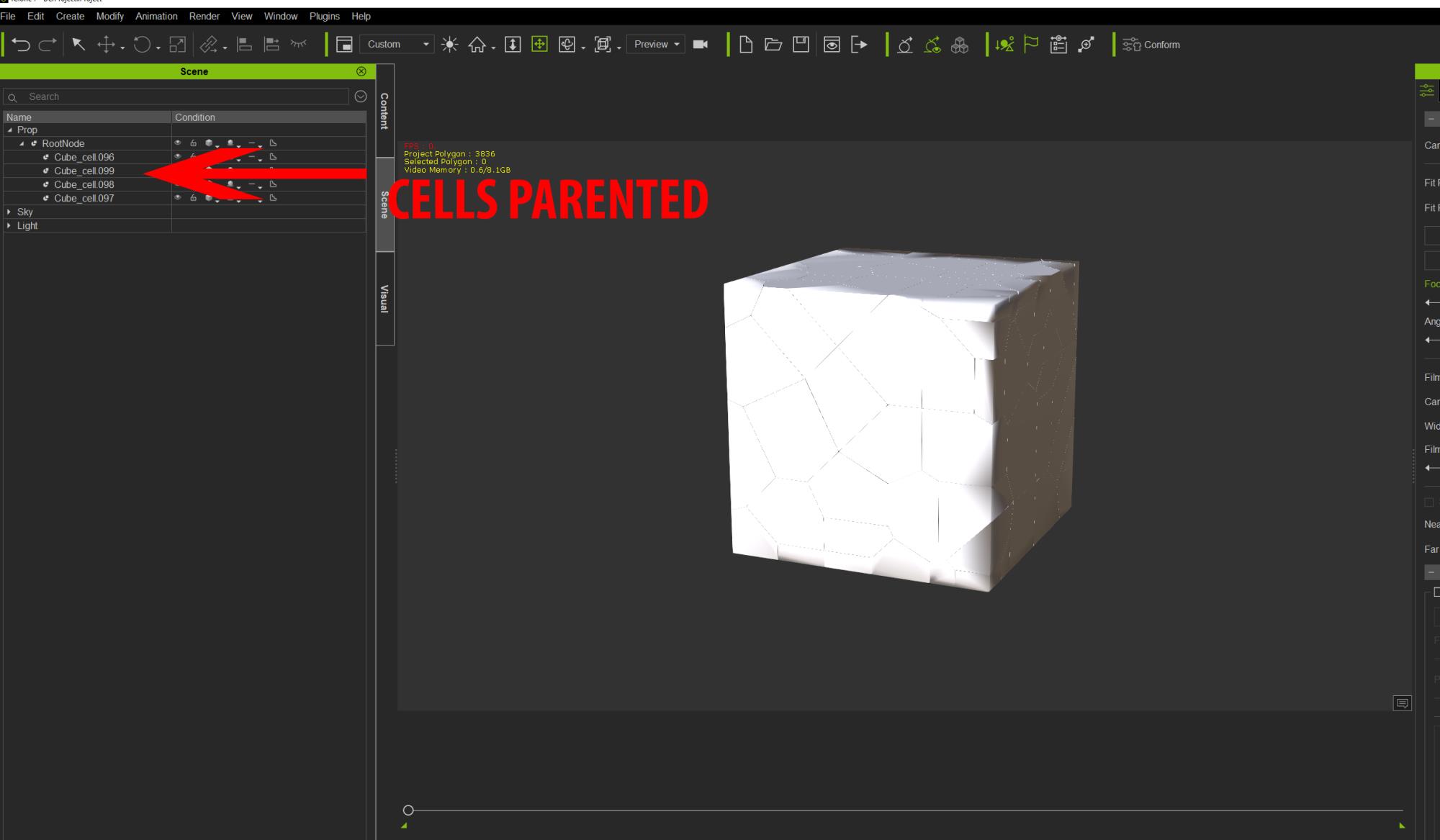
I forgot to mention that in my exemple Cells were parented to the original cube. So if someone have Iclone, it will be very
cool to make a physics baking animation destruction inside Iclone but not outside. ;)
|
|
By kurzal - 8 Years Ago
|
|
mark (12/15/2017)
Been awhile.....Great to hear from you!!!!:D:D
Hi, Mark. I hope now I will appear more often ;)
|
|
By yoyomaster - 8 Years Ago
|
Thanks everyone for all the replies, much appreciated!
Turns out that I was doing it right from the start, at least the Blender part, I was just importing it wrong in iClone, works like a charm now, here is a test FBX file I created for testing.
fractureASCII.zip
Also, I am very excited about the upcoming PopcornFX integration, but I have yet to see anything done with Popcorn for destruction that comes close to what Blender can do, especially the fracture branch of Blender which is mind boggling IMHO, here is a short video giving an idea of what can be done at the moment, and développement is massive for this!
|
|
By yoyomaster - 8 Years Ago
|
Rendered the imported FBX in iClone 7, loving it! :)
|
|
By mtakerkart - 8 Years Ago
|
Cool Yoyo!! Using Blender will be an unavoidable part to fracture props because Iclone is not a modeler.
But for elaborate setup set , animating outside of Iclone could be tedious and very heavy amount of data
to manage. I'm shure that Iclone Physics animation can handle it.
|
|
By Rampa - 8 Years Ago
|
|
So can you attach a baked ocean modifier to a null and have it work as well? The null part is what I didn't know, and why my efforts were always thwarted.
|
|
By RobertoColombo - 8 Years Ago
|
Hi,
time ago I tried the same and got stuck when the asset was imported in 3DX because it was not able to resolve the parenting of the fractured elements.
Now it seems that there is a solution, so would it be posisble to show the FBX export settings ?
Also, does the parenting to a dummy play a role to have the fractured elements being readable by 3DX ?
Thanks
Cheers
Roberto
|
|
By yoyomaster - 8 Years Ago
|
|
RobertoColombo (12/15/2017)
Hi,
time ago I tried the same and got stuck when the asset was imported in 3DX because it was not able to resolve the parenting of the fractured elements.
Now it seems that there is a solution, so would it be posisble to show the FBX export settings ?
Also, does the parenting to a dummy play a role to have the fractured elements being readable by 3DX ?
Thanks
Cheers
Roberto
I used the default settings for import, only thing I had to do is apply an auto smooth of 15 to all the pieces, other than that I used the default.
Also, if you are serious about making demolition simulations in Blender, i suggest you get the Blender fracture build, it is tons better than Blender default fracture add-on, you can find the thread for it here...
Blender Fracture build thread on Blender Artist forum
|
|
By RobertoColombo - 8 Years Ago
|
Hi,
thanks for the answer.
Yes, I used the Blender plug in to create the fractures and it workd fine, then exported, but I got stuck in 3DXchange.ange because the sub-prop hierarchy was not recognized and I did not want to re-create it manually in 3DXchange.
I will do some more tests when I am back home, after XMAS.
Cheers
Roberto
|
|
By Rampa - 8 Years Ago
|
|
yoyomaster (12/15/2017)
Rendered the imported FBX in iClone 7, loving it! :)
It'd be great if you could put up a tutorial showing how you set up your fracture animation for export into 3DXchange. :)
|
|
By yoyomaster - 8 Years Ago
|
Rampa (12/16/2017)
yoyomaster (12/15/2017)
Rendered the imported FBX in iClone 7, loving it! :)
It'd be great if you could put up a tutorial showing how you set up your fracture animation for export into 3DXchange. :)
Will do, probably next week, working on importing Blender particles with the fracture at the moment, working great so far!
Here is the type of data we need to import in iClone, and so far I see no reasons not to be able to import the whole thing, dust particles included!
|
|
By Rampa - 8 Years Ago
|
|
All you have to do is save it as "FBX 6.2 ASCII"! :)
|
|
By yoyomaster - 8 Years Ago
|
|
Rampa (12/16/2017)
All you have to do is save it as "FBX 6.2 ASCII"! :)
Yep, Binary wont work in 3DXchange! ;)
Still, I wish they'd implement Alembic import, this would open so many possibilities for iClone users!
|
|
By Rampa - 8 Years Ago
|
|
Still can't do actual mesh deformation animation yet, AFAIK. Works great for sims that are separate objects.
|
|
By yoyomaster - 8 Years Ago
|
|
Rampa (12/16/2017)
Still can't do actual mesh deformation animation yet, AFAIK. Works great for sims that are separate objects.
Exactly, like fluids, which are easy to do in Blender or Houdini!
|
|
By Cary B - 8 Years Ago
|
|
Very cool stuff...
|
|
By 4u2ges - 8 Years Ago
|
So there. Quick and dirty Blender ocean sim into iClone. I was able to push animation frames into iClone morphs.
I run sim for 100 frames without thinking how I would animate it in iClone, which is quite time consuming. So I got 100 morphs.
Being quite tired today, I was able to only animate 30 frames.
Out of which 1/3 had to be cut after converting to perform because of this stupid bug with frozen frames at the beginning of the clip.
After stretching I only got 7 seconds of it so far. There is a lot can be done with enough patience... or when we would have a scripting interface :)
|
|
By 《/^\》 - 8 Years Ago
|
|
Real awesome @yoyomaster
|
|
By mtakerkart - 8 Years Ago
|
@4u2ges
About ocean in Iclone, I made this in few minutes , inspiring about how UDK 4 made ocean water without alembic, etc....
It's just a mesh with animated textures (not video) , heightmap, diffuse roughness, etc... Because i do not search for realism it's ok for me for a calm ocean.
I will dig deeper when PopcornFx will be out.

|
|
By 4u2ges - 8 Years Ago
|
That's very nice mtakerkart, I like your texture. I actually needed a river with fairly strong current, but started with the ocean to see where it takes me.
Yes, will see what PopFX would bring us... hopefully soon.
|
|
By Me3Dtoo - 8 Years Ago
|
You say not realistic?.... close enough for me.
Looks 1000 times better than any morph.
This water mimicks.... real water flow. :Wow::Wow: ...so what if there is no spray. matakerkart.... be knowing thangs. :cool:
|
|
By yoyomaster - 8 Years Ago
|
Got particles export to work, but it takes a very long time with more than a thousand particles.
That's actually pretty decent looking mtakerkart!
|
|
By Rampa - 8 Years Ago
|
You can use video for displacement as well. There is trick to get it working though. You start with an image in the displacement channel, then set your tessalation settings. Now you switch-out the image for a video, and use the strength slider to control the amount.
You cannot use video for the initial setup, because it lcks-out the tessalation settings.
|
|
By mtakerkart - 8 Years Ago
|
Hahaha! Thank you very much guys!! But I'll put some caustic effect on the wood struture , some foam with the popcornFx and rework this
specific transparency/refraction of the ocean water. I take the texture from this free UDK project:
I didn't use video for texture in Iclone because it lacks du to the specific codec , the behavior is not smooth for realtime on my configuration.
For river may I suggest to see this video of this effect. It's a simple mesh with animating texture.
Because Iclone can't composit multitexture like UDK , I think you can fake with 2 or 3 meshes with different opacity.
Udk 4 or Unity market place are the best place for me to learn how to handle effects in realtime ;)
|
|
By 4u2ges - 8 Years Ago
|
Great suggestions, thanks guys!
|
|
By Me3Dtoo - 8 Years Ago
|
|
mtakerkart (12/18/2017)
Because Iclone can't composit multitexture like UDK , I think you can fake with 2 or 3 meshes with different opacity.
Didn't you get the memo?
One day iClone is going to composite multi-textures, too.
Yes, She Will!:)
|
|
By yoyomaster - 8 Years Ago
|
Made more tests, with more resolution, works really well, here is a new FBX file
wall_fracture_test.zip
Here are my steps...
Open the FBX in 3DXchange
In the FBX import dialogue box make sure import animation is on, click OK
To fix the smoothing problem just shift select the first and last wall_key entries in the scene tree, then enter 15 in the input field of the auto-smooth function (right panel under Normal), then click the auto-smooth button.
In the Animation panel (just under the smooth function), click on the entry in the motion library, this will activate all the frames in the timeline.
That's it, just select the Root_Node in the Scene tree and either open directly in iClone, or save to your custom library.
|
|
By 《/^\》 - 8 Years Ago
|
@Yoyomaster, are you using Fracture Modifier?
If so what are you export settings as I'm not getting the animation when importing to iClone 3DExchange.
|
|
By yoyomaster - 8 Years Ago
|
|
《/^\》 (12/31/2017)
@Yoyomaster, are you using Fracture Modifier?
If so what are you export settings as I'm not getting the animation when importing to iClone 3DExchange.
I am using the fracture branch by scorpion81, for the animation to appear, you need to click the entry in the motion library, it will populate the timeline with your frames and keyframes, dunno why, but you have to do this, at least this is how I do it here, works fine that way!
|
|
By Rampa - 8 Years Ago
|
|
You need to export as ASCII 《/^\》 (12/31/2017)
@Yoyomaster, are you using Fracture Modifier?
If so what are you export settings as I'm not getting the animation when importing to iClone 3DExchange.
You need to export your FBX from Blender as ASCII.

|
|
By yoyomaster - 8 Years Ago
|
Rampa (12/31/2017)
You need to export as ASCII 《/^\》 (12/31/2017)
@Yoyomaster, are you using Fracture Modifier?
If so what are you export settings as I'm not getting the animation when importing to iClone 3DExchange.You need to export your FBX from Blender as ASCII.
Seems like he can import the file no problem, so my bet is that he did export as ASCII, the problem seem to be about having the animation show up in the timeline, hence my reply!
|
|
By 《/^\》 - 8 Years Ago
|
@Rampa I did figure out I need to export as Blender as ASCII & have been playing around with settings to see if I was missing something.
@Yoyomaster, I have seen the animation section within 3DExchange but there are no keyframes (there are two keyframes that are empty), maybe I'm missing something within the Fraction Modifier Blender app, I've tried the default ASCII settings & tried a number of alternatives. Do you need to bake the animation or is there a step to record keyframes, sorry I'm a noob on Blender :P
Here is my blender file
|
|
By yoyomaster - 7 Years Ago
|
@Yoyomaster, I have seen the animation section within 3DExchange but there are no keyframes (there are two keyframes that are empty), maybe I'm missing something within the Fraction Modifier Blender app, I've tried the default ASCII settings & tried a number of alternatives. Do you need to bake the animation or is there a step to record keyframes, sorry I'm a noob on Blender :P
Here is my blender file
Have you converted your fracture to animated objects (right menu at the bottom)
It creates a null with all the objects parented to it, each object has its own animation, just get the FBX I posted, it will show you what I mean!
|
|
By 《/^\》 - 7 Years Ago
|
yoyomaster (1/1/2018)
@Yoyomaster, I have seen the animation section within 3DExchange but there are no keyframes (there are two keyframes that are empty), maybe I'm missing something within the Fraction Modifier Blender app, I've tried the default ASCII settings & tried a number of alternatives. Do you need to bake the animation or is there a step to record keyframes, sorry I'm a noob on Blender :P
Here is my blender file Have you converted your fracture to animated objects (right menu at the bottom) It creates a null with all the objects parented to it, each object has its own animation, just get the FBX I posted, it will show you what I mean!
@Yoyomaster that's the ticket, thank you sooo much :D
|
|
By 《/^\》 - 7 Years Ago
|
Someone may find this helpful but these are the steps I have taken:
Download & unzip Open application (blender.exe) Delete default Blender scene setup (A, A, del) Add plane - Scale large
- Right panel select "Physics"
- Select "Rigid Body"
- Passive
Add a cube - Scale up
- Raise location to sit flush on plane
- Right panel select "Physics"
- Select "Rigid Body"
- Active
- Select "Fracture"
- Under "Fracture Settings" set "Fracture Algorithm" to "Voronoi + Fractal Boolean"
- Set "Shard Count" to 100
- Under "Rigid Body Collisions" set "Friction" to 0.60
- Under "Fraction Settings" select "Execute Fracture"
- Play the timeline (you may need to extend the time to allow for the pieces to land, if so "Execute Fracture" again
- Under "Fracture Utilities" select "Convert To Keyframed Objects"
- Export as FBX version 6.1 ASCII, select "Selected Objects"
- Import into iClone 3DExchange
- Make sure "Import Animation" is checked
This is fairly basic but baby steps, next I'll add derby & smoke :D
|
|
By yoyomaster - 7 Years Ago
|
|
Yes, that's pretty much it, works really well, now, if we add Alembic import, this process would be even more powerful, and much more straightforward, just saying! ;)
|
|
By 《/^\》 - 7 Years Ago
|
Here is a test with glass explosion with different textures, would like to know how to remove the cracks when importing, I understand about smoothing in 3DExchange.
|
|
By yoyomaster - 7 Years Ago
|
|
《/^\》 (1/11/2018)
Here is a test with glass explosion with different textures, would like to know how to remove the cracks when importing, I understand about smoothing in 3DExchange.
Proper % in smoothing is the only way I found to alleviate the cracking when Importing, there is a way to completely remove it for Blender Cycles, I need to see if this method can be used in iClone!
One way of doing it though is to import the non fractured model, then hide it at the proper time then make the fractured object appear in iClone, a switcharoo workaround of sort!
|
|
By animagic - 7 Years Ago
|
|
yoyomaster (1/11/2018)
One way of doing it though is to import the non fractured model, then hide it at the proper time then make the fractured object appear in iClone, a switcharoo workaround of sort!
I believe something similar is done for the iClone breakable props.
|
|
By 《/^\》 - 7 Years Ago
|
yoyomaster (1/11/2018)
《/^\》 (1/11/2018)
Here is a test with glass explosion with different textures, would like to know how to remove the cracks when importing, I understand about smoothing in 3DExchange.
Proper % in smoothing is the only way I found to alleviate the cracking when Importing, there is a way to completely remove it for Blender Cycles, I need to see if this method can be used in iClone! One way of doing it though is to import the non fractured model, then hide it at the proper time then make the fractured object appear in iClone, a switcharoo workaround of sort!
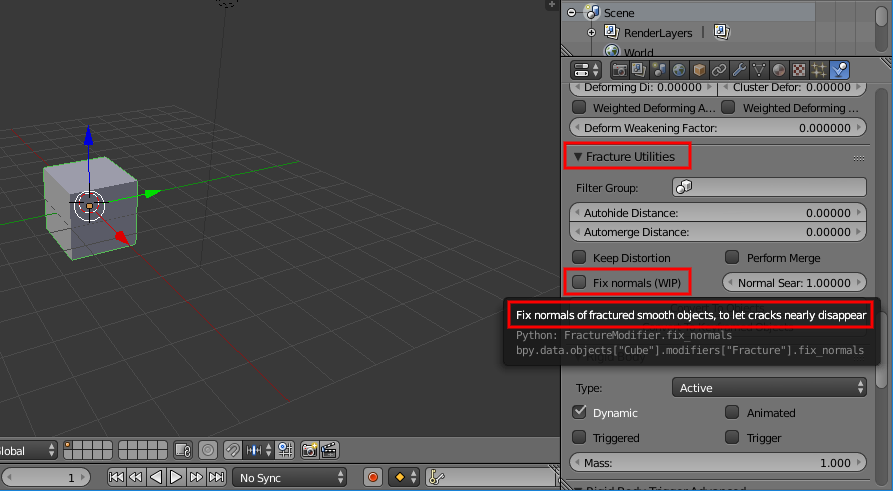
I believe I found the way within Blender Fracture Modifier to do it, under the "Fracture Utilities" Tab & check "Fix normals (WIP)" see the popup description.
It works with what I have tested so far.
|
|
By 4413Media - 7 Years Ago
|
I've done this quite a bit. Several years ago I experimented with fbx animation with fairground rides and wondered if it was possible to import blender physics in for a potential roller coaster in iClone.
So I started experimenting and discovered something fun... at around three minutes and thirty seconds in.
I've gotten a lot better at it since then. I messed around with collision, recreated the room in Blender for added effect and added various physics into structures, so they would bounce off of it. :) I know for Skygirl 4, sadly not going to happen, there would have been a huge fight scene with structures collapsing; cars crumbling through. Big feat, but can be easily achievable. :)
One way of doing it though is to import the non fracturednon fractured model, then hide it at the proper time then make the fractured object appear in iClone, a switcharoo workaround of sortsort!
That's the way. Do it a single frame, turn opacity down to zero then crank it up to 100 in the next frame and vice versa. One thing is certain, just in case, I always parent the objects to an empty before exporting. Avoids crashing from my experience.
|
|
By 《/^\》 - 7 Years Ago
|
@BenjaminTuttle love the story telling!
Here is a clip using Blender Fracture Modifier with text, reversed the motion clip in iClone which was much easier then Blender.
I don't have the PopcornFX plugin but the fire is from PopcornFX, hope you guys like it.
|
|
By 4u2ges - 7 Years Ago
|
Can someone download this "exploded" fbx and see if the animation is working in 3DX for you?
I am having a problem as animation would not run and I've no idea what to attribute it to - Blender export or 3DX.
https://www.dropbox.com/s/io7rgdt69hv7dy0/sphere_exploded.zip?dl=0
|
|
By Rogue Anime - 7 Years Ago
|
|
4u2ges (1/20/2018)
Can someone download this "exploded" fbx and see if the animation is working in 3DX for you?
4U - I tried it, and it doesn't show any animation there.. here's a pic ~V~
|
|
By 4u2ges - 7 Years Ago
|
Thanks Val! Let me dig dipper in Blender to see why it is not exported...
|
|
By 4u2ges - 7 Years Ago
|
Oh wait a sec! Did you check "Import animation" in 3DX, when importing? Because I do not see the clip in "Motion libraries" section on your screenshot.
(I do have a clip there when I import.. but it just does not play)
|
|
By Rogue Anime - 7 Years Ago
|
|
4u - The box was not highlighted for me to be able to check it... ? ~V~
|
|
By 4u2ges - 7 Years Ago
|
lol no, it is, you just have to check it :)

|
|
By 4u2ges - 7 Years Ago
|
Here is a full screenshot of what I get
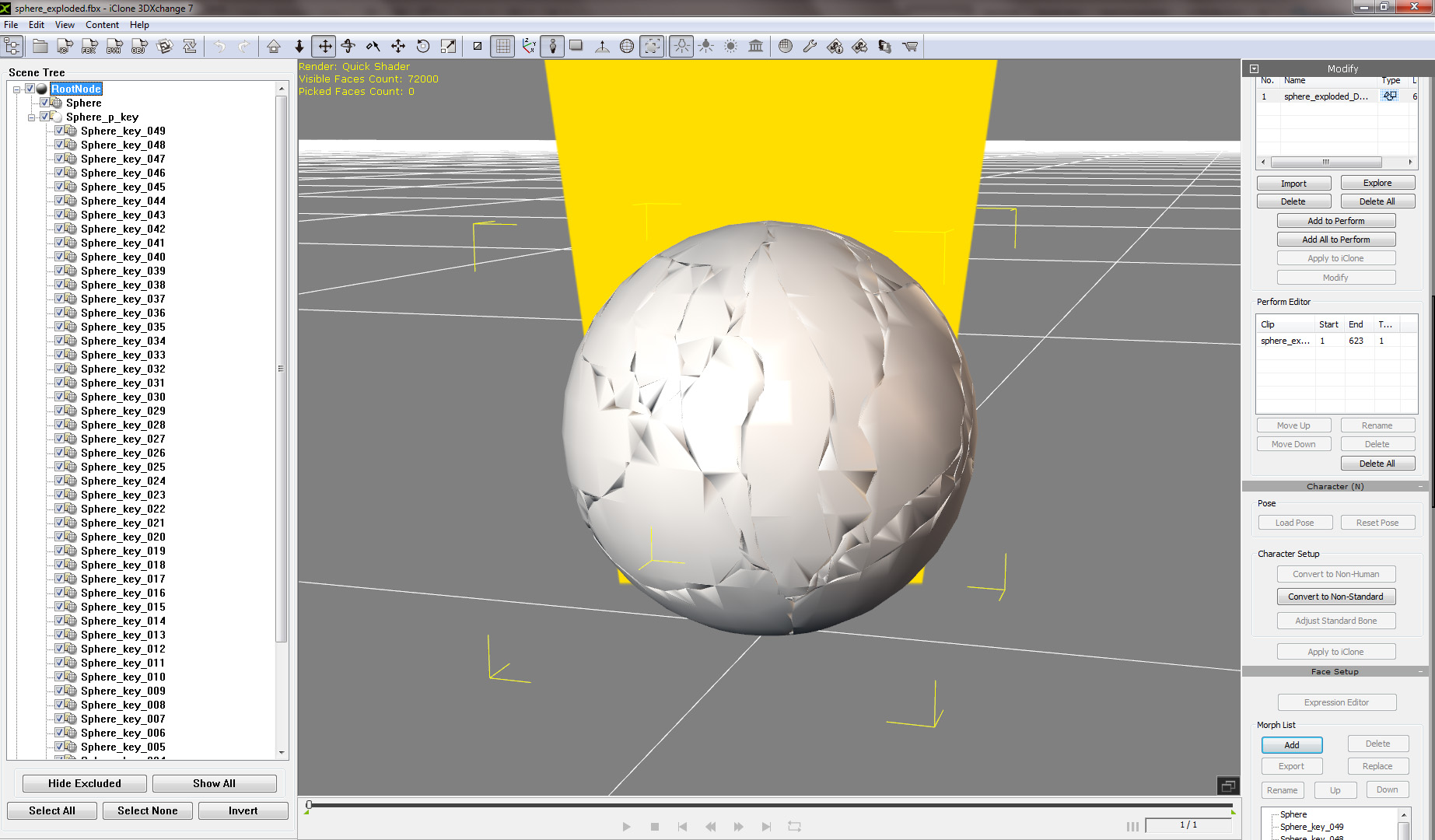
|
|
By Rogue Anime - 7 Years Ago
|
|
4u2ges (1/21/2018)
lol no, it is, you just have to check it :)
OH- DUHHH...:w00t: Sorry 'bout that, mate! Doing 5 things @ once as usual.. Got it - It shows there is SUPPOSED to be frames of animation in there from start 2 finish if I see it right? But nothing to slide on the timeline.. ~V~

|
|
By 4u2ges - 7 Years Ago
|
Yes, thanks, just want to make sure we are on the same page :)
|
|
By 4u2ges - 7 Years Ago
|
Some update... If I export any single fractured piece, it does animate in 3DX just fine. As soon as I select to export 2 or more pieces, animation stops working. I am stuck!
I am sure it is some silly omission. Here is blender file. Note: it can only be opened in v2.79 - Fracture Modifier Build
NEVER MIND! Panic button was pushed too soon. It started working.... Still no idea what was going on (done some cleaning... rebooted computer.. etc) :Whistling:
|
|
By Rogue Anime - 7 Years Ago
|
|
4u2ges (1/21/2018)
It started working....
Well, that's good news... What the heck am I DOING wrong? ~V~
|
|
By 《/^\》 - 7 Years Ago
|
4u2ges (1/21/2018)
Some update... If I export any single fractured piece, it does animate in 3DX just fine. As soon as I select to export 2 or more pieces, animation stops working. I am stuck! I am sure it is some silly omission. Here is blender file. Note: it can only be opened in v2.79 - Fracture Modifier Build NEVER MIND! Panic button was pushed too soon. It started working.... Still no idea what was going on (done some cleaning... rebooted computer.. etc) :Whistling:
It's possible the animation didn't cache before you exported it, when making changes you need to run "Fracture execute" then ALT + A
Here is a screen cast of exporting a sphere, hope it can help in some way :laugh:
|
|
By 4u2ges - 7 Years Ago
|
|
《/^\》 (1/21/2018)
It's possible the animation didn't cache before you exported it, when making changes you need to run "Fracture execute" then ALT + A
Here is a screen cast of exporting a sphere, hope it can help in some way :laugh:
Thanks for making and sharing this. It would definitely help a lot to the community in quickly building destructible scenes...
But no, I was very careful in my workflow.. it did not want run at the time :)
Just couple of tips. To overcome the evident surface cracks on the prop, I had 2 versions of a prop tide together - solid and breakable (just like iClone breakable tableware) and then triggered the visibility/opacity at the action time.
If you need to have a different material assigned to the inner surface, make sure to have at least 2 materials for the prop in Blender and assign one for the "Inner material" in fracture settings. Also, make sure to have a UV map created before you fracture it.
Finally, for the space actions there is no need for the rigid plain (just disable gravity in Blender)
|
|
By 《/^\》 - 7 Years Ago
|
4u2ges (1/21/2018)
《/^\》 (1/21/2018)
It's possible the animation didn't cache before you exported it, when making changes you need to run "Fracture execute" then ALT + A
Here is a screen cast of exporting a sphere, hope it can help in some way :laugh:
Thanks for making and sharing this. It would definitely help a lot to the community in quickly building destructible scenes... But no, I was very careful in my workflow.. it did not want run at the time :) Just couple of tips. To overcome the evident surface cracks on the prop, I had 2 versions of a prop tide together - solid and breakable (just like iClone breakable tableware) and then triggered the visibility/opacity at the action time. If you need to have a different material assigned to the inner surface, make sure to have at least 2 materials for the prop in Blender and assign one for the "Inner material" in fracture settings. Also, make sure to have a UV map created before you fracture it. Finally, for the space actions there is no need for the rigid plain (just disable gravity in Blender)
Thanks, still lots to learn 😉
|
|
By yoyomaster - 7 Years Ago
|
|
Some really cool stuff in this thread, now if RL could implement Alembic import in iClone, it would make the process much easier, and we could also export/import the particles that come with the Blender Fracture Modifier, which would make the whole thing even more useful, just saying! :)
|
|
By dogged2003 - 7 Years Ago
|
Tell me where to get the Fracture Modifier for Blender (i have Blender 2.79b)?
Thank you.
|
|
By 4u2ges - 7 Years Ago
|
|
It has a new home now: http://blenderphysics.com/fracturemodifier/
|
|
By dogged2003 - 7 Years Ago
|
|
Thank you.
|
|
By dogged2003 - 7 Years Ago
|
looking for a tutorial, how to break a wall on which there is a texture.
Thank you.
|
|
By dogged2003 - 7 Years Ago
|
|
iClone does not open a project with 100 objects assigned to physics. It simply closes without error. 
Issue 4039Thank you.P.S. If you enable the Modify - Phisics - Bounding - Bound Type: Self Mesh only for the duration of the simulation, then iClone is working. Saves and reads. And even the video shows. |
|
By dogged2003 - 7 Years Ago
|
If you look at the forum for a long time ... You can make such videos. Made by iClone physics.
|
|
By Zeronimo - 7 Years Ago
|
yes, I see the same thing:
iClone 7: import failed
iclone 6: import failed
iclone 5: incompatible project file
|