|
By Rampa - 9 Years Ago
|
There is a free version that I have played with quite a bit. It works very well as a companion to iClone. It can even use CC characters exported as FBX to generate the crowds. It's a standalone program.
https://secure.axyz-design.com
|
|
By Kelleytoons - 9 Years Ago
|
Damn you, Rampa, why are you making me spend money?! <g>.
I can't find anything on that site that says what is new in version 3.0. Do you have a link anywhere? I'd be real curious why this is a whole version upgrade (there are a couple of things about 2.x that kept me from ever pulling the trigger, but if they are fixed...)
|
|
By Rampa - 9 Years Ago
|
|
Looks like PBR and a UE4 plugin. A few other bits that probably don't matter. Watch the whole video when the page loads. It covers it.
|
|
By Kelleytoons - 9 Years Ago
|
Yeah, I saw it... and, of course, bought it (software slut). I'm not sure I'm friends with you, Rampa (you cost me WAY too much money).
I had been going back and forth on Anima for quite some time, but the reduction in price convinced me -- hopefully PBR will work across into iClone (we'll see). The good news for me is I was able to get the new Substance Painter for only $80 (and the new release today) so that saved me enough to pay for all this. Yeah, right, that's my story and I'm sticking to it when my wife asks.
|
|
By Rampa - 9 Years Ago
|
|
Yeah, see. I saved you money! ;)
|
|
By Pollux - 9 Years Ago
|
Thanks Rampa, I'll check it out.
:cool:
|
|
By diomkal - 9 Years Ago
|
Hi Rampa, do you use Anima or AXYZ Hub for your Crowds creation? could you please give us more explanation what you mean exactly?
I was on the side but there is so much informations.
|
|
By Kelleytoons - 9 Years Ago
|
|
Rampa (11/23/2017)
Yeah, see. I saved you money! ;)
Yeah, reminds me of the old Burns and Allen show where Gracie kept "saving" money on appliances she was buying and then she turned to the appliance salesman and said "Tell me when I've saved enough money to pay for all these."
Just a quick test to see how the crowds actually work in iClone (prior to this I could only do some very limited 4 second animation testing). High quality textures are going to be limited to around 30-50 actors, although it will depend on the scene and what different actors you have in them. This particular scene I "cheated" by cutting it in half and exporting both halves (and easily rejoining them by just importing them -- they lined up just fine). The big issue is XChange -- this points out more than ever that it is LONG overdue for an overhaul to a 64bit program (I have zero faith this will ever happen -- folks were complaining about it 4 years ago and still no movement). With all that is happening with iClone it may well end up being the weakest link (because iClone itself has no problems with a lot more folks/textures due to being able to use more memory).
|
|
By Kelleytoons - 9 Years Ago
|
|
diomkal (11/23/2017)
Hi Rampa, do you use Anima or AXYZ Hub for your Crowds creation? could you please give us more explanation what you mean exactly?
I was on the side but there is so much informations.
I don't think Rampa has Anima, but in any case I can tell you there isn't any "Hub" program that I know of, unless it's for rendering (which you wouldn't use with iClone).
The Anima program produces an FBX file, containing the people and the animation of them. You can watch their demo videos to see how easy it is to generate the people and their behavior (last year, when Rampa and I first started looking at this, I was able to play around a bit and it was fun). You can even bring in your own assets -- I had zombie crowds, for example.
You can export your iClone scene as OBJ and bring it into Anima so you can put the people around it. The biggest problem, as I noted above, is that XChange can only handle a certain amount of memory (FAR below what iClone can handle). So you may have to either limit the resolution of your textures you export from Anima, or you can do what I did above and split the scene into various parts and recombine. I would hope that SOMEDAY RL would fix XChange, but it won't be in my lifetime.
If you need crowds there really isn't any good alternative, and at around 35% off this is the best time to buy this program (which I did).
|
|
By Rampa - 9 Years Ago
|
I have the free version 2 that is limited to 4 seconds of animation, but I was able to import a crowd of 50 - 100 people in 3DX. You do need the 4 gig patch for 3DX. As KT mentions, you don't need any sort of hub. The program is standalone. You can get extra rendering nodes if you are using the program for Archviz without exporting, but that's not how we would use it.
Another interesting way I found to use was for generating complex walk paths for a single character. The paths and stairs work quite well, and if you export a one-person "crowd" you can characterize that character. It uses the HumanIK skeleton. So yes. It is very versatile! :)
Version 3 has a UE4 plug, so maybe AXYZ would be interested in an iClone plugin as well.
|
|
By Rampa - 9 Years Ago
|
|
[b]Kelleytoons (11/23/2017)
Just a quick test to see how the crowds actually work in iClone (prior to this I could only do some very limited 4 second animation testing). High quality textures are going to be limited to around 30-50 actors, although it will depend on the scene and what different actors you have in them. This particular scene I "cheated" by cutting it in half and exporting both halves (and easily rejoining them by just importing them -- they lined up just fine). The big issue is XChange -- this points out more than ever that it is LONG overdue for an overhaul to a 64bit program (I have zero faith this will ever happen -- folks were complaining about it 4 years ago and still no movement). With all that is happening with iClone it may well end up being the weakest link (because iClone itself has no problems with a lot more folks/textures due to being able to use more memory).
This little guy is your best friend for big models and 3DXchange. http://www.ntcore.com/4gb_patch.php
|
|
By Kelleytoons - 9 Years Ago
|
Tried that, Rampa -- made no difference whatsoever (that was actually the first thing I tried -- I'm not so sure now that it works, as XChange choked on exactly the same place both before I applied that patch as well as after).
We REALLY need RL to step things up and just recompile the @#Q$@$#% program. Hell, I'll do it for them if they give me the source <g>.
|
|
By animagic - 9 Years Ago
|
|
I believe 3DXchange was updated so that the patch is no longer needed. It will be able to use more RAM by default, but it's still only a 32-bit program (meaning about 3.5 GB max RAM use). One of life's mysteries is THAT it's still a 32-bit program.
|
|
By Kelleytoons - 9 Years Ago
|
That sounds right, Ani (or rather, sounds wrong. Sigh). The file in iClone was around 2.5GB, and you have to figure XChange itself needs around 1GB to function.
This has been an issue for at least four years now. Doubt that it will ever get corrected (or rather, that I will live to see it).
|
|
By animagic - 9 Years Ago
|
|
I'm just looking at the ordering page. Why would they want our SSN (under Individual Tax Identification Number)? I don't really want to give that out.
|
|
By Rampa - 9 Years Ago
|
|
No star after it. I don't think you need to enter anything on that line, unless you want to.
|
|
By Kelleytoons - 9 Years Ago
|
|
I didn't have to enter SSN or anything other than the usual personal info (address and email). Didn't even get asked that.
|
|
By animagic - 9 Years Ago
|
|
OK, no more excuses. This will cost me money..:unsure:
|
|
By Dr. Nemesis - 9 Years Ago
|
Ok, I really didn't wanna do this but the amount of time this tool would save me is getting difficult to ignore.
I only have one reservation though, and that's buying more stuff once I've bought the tool. I don't wanna have to buy more characters or animations.
My film is set in modern day. Crowd behaviour would include standing around drinking (like in a bar), running away from stuff, and of course the everyday standing/ walking around.
Would this all be doable without further purchases?
|
|
By Bellatrix - 9 Years Ago
|
|
Kelleytoons (11/23/2017)
The big issue is XChange -- this points out more than ever that it is LONG overdue for an overhaul to a 64bit program (I have zero faith this will ever happen -- folks were complaining about it 4 years ago and still no movement). With all that is happening with iClone it may well end up being the weakest link (because iClone itself has no problems with a lot more folks/textures due to being able to use more memory).
Agreed 100%. The only excuse, is RL is merging 3dxchange functionalities into iClone, say, as a tab.
IMO the weakest link is UI GUI customization - Blender's strongest trait. Until Python becomes possible, I guess.
|
|
By Kelleytoons - 9 Years Ago
|
|
Dr. Nemesis (11/24/2017)
Ok, I really didn't wanna do this but the amount of time this tool would save me is getting difficult to ignore.
I only have one reservation though, and that's buying more stuff once I've bought the tool. I don't wanna have to buy more characters or animations.
My film is set in modern day. Crowd behaviour would include standing around drinking (like in a bar), running away from stuff, and of course the everyday standing/ walking around.
Would this all be doable without further purchases?
You can definitely import your own characters -- I have robots I'm working on as well as steam punk folks. Earlier in my tests I did zombies. And they all look as good as you would expect from your own resources, top notch PBR quality (how could they not? They are just as good as whatever the source and render engine is).
You can also import your own animations but you *will* be limited in how your can get your folks to run -- they tend to "jog" although I have read that Anima 3 has increased that speed (so I have to see. I can report back if it's important to you.
No question this is the only way you can actually generate crowd behavior in iClone.
|
|
By justaviking - 9 Years Ago
|
@KelleyToons - Nice demonstration. Thank you.
@Rampa - Thank you for bringing this to our attention.
@KelleyToons or Rampa or anyone...
Could one of you give an outline of the steps in your process?
- Start with CC, get characters to iClone
- How do you export your iClone scene and get into this tool (somehow) so people know where and where not to walk
- Do you pre-populate the scene in iclone, or do that in Anima
- How did you render (or "compute") the scene in Anima, then you go through 3DXchange, I assume?
- It looks like all the textures survive, so using FBX as a transfer format?
- What's it like when you bring the crowd into iClone?
- Can you make adjustments in iClone? Are they individually animated characters then, or one big blob? Do you have to go back to Anima to edit?
Will appreciate any insight to the process that you can provide.
|
|
By Kelleytoons - 9 Years Ago
|
Dennis,
The overview is this: Anima will produce an FBX which you will then import via XChange, and use Perform to do whatever animation you have created.
To create that animation you start off in iClone and export however much of your scene as you will need to do as an obj. This comes into Anima and at that point you can then make the pathways, escalators, stairs, elevators and stoplights or streets to make the characters behave properly. Inside of Anima you can also import your own characters, as I did with the robot -- it's a quick and easy process and you can build up a library of your own (frankly the ones they supply are only good for a distance view). To import your own character you can import an avatar into XChange and export as FBX, or you can export from Mixamo, or Daz, or even Max -- it's pretty accepting of just about any rigged character (haven't tried it from Blender but I don't know why it wouldn't).
You can also import your own animations -- both walk cycles as well as various perform actions (the characters have a limited ability to stand around and "do" stuff). I had some zombie walks that were pretty cool -- and I even defined a "Zone" where when they got there they turned into zombies (at least their walk did). You can also define variations in the characters so they populate randomly.
Honestly the best way is to just download the "free" version (which is totally free with a few limitations -- only 4 seconds of animation, limited amount of different characters at one time). The limitations won't prevent you from doing just about all you need to decide whether it will work for you (and there's lots of help available). I evaluated for nearly a year and in the end it was the price that kept me from buying (when I was looking the exchange rate and price made it around $350, which seemed about $100 too much). At around $220 this seems like a great deal, even if the limitations in XChange mean you sometimes have to import sections of stuff (I haven't got a clear handle yet, and I *may* be able to work around it by exporting without textures and then just assigning the textures after I import into iClone -- I had to do that with the robot test anyway because it didn't bring in the AO or Glow maps, but it took two seconds to drag those in).
|
|
By animagic - 9 Years Ago
|
|
Thank you Rampa and Kelley for providing USEFUL information in this thread. I'm not interested in reading what I supposedly CAN'T do. I've used the Anima demo some time ago and it just works.
|
|
By justaviking - 9 Years Ago
|
|
Thanks for the excellent reply, KelleyToons. Much appreciated. :)
|
|
By Kelleytoons - 9 Years Ago
|
I should also add that since I bought this yesterday I've been in touch with the Anima folks and they are VERY responsive and interested in improving their product. I suspect if enough of us buy and let them know how important a partnership could be, they might be able to work out an iClone plug-in or at least improve things for our own workflow.
Thanks again, Rampa -- while I joke about you costing me money (you do!) I'm glad to have spent it.
|
|
By TonyDPrime - 9 Years Ago
|
I am going to enjoy using this tool, thanks Rampa for highlighting this.
Whether you would only use it in standalone, with C4D, Max alone, iClone alone, iClone going to Max, Max to iClone, Max-to-iClone-and-then-back-into-Max, iClone-into-Max-and-then-back-into-iClone,
PreViz, PostViz, MidViz, Pre-but-essentially-after-lunch-it-will-be-midViz, Mid-but-almost-doneViz,
ArchViz, ArchitectualViz, ArchVizualization, ArcheologistViz, or ArchieBunkerViz,
this seems, in all scenarios, to be of great utility.
|
|
By Rampa - 9 Years Ago
|
I'll add a bit of info on using the crowds.
The crowd comes in as a giant skeleton. Remember it is one model, so all the characters are connected to the root.
You can edit the bones in the motion layer, if you wish.
The materials are just like any other materials, and you can edit them accordingly.
The free version allows only 5 unique characters, but you can have as many of them as you want. Send in the clones!
If you have a "crowd" of only one character, you can characterize it in 3DX. It uses the HumanIK preset. Handy for motion import!
|
|
By JimmyB7 - 9 Years Ago
|
|
What are the recommended settings for Anima Lite 3.0 Export 3D Scene? Especially: “Units”, “Texture Quality”, “Preset”, "Animation Format”, “Escalators”, and “FBX Version”. Any other export settings tips would be appreciated too. Thank you.
|
|
By Kelleytoons - 9 Years Ago
|
|
The only thing I change are units (to feet -- dunno if it's even necessary, but I do it) and as high a quality as I can import into XChange (but I do think there's a workaround -- you can export at a very high quality and a low one, and then replace the textures after you bring it into iClone -- I'll play more and elaborate when I'm feeling better).
|
|
By mtakerkart - 9 Years Ago
|
|
they might be able to work out an iClone plug-in
That's exactly what I thought when I saw this app. I'll have no problem to pay for that. But for now it's not my priority....
|
|
By TonyDPrime - 9 Years Ago
|
Here are 2 tries:
The first one was default setting from Anima, then imported from 3DX to iClone with max map @2048x 2048. The animation could not be transferred over, kept saying "out of memory" (32 bit thing probably).
The resolution I think also stuttered somehow the video, it looks jittery, not smooth, full-screen @30FPS. Not sure what that unwanted effect is called, when panning cam on 3D objects gets jittery-stuttery looking.
This second one was exported default setting from Anima, then imported from 3DX to iClone with max map of 256x256. In this case the animation was transferred over, and I looped the 4 seconds over and over again. I did adjust certain things when exporting placement wise from Anima, but why some character animations got messed up I don't know, because that was not what was being displayed in Anima upon play back.
But oh well...!
|
|
By Kelleytoons - 9 Years Ago
|
Did you import at 30fps? The normal default in XChange is 24fps, and if you don't import at the proper rate it will look jittery like that.
I've never had any issues with jittery playback when imported at the right frame rate.
|
|
By JimmyB7 - 9 Years Ago
|
|
30fps import into 3DXchange fixed my problem. I thought it was the export settings in Anima. Thanks Kelleytoons.
|
|
By Rampa - 9 Years Ago
|
With the 3DX memory limitation, it is a good idea to keep your textures really small, or leave them out entirely. You can add them iClone, if need be.
It's a good idea to have your export FPS and import FPS the same. Although you can safely reduce the FPS by half, and be pretty-much OK. The FPS is setting keys, not animation frames, so your thinning the data if you do that.
I posted this thread after I saw that they have a UE4 plugin for it. I then thought to mention it to RL. But I like to mention all kinds of interesting things. ;)
|
|
By animagic - 9 Years Ago
|
When I tested the demo back in June, I exported and imported at 12 fps, which helped smooth the motions. The idea is that there is some space for interpolation. Unless the motions are very fast, 12 fps is enough resolution.
Here is a comparison video I did at the time with 30 fps followed by 12 fps:
|
|
By Kelleytoons - 9 Years Ago
|
|
Rampa (11/25/2017)
With the 3DX memory limitation, it is a good idea to keep your textures really small, or leave them out entirely. You can add them iClone, if need be.
It's a good idea to have your export FPS and import FPS the same. Although you can safely reduce the FPS by half, and be pretty-much OK. The FPS is setting keys, not animation frames, so your thinning the data if you do that.
I posted this thread after I saw that they have a UE4 plugin for it. I then thought to mention it to RL. But I like to mention all kinds of interesting things. ;)
As I said earlier, I talked with the Anima people and they seem very accommodating. I suspect they may even consider an iClone plugin. But it isn't necessary, as we can manage things with XChange if, as you say, we watch out for texture issues.
|
|
By TonyDPrime - 9 Years Ago
|
|
rogyrue (11/25/2017)
Its a waste of money and time for Iclone users its not designed to be used with Iclone and i dont know why any one would try to recommend it to a iclone user. Sure its great in Vray in Max are in Maya . No harm in messing around with it but to say its the best crowd simulator to use in iclone is just wrong and misleading
Don't be jealous...you will make something good too when you join us in hailing the might of AXYZ Anima and start using it...
Besides, how can it be wrong if it feels so right!...
|
|
By TonyDPrime - 9 Years Ago
|
|
Rampa (11/25/2017)
With the 3DX memory limitation, it is a good idea to keep your textures really small, or leave them out entirely. You can add them iClone, if need be.
It's a good idea to have your export FPS and import FPS the same. Although you can safely reduce the FPS by half, and be pretty-much OK. The FPS is setting keys, not animation frames, so your thinning the data if you do that.
I posted this thread after I saw that they have a UE4 plugin for it. I then thought to mention it to RL. But I like to mention all kinds of interesting things. ;)
Wow, this does look like what my 2nd clip had!
Just a technical question, is it adjusting frame rate from Anima, or changing frame rate in 3DXchange upon import?
|
|
By Rampa - 9 Years Ago
|
|
I exported from Anima at 30, and imported at only 5. It looked fine. If they are moving faster, you need a bit higher.
|
|
By Rampa - 9 Years Ago
|
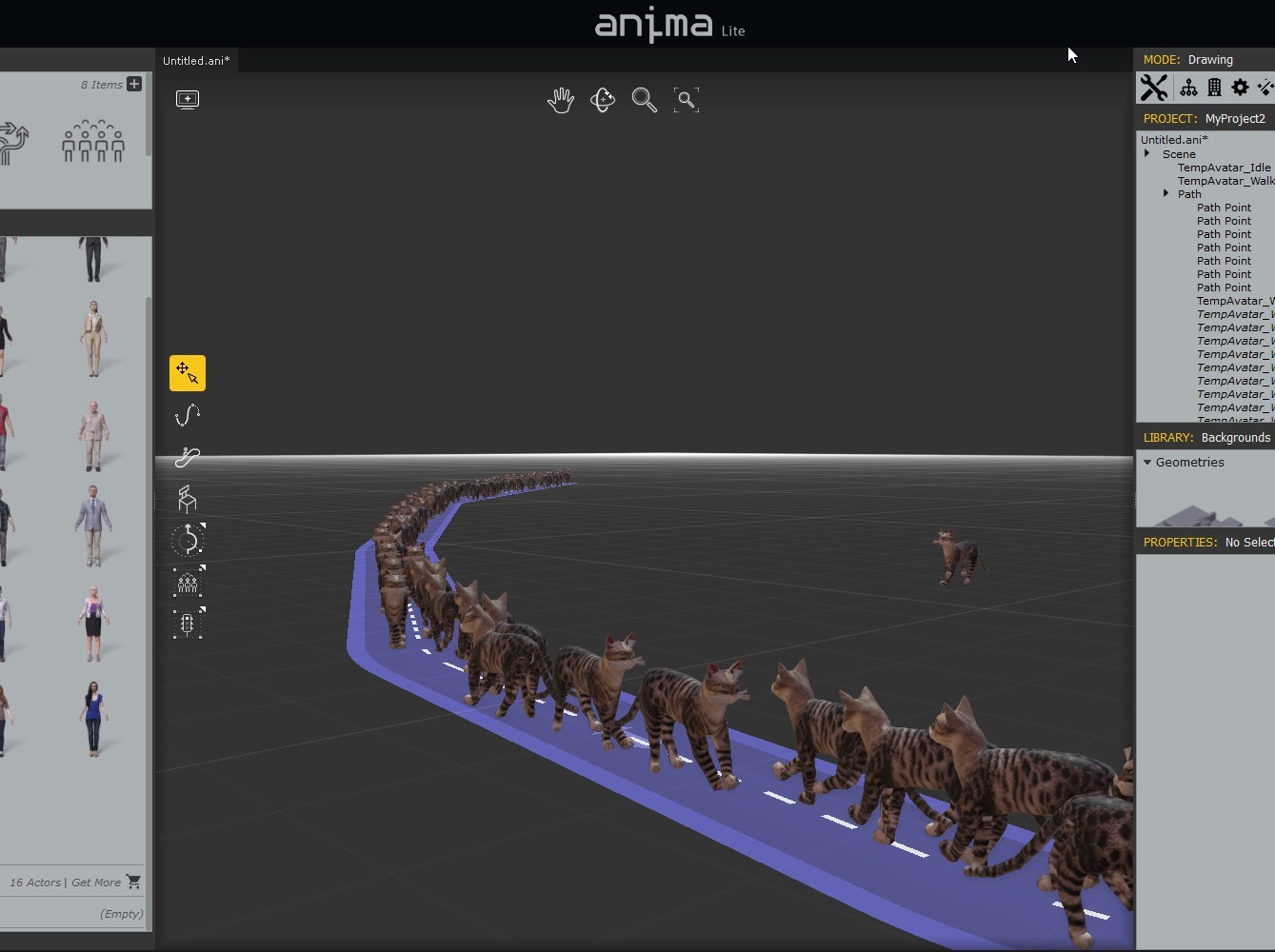
So you are not restricted to just humans. :)
|
|
By TonyDPrime - 9 Years Ago
|
Rampa (11/26/2017)
So you are not restricted to just humans. :)
That reminds me of the nature shows with insects marching in unison...
This is really awesome!
Cat Swarm!
|
|
By Rampa - 9 Years Ago
|
I was able to import the cat animations, but the foot-falls were not right for path-following. Guess I'll have to read a bit. The cats on the path are using a human walking motion. Reallusion makes their animals with Biped in Max, so most quadrupeds can be mapped to biped bones.
Anyway, just for fun. The humans are more interesting, and easier to deal with.............................In the program, I mean. ;)
|
|
By rogyru - 9 Years Ago
|
TonyDPrime (11/25/2017)
rogyrue (11/25/2017)
Its a waste of money and time for Iclone users its not designed to be used with Iclone and i dont know why any one would try to recommend it to a iclone user. Sure its great in Vray in Max are in Maya . No harm in messing around with it but to say its the best crowd simulator to use in iclone is just wrong and misleading
Don't be jealous...you will make something good too when you join us in hailing the might of AXYZ Anima and start using it... Besides, how can it be wrong if it feels so right!...
Well it could help if anyone actually posted a WORKING scene inside of Iclone :)
|
|
By yoyomaster - 9 Years Ago
|
I posted this in another thread, it is a free and open source crowd add-on for Blender, so it could be ported to iClone I suppose, or just be used in Blender then exported to FBX.
Crowdmaster
I have not tried to export to iClone, but it works well from within Blender!
|
|
By animagic - 9 Years Ago
|
|
For the doubters: anyone can download the Anima trial and try for themselves. I don't feel obligated to do the work for others; too busy.
|
|
By wires - 9 Years Ago
|
|
animagic (11/26/2017)
For the doubters: anyone can download the Anima trial and try for themselves. I don't feel obligated to do the work for others; too busy.
Agree 100%, if anyone has an interest in the software then the only way to know if it is suitable for their own requirements is for them to test it on their own system.
|
|
By TonyDPrime - 9 Years Ago
|
|
animagic (11/26/2017)
For the doubters: anyone can download the Anima trial and try for themselves. I don't feel obligated to do the work for others; too busy.
You tutor other users quite a bit, in this post alone you showed a great clip of an import where there was an issue, and then with that issue resolved.
Mega helpful!
|
|
By TonyDPrime - 9 Years Ago
|
yoyomaster (11/26/2017)
I posted this in another thread, it is a free and open source crowd add-on for Blender, so it could be ported to iClone I suppose, or just be used in Blender then exported to FBX. CrowdmasterI have not tried to export to iClone, but it works well from within Blender!
Yes, thanks for this info as well. What have your experiences been working within Blender and exporting to iClone?
I myself find the UI in Blender tough, but this is my own lack of practice with the UI, I am more familiar with 3DS Max (1st) and Maya (2nd).
|
|
By yoyomaster - 9 Years Ago
|
TonyDPrime (11/26/2017)
yoyomaster (11/26/2017)
I posted this in another thread, it is a free and open source crowd add-on for Blender, so it could be ported to iClone I suppose, or just be used in Blender then exported to FBX. CrowdmasterI have not tried to export to iClone, but it works well from within Blender! Yes, thanks for this info as well. What have your experiences been working within Blender and exporting to iClone? I myself find the UI in Blender tough, but this is my own lack of practice with the UI, I am more familiar with 3DS Max (1st) and Maya (2nd).
Yes, Blender UI is different, you can select a MAX or Maya preset for it if you wish, there are videos on moving to Blender from either Max or Maya, I am a Houdini person myself, but I used Max, Maya and others at work, but for personal projects I really like Blender.
Blender export to iClone works really well for static models, but I haven't used it to export animated stuff so far.
|
|
By Rampa - 9 Years Ago
|
|
If Crowdmaster were a complete solution, it would be great. But from what I can tell, you need to create and add all your own assets, and then set up the crowd behavior in the node editor. So it is not very user friendly for most iClone users.
|
|
By TonyDPrime - 9 Years Ago
|
|
yoyomaster (11/26/2017)
Yes, Blender UI is different, you can select a MAX or Maya preset for it if you wish, there are videos on moving to Blender from either Max or Maya, I am a Houdini person myself, but I used Max, Maya and others at work, but for personal projects I really like Blender.
Blender export to iClone works really well for static models, but I haven't used it to export animated stuff so far.
Thanks so much for the feedback on Blender, have to revisit it.
And I have to ask too, how do you like the new Eevee renderer, does it feel like iClone's PBR?
|
|
By yoyomaster - 9 Years Ago
|
TonyDPrime (11/27/2017)
yoyomaster (11/26/2017)
Yes, Blender UI is different, you can select a MAX or Maya preset for it if you wish, there are videos on moving to Blender from either Max or Maya, I am a Houdini person myself, but I used Max, Maya and others at work, but for personal projects I really like Blender.
Blender export to iClone works really well for static models, but I haven't used it to export animated stuff so far.
Thanks so much for the feedback on Blender, have to revisit it. And I have to ask too, how do you like the new Eevee renderer, does it feel like iClone's PBR?
Eevee is still in very early development, but it already supports SSS and volumetric lights, I have rendered some of the demos, you can find the results with render times on my Vimeo channel.
Mad Steam Studio on Vimeo
|
|
By yoyomaster - 9 Years Ago
|
|
Rampa (11/26/2017)
If Crowdmaster were a complete solution, it would be great. But from what I can tell, you need to create and add all your own assets, and then set up the crowd behavior in the node editor. So it is not very user friendly for most iClone users.
Crowdmaster is actually pretty easy to setup and it is fully node based, you can do pretty much anything with it if you put your mind to it, easy, usually does not mean powerful, not in my experience at least, and the guy is pretty committed to its development, did I mentioned that it is free!
Here is a basic tutorial for it.
|
|
By Rampa - 9 Years Ago
|
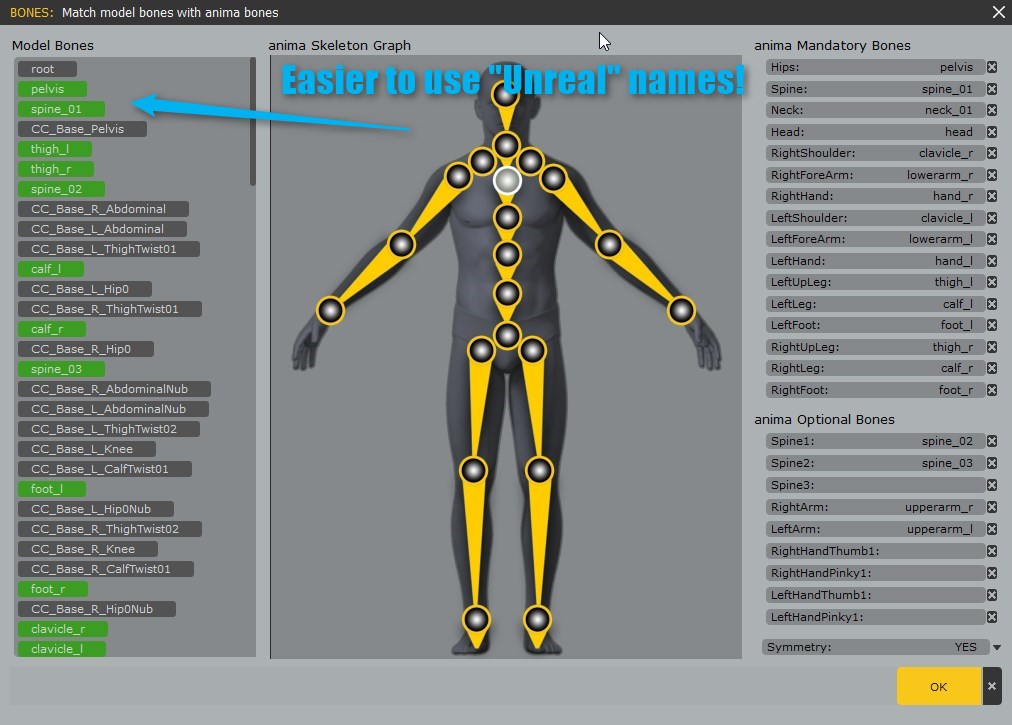
For importing CC characters into Anima, it is much easier if you set the FBX export settings in CC to "Unreal". It renames the basic bones you'll need, making re-targeting in Anima much easier.
|
|
By Dr. Nemesis - 9 Years Ago
|
Just a quick note, CGriver (aka CGWorld apparently) seems to be selling this for even cheaper ($186US) right now.
They're listed here as re-sellers so seems legit. After conversion that seems close to $40 cheaper than the black Friday price at Axyz.
-Doc
|
|
By gordryd - 9 Years Ago
|
|
Is it possible to import a low-poly object "placeholder" scene into Anima to build your paths around, and then export only the finished characters/animation (not the objects) for use in iClone with the real textured objects? Seems like this would be a way to get around some memory limitations...
|
|
By Kelleytoons - 9 Years Ago
|
You don't reimport any of your scene back from Anima -- when you export whatever it is you need to export (and it can be low poly or high poly, but it should only be the objects you want people to move around and/or interact with) they are just used as a placeholder inside of Anima to generate the people. The people are then just what is exported.
So, no, your idea won't get around memory limitations (which seem to be only based on textures -- so far that's what I've discovered. So I think the workaround is to first export a very low texture version and reload the textures inside of iClone. More on this to come).
|
|
By Rampa - 9 Years Ago
|
|
gordryd (11/27/2017)
Is it possible to import a low-poly object "placeholder" scene into Anima to build your paths around, and then export only the finished characters/animation (not the objects) for use in iClone with the real textured objects? Seems like this would be a way to get around some memory limitations...
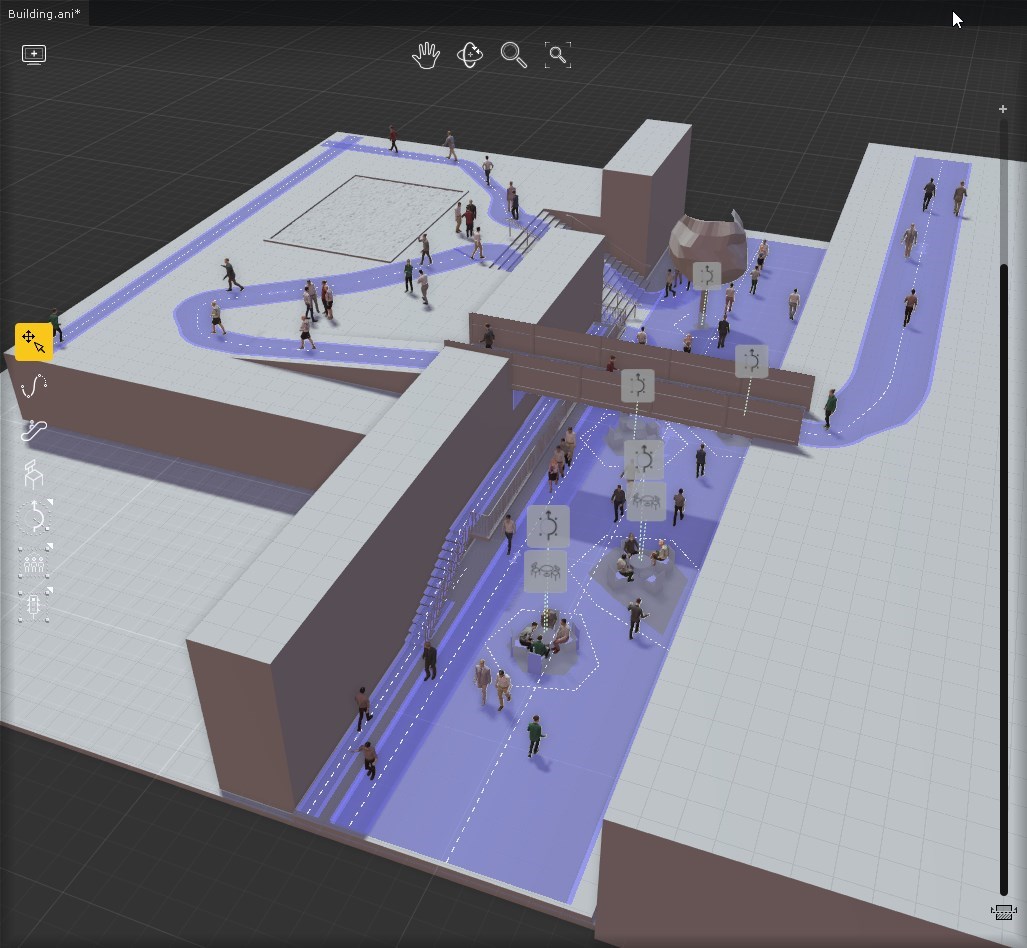
That's how it works. You put put in a backdrop that the paths and what not are placed upon. It is not exported. You only need to import things the crowds would interact with, not the whole scene.
|
|
By rollasoc - 9 Years Ago
|
Dr. Nemesis (11/27/2017)
Just a quick note, CGriver (aka CGWorld apparently) seems to be selling this for even cheaper ($186US) right now. They're listed here as re-sellers so seems legit. After conversion that seems close to $40 cheaper than the black Friday price at Axyz. -Doc
Followed your link and purchased. Slightly worried, the download was a readme file saying, we are working on it. Took about 24 hours for the email from axyz with the serial key and the product to be added to my account (which I had setup to download the demo).
|
|
By Jfrog - 9 Years Ago
|
|
It's now at at $249 US. So perhaps it was a error and they corrected it.
|
|
By JimmyB7 - 9 Years Ago
|
First of all, thank you Dr. Nemesis, saved me over $60. The order from CGRiver did take over 24 hours to complete but it was worth the wait. Secondly, The first thing I tried with the licensed Anima 3 was to export the 50 actor crowd Demo called Evermotion Archexteriors-028 at the 1800 frames provided. It took a good while to export to FBX and the resulting file size was about 247 MB. I set 3DXchange to import at the suggested 5 fps, and low and behold it imported beautifully. And after a short transfer delay it exported nicely to iClone 7.1.
I've attached a quick and dirty video I made using the Anima 3.0, 50 actor crowd with no changes. This video is only for demonstration purposes just to show a somewhat extreme pipeline effort can be done.
|
|
By Dr. Nemesis - 9 Years Ago
|
|
rollasoc (11/28/2017)Followed your link and purchased. Slightly worried, the download was a readme file saying, we are working on it. Took about 24 hours for the email from axyz with the serial key and the product to be added to my account (which I had setup to download the demo).
No need to worry. Takes about 48 hours. First they open you an account, then Axyz put your details in there. Mine came in this morning, I've tested it and all is legit.
I live in Canada so the Euros price was just too high for me. It was worth taking the leap. I'll be keeping an eye for more sales there in future.
JfrogIt's now at at $249 US. So perhaps it was a error and they corrected it.
I think it was some additional Cyber Monday sale adding on to their pre-existing sale. Now that the Black Friday/Cyber Monday sale is done, the awesome price is understandably gone.
JimmBFirst of all, thank you Dr. Nemesis, saved me over $60...
I'm glad to have helped!
As for my experience so far, I haven't exported since registering but what I tried of the demo was very good. Had some trouble importing to Iclone at first but once I figured that out, it was pretty amazing. Questioning whether I need to import any additional guys. One of the reasons I bought this was that it seemed I wouldn't need to, as they provide a good number of people to start with. Other than the guy with a target on his shirt making it obvious that there's colour swapping going on, the tool does a pretty job of making varied looking crowd.
Normally I wouldn't have spent this on such a specialized tool but I counted the number of scenes in my movie that would use it and the investment became worthwhile.
|
|
By Kelleytoons - 9 Years Ago
|
|
Dr. Nemesis (11/28/2017)
[quote][b] the tool does a pretty job of making varied looking crowd.
Normally I wouldn't have spent this on such a specialized tool but I counted the number of scenes in my movie that would use it and the investment became worthwhile.
It's VERY surprising how much adding 20 or 30 folks to your background helps with a convincing animation, something that can't be done easily (or at all) without a product like this. I also love how the randomness of the AI helps with the convincing (one of the things that most folks can't do very well is create such random effects -- when we get Python scripting we should be able to do similar things with objects, like vehicles, but doing realistic walks and pauses and avoidances like this product does effortlessly would be nearly impossible otherwise).
Rampa has once again come through and helped the iClone community greatly. Thanks, again, for starting this thread and giving at least three or four of us the chance to bring our animations up to the next level.
|
|
By gordryd - 9 Years Ago
|
|
Is it possible to import a character into Anima with a prop (say, a soldier with a rifle)? I've read through the Anima doc but didn't see this mentioned. If it worked, it would be an easy way to create a whole platoon at once...
|
|
By Rampa - 9 Years Ago
|
Any accessory on your character will be part of the FBX export from 3DX, CC, or iClone. If the rifle is attached, your good to go.
You can also attach rifle props to any bone in the imported FBX. So you can attach it to any particular soldier's hand. The FBX crowd is skeletal, so you can adjust its bones on the animation layer as well.
|
|
By animagic - 9 Years Ago
|
|
I have been looking for a crowd generator for a long time, so I'm pleased with this find. I could even have gotten it cheaper, but that's OK.
|
|
By Dr. Nemesis - 9 Years Ago
|
|
Kelleytoons (11/28/2017)It's VERY surprising how much adding 20 or 30 folks to your background helps with a convincing animation, something that can't be done easily (or at all) without a product like this. I also love how the randomness of the AI helps with the convincing (one of the things that most folks can't do very well is create such random effects -- when we get Python scripting....
Haha, doing 20-30 background characters would take me more time than it's worth and it wouldn't look this natural.
And it's funny, I did consider wether building something like this inside Iclone with Python would be a better option.
I thought the script could generate paths and place walk animations on characters. The difficulty is that Anima is actually using AI and good animation blending to do stairs, and avoidance of other characters and the no go areas. That's what makes it look natural and not just a bunch of people playing animations. I'd never be able to code that myself.
I'm really looking forward to more Python info so I can stop having to guess everything though.
|
|
By Kelleytoons - 9 Years Ago
|
Yeah, I've been evaluating Anima for almost a year now, and during that time I considered how much programming it would take me to emulate this. Would be staggering and just not worth it in any way shape or form.
I still intend to do some traffic emulation, perhaps building on the open source of that Blender code (which is Python already). Vehicles won't require as much care since you don't have to worry about foot slippage and other such things. But even there I might think it's better to spend my time doing other things (particularly when I haven't much time left here).
|
|
By rogyru - 9 Years Ago
|
Can some one please post a working expample inside of Iclone along with a foreground scence running at a steady FPS.Hate to see people spend money on a porduct that is not ready to work inside of ilcone
thanks :)
|
|
By BOLPHUNGA - 9 Years Ago
|
does this have a Ai feature? and physics?
random motion type crowd sims dont get much mileage
even warlord started giving them away.
|
|
By Dr. Nemesis - 9 Years Ago
|
|
rogyrue (11/29/2017)
Can some one please post a working expample inside of Iclone along with a foreground scence running at a steady FPS.Hate to see people spend money on a porduct that is not ready to work inside of ilcone
thanks :)
No need to risk your money or rely on a stranger's video, there's a free demo and it exports 4 second animations. That's the best way to see if it suits your needs and runs at a steady FPS on your machine.
|
|
By Kelleytoons - 9 Years Ago
|
|
AeMax (11/29/2017)
does this have a Ai feature? and physics?
random motion type crowd sims dont get much mileage
even warlord started giving them away.
As the Doc notes below, there's a free version you can test for yourself. What it's *mostly* about is adding folks to architectural renderings (because buildings look "dead" if folks aren't walking around in and outside them). That's what it does best -- while you can, to some degree, bend it to your will, it's just best to add those background folks that we normally don't think much about (think of it as the iClone equivalent of "extras" in a movie). You wouldn't use them as any main characters, nor can they do much more than walk, run or sit around talking (I have some zombies that look pretty good, though).
If you don't feel you need such background folks when don't worry about it (this wouldn't be the solution for things that major animation software costing $$$ would solve -- there's a pretty amazing piece of software used for LotR and other such that handles that).
|
|
By knoble - 9 Years Ago
|
|
How do you characterize the character when working with a crowd of one? I would like to use use a walk path with another character.
|
|
By Rampa - 9 Years Ago
|
|
knoble (11/30/2017)
How do you characterize the character when working with a crowd of one? I would like to use use a walk path with another character.
You can load your crowd of one into 3DXchange and characterize it the same way you would any other, and the animation is converted along with it. But......... There is currently a bug in 3DX 7.1 that breaks the process. I have found a workaround. If you characterize the model, and then check the "active" box, then you can save a profile. Now un-check the "active" box and load that profile back. Then you will be able to use the preview, and your character will actually convert.
|
|
By Rampa - 9 Years Ago
|
Rampa (11/30/2017)
knoble (11/30/2017)
How do you characterize the character when working with a crowd of one? I would like to use use a walk path with another character.You can load your crowd of one into 3DXchange and characterize it the same way you would any other, and the animation is converted along with it. But......... There is currently a bug in 3DX 7.1 that breaks the process. I have found a workaround. If you characterize the model, and then check the "active" box, then you can save a profile. Now un-check the "active" box and load that profile back. Then you will be able to use the preview, and your character will actually convert.
An important note on this. You have to use the same character that you characterized. So my basic procedure is this:
Drag a character from the Anima character panel into the scene. Drag the "Tpose" motion onto them (in the animation tab).
Export 3D Scene.
Open in 3DX and characterize and convert.
Go back to Anima
Create your path.
Drag your character from where they are in the scene onto your path. Don't use "Generate".
Export your 3D Scene.
Go back to 3DX.
Import the new FBX into your motion library. Choose the current character for your profile.
Add as many as you want. You can bulk import.
Add the motion(s) from your library into the perform editor.
Export to iClone. You only need to export the motions, but export the character to if it doesn't let you export motions only. It will create a folder full of motions in your custom folder.
This is fantastic if you need a character to traverse stairs, as that is pretty difficult to do well in iClone.
|
|
By animagic - 9 Years Ago
|
|
Some great and helpful tips, Rampa. I always have trouble with characters on stairs...:unsure:
|
|
By Lamias - 9 Years Ago
|
Amazing software. And this thread is even more amazing.
One small question: Is the option to export to FBX new for Anima 3, or was it there in Anima 2 as well? I had downloaded Anima 2 back then, but from what I recall, there wasn't any way to export to fbx.
Or am I wrong?
|
|
By Rampa - 9 Years Ago
|
@Lamias
The lite version is free. What makes it "lite" is that it only exports 4 seconds of animation. Same was true for version 2. I started playing with it a year ago, and do recall FBX in version 2 as well.
If you have 3DXchange, the FBX files generated from it are very easily imported, with animation, materials, etc.
If you have Pipeline, you can send any iClone character(s) to be used in crowds. You need to retarget the bones (just once).
If you import a "crowd" of just one character, you can characterize it in 3DX. Handy for fancy walk paths with stairs and such.
It can also import any terrain to be used as a walking surface. This includes stairs and tunnels.
It's very easy to use, and fairly intuitive.
It is "full featured" in that it creates complete crowd props as it's default. Crowds are actual characters with lots of animations.
It's pretty affordable, and does not require an expensive host software, like Max or Maya.
No, it is not integrated inside iClone. Perhaps I should have said, "Best crowd generator for 3DXchange users". ;)
|
|
By animagic - 9 Years Ago
|
I would rather trust Rampa for any statements regarding Anima...;) There is a free version with which you can try out things, so no money needed for that.
To reiterate: there are Max and Maya plugins, but there is also FBX export, which is how things get into iClone (via 3DX). There are many things what can be done with iClone "that are not supposed to work".
Anima is a crowd simulator and you take the baked simulation and import it into iClone. Due to 3DXchange limitations, it may be necessary to split up the crowd.
|
|
By RobertoColombo - 9 Years Ago
|
Hi there,
my 2 cents...
I started playing a bit with Anima Lite version and I have to say that it is absolutely great.
Very easy to use: in a reasonable quick time it is possible to create crowd animation and bring the result back to iClone.
I am working with it for a scene of my current project and when I am done I will post here something to show.
Regarding the CrowdGenerator for Blender, it has the huge advantage to be FREE, but after I checked some tutorials and the doc, I got the feeling that, despite it is still very powerful and helpful, it lacks the key factor: the "easy-to-use" approach.
In fact, in order to generate a crowd with it, it is necessary to:
1. import the models of the characters
2. assign the animations to them
3. create a complicated graph and assign the actor models to the crowd agents
4. bake the simulation
5. export to 3DX
These main steps can be not that easy for everybody.
Moreover Anima focuses on real crowd situations and it makes super/easy to accomplish them, like people working in groups or gathering to a certain point, or waiting at traffic lights, bus stops, randomly sittings on benches, walking over stairs, avoiding obstacles etc. etc.
Cheers
Roberto
|
|
By theschemer - 9 Years Ago
|
I have been watching this thread with interest but have not tried it yet. I have an important question though. If you buy the software, what benefits do you get besides longer than 4 seconds of play time? How many characters come with the basic package? I see you can buy more characters to fit your needs, but how much does it cost to have a great deal without spending a small fortune on all the extras? If I can add my own characters from Iclone, then the paid version just allows for more play time, or many other features? Just trying to decide while it is still on sale if the entry price may be all a person needs for crowd simulation on a budget. :P W
Thanks,
TS
|
|
By Kelleytoons - 9 Years Ago
|
There are really only two differences between the free and the paid -- the 4 second limitation, and the number of characters limitation (in the free version you can't use more than one imported character. No restrictions on the number in the paid).
The second limitation isn't a big deal if you are okay with the characters provided, but I've already imported dozens of my own characters and wouldn't want to stick with only theirs. But the first is a killer for any real animation. And there's no way around it -- you can't, for example, render 4 seconds, and then 4 more seconds -- only the same first 4 seconds will be exported. So unless you just want a VERY short crowd simulation you need the paid version.
But in the free one you can audition everything and determine if it's for you -- you can import your own characters and motions and, as I said, at least audition one of them to see (you may not be limited in motions -- I don't remember and don't care now that I own it).
If you ever thought you needed more than three or four background characters you need this plugin -- it works pretty seamlessly within iClone (but, again, you can test that out yourself).
|
|
By theschemer - 9 Years Ago
|
|
Kelleytoons (12/26/2017)
There are really only two differences between the free and the paid -- the 4 second limitation, and the number of characters limitation (in the free version you can't use more than one imported character. No restrictions on the number in the paid).
The second limitation isn't a big deal if you are okay with the characters provided, but I've already imported dozens of my own characters and wouldn't want to stick with only theirs. But the first is a killer for any real animation. And there's no way around it -- you can't, for example, render 4 seconds, and then 4 more seconds -- only the same first 4 seconds will be exported. So unless you just want a VERY short crowd simulation you need the paid version.
But in the free one you can audition everything and determine if it's for you -- you can import your own characters and motions and, as I said, at least audition one of them to see (you may not be limited in motions -- I don't remember and don't care now that I own it).
If you ever thought you needed more than three or four background characters you need this plugin -- it works pretty seamlessly within iClone (but, again, you can test that out yourself).
Thanks for the explanation KT. That clears up all my questions. I will likely buy it while it is still on sale, I think till the end of the year.
TS
|
|
By SeanMac - 9 Years Ago
|
Anybody else trying out Houdini? Either the free version - Houdini Apprentice - or the paid ($199) version, Houdini Indie. These are from www.sidefx.com.
This is a lot more difficult to get your head round than Anima but much more powerful both for crowds and for fluids.
Procedural may be the future. Give it a taste.
(I am trying it out because files can be imported into PopcornFX Editor)
(I have no relationship with sidefx.com)
Home Built in Coolermaster ATX case with GigabyteGA-Z170X-GAMING 7 MoBo, i7-6700 @ 3.4 Ghz, Asus GeForce GTX 1080 Ti GraphicsCard, 32Gb DDR4 RAM, an Acer CB241HQK & a Samsung S24D300 monitor, Huion H610Pro Graphics Tablet, Kinect v2, Logitech C920 Webcam, Win 10 64 Bit OS
|
|
By theschemer - 9 Years Ago
|
Dr. Nemesis (11/27/2017)
Just a quick note, CGriver (aka CGWorld apparently) seems to be selling this for even cheaper ($186US) right now. They're listed here as re-sellers so seems legit. After conversion that seems close to $40 cheaper than the black Friday price at Axyz. -Doc
I am sure glad I read through the whole thread. Thanks for the extra $40 in savings. I just bought it. :P
TS
|
|
By RobertoColombo - 9 Years Ago
|
One way to extend the 4 sec time limitation is to prepare some motion files that actually perform at higher (e.g. double) speed (this can be easily done in iClone/3DX, see below), assign them to the characters in Anima, export the FBX, then in iClone stretch the animation clip to lower the speed (e.g. half): this way the animation will last well beyond the 4 secs :cool:
Steps to double the speed in iClone/3DXChange:
1. Characterize an Anima template character in 3DXChange
2. Import an animation clip in 3DXChange and assign it to the character Perform
3. Send the character to iClone
4. in iClone, reduce the length of the animation clip so that it plays faster
5. collect it and save as iMotionPlus
7. in 3DXChange remove the original animation and import the save iMotionPlus, then assign it to perform
8. export the FBX with the new animation
9. in Anima import the FBX
10. repeat for all the needed animation clips and then assign them to the crowd, export teh FBX, re-import to 3DX/IClone and lower the speed
|
|
By Jfrog - 9 Years Ago
|
Just a quick note, CGriver (aka CGWorld apparently) seems to be selling this for even cheaper ($186US) right now.
They're listed here as re-sellers so seems legit. After conversion that seems close to $40 cheaper than the black Friday price at Axyz.
Thanks for the link, I just bought it. I had access to the product download link 30 seconds after paying with paypal, so no delay here. :)
Thanks also to others for the feedback!
|
|
By theschemer - 9 Years Ago
|
Jfrog (12/27/2017)
Just a quick note, CGriver (aka CGWorld apparently) seems to be selling this for even cheaper ($186US) right now.
They're listed here as re-sellers so seems legit. After conversion that seems close to $40 cheaper than the black Friday price at Axyz.
Thanks for the link, I just bought it. I had access to the product download link 30 seconds after paying with paypal, so no delay here. :) Thanks also to others for the feedback!
You got lucky. I ordered mine from the same place and am still waiting and its been over 24 hours. I just checked the time in Italy and its after 10PM over there so I guess it will be tomorrow for me...Just my typical luck I guess. :hehe:
|
|
By Jfrog - 9 Years Ago
|
You got lucky. I ordered mine from the same place and am still waiting and its been over 24 hours. I just checked the time in Italy and its after 10PM over there so I guess it will be tomorrow for me...Just my typical luck I guess. 
Actually I was wrong the only download link I have is my invoice. :)
|
|
By theschemer - 9 Years Ago
|
Jfrog (12/28/2017)
You got lucky. I ordered mine from the same place and am still waiting and its been over 24 hours. I just checked the time in Italy and its after 10PM over there so I guess it will be tomorrow for me...Just my typical luck I guess. Actually I was wrong the only download link I have is my invoice. :)
Well hang in there...I received mine just 3 hours shy of 48 hours. I just installed the reg code a few minutes ago. I have a new question for the more advanced users. What is the best/most efficient use of the 3 spare render nodes that come with the software?? I have never used or heard of a "render node" but I am pretty sure they are just links through my network to allow other pc's to share the render load. But, do I need to install Anima on all the other pc's? And what kind of performance gain can be expected? How fast is it in normal use without using the render nodes as compared to using them? I don't have any other sporty pc's to use them on but am building a new pc shortly here after the holidays are over so can use my current pc for one of the nodes. That is if I understand what they are for, of course. ;)
Thanks,
TS
|
|
By Kelleytoons - 9 Years Ago
|
|
Since I only got Anima to use with iClone I don't need any render nodes, but perhaps someone who uses it outside of that purpose can comment.
|
|
By RobertoColombo - 9 Years Ago
|
I bought it.
It took about 24 hours to have the activation code (after pushing via email...) but now I got it installed and working and it is simply amazing how easy is to build and export crowds of people.
I tried immediately the "stress test" by creating a crowd of 999 characters randomly moving and then exporting 10 secs of animation with very low textures.
The file was created in few minutes and the size is 1.6GB, which is independent from the texture size, as a similar test with medium texture size gave the same file size.
Unfortunately, 3DXchange crashes when I try to open it. :crazy:
So, I tried the same test with 500 characters: the file size went down to exactly the half: 800MB.
This time 3DXchange was able to open the file... but during the conversion I got the message "Import File Error! 3DXchange may not support this data format" :angry:
Next step was to try 250 characters... file size is about 400MB, 3DXchange now can open and convert the file... but it gets stuck when trying toe export to iClone format! :angry::crazy::pinch:
So... time to try try with 125 characters... 200MB file size, 3DXchange opens the file, converts it, and finally is able to export the iProp.
Conclusion: out of an amazing SW that lets us create in few minutes animated crowds of up to 999 characters, 3DXchange limits the pipeline to about something more than 100.
That's really a pity!!!! :angry::crazy::pinch::crazy::angry::(
I already opened a ticket in the FT (https://www.reallusion.com/FeedBackTracker/Issue/We-need-a-64b-version) and maybe it could be helpful to vote it or pushing RL to a 64b conversion.
I hope RL can soon plan this conversion, as they did for iClone 5.
Cheers
Roberto
|
|
By Jfrog - 9 Years Ago
|
Well hang in there...I received mine just 3 hours shy of 48 hours.
Thanks for the cheering up, I should receive it today. :)
Conclusion: out of an amazing SW that lets us create in few minutes animated crowds of up to 999 characters, 3DXchange limits the pipeline to about something more than 100.
That's really a pity!!!!    
I totally agree. It does not make sense to sell a pipeline solution based on a 32 bit application. I added my vote.
|
|
By RobertoColombo - 9 Years Ago
|
Thanks! 4 more votes and the ticket goes to the top of the list in the FT...
Who else wanna support this request for 64b 3DXchange ?
|
|
By toystorylab - 9 Years Ago
|
V.O.T.E.D. :satisfied:
|
|
By Kelleytoons - 9 Years Ago
|
|
Well, of course I voted (I have a whole thread about this) but even if we get another couple of votes I am not at all optimistic they will EVER put out a 64bit version. Hell, in that other thread I said that *I* would do it (it can't possibly take more than 10 minutes unless the code base is a disaster -- all it really needs is a recompile. However, since they have NOT done that I'm thinking more and more that the code IS a disaster and would have to be completely rewritten. And that ain't gonna happen, not in my lifetime).
|
|
By RobertoColombo - 9 Years Ago
|
Hi KT,
I can't judge about the code, but perhaps RL thinks to renovate the GUI to align with the style of iClone / CC and that would cost more time.
Another possible issue might be the testing, not just the re-compilation (nowadays testing is the real bottleneck for anything), even though they could set up a team of Beta testers for this to break down the costs.
Anyway, I still hope somebody out there in Taiwan will allocate the resources for this, as much as they did when the moved from 32b to 64b with one of iClone 5 updates (it was a wonderful and welcomed surprise for everybody!).
Surely today, with the growing PC/GPU power, which makes it possible to allocate GBs of assets within one scene, 3DXChange is becoming the "Window 3.1" or even the "MS-DOS" of iClone SW portfolio....
At minimum, they could think to add a FBX import function directly in iClone (we already have the Export function...)
Cheers
Roberto
|
|
By illusionLAB - 9 Years Ago
|
|
I'm rather hoping that RL's resistance to updating 3DX is because they have finally seen sense and are planning it's demise and integrating it's duties into iClone Pipeline. It's currently one of many idiosyncrasies that is unique to Reallusion - there may be benefits for RL, but absolutely zero for us users. Imagine if Adobe made us convert all JPGs or TIFFs into PSD files in a separate program before being able to load them into Photoshop... ridiculous!
|
|
By RobertoColombo - 9 Years Ago
|
3DX was probably thought to separate the market segment of RL products in pure animators (who did not need asset conversions) from modelers.
In the past it could make sense, because the 3D modelling tools were few, complex, and pricey.
Today it is not like this any more, because modelling tools like Blender are free and we also have additional tools (like AnimaXYZ) which provides specific functionalities to create complex assets in few mouse clicks: the outcome is that the transfer of 3D assets between different SW using standard format is done by more and more people.
So, yes, i also think that RL should start to think to integrate into iClone the functionalities of 3DX, which, in some cases, are a duplicate of what can be already be done in iClone (e.g. all the material stuff).
I repeat myself here, hoping that RL will listen to: at least, pls, enable a FBX/OBJ import feature in iClone, so that we can go beyond this ancient 32b size limitation....
Cheers
Roberto
|
|
By theschemer - 9 Years Ago
|
Voted. That has been needed for a while now.
|
|
By rogyru - 9 Years Ago
|
RobertoColombo (12/29/2017)
I bought it. It took about 24 hours to have the activation code (after pushing via email...) but now I got it installed and working and it is simply amazing how easy is to build and export crowds of people. I tried immediately the "stress test" by creating a crowd of 999 characters randomly moving and then exporting 10 secs of animation with very low textures. The file was created in few minutes and the size is 1.6GB, which is independent from the texture size, as a similar test with medium texture size gave the same file size. Unfortunately, 3DXchange crashes when I try to open it. :crazy:So, I tried the same test with 500 characters: the file size went down to exactly the half: 800MB. This time 3DXchange was able to open the file... but during the conversion I got the message "Import File Error! 3DXchange may not support this data format" :angry:Next step was to try 250 characters... file size is about 400MB, 3DXchange now can open and convert the file... but it gets stuck when trying toe export to iClone format! :angry::crazy::pinch:
So... time to try try with 125 characters... 200MB file size, 3DXchange opens the file, converts it, and finally is able to export the iProp. Conclusion: out of an amazing SW that lets us create in few minutes animated crowds of up to 999 characters, 3DXchange limits the pipeline to about something more than 100. That's really a pity!!!! :angry::crazy::pinch::crazy::angry::(I already opened a ticket in the FT ( https://www.reallusion.com/FeedBackTracker/Issue/We-need-a-64b-version) and maybe it could be helpful to vote it or pushing RL to a 64b conversion. I hope RL can soon plan this conversion, as they did for iClone 5. Cheers Roberto
Great to see a detailed post on the problems faced . Could you post a short animation of 125 crowd you managed to tun in to a iprop . Would be good to see what level of quality we are talking about . As lots of chat going on but no one is really showing the best crowd simulation for iclone working inside of iclone for some strange reason :crying: . Had posts deleted when i raised this in the past
|
|
By animagic - 9 Years Ago
|
First of all, I voted too for the 64-bits 3DXchange. In return I ask that y'all vote for my mirror request (#3371), if you didn't already.
I have been with RL so long that a separate 3DXchange doesn't bother me as much as it does others. There was a time when there was NO 3DXchange, so its introduction was great. There was only a peculiar utility to import and convert 3DS files (I forgot the name). At that time, iClone had also a very different focus from today.
iClone has been re-coded many times over the years (version 1.52 (my first one) is very different from version 7), especially with the GUI changes using the QT library in version 6, but may others as well. So rewriting something, RL has done before.
We can of course speculate about why still no 64-bit 3DXchange, but unless we get any word from RL, it's just speculation. Maybe they use a 32-bit DLL that doesn't like 64-bit, as with some codecs.
|
|
By animagic - 9 Years Ago
|
|
rogyru (12/29/2017)
As lots of chat going on but no one is really showing the best crowd simulation for iclone working inside of iclone for some strange reason :crying: . Had posts deleted when i raised this in the past
I believe you stated that it was not suitable at all for iClone, and as there are currently a lot of other things to explore within iClone, crowd simulation is not a super high priority.
As has has been pointed out, there is a free trial version of Anima so anyone can determine its suitability for their particular situation. You cannot expect others to go through the trouble to alleviate your concerns.
|
|
By rogyru - 9 Years Ago
|
animagic (12/29/2017)
rogyru (12/29/2017)
As lots of chat going on but no one is really showing the best crowd simulation for iclone working inside of iclone for some strange reason :crying: . Had posts deleted when i raised this in the past
I believe you stated that it was not suitable at all for iClone, and as there are currently a lot of other things to explore within iClone, crowd simulation is not a super high priority. As has has been pointed out, there is a free trial version of Anima so anyone can determine its suitability for their particular situation. You cannot expect others to go through the trouble to alleviate your concerns.
sorry was asking some one a simple question . If you dont like it then just move along you don't decide who posts what its Back seat moderation
|
|
By RobertoColombo - 9 Years Ago
|
animagic (12/29/2017)
First of all, I voted too for the 64-bits 3DXchange. In return I ask that y'all vote for my mirror request ( #3371), if you didn't already.
Hi Job,
I admit that I did not voted, despite I would really be glad to have a working mirror.
So, now you have one more vote.
Regarding posting some video examples of AnimaXYZ, as already said before by somebody else, the SW is free up to 4 secs animation: just install it, create 4 secs animation, export in FBX, import in 3DX, export to iClone and judge by yourself if it worths the money.
I did this and my answer was undoubtedly YES: it worths the money!
I know how long did it take to do even some basic animation for 50-60 characters: ages.... so, less than 200 bucks worth more than my time, which is something that I (we...) cannot buy...
Think about spending days on animation a crowd vs. 1 hour: what else would you do in those days when you save this time ? ;)
So far I created 4 very complex projects and each of them took a huge time (months...) to be finished.
(if you are curious, you can see them here: https://www.youtube.com/playlist?list=PLDuGMiiUtBuck3Pcrf8bU1bFZjWIk2-ls).
The reason was mostly do to the lack of strategy in composing the scenes, the time needed to do the animations when I have many characters, the time spent to iterate on changing some stuff (here I am really looking forward for the Python API to automatize some processes...), etc. etc.
Now I am more thinking about way to achieve the same level of result but in less time: AnimaXYZ is a powerful tool for this.
Cheers
Roberto
|
|
By Kelleytoons - 9 Years Ago
|
I'm one of the few that prefer XChange remain a separate program -- for one thing, we don't need iClone to take any more time to load than it already does, nor do we need any more complexity in it. They would have to put all the rigging stuff in and that alone might cause our basic program to not work anymore. As for an analogy -- even a fully featured Adobe program like Adobe Premiere Pro might require you to use a separate program to prepare assets (it doesn't like some codecs for example, and I need to massage them first in other programs). But it DOES need recompiling desperately.
(And I voted for flat mirrors, long ago -- I assume it's the same request. I only have three votes -- one for mirrors and another for this).
|
|
By Rogue Anime - 9 Years Ago
|
|
Hey, Kelly - DAMN YOU - (to quote you once again) 10 pages of this, and now I'M SPENDING MONEY AGAIN!! lol - Ya just KNEW I had 2 have this, too, didn'tcha? Now I can bug you endlessly to HELP me with it! (& that's what ya get) ~V~
|
|
By RobertoColombo - 9 Years Ago
|
OK, here is an example:
Note:
1. all the cars and flying ships have been animated in the traditional way, which took some time: I will check how to speed up this with Anima (I need to check whether it can create crowds of moving objects with no skeleton rig)
2. crowds are under the cause-way, at the bus stop, and in the square facing the shopping mall behind the causeway
3. I did this clip with the free version of the SW, which is limited to 4 secs, whereas the video is about 6-7 secs, so I stretched the crowd animation to fit the timeline (characters move slowly). I will re-do with the pro version for the final video
4. you can experiment with a close-up of the crowd (i did not need for this clip)
5. make sure to watch in HD!
Cheers
Roberto
|
|
By Kelleytoons - 9 Years Ago
|
You can't use Anima for anything other than people -- while you can load your own animations in (and I have) they have to be regularly rigged animations, and characters have to have a full human rig.
While I suspect you could fiddle around with using Python to intercept the various boned rigged "humans" and substitute other objects (and deal with z positions separately) my gut tells me that once we have Python for such things we might as well program it ourselves to handle cars and other inanimate objects (it's actually one of the things in my "top five" list to do). The power of Anima comes from the fact that people are a LOT harder to deal with in terms of how they react and move around things and keeping their feet from sliding. Even I wouldn't try programming people motions (and I did, once upon a time, in Max, where my script was once one of the most sought after animation scripts around).
(And it's only fair, Val, that I end up costing you money, too :>).
|
|
By rogyru - 9 Years Ago
|
|
RobertoColombo (12/29/2017)
OK, here is an example:
Note:
1. all the cars and flying ships have been animated in the traditional way, which took some time: I will check how to speed up this with Anima (I need to check whether it can create crowds of moving objects with no skeleton rig)
2. crowds are under the cause-way, at the bus stop, and in the square facing the shopping mall behind the causeway
3. I did this clip with the free version of the SW, which is limited to 4 secs, whereas the video is about 6-7 secs, so I stretched the crowd animation to fit the timeline (characters move slowly). I will re-do with the pro version for the final video
4. you can experiment with a close-up of the crowd (i did not need for this clip)
5. make sure to watch in HD!
Cheers
Roberto
Thanks Roberto for taking the time to post a working scene that's impressive. i like the look of your project and i can see how Anima works for you .
|
|
By animagic - 9 Years Ago
|
That looks good, Roberto. With the holidays almost over, there will hopefully be more time to experiment with Anima for everyone.
|
|
By Rampa - 9 Years Ago
|
@Roberto
Cool scene! :)
Another thing you might try to reduce the 3DX bottleneck is to set the keyframe import at 10FPS. For general crowd motion, that seems to be plenty enough.
|
|
By Jfrog - 9 Years Ago
|
Nice example Roberto! That's exactly the kind of crowd quality I was expecting. It looks great in the background and adds loads of life to the scene. I am just curious to see if it will look natural enough on medium shots, but I should be able to test it soon.
Thank you.
I also voted for the miror feature Animagic. :)
|
|
By RobertoColombo - 9 Years Ago
|
Thanks guy.
Here is one more example, this time with two crowds, each of them populated with 100 characters.
Cheers
Roberto
|
|
By Rogue Anime - 9 Years Ago
|
|
Roberto - That's in-SANE! Love your work ~V~
|
|
By RobertoColombo - 9 Years Ago
|
This is an example of background created in iClone, to be imported in Anima.
Starting from the original scene, I created the map of objects with cube primitives.
The yellow areas are the roads, where usually pedestrian do not walk, especially in the forthcoming future world with autonomous driving cars: who can really trust a SW ? :D

Here is the background imported in Anima, after creating the various crowd pathways.

Right now I am checking whether it is possible, in Anima, to export separately the FBX associated to each pathways but still avoiding collisions with the characters form the other pathways. Not sure it is possible and I am also about to send a request to Anima to enable this feature (i.e. generating separated FBX for each pathways) because this will solve the 3DX limitation
Cheers
Roberto
|
|
By Rogue Anime - 9 Years Ago
|
Roberto - This element is what I have been missing. I have the program now, seeing your posts on this thread. I have subscribed to your channel on youtube. I would be eternally GR8ful if you would do a tutorial for BEGINNERS at Anima! (Your future scene would be a fine example to use) Thanks in advance for the consideration,
Yours, ~V~
|
|
By RobertoColombo - 9 Years Ago
|
|
OK, I will do something... stay tuned ;)
|
|
By animagic - 9 Years Ago
|
|
A tutorial would be very helpful and inspirational! BTW, I like the Sci-fi scene/theme.
|
|
By RobertoColombo - 9 Years Ago
|
Thanks Job.
I will do a tutorial about how to populate a path over a terrain with a crowd.
This is a snapshot of the result.

Coming hopefully within today... (if I am able to finish before the soccer match starts :D)
Cheers
Roberto
|
|
By Rampa - 9 Years Ago
|
@Roberto
I figured it has to be possible to export single paths. And I did find it! :)
In the scene manager (upper right-panel) you can hide and lock the different nodes. When you lock a node, it bakes it. Then you can hide the other node(s) for export.
So just lock all your nodes when your done creating the crowds, and then, one-by-one, hide all but one to export.
EDIT:
Actually, you don't even need to lock them. Just hide the others. It behaves as if they are still there. So all you need to do is hide them one-by-one!
|
|
By RobertoColombo - 9 Years Ago
|
Hi Rampa,
great! Yes, I forgot about the bake feature: that's exactly what we need :-)
This way, it is possible to break down huge crowds into multiple FBX and recompose them in iClone, maintaining the collision avoidance.
Cheers
Roberto
|
|
By Dr. Nemesis - 9 Years Ago
|
|
Rampa (12/30/2017)
I figured it has to be possible to export single paths. And I did find it! :)
Good work, Rampa.
|
|
By RobertoColombo - 8 Years Ago
|
Hi there,
as promised, here is the tutorial.
Enjoy it.
Cheers
Roberto
|
|
By Rogue Anime - 8 Years Ago
|
|
I asked - you DELIVERED! Thanks so much - diving in now!! Your tutorials are really easy to follow, thanks again. ~V~
|
|
By Rampa - 8 Years Ago
|
Great Roberto! :)
For anyone who does not want to use Blender, the free version of Earthsculptor can create a meshed terrain of the same resolution as the iClone heightmap (512 square). It's also pretty good for initial terrain creation. http://www.earthsculptor.com
|
|
By Jfrog - 8 Years Ago
|
Thank you very much Roberto for the great tutorial. Thanks also Rampa for the nice tips.
Does anybody knows what would be the best workflow to match the Iclone character bones with anima bones? I tried exporting my character model with the 3ds Max and the unity target tool presets but every bones has to be link manually. Also I always ended up missing a few bones matches. Perhaps a tutorial is needed... ;)
From the manual, it says that the bones from 3ds Max and cinema 4d character can be matched automatically but perhaps 3dxchange is not naming the file properly to fit this workflow...
I like Anima a lot but I think it will be more powerful once I can use my own characters. :)
|
|
By Kelleytoons - 8 Years Ago
|
|
I've only used Daz characters because the CC characters all need Export licences on their clothing (which I don't own). So I can't speak for them, but I do know how to match the bones perfectly for Daz. The good news is that once you get it right it will just use that same import next time (so you only need to do it once).
|
|
By Rampa - 8 Years Ago
|
Whatever you use for export settings, CC exports the same bones. It just changes names for compatibility. I actually suggested using the Unity or UE4 export because then the bones you need get simpler names that are easy to recognize in the list in Anima. It needs the same basic 15 bones that 3DXchange does for characterizing. You can have more if you want.
There is another great option for getting lots of characters, and it is similar resolution. That is Autodesk Character Generator. It's skeleton is automatically recognized by Anima from the get-go. Using the lowest resolution for the mesh and skelton works great for crowds. I believe it is completely free for low-resolution exports.
Makehuman and MBlab are sort-of promising, looking towards the future. Makehuman has low-rez proxies, and a fairly large user-generated clothing library that can be downloaded.
|
|
By TonyDPrime - 8 Years Ago
|
This is currently one of the best, and most active, info-filled thread-topics to use with iClone...
And is FREE! :P
|
|
By Kelleytoons - 8 Years Ago
|
|
I don't think Autodesk Character Generator is free anymore -- only option I could find is a $50 per year subscription (might still be a good deal depending on the characters you might need).
|
|
By Jfrog - 8 Years Ago
|
I've only used Daz characters because the CC characters all need Export licences on their clothing (which I don't own). So I can't speak for them, but I do know how to match the bones perfectly for Daz. The good news is that once you get it right it will just use that same import next time (so you only need to do it once).
I bought most of the export licences but Daz character seems like a good alternative.
I actually suggested using the Unity or UE4 export because then the bones you need get simpler names that are easy to recognize in the list in Anima
I will try with the unity option as I did not see any difference between Unreal and the 3ds Max option. :)
The only option I could find is a $50 per year subscription (might still be a good deal depending on the characters you might need).
This is still a good deal! If the fbx character generated by the software can legally be use in third party software and not only with other autodesk products.
This is currently one of the best, and most active, info-filled thread-topics to use with iClone...
Yes we are lucky to have Kellytoons, Rampa, Roberto and other generous knowledgeable members in this forum. |
|
By Jfrog - 8 Years Ago
|
After many attempts , I finally was able to import cc characters. I couldn't succeed importing my G5 characters but I will try again this week. Anima is a great app if you take the time to learn it. Thanks again for suggesting to look into it Rampa.
Let's hope Reallusion release a 64 bit version of 3dxchange soon.
|
|
By RobertoColombo - 8 Years Ago
|
Here is another test, this time using the technique to bake the various area paths and exporting separated FBX.
They are finally recomposed in iClone and this way we can build up crowds of hundreds or thousands of characters.
Cheers
Roberto
|
|
By Kelleytoons - 8 Years Ago
|
Yeah, it's hard if not impossible to see how you could do it any other way in iClone (as some foolish folks suggested one time).
If the camera wasn't moving (or at least not moving in the z direction) you *might* be able to fake it with planes, but even then you'd have to have some sort of software to handle the collisions, etc. Hopefully once and for all this will shut those folks up who couldn't see how incredibly useful this "addon" is.
|
|
By RobertoColombo - 8 Years Ago
|
Hi KT,
the other thing that makes a big difference is the time: to create a crwod with hundreds, if not thousand of characters, takes really a short time (only bottleneck by how slow is 3DXChange to import the FBX....)
Working with planes can be "cheaper", if people do not want to spend moeny for this tool, but much more time consuming to achieve a trustable result.
I am currently discussing with AnimaXYZ people to suggest them to add the possibility to create "crowds" of non-rigged objects (i.e. what we call in iClone "props") and them move them around with the same engine.
This would open a lot of new possibilities, e.g. creating highways with tons of cars moving back and forth or, another example I rpovided to them, creating a "crowd" of arrows, which follows a background mesh, obviously representing the 3D trajectories of all the arrows.
Just 2 examples, but there coudl be some many others... I hope they will enhance the tool: it should not be so complicated... after all they just need to move the assets around without caring about the element animation.
Cheers
Roberto
|
|
By gordryd - 8 Years Ago
|
Help! I've seem to have lost the 'recipe' for importing CC characters into Anima. I did a few w/o problems with the trial version -- after upgrading to the paid version I finally started working on building up my library of CC characters in Anima. Some seem to work OK (although some strange neck bending in some motions), but others come in upside-down or sideways with no way to flip them around inside Anima. When I check them in 3DX the orientation is correct. Any ideas? Here is how I am exporting:

Strange neck position

|
|
By Kelleytoons - 8 Years Ago
|
The neck *might* be a bone issue -- make sure you have the right bones mapped (the default choices aren't necessarily the right ones). But you can also adjust the neck inside of Anima at the import stage.
I've never imported a CC character -- I don't own the export rights for any clothing -- so I can't say exactly what the issue is. I have few problems importing any other characters (particularly Daz ones or Mixamo ones, which are the only ones I've tried) as long as the bone assignments are correct (again, not intuitive -- for one thing, the "chest" bone is NOT the correct bone to use for chest, but rather the spine one, and the chest IIRC is used for Spine 01 or some such).
I'll see if I can import a naked CC into Anima and what might be happening.
|
|
By Kelleytoons - 8 Years Ago
|
Okay, it's simple (sort of) -- just export from CC using "Covert Bone Structure for Unreal 4 Rig" and then match up the correct bones (always tricky -- here the "pelvis" is the hip bone, "Spine01" the spine; and the usual collar/shoulder bones are the upper arms).
All is then well.
|
|
By gordryd - 8 Years Ago
|
Thanks for the reply KT. I did set up the bones for Unreal and used the matching per Rampa's diagram. As I said, it worked before -- now using presumably the same export settings in CC, I get the following:
Both these were exported from CC & imported into Anima exactly the same way...not sure what is happening?
|
|
By Kelleytoons - 8 Years Ago
|
|
Since it's working for me I don't know what to tell you.
|
|
By Rampa - 8 Years Ago
|
In the Anima import,, make sure you have "Automatic rotation" set to "Yes".
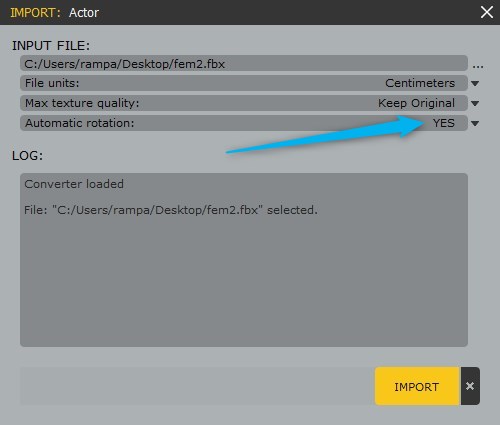
The skeleton is the same bones no matter which preset you choose. But they some do get renamed. I suggested the UE4 because it renames exactly the 16 bones you need to retarget. Makes it easier.
|
|
By Rampa - 8 Years Ago
|
|
Different engines have different "up"axiis as well. I assume the UE4 export from CC is setting Y as up, as that's what UE4 uses. iClone is Z up.
|
|
By rollasoc - 8 Years Ago
|
Current Facebook conversation with AXYZ.

So if anyone has any characters to aid AXYZ's process, that would be nice.
|
|
By gordryd - 8 Years Ago
|
I am working with AXYZ tech support on the issue of my characters imported in all different orientations, so I went ahead and sent them FBX exports from all 3 Reallusion packages I have, as follows:
- iClone.zip (iClone.fbx) - Base character exported with standard iClone (V7.2) settings (Actually iClone does not do a 'native' export - the default is 3ds Max, but can also do Unity, Unreal, Blender, etc. I used 3ds Max since that's what iClone defaults to)
- CharCreator.zip (CharCreator.fbx) - Base character exported with standard Character Creator (V2.3) settings
- 3DX.zip (3DX.fbx) - Base character exported with default(?) 3DXchange (V7.2) settings ('Custom' setting? May have been modified, not sure...)
Let's see if they add an 'iClone/Reallusion' import selection...
|
|
By joel.lovell - 7 Years Ago
|
I was trying this out. I also remember somewhere that Warlord had a tutorial I think - will have to ask him. I'm stuck on one step - I import into 3DXChange, and when I try and send to iClone, it arrives, but is not animated. What am I missing? When I try and convert to non-standard character first, it gives an error about similar node names or soemthingand still doesn't animate in iClone. Suggestions? Or link to detailed tutorial video? :)
|
|
By Kelleytoons - 7 Years Ago
|
Crap, I thought one of these talked about how to do it. I'll leave them here anyway, but the answer is when you import checkmark "Import Animation" (and use 12 as your framerate) and when you export make sure you checkmark "export animation". I'll see if I can put a screenshot:
|