|
By fjccommish - 9 Years Ago
|
It's via 3dxchange, of course.
When the Genesis 8 (male, I haven't yet tried female) gets into iClone, the arms are twisted behind the body.
What settings are needed to export DAZ Genesis 8 to iClone properly?
|
|
By tq.linux - 9 Years Ago
|
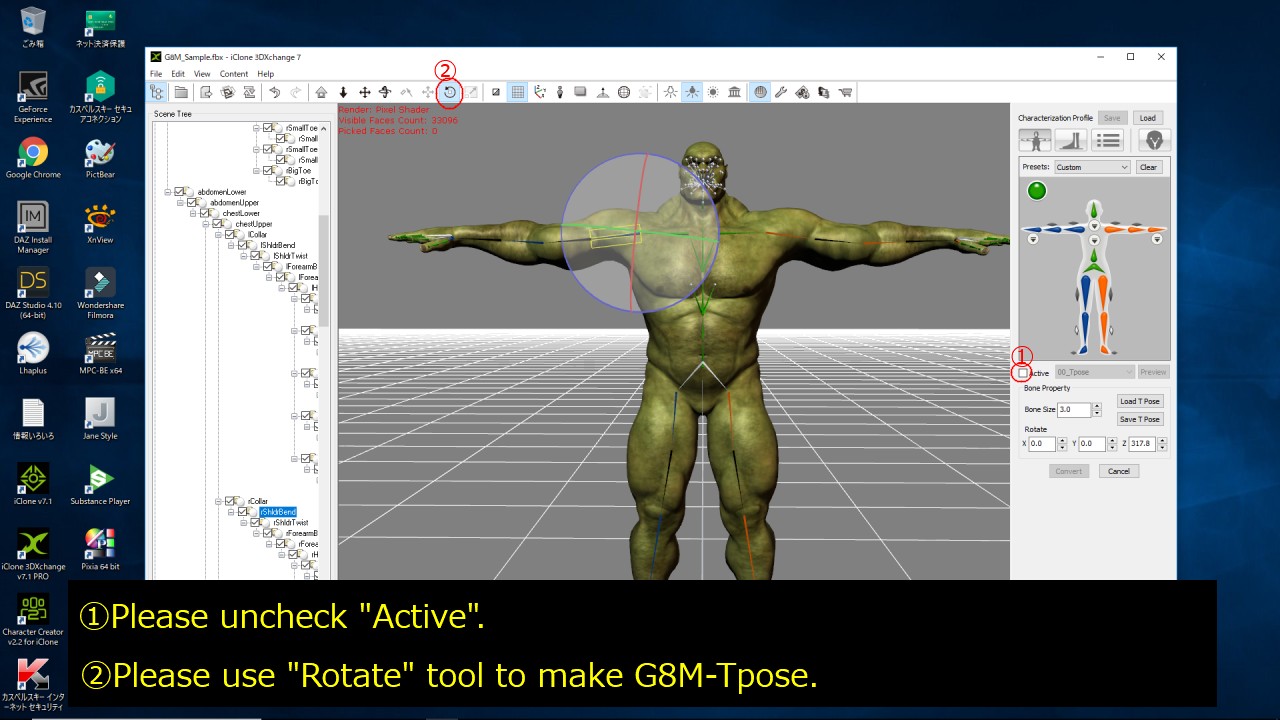
I think an idea as "G8M's A-Pose = IC7's T-Pose" is the cause of the trouble.
So I adjust G8M's T-pose in 3DX7.
|
|
By rollasoc - 9 Years Ago
|
Thanks for the info. I was struggling last night to get a G8 female into iClone.
I followed your images tonight and it took about 5 minutes.

|
|
By Kelleytoons - 8 Years Ago
|
|
Sorry to revisit an old thread but do you get the facial mapping as well?
|
|
By rollasoc - 8 Years Ago
|
|
Kelleytoons (1/29/2018)
Sorry to revisit an old thread but do you get the facial mapping as well?
Possibly not....

I gave her a speech using TTS, but her lips didn't move.
|
|
By Kelleytoons - 8 Years Ago
|
|
Yeah, that's been my experience as well, which kind of rules out using Daz characters in iClone.
|
|
By RB3006 - 8 Years Ago
|
I can assure you, G8 works normally in iC.
Only problem. The eyes have to be mapped manually.
There is currently a bug.
Everything else makes the DUF file automatically
|
|
By tq.linux - 8 Years Ago
|
Hi!
I'm in trouble about a defect by automatic conversion between DS4.10 and 3DX7.2, too.
The problem (Movement of an eye and Expression) is serious in particular.
My countermeasures are "Using export morgh rules" and "doesn't use "Duf". The size of the FBX file will be big, and it's fact that an adjustment in 3DX7 is serious.
But a defect in iClone7 would be less.
|
|
By TheOldBuffer - 8 Years Ago
|
|
The daz to iclone conversion via duf isn't working in 3dx7. It's working in 3dx6 so it isn't daz that's the problem it's 3dx7. I'm trying to find bit of time to add to FBT. N.B. Fopr the conversion to work in 3dx6 use the older duf files or it screws all the expression and viseme morph sequence.
|
|
By Kelleytoons - 8 Years Ago
|
Okay, I'm real confused (my normal state but). Does it or does it not work?
Some folks say it does, some say it does not. If it works in XChange 6, does that mean all the facial stuff gets mapped correctly for use in iClone 7? I would guess not -- that all changed in 7. I want to use Faceware for my animation, but if the face stuff isn't mapped correctly for this it won't work.
|
|
By TheOldBuffer - 8 Years Ago
|
|
Kelleytoons (1/30/2018)
Okay, I'm real confused (my normal state but). Does it or does it not work?
Some folks say it does, some say it does not. If it works in XChange 6, does that mean all the facial stuff gets mapped correctly for use in iClone 7? I would guess not -- that all changed in 7. I want to use Faceware for my animation, but if the face stuff isn't mapped correctly for this it won't work.
It doesn't work for me. 3DX7 won't fill in the slots in the expression editor and 3DX6 will only work using the older duf files.
|
|
By Kelleytoons - 8 Years Ago
|
|
Thanks -- that's kind of what I thought from my limited tests.
|
|
By tq.linux - 8 Years Ago
|
|
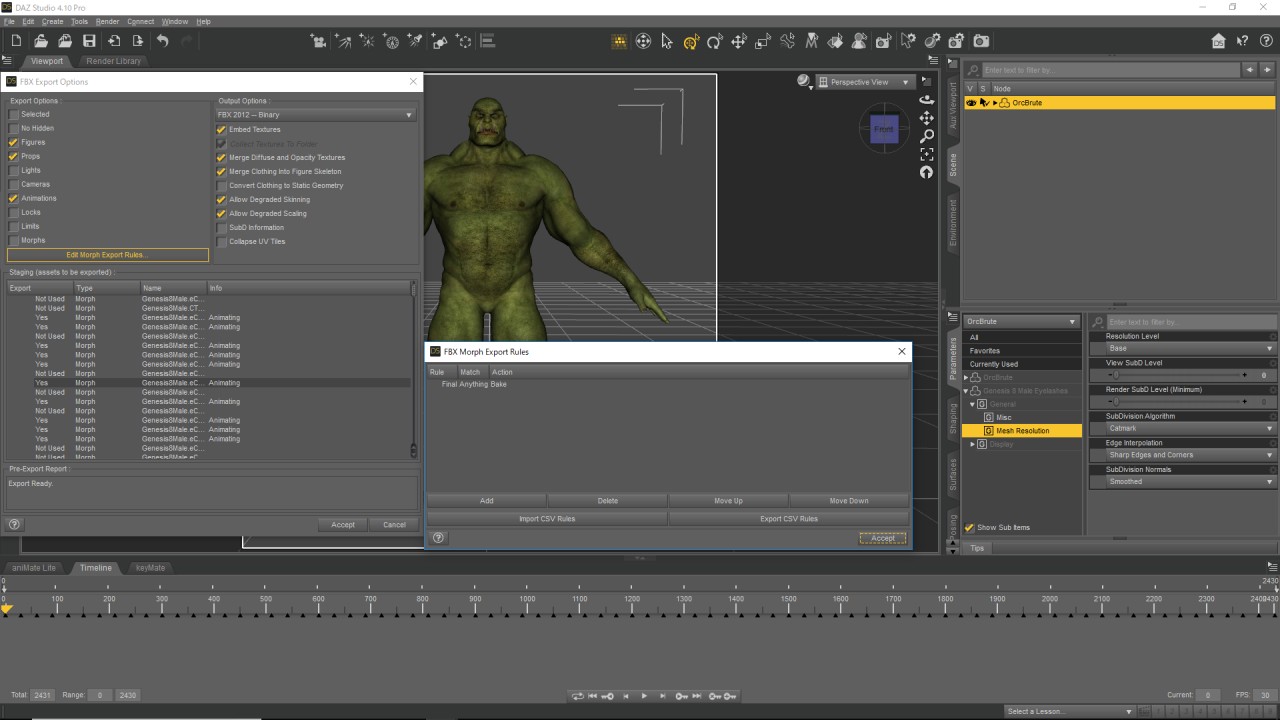
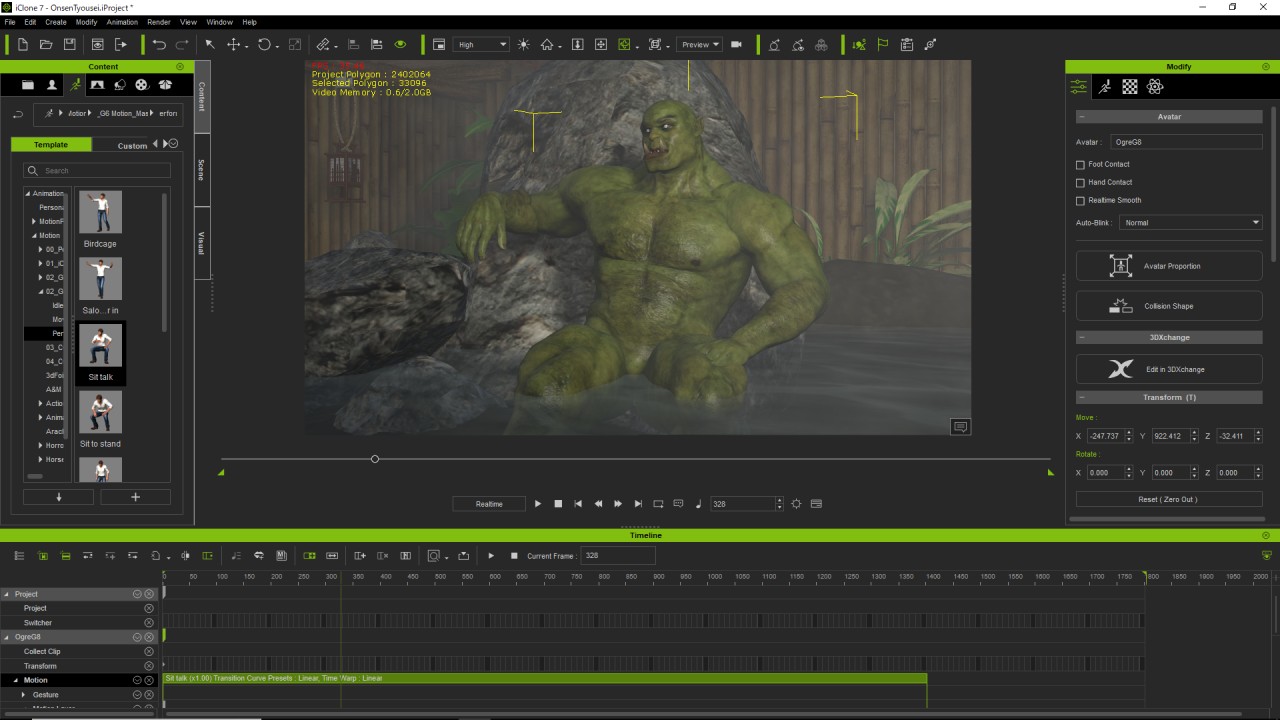
I output FBX with morphs about an expressions.(Pic1) I work while hoping for 3DX7 not to stop. There is also a thing which becomes a good result in iClone7.(Pic2) I'm waiting for DUF as a solution, too.(^^)/ 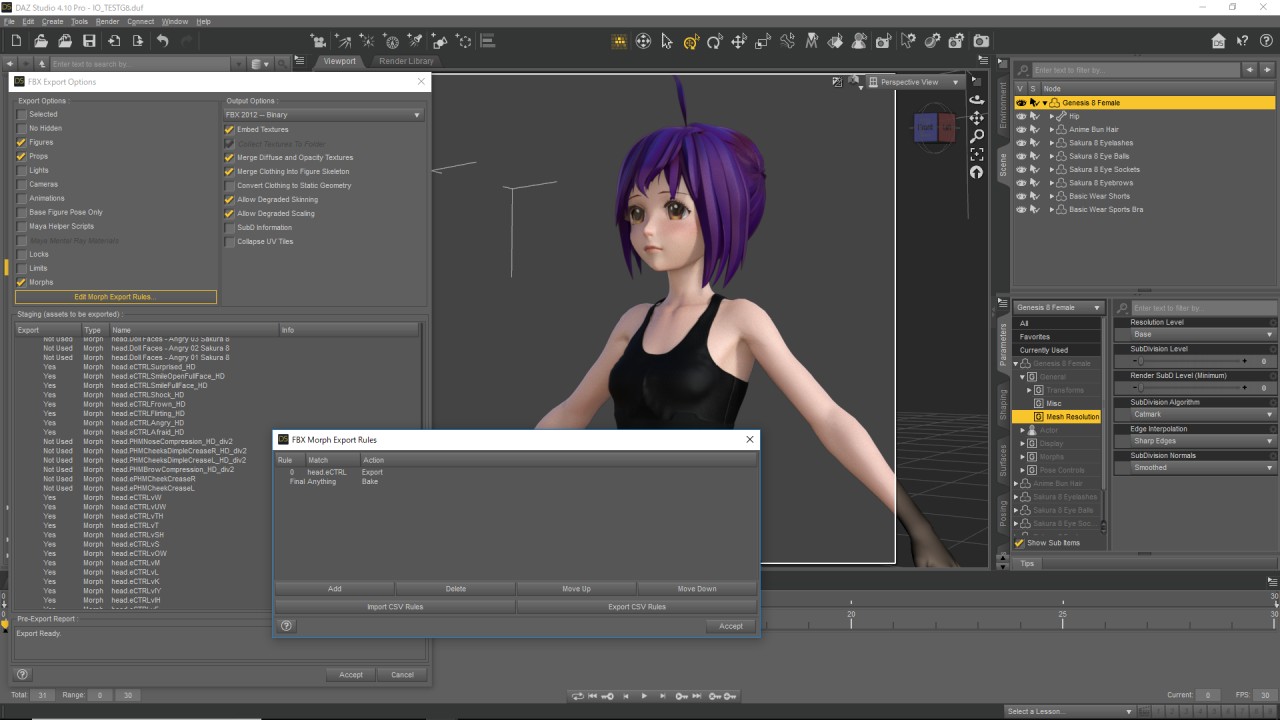 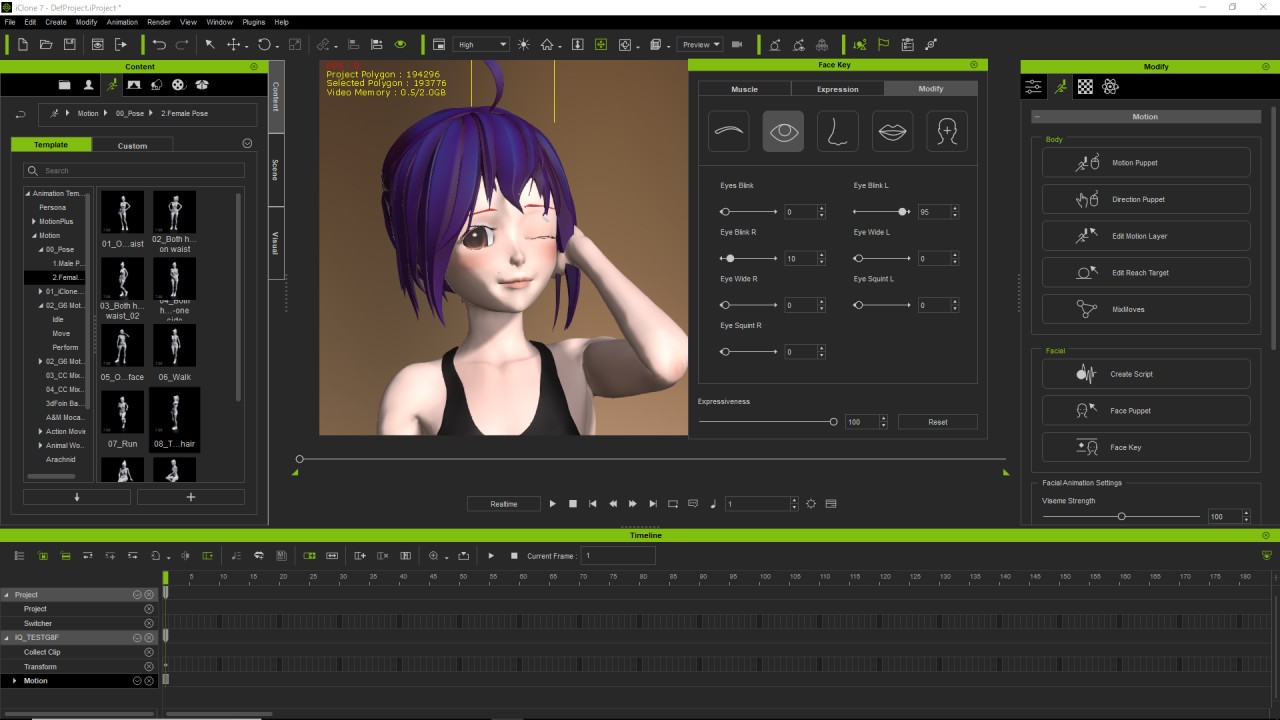 |
|
By Kelleytoons - 8 Years Ago
|
I'm not sure exactly what you mean -- I get that you (somehow) make expressions in Daz (a route I'm not going to go as I do not know that program nearly well enough) and then -- what? -- remap that in XChange somehow?
Oh well, I guess I'll just write off the import of Gen 8 characters for FW stuff.
|
|
By kungphu - 8 Years Ago
|
|
I haven't used Gen 8 figures but for non-standard figures you can just set up a keyframe in Daz and then use a slider to apply several different facial morphs on that frame. When importing into 3DXchange you'll see the set of Daz morphs show up. You'll have to use them in 3DXchange to manually make your own facial expressions to match the facial guide poses in 3DXchange (hope that makes sense). It works for non Genesis characters. Don't see why it wouldn't work for Gen 8. It's just a time consuming PiTA :)
|
|
By Kelleytoons - 8 Years Ago
|
Ah -- that sounds like a drag. So perhaps I'll wait and see if someone simplifies the process somehow (if I were going to do this it wouldn't be for just ONE character, and having to redo something like that is just something I would never do).
But thanks for the info.
|
|
By kungphu - 8 Years Ago
|
|
NP, and yesssir... it is a total drag. I did it for multiple characters in iclone 6 (that required even less facial morphs) and it took forever! Not sure if there is a slick workaround.
|
|
By Kelleytoons - 8 Years Ago
|
|
Well, we can always hope that Python will help (obviously it's really only for iClone, but perhaps there will be some process that also allows characters to be manipulated/rigged with it).
|
|
By tq.linux - 8 Years Ago
|
|
I could change well today. (Readjustment of an eye and a jaw is necessary.) It was troubled until yesterday by the same condition.
Please see a picture for FBX Export Setting. I think Simply G8F was good. 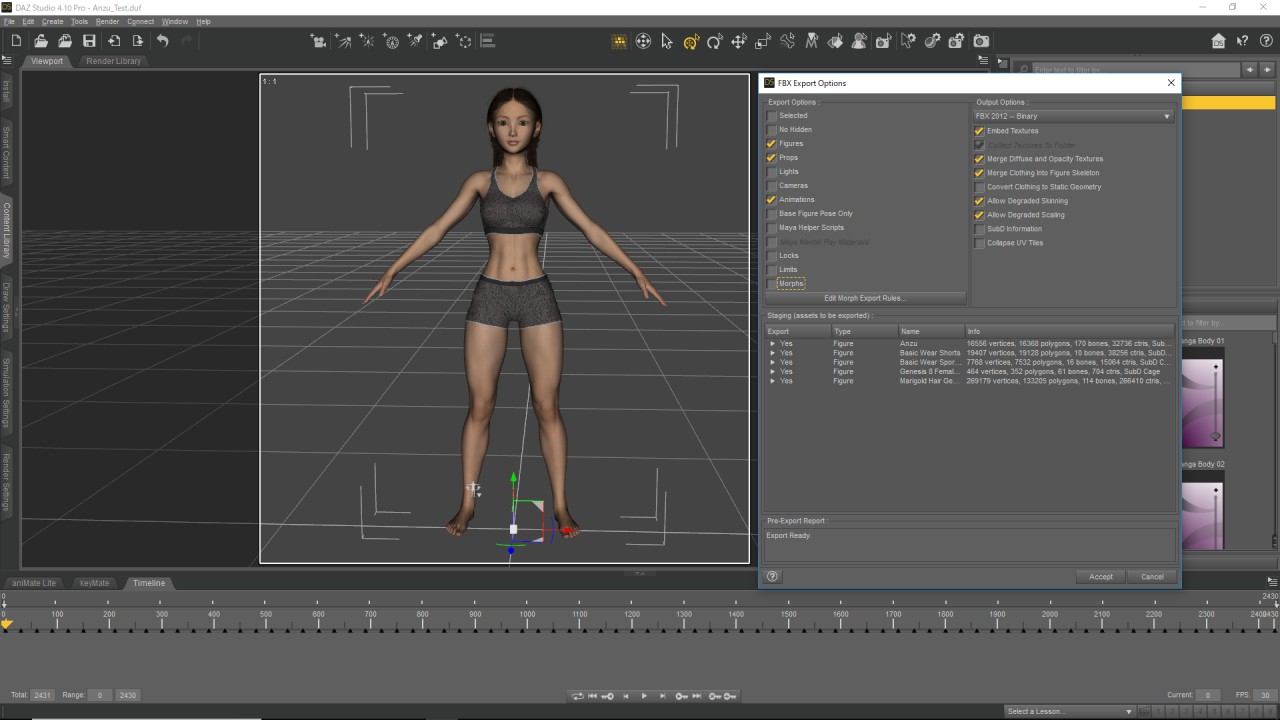 |
|
By GOETZIWOOD STUDIOS - 8 Years Ago
|
To summarize the current Daz3D to iClone 7.2 issues:
3DXchange Automatic Expression Mapping:
Head Eye Jaw Viseme Muscle
Genesis OK OK OK OK OK
Genesis 2 OK OK OK OK OK
Genesis 3 OK FAILED FAILED OK OK
Genesis 8 OK FAILED FAILED OK OK
If you take a look at the file *Daz Genesis Avatar Face Key Sequence.xls* that comes with the DAZ Genesis Extension you will see that facekeys 82 to 95 that are not created by the DUF files are supposed to be automatically created by 3DXchange.
Facekeys 90 to 95 (Face Orient) are indeed recreated correctly by 3DXchange in all cases.
Facekeys 82 to 89 (Eye Look) are not created automatically by 3DXchange for Genesis 3 and 8 figures.
Facekeys 61 to 66 (Jaw Rotate & Move) are created by DUF files in all cases but for some reason 3DXchange fails to import those from the FBX files for Genesis 3 & 8 figures.
When importing a Genesis 8 figure, 3DXchange says the figure has been recognized as a Genesis 3 figure.
After having imported a Genesis 3 or 8 figure into 3DXchange and opened the Expression Editor, 3DXchange says that *Jaw, Left Eye and Right Eye have not been mapped*. But it does not say why.
|
|
By Kelleytoons - 8 Years Ago
|
|
Put this in FT.
|
|
By GOETZIWOOD STUDIOS - 8 Years Ago
|
The post was for iClone users.
Reallusion is already working on it as the FT issue has already been assigned. I've added a link to the post in the issue comments though:
https://www.reallusion.com/FeedBackTracker/Issue/Eyes-no-longer-get-mapped-automatically
|
|
By Kelleytoons - 8 Years Ago
|
|
On 2/21 Kai is going to do a webinar on importing Gen 8 characters into iClone. I signed up but also posted this thread, so hopefully he will be able to cover the workarounds and difficulties (others might want to add their voices as well).
|
|
By kungphu - 8 Years Ago
|
|
Sounds good to me. I STILL haven’t upgraded to 7.2 for all the bells andnwhistles. I can confirm that 7.1 worked with zero issues with Gen 3. All the characters in my latest vid were gen3 that I zrbrushed. It was EZ peasy to get them up and running in iclone and with Faveware.
|
|
By Dr. Nemesis - 8 Years Ago
|
So this seems a bit old now but I'm experiencing problems with 3DXchange 7.2 and am not quite sure if they are the same as everyone else. In some people's posts it seems like imported Gen3 characters have no facial mapping whatsoever. In other posts I see some people saying there's facial mapping but not for the eyes.
I myself am getting no facial mapping whatsoever. I'm unclear if that's a known bug or if the known bug is just the eyes issue.
Thanks for any help.
|
|
By Kelleytoons - 8 Years Ago
|
Just a wild guess (because I just woke up) but I suspect you don't have the latest GenesisToCC file Duf that you need -- even if you downloaded what you think is the right one you should redownload it again, because it was changed recently and after doing that most folks were able to get things working again.
If it's not that perhaps you can tell us your exact workflow and someone can point out where you might be going astray.
|
|
By TheOldBuffer - 8 Years Ago
|
It's not the duf file at fault it seams. It's 3dx7.2 I've got a ticket in for this at the moment.
E.G. A Genesis 3 character exported from daz imported into 3dx6.* will map all the facial expressions correctly, the EXACT same model when loaded into 3dx7.2 will only have head movement mapped.
Obviously this isnt good because 3dx6.5 cant accept the face mapping for the extended face mapping needed for mocap and puppet.
|
|
By Kelleytoons - 8 Years Ago
|
Are you sure about this? Because a Gen 8 figure WILL work -- I saw Kai do it (look at his demo). And I do believe the Gen 3 issue was raised there and it turned out a new Duf file made it work.
Then again, I'm still just waking up. But for sure you ought to watch that webinar again and see what was talked about (of course, you might have been there. If so, apologies).
|
|
By TheOldBuffer - 8 Years Ago
|
I'll qualify it, it doesn't work on my system. None of the duf files work with my 3dx7.2 ( they worked in 3dx7.0 and I'm sure 7.1) whether they be the old ones or new. The new duf files work in 3dx6.5 but obviously 3dx6 wont map the extended facials correctly.
My system is fully up to date with updates and I've done extensive diagnostics/repairs etc. to make sure. What I'd like to know is what windows c++'s are used by 3dx so I can reinstall them and see if that helps.
|
|
By Kelleytoons - 8 Years Ago
|
|
Hmmm, it's a witches brew, to be sure, to try and figure out what is what. Just for fun I'll try a Gen 3 figure this afternoon and see what happens on my system.
|
|
By Dr. Nemesis - 8 Years Ago
|
TheOldBuffer, you and I seem to be experiencing the exact same thing.
The weird thing is it started happening after I updated to Iclone 7.2. I specifically avoided updating 3dXchange cause I had read about problems. In my mind that makes no sense, but I have no other explanation.
So I thought maybe if I update to 3DXchange 7.2 it'll map the face, but just not the eyes, like I've read in some places. No change. The whole face comes in unmapped. The shapes exist in the Gen3 FBX character but 3DXchange isn't automatically picking them up. My movie has 7 main characters and several other with speaking roles. making the links by hand for one character is hard enough. For all of them is impossible.
And today was the day I'm supposed to be evaluating the Faceware plugin, but I'm not sure how I can do that with this problem. Reallusion, I'm trying to give you my money but you aren't making it easy.
PS, Kellytoons, re downloading the facekey was the first thing I did. Didn't seem to be the problem. Thanks though.
|
|
By Kelleytoons - 8 Years Ago
|
Okay, I tried it and here are my results.
It mapped the eyebrows and cheeks and mouth movements (and, of course, head). It didn't map eyes but it took seconds to fix that (even Kai had to do that in his webinar). But for me the big issue was it didn't map the phonemes.
I brought it over anyway into iClone and tried it with Faceware. It was... interesting. Because the mouth and cheeks move a bit (and because the eyes, eyebrows and head move convincingly) it looked like my character was *trying* to speak with some sort of impediment. The lack of phonemes *really* hurts it there, I do believe.
I don't think this is a system issue -- it looks yet to be another bug with XChange, so your trouble tickets won't get anywhere. Truth be told, RL doesn't seem to want to fix ANYTHING with XChange, so I think the only thing to do is wait until this fall, when CC3 comes out. Kai basically said as much in the webinar, saying the process for bringing in Daz characters will "be much simplified". I think that's what they are aiming for, a way to bypass XChange completely (of course this begs the question of whether we still need XChange for props, because clothing and characters will be handled by CC3. Would ANYONE pay any amount of money whatsoever for yet another bug filled version of XChange? I kind of doubt it).
I truly feel for those of you who can't wait -- I've never cared to even try bringing in a Daz character before, although having *sort of* done so I can see the appeal. Since I easily convert Daz clothing I just use CC characters and feel no need for it otherwise, but for those of you who do... I'm not sure there will be any solution for quite some time.
|
|
By Dr. Nemesis - 8 Years Ago
|
Yeah, I'll put it in the Feedback Tracker this evening. I'm fine with no improvements being made to it if they have other plans, but to break it so badly and give no word whatsoever is not very good.
So my options are to choose between VFX, or between characters since going back to 7.1 won't support PopcornFX. Lovely.
Thanks Everyone.
|
|
By Dr. Nemesis - 8 Years Ago
|
Double post.
|
|
By donald.dade - 8 Years Ago
|
I've found that importing G8s with 3DX7 are fast and easy, but there's no facial expression. When I use the corresponding Daz Extensions DUF to get facial expressions, 3DX7 actually crashes upon import. It's 100% reproducible; without the DUF, it works but without facial expressions. With the DUF, 3DX7 crashes upon import.
This thread goes back a long way, has there been a fix, or at least an acknowledgement? The ability to import G8s is the primary reason why I've invested well over $2000 in the RL ecosystem, my budget is blown, and the product crashes leaving me with NOTHING to show for my investment.
|
|
By Peter (RL) - 8 Years Ago
|
|
Hi Donald
This is an old thread. The Daz Genesis 8 to iClone process should work fine now and did when I just tested.
Do make sure you have correctly copied the appropriate "Reallusion" folder to Daz Studio.
So for example copy the Reallusion folder from iClone_Daz_Genesis_Extension_v4_IC7\DAZ Genesis Extension\Daz Genesis to iClone\Genesis8_Female to the location below (default install).
C:\Users\Public\Documents\My DAZ 3D Library\data\DAZ 3D\Genesis 8\Female\Morphs
Then make sure you restart Daz Studio for the changes to take effect. Now once you apply the Genesis8_Female_iCloneFaceKey.duf file to your character it should be correctly assigned. Then do the same for the male characters. Instructions are also supplied in the iClone_Daz_Genesis_Extension_v4_IC7.zip file.
Do also make sure that you have iClone 7 and 3DXchange 7 updated, and you have the latest version 4 of the Daz Genesis Extensions.
|