|
By R.Man - 8 Years Ago
|
Hello
Please help i have 2 questions
1. Is there a way to increase the CC character polygons to get smooth meshes for unity filmmaking? The IC realtime smooth
seems only available for IC.
2. is it possible to add thickness to CC cloths to get double sided mesh in unity?
Thanks a lot
|
|
By paulg625 - 8 Years Ago
|
You can't export higher resolution (Smoothing) from Iclone because its a function of post process, not modeling, in the video card. you would have to use a third party 3D editing program 3Dmax, Blender, Maya, Lightwave or similar modeling program to subdivide the mesh. You will also need to know how the program handles morph function as well as changing topology needs to transcend to the morphs as well. So in other words you couldn't export Obj of main model subdivide then replace mesh as then the morphs wouldn't work. you would have to export as FBX and work on the entire model in the modeler program.
Pretty much same answer for clothing you will need to use third party Modeling program. You can adjust the mesh within CC but not create new topology.
|
|
By R.Man - 8 Years Ago
|
Oh so sad.
Being forced to pass through a 3rd party software make the pipeline longer. I'm inside a film project so the requirements is different than a game project.
So now i have to Create in CC>>Animate in Iclone>>send to Blender just for smoothing >>send to unity , imagine doing that for 30 characters... also this limitation generate 3 problems
1.FBX iclone to unity has import issue, the character animation is modified ,
2.in the case of using Alembic , it will double the file size 1 alembic files from IC then 1 Alembic files from blender.
3.If i have some animation modification from iclone the way is longer.
I hope CC will be more suited for film productions one day.
|
|
By vidi - 8 Years Ago
|
2. is it possible to add thickness to CC cloths to get double sided mesh in unity? Pretty much same answer for clothing you will need to use third party Modeling program but in this case you would lost the UV Better would be to use a double side shhader to turn off the backface culling Also I find CC are smooth enough , what want you archieve ?
|
|
By animagic - 8 Years Ago
|
|
manran (11/10/2017)
I hope CC will be more suited for film productions one day.
RL products are perfectly suited for film-making. I've been doing it for quite some time. You might as well ask why Unity isn't more suited on its own...:P
|
|
By Wuv3D - 8 Years Ago
|
|
manran (11/10/2017)
So now i have to Create in CC>>Animate in Iclone>>send to Blender just for smoothing >>send to unity , imagine doing that for 30 characters... also this limitation generate 3 problems .
To increase poly count you sub divide, not smooth.
If you decide to "increase poly count", sub divide..... your previous morphs will no longer work.
Do not rely on Blender or any software to "properly" Sub - D" your existing Base Model and Morphs. (Resulting in Exact Vertex Count and Order).
All vertex count and order will not be "exactly" the same.
This is asking for trouble.
Have you thought about compiling your game.? Are you planning on using one "medium to high" resolution for all shots, close-ups / far away, etc.
"LOD" Level of Detail
1. Create 3 base characters with different poly counts.
2. Send each base model to CC.... (to generate the morphs)
3. Animate in iClone.
4. Send to Unity.
|
|
By vidi - 8 Years Ago
|
|
1. Create 3 base characters with different poly counts. 2. Send each base model to CC.... (to generate the morphs)
haha uvw ofcourse swoooopy ? :rolleyes: diffent Polycounts load into CC ? and no he want not compiling a game he want make a movie
|
|
By Rampa - 8 Years Ago
|
Not sure if tessalation is native in Unity yet, but if it's not, there is a free addon for it.
Tessalation is a feature of DX11 that allows a GPU to render a sub-divided surface without the original being subdevided. It also allows for displacement effects. Think of it as "hardware bump mapping".
https://www.assetstore.unity3d.com/en/#!/content/37322
|
|
By R.Man - 8 Years Ago
|
This is what i'm working on
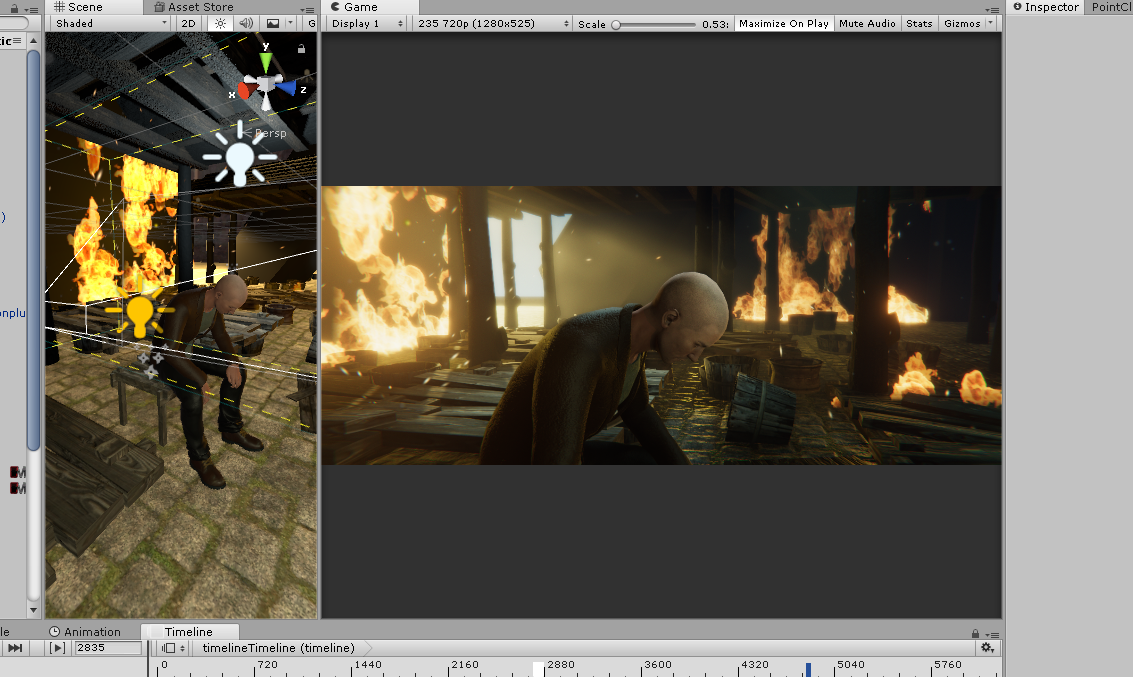
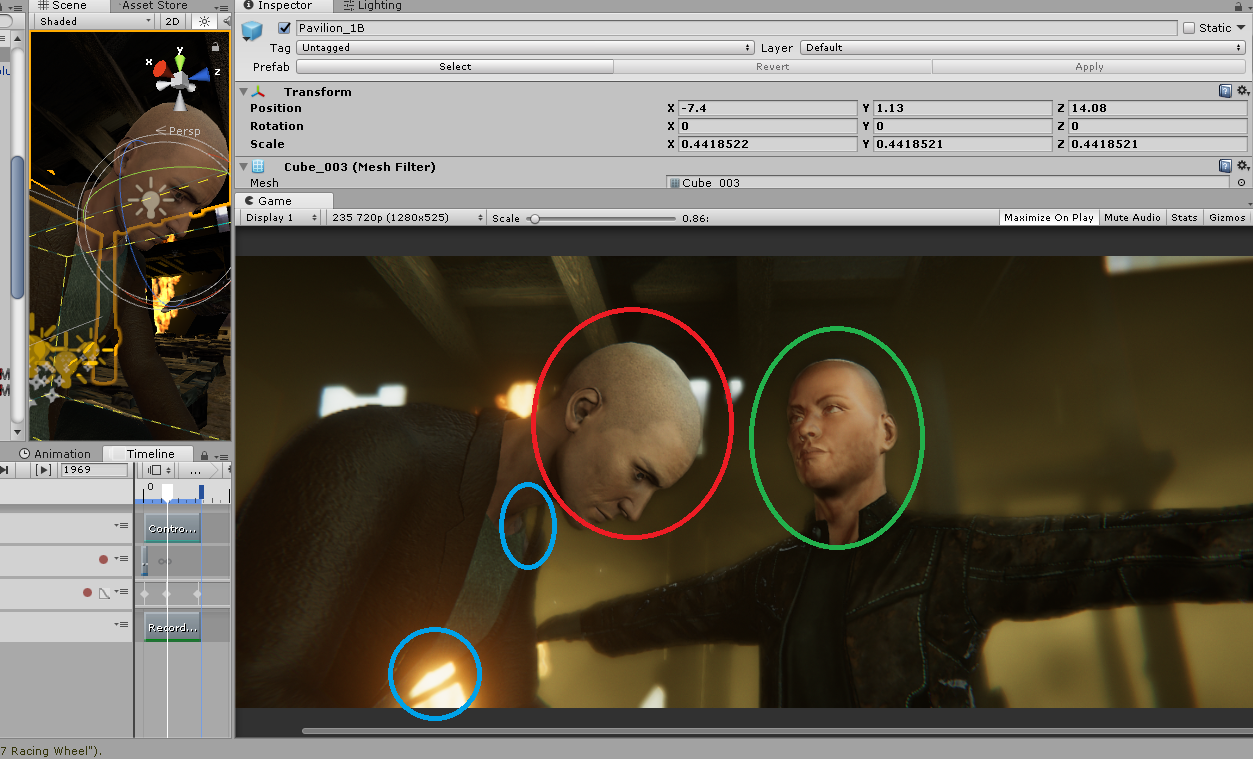
and here are the issues , those issues could be easy to solve if it wasn't a movie project ( need of dynamic and repetitive pipeline between modelling and animations )
in green you have a fuse character it's smooth and every meshes are double sided jackets etc.But i don't want to use Fuse it's just a test.
in red you can see that there are rough edges on the head , it's a lack of polygon , i hope i will able to solve with tessalation in unity.
in blue the non double sided mesh
|
|
By Wuv3D - 8 Years Ago
|
@manran,
Fix the avatar's mesh for Game Engines.
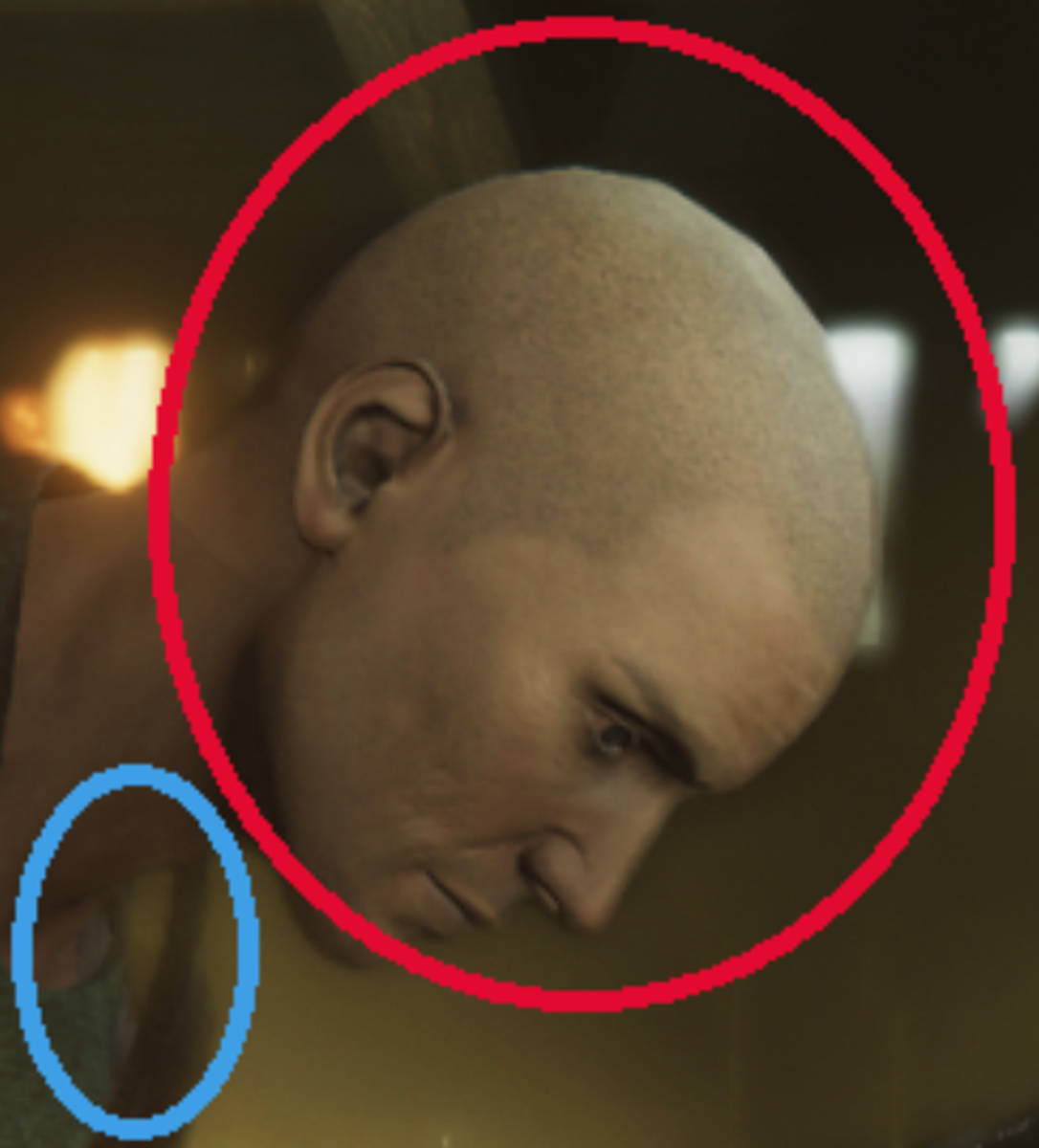
Too Blocky:
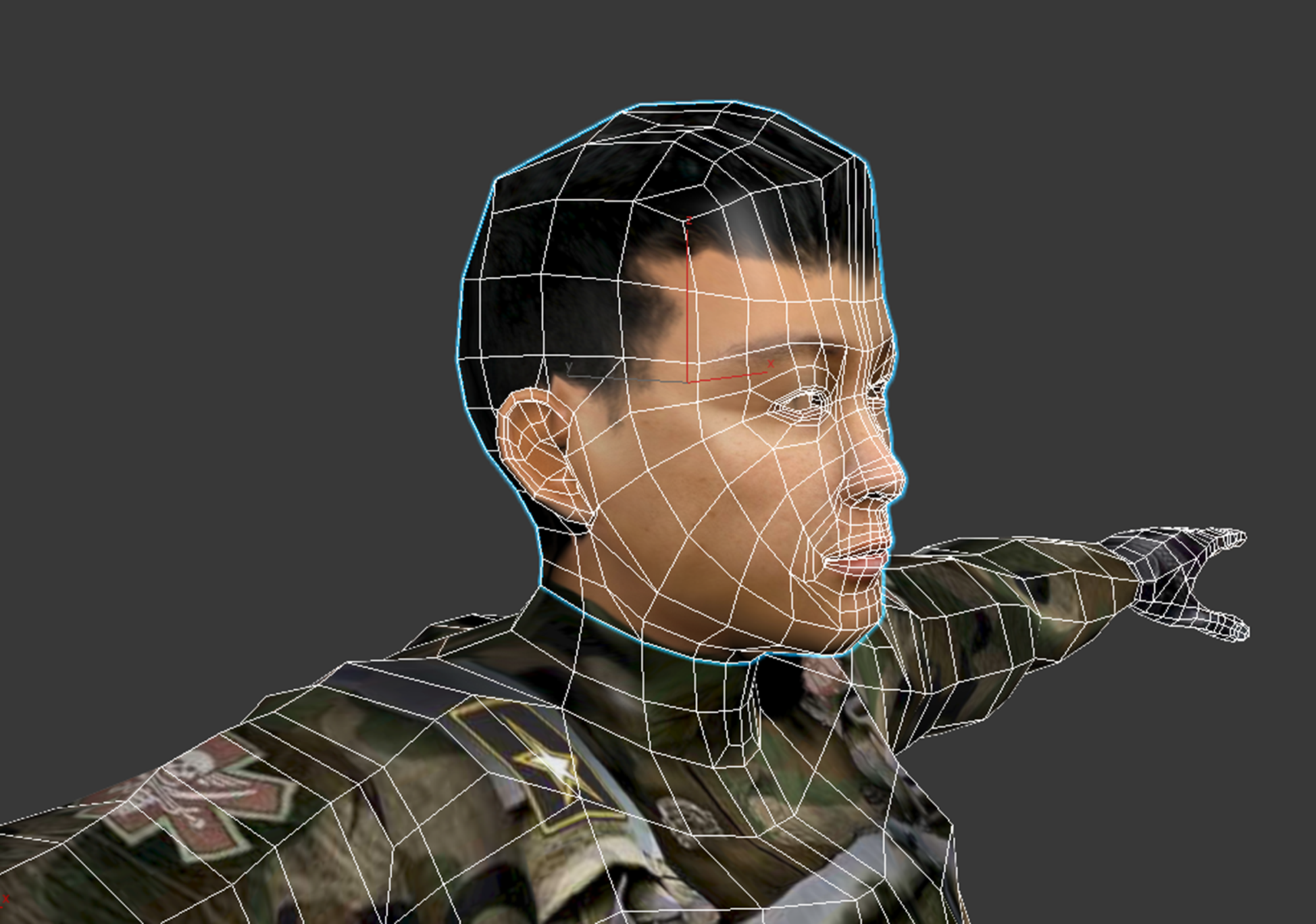
Head:
Sub Divide only what's needed.
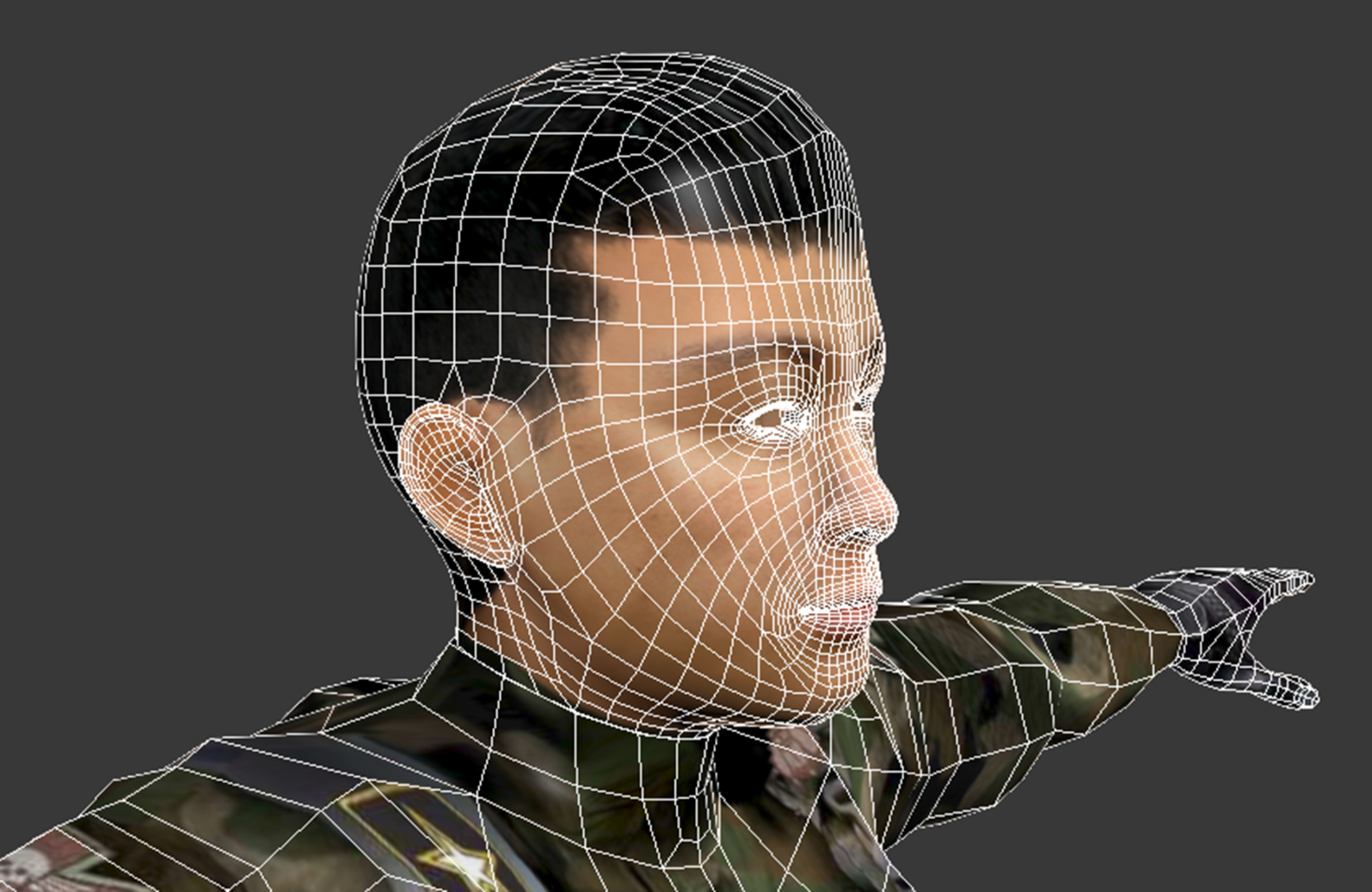
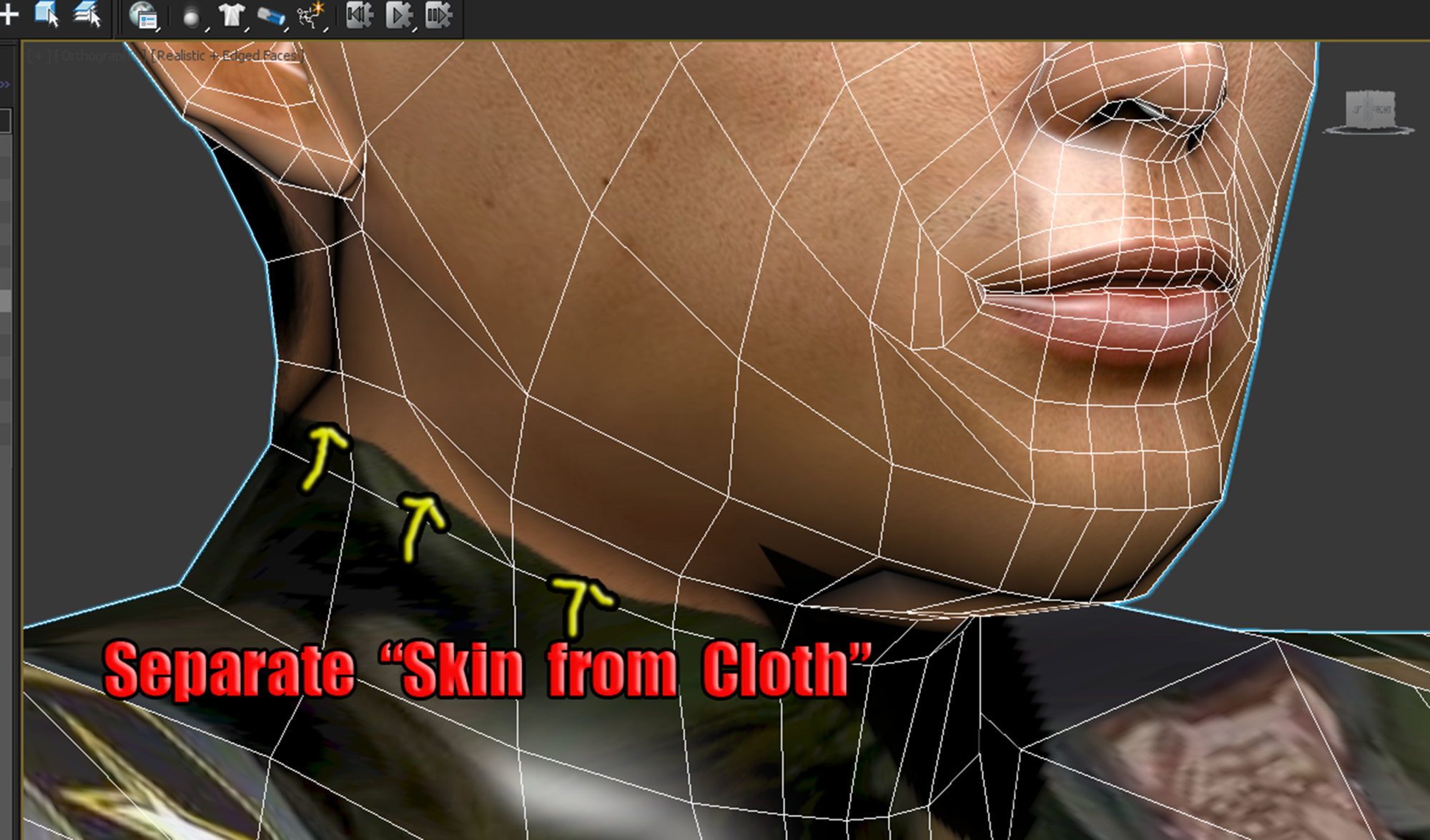
Fix the Neck: (Separate "Skin" from "Cloth")
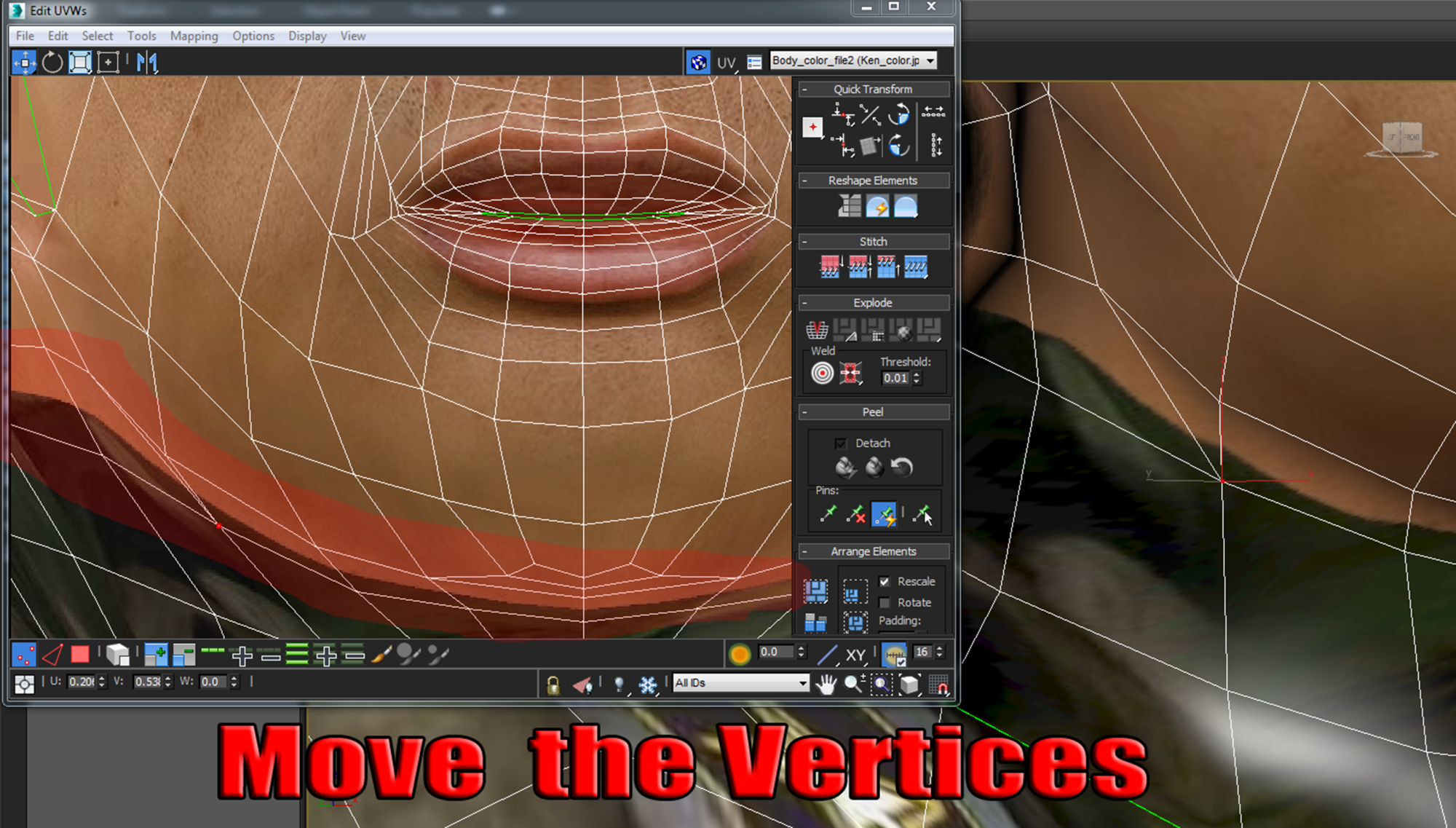
Move the Vertices:
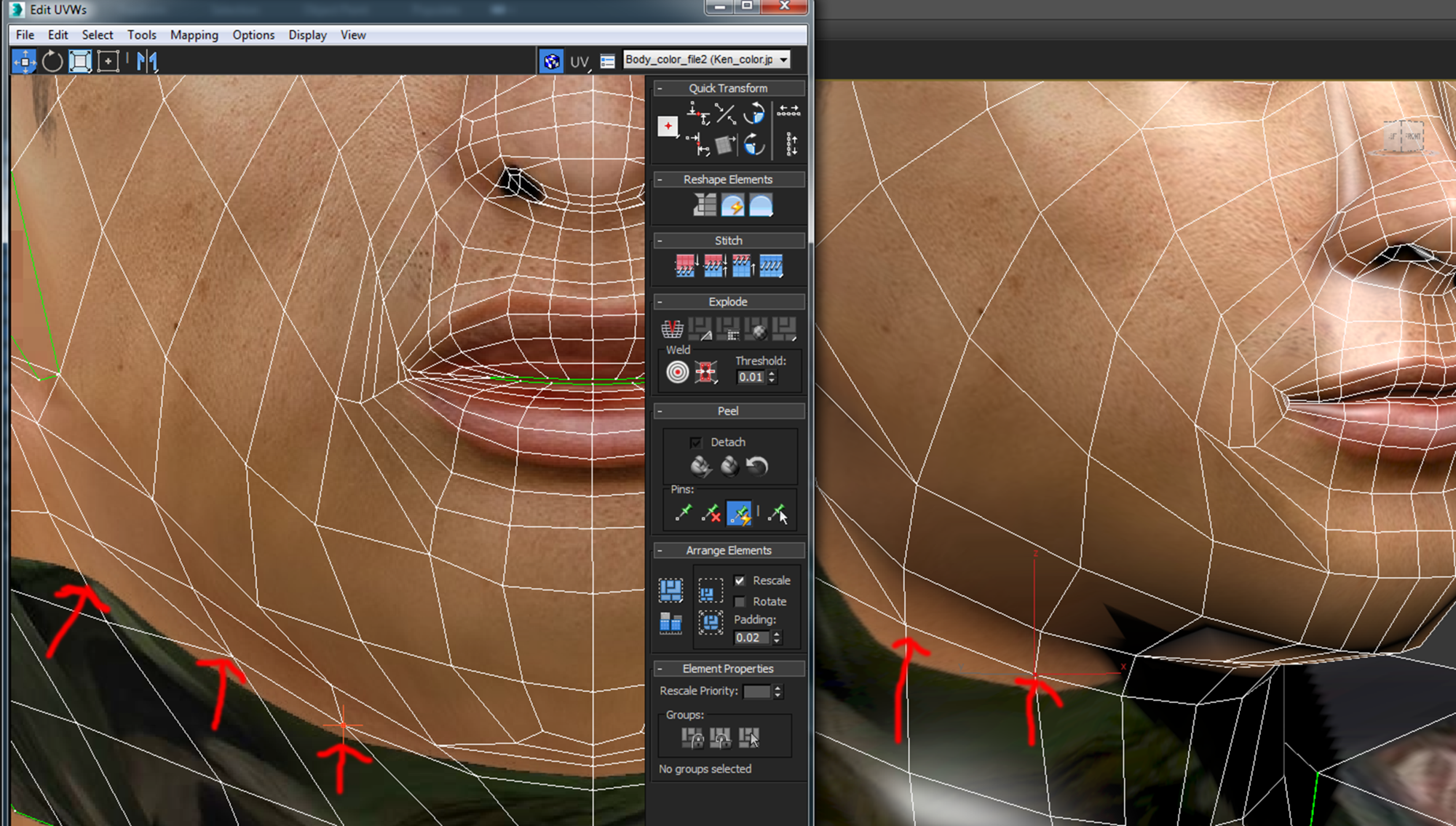
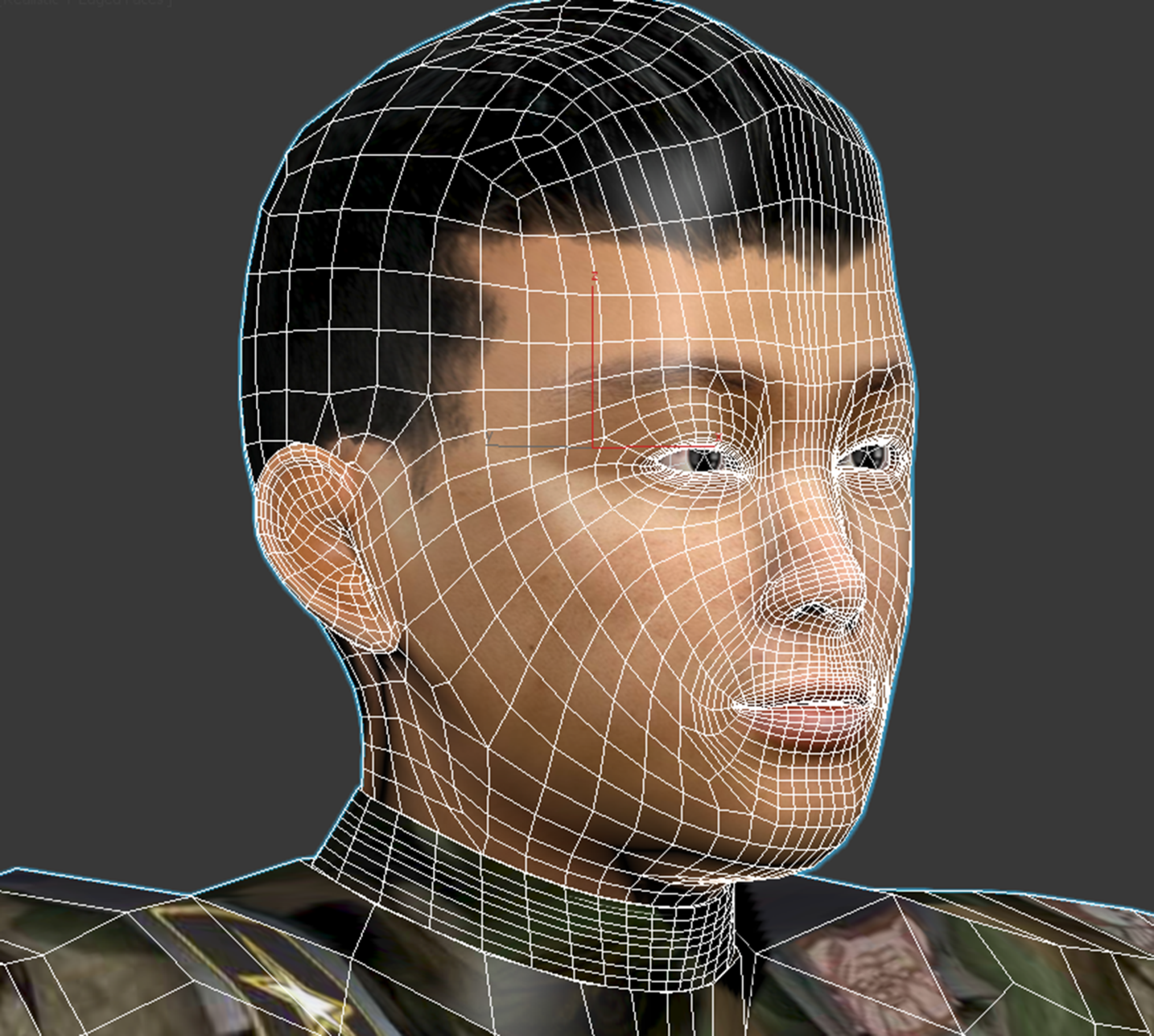
Now it's Game Ready:
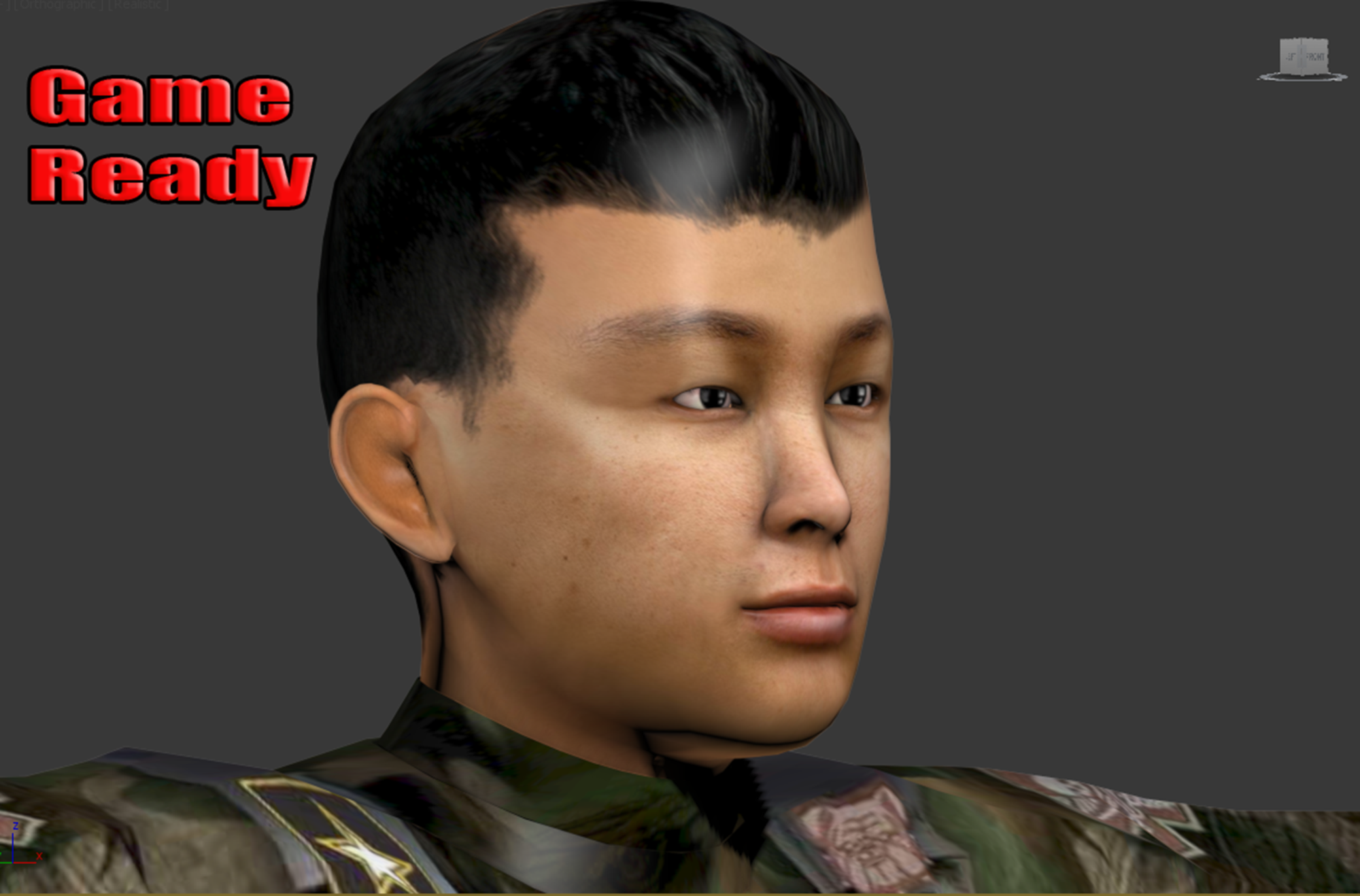
|
|
By paulg625 - 8 Years Ago
|
Yes but would have to do in Unity, this would be specific to the software as a function. Depends on direction of normals and if software recognizes double sided shader.
vidi (11/10/2017)
2. is it possible to add thickness to CC cloths to get double sided mesh in unity? Pretty much same answer for clothing you will need to use third party Modeling program but in this case you would lost the UV Better would be to use a double side shhader to turn off the backface culling Also I find CC are smooth enough , what want you archieve ?
|
|
By Wuv3D - 8 Years Ago
|
|
in blue the non double sided mesh.
A quick way to show "Thickness."
1. Select the poly's and "Extrude" them.
|
|
By Wuv3D - 8 Years Ago
|
I find it much easier to do things in Game Engines when I follow there guidelines for characters.
It works great.
|
|
By paulg625 - 8 Years Ago
|
Question? would Extrude always show texture on backside or is this software specific? Example this would work in lightwave because it has double sided textures but know some create double meshes one for one side one for the other .
Wuv3D (11/10/2017)
in blue the non double sided mesh. A quick way to show "Thickness." 1. Select the poly's and "Extrude" them.
|
|
By vidi - 8 Years Ago
|
Yes but would have to do in Unity, this would be specific to the software as a function. The TE use Unity.
|
|
By paulg625 - 8 Years Ago
|
Hi Vidi, Is there something on the store page your pointing out or are you suggesting he use Unity assets?
vidi (11/10/2017)
Yes but would have to do in Unity, this would be specific to the software as a function. The TE use Unity.
|
|
By Wuv3D - 8 Years Ago
|
paulg625 (11/10/2017)
Question? would Extrude always show texture on backside or is this software specific? Example this would work in lightwave because it has double sided textures but know some create double meshes one for one side one for the other . Wuv3D (11/10/2017)
in blue the non double sided mesh. A quick way to show "Thickness." 1. Select the poly's and "Extrude" them.
Think of a mesh as a simple plane. It has two sides. It's given a shader.
What determines how the light strikes it is how it's "Normals" are projected.
Whether a two sided shader is used or not, if the normals are flipped, you only see one side.
The other side would be black.
Extrude affects the face extruded, not the other side.
A "Push" modifier, or a modifier that gives thickness effects both sides of an object.
A software's ability to show two sides shader's is app dependent.
Not all have this ability.
|
|
By vidi - 8 Years Ago
|
|
Hi Vidi, Is there something on the store page your pointing out or are you suggesting he use Unity assets?
there is something wrong with using a two-side shader in Unity ? We use it in iClone too , therefore why not in Unity ?
|
|
By R.Man - 8 Years Ago
|
Wuv3D
Thank you for your valuable advice but i think that there is a little misunderstanding, i need a higher resolution mesh as i plan to make a movie with unity , this is not a game project.
ALL THE GUYS
Thank you guys for all you advice i will try them and will come back to you ASAP. the tesselation from unity seems working, i have to solve the double sided mesh now.
For your eyecandy some render of the same project without smoothing :) 
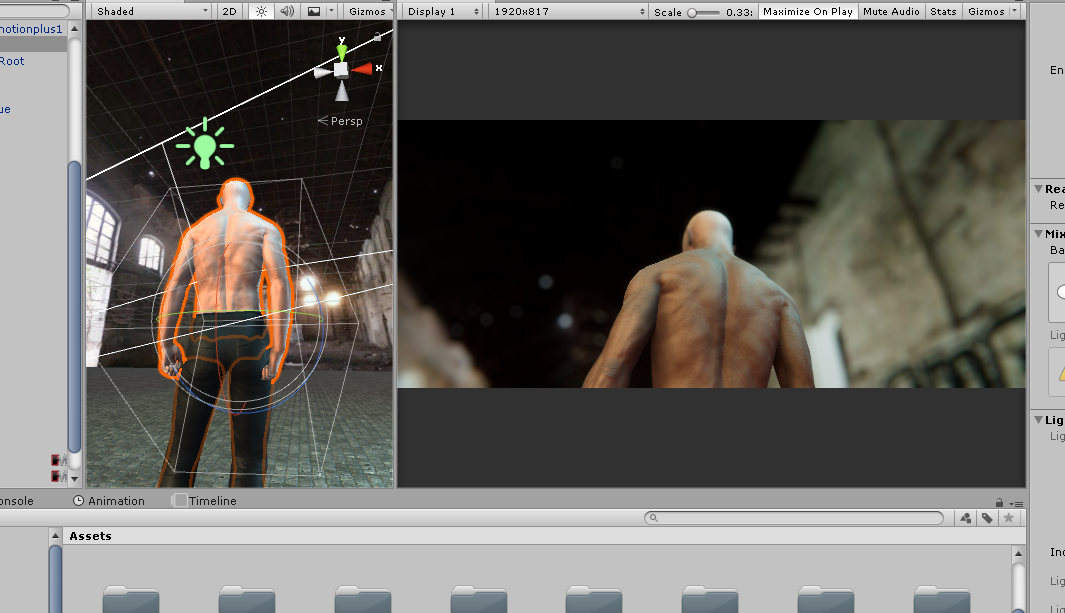
|
|
By Wuv3D - 8 Years Ago
|
manran (11/11/2017)
Wuv3DThank you for your valuable advice but i think that there is a little misunderstanding, i need a higher resolution mesh as i plan to make a movie with unity , this is not a game project.When it's time for "Lighting".... You put on your "Lighting Hat" You are a Lighting Artist....You KNOW the finer point of lighting. Time to put on your "Texture Artist Hat." To get the highest resolution - WITHOUT cranking up poly count, tessellation, etc., etc...Texture Artist SKILLS:1. Texture - UV ratio. Unwrap your characters using a (2 to 1) ratio. 1. If your Diffuse map is 1024 X 512.  2. MAKE your UV = 512 X 256  Load your uv template into your favorite image editor.  Overlay your texture  Low poly with high resolution!  Why they don't talk about this? Unwrap UVW .... perhaps the most difficult task in CGI. Result: You Won't Believe Your Eyes. :w00t:Low to Medium poly characters with stunning visuals. :Wow:
|
|
By Wuv3D - 8 Years Ago
|
@manran,
Notice the image and uv template (somewhat unusual size) 1024 x 512.... instead of just 1024 x 1024, 2048 x 2048, etc..
I "Change" the normal (Given) size to this "stretched out" size to make it easier to paste images onto.
Following this procedure = 2 to 4 times faster rendering.... or even Faster.
Guaranteed! :cool:
Tessellation will severely tax your cpu's precious resources = much longer render times. :crying:
|
|
By R.Man - 8 Years Ago
|
Again thank you for your input but what you've said is already done. To avoid those long steps i've choosen CC. I don't know if you had the opportunity to work with CC , CC character has a very good texture map and hi resolution up to 2048*2048, my issue was the lack of polygon but now i've found a temporary Tesselation solution inside unity which is killing a bit of performance inside unity but i's oki, After testing Daz,Poser,fuse character to see the result , the biggest issue here is the CC character itself it should be possible to change the polygon resolution directly inside the software. May be reallusion should see it as a potential cinema tool and add some feature. The futur of rendering is realtime , they should act accordingly. I've choose CC to speed up and straighten the pipeline, if i still need to go to blender or any other software again just for applying smooth and converting meshes to double sided , i think there are better pipeline without CC.Remember we are in a film pipeline here we need speed, productivity and quality...most of the character need a lot of detail and will be shoot with close up cameras , and they will be screened in a 1,110-5,000 sq ft screen size. Wuv3D (11/11/2017)
manran (11/11/2017)
Wuv3DThank you for your valuable advice but i think that there is a little misunderstanding, i need a higher resolution mesh as i plan to make a movie with unity , this is not a game project.When it's time for "Lighting".... You put on your "Lighting Hat" You are a Lighting Artist....You KNOW the finer point of lighting. Time to put on your "Texture Artist Hat." To get the highest resolution - WITHOUT cranking up poly count, tessellation, etc., etc...Texture Artist SKILLS:1. Texture - UV ratio. Unwrap your characters using a (2 to 1) ratio. 1. If your Diffuse map is 1024 X 512. 2. MAKE your UV = 512 X 256 Load your uv template into your favorite image editor. Overlay your texture Low poly with high resolution! Why they don't talk about this? Unwrap UVW .... perhaps the most difficult task in CGI. Result: You Won't Believe Your Eyes. :w00t:Low to Medium poly characters with stunning visuals. :Wow:
|
|
By Wuv3D - 8 Years Ago
|
manran (11/12/2017)
my issue was the lack of polygon
Why don't you add a few edge loops where needed.
Tessellation is a resource hog.... especially in a game engine.
|
|
By vidi - 8 Years Ago
|
Tessellation is a resource hog.... especially in a game engine
:rolleyes: Swooopy Wuv seems not recognize that is dynamic tresselation from shader and depends the distance from the camera . It is a Game engine feature to optimize the resource and to have the good resulution in close up
the biggest issue here is the CC character itself it should be possible to change the polygon resolution directly inside the software. May be reallusion should see it as a potential cinema tool and add some feature. The futur of rendering is realtime
Therfore we have iClone , it is Realtime , a Filmmaking Tool and it has a dynamic tresselation option too . It is not RL Task to make it great for Unity.
If you prefer the naked Unity as Filmakingtool , you can not expect this is without additional effort.
|
|
By R.Man - 8 Years Ago
|
|
[/quote] Therfore we have iClone , it is Realtime , a Filmmaking Tool and it has a dynamic tresselation option too . It is not RL Task to make it great for Unity.
If you prefer the naked Unity as Filmakingtool , you can not expect this is without additional effort. [/quote]
External pipeline cost extra time and extra money.Believe me it's not a voluntary choice to find external renderers instead of iclone, i expected much things from IC 7 , but after testing and pushing the new pbr renderer to its limit, i've discovered some issues that any lighting guys should notice after some experimentations 1.the VXGI is good but not enough for cinema standard at least if we have something like this using the same technology i will be happy https://www.youtube.com/watch?v=-wmbpL9OvNM , 2.The HBAO is not realistic 3.the DOF from the new real camera system has a very synthetic blur, remember that DOF is a storytelling tool , if it fails many things can fail.In sum everything is implemented but lack some finesses , it's still too gamish yet . If you have some link or image to show me that some people can get crazy things out of it i'm very open. I've decided to believe and respect the animation workflow side of IC ,i have no doubt it's very good, an can be a part of the pipeline.I just think that having mesh resolution control in CC2 or Iclone should be a basic feature. I've investigated with DAZ,FUSE,POSER they all have smooth mesh by default or mesh rez control instead.
But like you said may be i should find a solution myself as it's a bit unusual project and method,also i've submitted this to the forum wishlist may be RL will look at this one day.
If they really plane to enter the serious arena of realtime VFX and Cinema they will have to solve this and the other issues ( GI,DOF etc) .
|
|
By Wuv3D - 8 Years Ago
|
manran,
There will be an argument every witch way you turn. This or that is better.
One thing for sure: "Optimize ANY Mesh" it will render 3 to 4 times faster.... Game Engine or animated movie.
I guarantee that if you optimize an avatars mesh... "One Time."... you won't waste time with (Tessellation or anything else)
...no need.... the mesh is primed for optimal rending.
Example:
LOD.... "Cut!" now switch characters.
Roll 'Em:cool:
|
|
By R.Man - 8 Years Ago
|
|
Thank you guys. Let say this issue is solved. I ended by using Unity's double sided shader and unity tesselation. Not the best solutions but it works. The goal is not to pass throud DCC softwares.
|