|
By toystorylab - 8 Years Ago
|
First of all, i conceive IC7 beeing much more stabile than IC6 :satisfied:...
BUT the "restore/recover"-function does NOT WORK AT ALL.
At least i had no succes to restore/recover after crashes. Not a single one :ermm:
In IC6 i had hundreds of crashes, BUT i ALWAYS could restore,
i never, ever had problems to restore after crash and i was really impressed by this function!
I really hope there will be improvements in IC7 regarding "restore"...:pinch:
Anyone else having issues?
Feedback tracker?
|
|
By pinguintje - 8 Years Ago
|
Yes, the same here. (I have Windows10 Creator update).
And when I close iClone7, there are often two errors in the Windows log book. (Application Error)
Best Regards,
Arie
|
|
By toystorylab - 8 Years Ago
|
Hey (goejedag) Arie,
i also have "Creators Update"...
I have postponed the update for months but after reading in a post
somebody from RL said there were no issues at all,
i did the switch...
I hope it has nothing to do with that update :doze:
Regarding "errors when closing IC7", no issues on my side...
|
|
By Kelleytoons - 8 Years Ago
|
|
Yep, dittos here.
|
|
By 4u2ges - 8 Years Ago
|
Confirmed. Did not auto-save a single time.
Plus, always crashing whenever I close it with this (at least project I am currently working on):
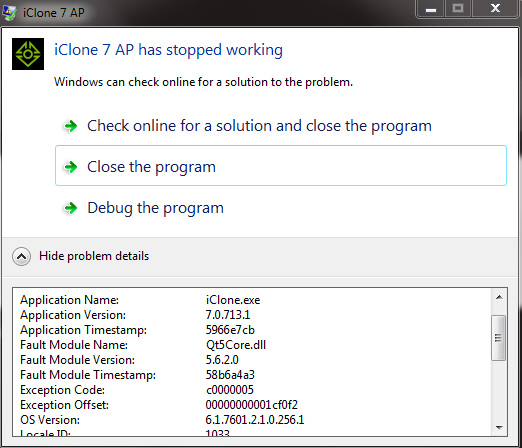
|
|
By TopOneTone - 8 Years Ago
|
|
Yes I'm experiencing the same problem, ic7 crashes during render and when I try to instigate the recovery option it fails instantly. I'm also using Windows 10. Sounds like it is a widespread fault in the current version, hopefully RL are onto it.
|
|
By animagic - 8 Years Ago
|
I had a crash today, and restore failed for me as well.
I have entered this in FT as issue #3453.
|
|
By toystorylab - 8 Years Ago
|
animagic (8/6/2017)
I had a crash today, and restore failed for me as well. I have entered this in FT as issue #3453.
Thanx! V.O.T.E.D. :D
Would be cool, if all the other members who wrote they have the same issue, would VOTE!
|
|
By pruiz - 8 Years Ago
|
|
I'm new - sorry - what do you mean by vote. I have the issue.
|
|
By Kelleytoons - 8 Years Ago
|
|
If you go to the tracker (there is a link at the top of this forum on the last "banner" of Ads RL shows) you can sign in and then vote on what issues you want to see fixed/improved (as well as add your own).
|
|
By justaviking - 8 Years Ago
|
|
Kelleytoons (8/6/2017)
If you go to the tracker (there is a link at the top of this forum on the last "banner" of Ads RL shows)...
When Feedback Tracker was first revealed, several of us "strongly urged" Reallusion to make a more visible, permanent-looking link to Feedback Tracker at the top of the forum page. As it is, it is 90% hidden, and if you don't already know about it you're not likely to notice it and realize it is valuable.
|
|
By Kelleytoons - 8 Years Ago
|
|
You're right, and I always tend to forget about it (so it really ought to just be a link at the top of the page next to the banner).
|
|
By toystorylab - 8 Years Ago
|
Vote here by clicking on:
VOTE
|
|
By but0fc0ursee - 8 Years Ago
|
|
davidcaputokeene (8/6/2017)
I'm new - sorry - what do you mean by vote. I have the issue.
Hello,
I NEVER have problems recovering a project. The most I can possibly lose is (2 to 3 minutes) of work.
Never more than that, because....
I save all projects every 2 to 3 minutes..... (With a DIFFERENT NAME)
If "Recover" doesn't work, simply open your last "Save"
Every hour or so.... Go back and deleted all those "Undesired Saves" and give your pc more space.
Pain in the neck, but you NEVER lose a project.
Guaranteed! :)
_____________________________________________________________________________________________________________
NOTE: (On your PC)
There are times when system restore does NOT work.
Why??
When you get "Too Many Errors"... you can NOT recover from this.
iClone:
PC's running at different speeds.... different hardware, i;e. graphics card, etc..... (New Updates)
Is everyone "Crashing Every Time?"
No.
An update patch may or may not be need.
Too many rely on recover.
|
|
By but0fc0ursee - 8 Years Ago
|
@davidcaputokeene,
I know this saving method is tedious, but you can really help Reallusion to fix problems saving soo many times.
How???
You save and save and save.... Then, BOING! Crash. (Do you remember exactly what you did?)
Ok... recover does not work.... Open your last save.
Now repeat the steps.... if she crashes again... Now you send a ticket to Reallusion's Support and or Feedback Tracker.
With the steps that made her crash..
Then RL will huff and puff, then blow the bugs away. :hehe:
|
|
By 4u2ges - 8 Years Ago
|
I personally always follow an incremental backup scheme while working on IC projects.. But..
We are all human beings. We are not computers, nor we are machines to be programmed with a timer.
Auto-save/restore was fairly well working in IC 6 (saving my a** a few of times when my "inner timer" failed).
And now it is not working at all. Time to fix it... simple is that.
|
|
By animagic - 8 Years Ago
|
|
The issue is not to do an incremental save, which I always do as well, the issue is that functionality currently in iClone is broken. This has nothing to do with "too many rely on restore".
|
|
By animagic - 8 Years Ago
|
|
davidcaputokeene (8/6/2017)
I'm new - sorry - what do you mean by vote. I have the issue.
The link posted for voting (https://www.reallusion.com/FeedBackTracker/Issue/Restore-no-longer-works-for-iClone-7) will take you directly to the relevant entry in the Feedback Tracker.
|
|
By kungphu - 8 Years Ago
|
I just voted.
Same problem here. Iclone 6 worked so well I got LAAAZEEEE with multiple saves. Looks like that'll be the route to go till it gets fixed. Man... it saved my skin a ton in I6.
|
|
By but0fc0ursee - 8 Years Ago
|
|
animagic (8/7/2017)
The issue is not to do an incremental save, which I always do as well, the issue is that functionality currently in iClone is broken. This has nothing to do with "too many rely on restore".
How many (countless) times have we heard people say they lost entire projects?
If users learn to save frequently... just open the last save and finish your project.
Never rely of restore to save you.
Because, It's not the first time iClone has lost functionality and it won't be the last, either.
New Users.... save frequently. "You'll wish you did."
|
|
By Peter (RL) - 8 Years Ago
|
|
We are currently investigating this issue. Thank you to all those that reported it and apologies for the inconvenience this issue is causing.
|
|
By justaviking - 8 Years Ago
|
but0fc0ursee (8/7/2017)
animagic (8/7/2017)
The issue is not to do an incremental save, which I always do as well, the issue is that functionality currently in iClone is broken. This has nothing to do with "too many rely on restore".How many (countless) times have we heard people say they lost entire projects? If users learn to save frequently... just open the last save and finish your project.
Never rely of restore to save you. Because, It's not the first time iClone has lost functionality and it won't be the last, either.New Users.... save frequently. "You'll wish you did."
By golly, you're both correct.
Many people have learned the value of doing incremental "Save As" while working.
But that does not negate the fact that iClones recover feature used to work and now seems to be broken and should be fixed.
P.S.
I was trying to figure out how to write the plural of "Save As."
Save As's ? Well, I guess it does help save your ass. ;)
|
|
By sabrinataranto88 - 8 Years Ago
|
|
Hi, I also have the same problem that I crash when rendering out, have you solved it? or is there a solution to this ??
|
|
By Peter (RL) - 8 Years Ago
|
|
Please update to version 7.02 as this should resolve the problem. To update go to Help > Check For Update in iClone 7.
|
|
By sabrinataranto88 - 8 Years Ago
|
|
Hi, I've updated version 7.02 but I always have the same problem while rendering out I crash I do not understand why, I have a pc icore 7 16 gb ram video card geforce gt 740 2 gb dedicated, iclone 7 ok, i it crashes only during rendering out
|