|
By c.claus - 9 Years Ago
|
Hey dear users,
i am a new user. I just installed iClone 7, CC2 and etc but iClone 7 works slow with so much lags while working. I have a powerful system performance!! 2 NVIDIA QUADRO P6000 Graphic Card (Updated to last driver), 64GB RAM, CPU Core i7 and Windows 10 64bit.
Please write me down the solution if you had same issue like me.
Thanks
CC
|
|
By Kelleytoons - 9 Years Ago
|
The Quadro 6000 card benchmarks pretty poorly against the recommended nVidia cards (for example, it's only 1/4 to 1/8 the performance of the 1080, the card I have) so it's possible that's the issue. If it's at all possible for you to try it with a different card that would be worth seeing (even the 1070 blows away the Quadro in terms of actual card performance). iClone can only use one card, so dual ones don't help, but you should definitely make sure it's *using* one of those cards (easy to check in iClone -- just look at your GPU memory when you load it up and it will tell you how much is available).
The other thing you might do is try earlier drivers -- with my 1080 card I had to step back to the April nVidia drivers as the current ones caused me all kinds of problems. Not everyone has reported this but at least one other person here did have similar issues, so it's worth at ry.
|
|
By paulg625 - 9 Years Ago
|
|
Also make sure while working your not set to high quality output on display. Also would be nice to know what you have on screen amount of video ram available, amount used. this would give us a bit more information to work with for helping you diagnose the problem. I have a Xeon system with twelve gig Titan X card. 128 gig ram and depending on what I have on the screen and settings I can manage to get things clunky to if I push to hard (millions polys, 4096 textures, substance material textures (unbaked) and custom video settings.
|
|
By Peter (RL) - 9 Years Ago
|
Unfortunately Nvidia Quadro and AMD FirePro Workstation cards are not supported by iClone 7. While these cards will likely run iClone we can't guarantee a problem free experience.
One thing to check is that your graphics drivers are up to date. Outdated drivers could also cause this kind of issue.
|
|
By evidanse - 9 Years Ago
|
Hello
I have the same problem with my computer
Cpu I7 octo core, 16 GB RAM and Nvidia gtx 950 M with 4Gb ram.
I tried to lower the render quality but with no effect...
It used to work faster with the 7.01 version than the 7.02.
Thx
Michel
|
|
By argus1000 - 9 Years Ago
|
iClone was sluggish with my older nVidia GTX 980 and 970, especially for the big scenes. So I bought an nVidiia GTX 1080. It blows away my previous cards. I didn't buy the TI version because I didn't think the performance was worth the difference in price. I'm very happy.
|
|
By mark - 9 Years Ago
|
A beefy Display card is a must but when I went to a 1TB SSD Drive for the C: drive my iClone world was rocked to the core!!!!:D:D:D
|
|
By evidanse - 9 Years Ago
|
I only use 1.4 gb of the 4.1 bg of my graphic card memory, but Iclone is still laggy....How is it possible ?
|
|
By TheOldBuffer - 9 Years Ago
|
|
evidanse (10/10/2017)
I only use 1.4 gb of the 4.1 bg of my graphic card memory, but Iclone is still laggy....How is it possible ?
Turn physx and GI off and see if that helps
|
|
By paulg625 - 9 Years Ago
|
Remember the older card also has fewer processor cores to work with. Might also want to check into a Driver update...
evidanse (10/10/2017)
I only use 1.4 gb of the 4.1 bg of my graphic card memory, but Iclone is still laggy....How is it possible ?
|
|
By gordryd - 9 Years Ago
|
|
I have slow response as well since upgrade to 7.02, as well as slow loading of intial program (I opened a feedback tracker for this). I have core i7, GTX 1050 ti, & 8GB DDR. The problem starts even before loading anything (graphic memory use is low) -- it takes >90 seconds when selecting ANYTHING in the CONTENT tab before the program actually responds and I can make my next selection (which takes an additional 90 seconds), so basically iClone is now un-usable. It worked fine from iClone 4 thru 7.01. Also, when the program loads, it stays stuck while loading ICColorManagementSection.dll for a couple of minutes before it continues to load. The rest of the DLL's load fast.
|
|
By Kelleytoons - 9 Years Ago
|
|
mark (10/6/2017)
A beefy Display card is a must but when I went to a 1TB SSD Drive for the C: drive my iClone world was rocked to the core!!!!:D:D:D
Would you tell us which one? (Just curious, although the WD 3D Blue looks tantalizing).
|
|
By evidanse - 9 Years Ago
|
I have turned physic and GI with no results
TheOldBuffer (10/10/2017)
evidanse (10/10/2017)
I only use 1.4 gb of the 4.1 bg of my graphic card memory, but Iclone is still laggy....How is it possible ?
Turn physx and GI off and see if that helps
|
|
By evidanse - 9 Years Ago
|
My graphic card is updated with no results...
I have installed iclone software in my 120 gb ssd drive and the content in an other traditional HDD drive... Do you think it's the origin of my problem ?
thx
paulg625 (10/10/2017)
Remember the older card also has fewer processor cores to work with. Might also want to check into a Driver update... evidanse (10/10/2017)
I only use 1.4 gb of the 4.1 bg of my graphic card memory, but Iclone is still laggy....How is it possible ?
|
|
By paulg625 - 9 Years Ago
|
What OS system are you using and how long have you been using it. Windows 10 has a few strange load issues locking the hard drive especially a SSD. Especially if you have updated either on your own. If store bought config they typically have all the settings right for SSD
gordryd (10/10/2017)
I have slow response as well since upgrade to 7.02, as well as slow loading of intial program (I opened a feedback tracker for this). I have core i7, GTX 1050 ti, & 8GB DDR. The problem starts even before loading anything (graphic memory use is low) -- it takes >90 seconds when selecting ANYTHING in the CONTENT tab before the program actually responds and I can make my next selection (which takes an additional 90 seconds), so basically iClone is now un-usable. It worked fine from iClone 4 thru 7.01. Also, when the program loads, it stays stuck while loading ICColorManagementSection.dll for a couple of minutes before it continues to load. The rest of the DLL's load fast.
|
|
By gordryd - 9 Years Ago
|
|
I am using Win 7 Home Premium (64-bit of course...) - my iClone 7 is installed on an SSD (WD Blue)
|
|
By mark - 9 Years Ago
|
Kelleytoons (10/10/2017)
mark (10/6/2017)
A beefy Display card is a must but when I went to a 1TB SSD Drive for the C: drive my iClone world was rocked to the core!!!!:D:D:D
Would you tell us which one? (Just curious, although the WD 3D Blue looks tantalizing).
This REALLY made all the difference for me with iC7, wish I had gotten it when iC6 came out, it would have help me "get-with-it" much sooner.
I really think it's a problem many folks are having with sluggish iClone response. iClone really reads/writes A LOT of info back and forth during use I discovered.
I went with a Samsung but I'm sure there are others that would work just fine. And the 1TB was a bit of overkill I could have used a 500GB just as well I'm sure ;) It came with a very nifty utility that cloned my C drive with no problem so swapping out was a breeze!!!
https://www.amazon.com/gp/product/B00OBRFFAS/ref=oh_aui_detailpage_o04_s00?ie=UTF8&psc=1
|
|
By Kelleytoons - 9 Years Ago
|
Thanks. After looking further I decided it wouldn't help me any -- I already have all my programs loading/unloading from my 256mb Samsung SSD, and while it *would* allow my content directory faster access I don't really do much there anyway (nowadays I'm into managing things by projects).
But I'm sure others who don't have an SSD boot drive would get faster access (I can't exactly say it was night and day when I first switched to an SSD, but at least it doesn't take *forever* to load, although Character Creator is still the slowest loading program I own, and I own MUCH bigger programs).
|
|
By StrangeMotions90 - 6 Years Ago
|
Hi, I've recently been having a lot of lag issue while using iClone 7 to the point where I can't work on any of my projects. I have contacted Reallusion support but they haven't been any help as none of the solutions they have given doesn't work, I would really appreciate it if anyone could help fix my problem so I can get back to working on my projects. I have already wiped my PC clean and reinstalled everything and have also made sure my drivers and Softwares are all up to date. I use an EVGA GeForce GTX 1080 graphics card with an Intel i7 processor, iClone 7 was working fine just over a month ago and it seems to only be iClone 7 that is having lag issues as the rest of my PC is still running smooth.
Thanks in advance.
|
|
By james_muia - 6 Years Ago
|
|
StrangeMotions90 (1/29/2020)
Hi, I've recently been having a lot of lag issue while using iClone 7 to the point where I can't work on any of my projects. I have contacted Reallusion support but they haven't been any help as none of the solutions they have given doesn't work, I would really appreciate it if anyone could help fix my problem so I can get back to working on my projects. I have already wiped my PC clean and reinstalled everything and have also made sure my drivers and Softwares are all up to date. I use an EVGA GeForce GTX 1080 graphics card with an Intel i7 processor, iClone 7 was working fine just over a month ago and it seems to only be iClone 7 that is having lag issues as the rest of my PC is still running smooth.
Thanks in advance.
Try checking this post I made.
https://forum.reallusion.com/406607/Iclone-lagging-when-moving-the-mouse-144hz-Gsync-User-This-may-be-your-solution
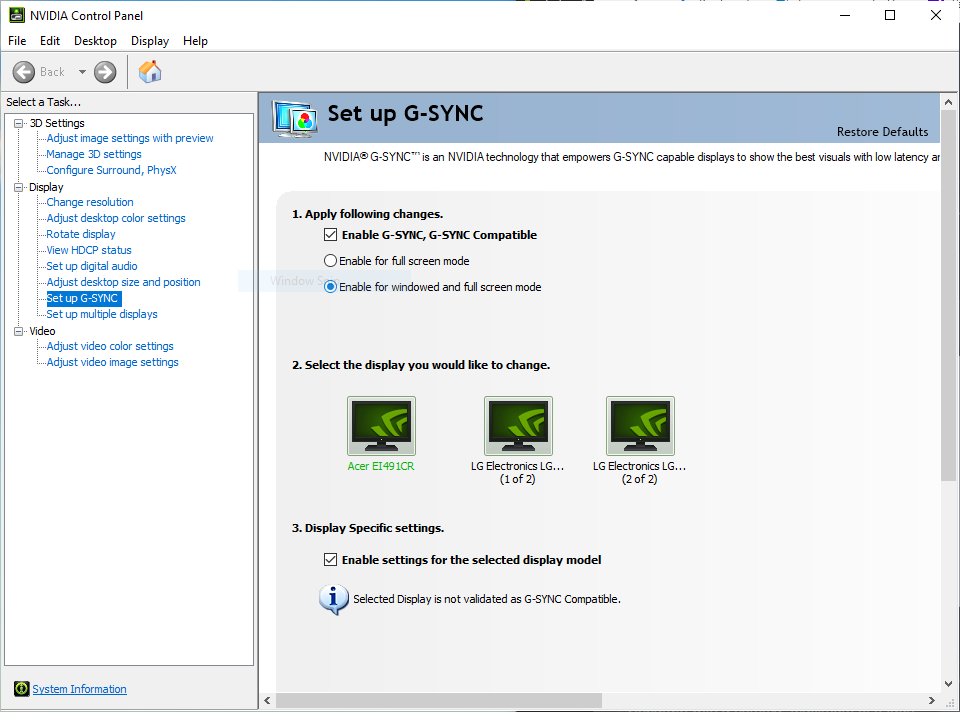
If you are a GSYNC user, make sure that 'Enable G-SYNC for full screen mode." is enabled.
If you have "Enable G-SYNC for windowed and full screen mode." enabled, IClone will be laggy. For some reason GSYNC does not work well in IClone if windowed and full screen mode is enabled.
|
|
By StrangeMotions90 - 6 Years Ago
|
|
Thanks for offering a solution to my problem but I do not have G-SYNC and I'm still having the same problems :/
|
|
By StrangeMotions90 - 6 Years Ago
|
Hi, I posted on here about this problem I was having before, I've fully installed any updates for my PC and have uninstalled and restalled all my reallusion software as suggested but I'm still getting a lot of lag to the point where I cant get any work done. I've even reduced the scene to the bare minimum as much as possible, removing a bunch of props etc. but this hasn't changed anything. As I'm currently stuck in lockdown, this would be a great time to get a bunch of work done but because of this lag issue, I'm unable to do so. This is really starting to annoy me to the point where I'm taking it into consideration if I should just give up on this project which would be a shame since I've put a lot of time and money into this project, as well as all my voice actors. Please if anyone knows a way to fix this, I could really use your help. Thank you.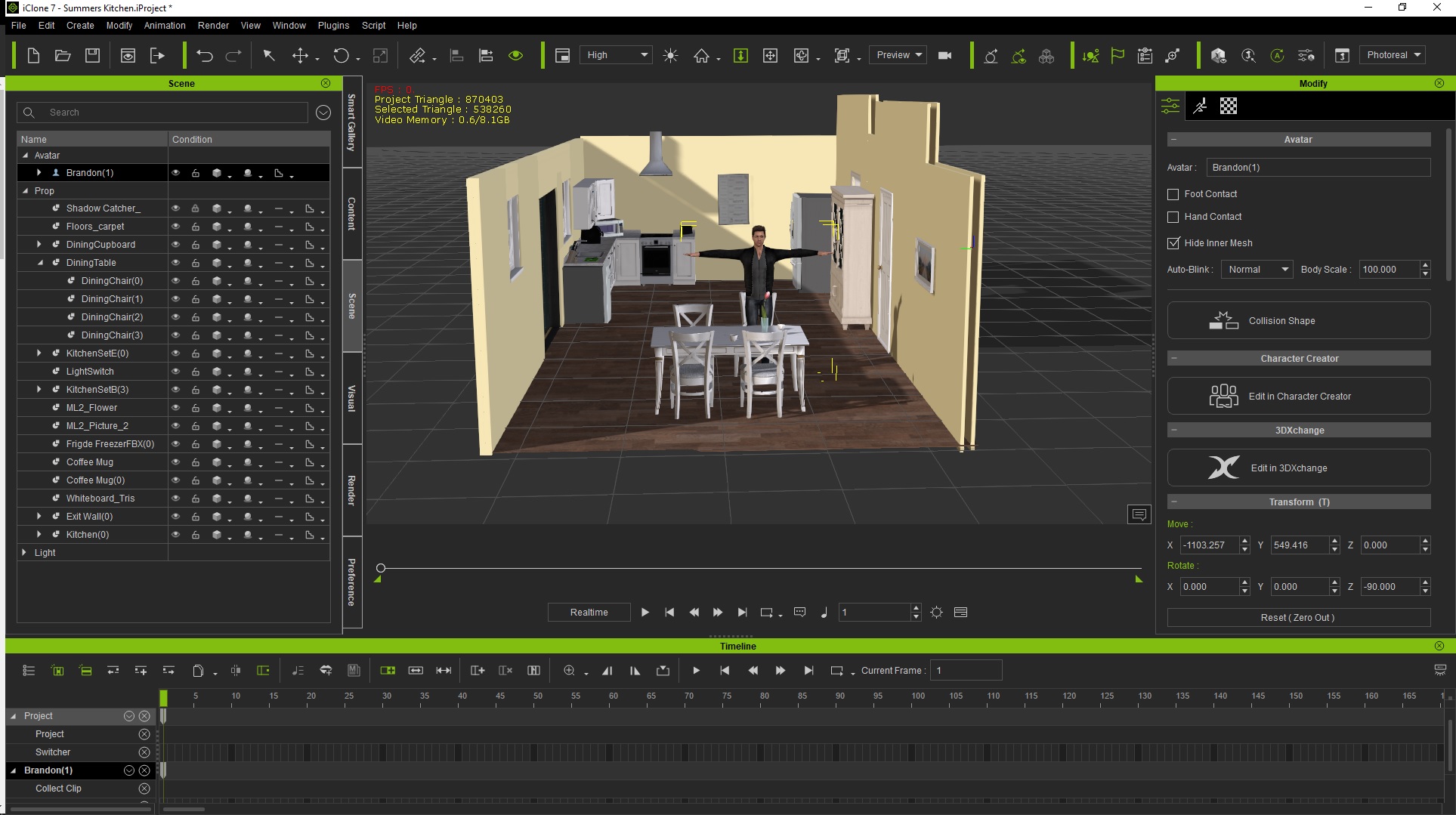
|
|
By Peter (RL) - 6 Years Ago
|
Hi StrangeMotions
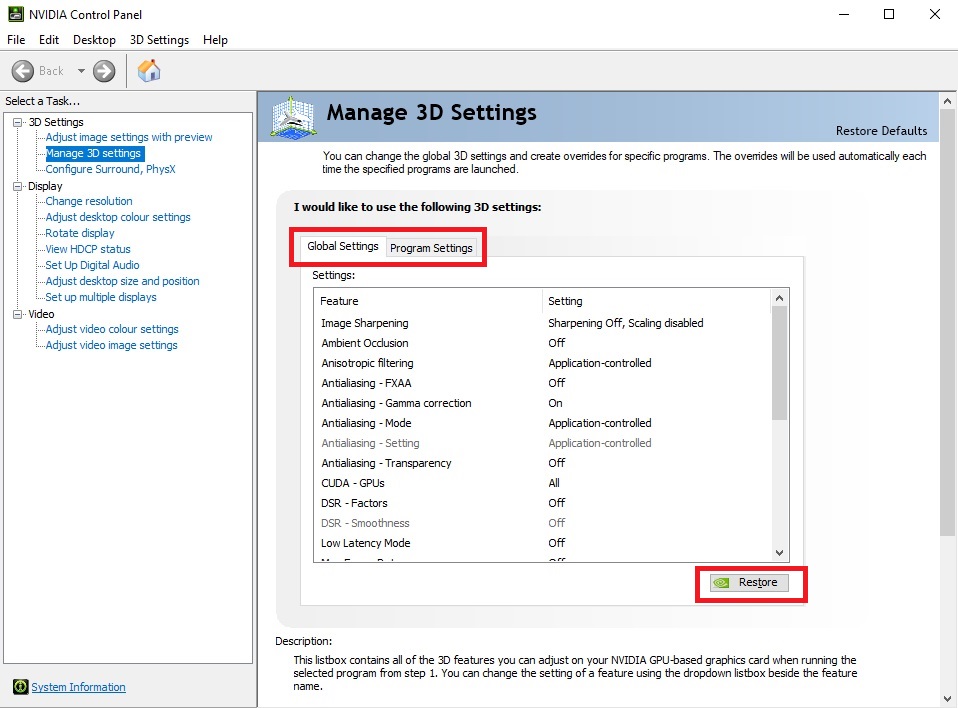
Have you customised your Nvidia graphics settings in any way? If so that could be the problem.
It is important that iClone 7 runs using the default "Application Controlled" option. This allows iClone to offer the best performance on your system.
If you are not sure, you can open the Nvidia Control Panel by right clicking the Desktop. Then try hitting the Restore button as shown below under the Global tab. Please Note: If it is important to have a Global custom setting, try creating a separate profile for iClone 7 under the Program Settings tab and make sure this is using the default setting.
|
|
By StrangeMotions90 - 6 Years Ago
|
|
Thanks for the reply, I have just tried this suggestion and restarted my PC but it doesn't seem to have made any difference.
|
|
By GHarry - 6 Years Ago
|
Hi Peter,
thanks for this Tip.
That was the solution for my Problems. My Projekt iClone 7 CubeWorld have more then 3GB Size and crashed after loading.
It wasn´t possible to move inside the CubeWorld. My other projects with more than 1 GB are running again now without any problems
Greetings
GHarry
|
|
By JohnLiebe - 6 Years Ago
|
In my case, the slowdown problem was with using the onboard Intel graphics for my second monitor.
When I switched to ONLY use my RTX2060 the performance difference was huge. Preview renders that took minutes before are now almost realtime.
I'm not sure if this is a bug in iClone, because I can run other software with integrated iRay just fine while using the onboard Intel GPU and 2nd monitor.
|
|
By new-own - 6 Years Ago
|
I just found out something huge that might help to find the reason and cause of why a lot of users having a very slow iClone 7.
I need to talk to a Reallusionist (Insider)...
|
|
By Peter (RL) - 6 Years Ago
|
|
new-own (5/18/2020)
I just found out something huge that might help to find the reason and cause of why a lot of users having a very slow iClone 7.
I need to talk to a Reallusionist (Insider)...
If you have found something that might help those suffering from performance issues, it would be beneficial to everyone if you posted it on the forum. However if there is a reason you don't want to, please feel free to send me a private message and I'll look into it. :)
|
|
By new-own - 6 Years Ago
|
Peter (RL) (5/18/2020)
new-own (5/18/2020)
I just found out something huge that might help to find the reason and cause of why a lot of users having a very slow iClone 7.
I need to talk to a Reallusionist (Insider)...
If you have found something that might help those suffering from performance issues, it would be beneficial to everyone if you posted it on the forum. However if there is a reason you don't want to, please feel free to send me a private message and I'll look into it. :)
The reason I didn't just share is because it is not a solution. It only shows developers what might cause the problem. Okay here is what I found.
I have my iClone running, playing an empty scene with nothing loaded into the scene gives me a realtime playback of around 21 fps. (Something is not right)
I load some character with animation into my scene and play it in realtime with QuickMode selected for the preview and I get around 3.1 fps. (That is unacceptable)
I use my motion capture plugins, LIVE FACE and Perecption Neuron and I get 3.1 fps during live animation preview and recording. recorded animation records with total loss of data and very jittery rough motion. (I was super sad for weeks to spend so much money and have this result.)
Then I accidentally found that, when iClone is running in the foreground as my main, it is acting slow and I get maximum of 6 fps playing back an animation. However, as soon as I switch any other software to my foreground and leave iClone in the background playing the animation, it jumps to a constant of 60 fps fixed! even when recording motion capture, I have to hit on Record button and then leave NotePad running on the foreground on top of iClone while I still can see what's happening on iClone.
I don't know what is the cause but I can see that if iClone is running in the foreground, something is consuming it heavily.
|
|
By Vedus - 6 Years Ago
|
I am new to iclone and cc3 and i am still learning
As 3D modeler i have configure my Desktop for at last best perfomance...
My Tips.
1: ) Install windows 10 HOME you don't need bussines or pro versions- AVCTP service: if you don’t use Bluetooth Audio Device or Wireless Headphones.
BitLocker Drive Encryption Service: if you don’t use BitLocker storage encryption. Bluetooth Support Service: if you don’t use any Bluetooth device. Computer Browser: this will disable Network discovery of systems on the local network. Connected User Experiences and Telemetry: it will disable Feedback, Telemetry and Data Collection. Diagnostic Policy Service Diagnostic Tracking Service: it will turn off Telemetry and Data Collection. Distributed Link Tracking Client: if you don’t need to use a network. Downloaded Maps Manager: if you don’t use the Bing Maps app. File History Service: if you don’t intend to use Windows Backup or System Restore. IP Helper: if you don’t use IPv6 connection. Infrared monitor service: if you never use File transfer via infrared devices. Internet Connection Sharing: it is an old service that can be disabled. Netlogon: if you are not on a domain controller environment. Program Compatibility Assistant Service: it will hinder your running in the Compatibility Mode though. Print Spooler: if you don’t use a Printer. Parental Control: if you don’t use the Parental Control feature. Remote Registry: you’d better disable it. Then, no one can access your Registry remotely. Secondary Logon TCP/IP NetBIOS Helper: if you are not a part of a Workgroup network. Touch Keyboard and Handwriting Panel Service: if you don’t use a touch device. Windows Error Reporting Service: if you don’t need to save or send error reports. Windows Image Acquisition: if you don’t use a Scanner. Windows Insider Service: if you are not a part of the Windows Insider Program. - Windows Search: if you never use Windows Search.
[/code]
Before disabling unnecessary services in Windows 10, you’d better create a System Restore Point and make a note of the Windows services that you are disabled. In this situation, you can take a look at the services that are shown as Automatic because only these services can make your Windows take longer time to boot up. Now, you can click the Startup Type header to show all the automatic services. Then, you can right-click on one service and select Stop. While you can also see that there is no such a Stop option after right-clicking a service. If so, just go to the next one. However, before stopping a service, you can read the description of that Windows service and then decide whether to stop it.
3: ) if you have 16GB memory create 32GB pagefile (if your HDD is fast :D )
This above is the Basics
4: ) As Modeler or animator you need speed so here again the basics..
Don't buy a simple ssd because is cheap..
CHEAP > SSD SAMSUNG MZ-76Q1T0BW 860 QVO 1TB 2.5'' SATA 3Sequential Read/Write SpeedUp to 550/520 MB/s Random Read/Write SpeedUp to 97K/89K IOPSPrice around 120-130$ Samsung 970 EVO MZ-V7E1T0BW 1TB SED PCIe NVMe SSD Sequential Read SpeedUp to 3,400 MB/s Sequential Read Sequential Write SpeedUp to 2,500 MB/s Sequential Write Random Read SpeedRandom Read (4KB, QD32): Up to 500,000 IOPS Random Write SpeedRandom Write (4KB, QD32): Up to 450,000 IOPS
* Performance may vary based on system hardware & configuration
PRICE around 170$ -200$
The above is 1TB if you want a lower budget go for 512GB is the half prices
If you want to start the upgrading then...
HDD > MOTHERBOARD > CPU > VGA > MEMORY
Sorry for my english ;)
|
|
By micahpharoh - 6 Years Ago
|
Wow, I'm just using the trial version but I'm having the exact same problem on a GTX 1070. Runs absolutely terribly while the window is active. Very strange.
Edit: I was getting around 3fps in the viewport before I changed my G-SYNC settings
|
|
By animagic - 6 Years Ago
|
I discovered something interesting, where the addition of one character slowed down the FPS to a crawl even in Quick Mode. I had used that character before without issues, but the one thing that I changed was the hair and that turned out to cause the problem. The hair is not very high-poly (about 13k), but it looks fuzzy so that may be the problem: lots of draws.
It also doesn't matter if I change the shading; even in wireframe it slows down playback.
|
|
By micahpharoh - 6 Years Ago
|
I noticed that when I moved my iClone 7 window to my other monitor the issue went away. Turns out it was caused by my G-SYNC settings (as someone mentioned in a previous post). These settings fixed the problem.
Edit: Well, it fixed it for a bit but now I'm having problems again. The frame rate is fine if I move the window to another monitor that doesn't have G-SYNC turned on.
|
|
By 3Aliens - 5 Years Ago
|
|
new-own (5/18/2020)
I just found out something huge that might help to find the reason and cause of why a lot of users having a very slow iClone 7.
I need to talk to a Reallusionist (Insider)...
HAHAHAHA Me searching for a Solution finds this!
|