|
By Lord Ashes - 9 Years Ago
|
Previously I did a tutorial on multi-stage transitional morphs (https://youtu.be/xYcOE7hY8QI) were I identified the difficulty of making multi-stage morphs because each successive morph stage needs to subtract out the previous morph stages. This means instead of just creating meshes which match the various stage of the morph, the user needs to create less intuitive delta morphs.
This applies to morph objects in iClone 6 (implemented using Dummy Bone and Face Expressions) and iClone 7 (implemented using the Morph Creator and Animator).
This tutorial video demonstrates the problem showing what a improperly executed multi-stage morph will look like (i.e. one that uses the morph meshes directly) side by side with what a properly executed multi-stage will look like (i.e. one that uses delta morphs). At the end of the video, I offer a possible solution for easily creating the necessary delta morph files for implementing your multi-stage morphs properly.
(EDIT1: Updated links to version 1.1 which compensates for OBJ files which do not specify a "g" (group) entry)
(EDIT2: Updated links to version 1.1 of the binaries. Previous link was still pointing to the old binaries)
(EDIT3: New links to source code and binaries)
As the video says, if you want to use the MorphBuilder program (written by Lord Ashes himself) to simplify your multi-stage morph creation, you have two options:
1. Trust Lord Ashes and download the windows binaries from http://www.mediafire.com/?e76zykp98im7y
or
2. Don't trust Lord Ashes (no offense taken) and download the source code from http://www.mediafire.com/?e76zykp98im7y
(The source code is a Visual Studio 2015 project which can be compiled with any edition of Visual Studio including the free Community edition).
|
|
By 4u2ges - 9 Years Ago
|
Very interesting. I got 2 questions though:
1. Is it possible to have the same concept applied to iProps with morphs created in IC7 Morph Creator?
2. I tried to download, but the filehosting.org never sends an email with download link (checked trash and junk box as well).
Thanks
|
|
By Lord Ashes - 9 Years Ago
|
|
4u2ges (7/15/2017)1. Is it possible to have the same concept applied to iProps with morphs created in IC7 Morph Creator?
Yes. While the tutorial showed the implementation as a boned prop in 3DXChange, the iClone 7 Morph Creator works the same way. If you want to apply multi stage transitional morphs, you will need to use Delta Morphs instead of the regular mesh morphs.
4u2ges (7/15/2017)2. I tried to download, but the filehosting.org never sends an email with download link (checked trash and junk box as well).
Hmm. It worked for me. Let me see if I can attach directly...
|
|
By Lord Ashes - 9 Years Ago
|
Hmm...The forum keeps telling me that I have exceeded my space, when I try to attach, even though the files is only 6k (and in RAR format which is one of the accepted formats).
Try these links instead:
As the video says, if you want to use the MorphBuilder program (written by Lord Ashes himself) to simplify your multi-stage morph creation, you have two options:
1. Trust Lord Ashes and download the windows binaries from https://ufile.io/vodzr
or
2. Don't trust Lord Ashes (no offense taken) and download the source code from https://ufile.io/wn12e
(The source code is a Visual Studio 2015 project which can be compiled with any edition of Visual Studio including the free Community edition).
Let me know if that worked better.
EDIT: Updated links to latest version of the software which addresses the bug with OBJ files that don't specify a "g" (group) entry.
EDIT2: Updated link to binaries which was still pointing to the old binary
|
|
By Lord Ashes - 9 Years Ago
|
BTW, just a heads up. The program is a quick implementation so it does not have any type of bullet proofing if you enter incorrect parameters. For example, all the files provided should gave the same number of vertices, texture vertices and faces. In addition if the object uses groups then this should also match. If it does not, you are likely to get odd behavior including possible program crash.
Please note that the parameters to the program should be provided in order starting with the source mesh and the listing the morphs in the order that they will be applied. When creating your Morph Object (in 3DXChange or Morph Creator) it is suggested to use the Morph.00.Source.OBJ or Morph.00.Delta.OBJ as the source for the morph. This will ensure that the Delta Morphs are compatible. The Morph.00.Source.OBJ and Morph.00.Delta.OBJ file should both be the same and should be a slightly reformatted version of your source OBJ file. The Morph Builder does create a Morph.??.Source.OBJ and Morph.??.Delta.OBJ file for each morph. In 3DXChange or Morph Creator you want to use the Delta files. The Source files are just a reformatted version of your original morph files and are not really needed. If you are using the Source Code, you can even turn them off.
The Source Code also contains the classes to hold an OBJ file's contents in memory. This can be useful if you are writing you own program for manipulating OBJ files. While this makes the program code longer, it is fairly easy to scan through the code to see that it does not do anything malicious.
|
|
By 4u2ges - 9 Years Ago
|
I must be doing something wrong.
I have an original and 3 consecutive .obj with morph amended.
Running morph builder gets this error (old VS 2010 Express does not allow me to debug).
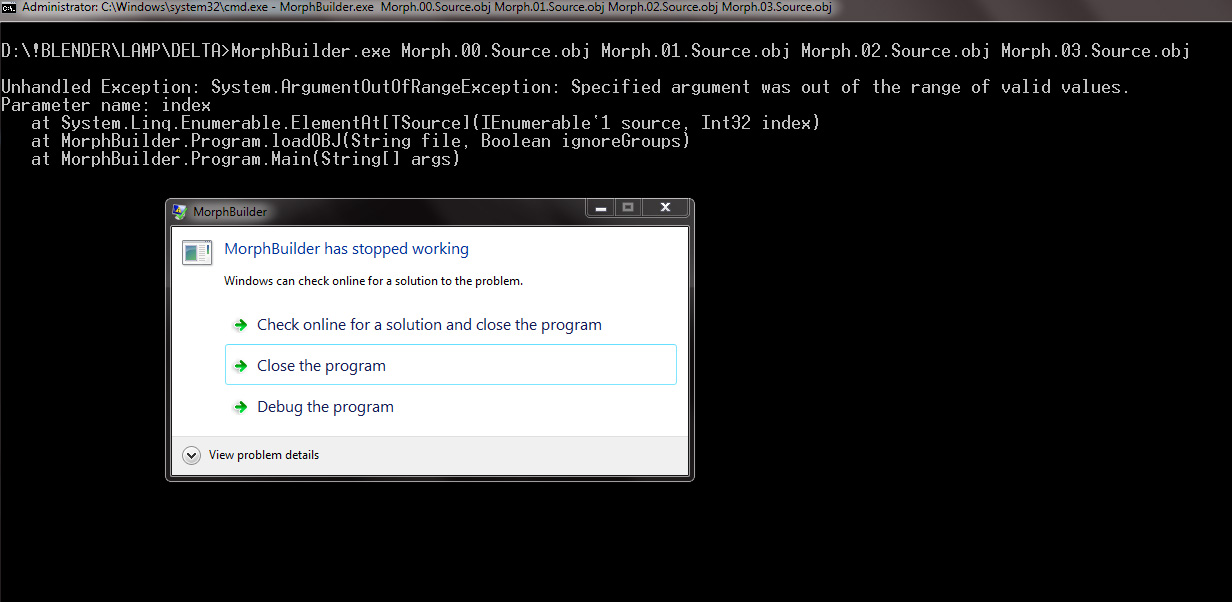
Now, looking at the obj sources it seems they are quite different. I suppose number of "v, "vt", "f" ... etc lines should exactly match. But they do not and I wonder why.
All I did is loaded original .obj into Blender. Then immediately Exported back to .obj and used that one as a source. Then I did a 3 consecutive mesh amendments (exporting to .obj after each).
So when I load this series into iClone Morph Creator, it all works fine (in a twisted way of course).
I can post another series of images. But it would be best if you could possibly try enclosed .objs to confirm as to what might be wrong (I think it is a Blender "thing"...)
Thanks
|
|
By but0fc0ursee - 9 Years Ago
|
|
4u2ges (7/15/2017)
I must be doing something wrong.
...Now, looking at the obj sources it seems they are quite different. I suppose number of "v, "vt", "f" ... etc lines should exactly match.
Scripting provides functionality that exceeds normal tools.
For this to work you must carefully follow Lord Ash's instruction.
Step by step!
You can't just load objects and add the script....
Configure the code "To Match."... as per the instructions.
Please note that the parameters to the program should be provided in order starting with the source mesh and the listing the morphs in the order that they will be applied.
When creating your Morph Object (in 3DXChange or Morph Creator) it is suggested to use the Morph.00.Source.OBJ or Morph.00.Delta.OBJ as the source for the morph. This will ensure that the Delta Morphs are compatible. The Morph.00.Source.OBJ and Morph.00.Delta.OBJ file should both be the same and should be a slightly reformatted version of your source OBJ file. The Morph Builder does create a Morph.??.Source.OBJ and Morph.??.Delta.OBJ file for each morph. In 3DXChange or Morph Creator you want to use the Delta files. The Source files are just a reformatted version of your original morph files and are not really needed. If you are using the Source Code, you can even turn them off.
|
|
By 4u2ges - 9 Years Ago
|
@Lord Ashes As oppose to complex .obj I just tried a simple cube in 3 stage single vertex move, where the list of mesh properties are matched. Still no luck - the error is the same.
|
|
By but0fc0ursee - 9 Years Ago
|
It's a simple code. One or more of the parameters are not met.
You're load a Cube... and see that the verts match, but...
The Morph.00.Source.OBJ and Morph.00.Delta.OBJ file should both be the same and should be a slightly reformatted version of your source OBJ file.
Is the source and delta a "slightly reformatted" version of the source?
What about the smoothing groups?
It's the little things we miss that...
Give the file to Lord Ashes to examine.
|
|
By 4u2ges - 9 Years Ago
|
Swoop, really, you have no idea what you are talking about :) You are a big expert in 3D but please try to read carefully and understand before posting something. How can I have a delta if the program crashes before it has a chance to create it..
|
|
By but0fc0ursee - 9 Years Ago
|
|
4u2ges (7/15/2017)
...you have no idea what you are talking about :) You are a big expert in 3D but please try to read carefully and understand before posting something. How can I have a delta if the program crashes before it has a chance to create it..
I'd never use that... I use the following plugins... "Wrap-it and Morph-it."
These plugins (Change) the source to match the object. (Simular objects... can't morph a pig into a caterpillar.)
...problem solved.
But...
I know one thing for sure... Lord Ashes made it work and provided the code.
I know how picky scripts can be.
One or more of the vital parameters are not met.
|
|
By Lord Ashes - 9 Years Ago
|
|
4u2ges (7/15/2017)
I must be doing something wrong.
I apologize that it does not seem to be working for you. I definitely tested it and it should work. However, I may know the issue (although error messages does not seem related):
The Morph Builder creates files called Morph.??.Source.obj but you are using these for input which may be causing the problem. Try renaming you OBJ files to something other than Morph.??.Source.obj or Morph.??.Delta.obj because the MorphBuilder will create these. For example (as shown in the Tutorial):
MorphBuilder.exe Source.obj Morph01.obj Morph02.obj Morph03.obj
(I will try this with your files and see if it works for me)
|
|
By Lord Ashes - 9 Years Ago
|
|
but0fc0urseeI'd never use that... I use the following plugins... "Wrap-it and Morph-it." These plugins (Change) the source to match the object. (Simular objects... can't morph a pig into a caterpillar.)
Are these Blender plugins for plugins for something else? I have a feeling that my tool and these plugins do slightly different things but it sounds like the plugins you are referring to might be something that I was looking for earlier.
Correct me if I am wrong, the plugin that you are suggesting will take two meshes and try to morph one into the other. Probably compensating for differences in vertices and faces. If so, that is great and it was something I was looking for a while back but my tool is for something different.
My tool is for the specific case when you are making multi stage transitional morphs. This is basically the process of applying one morph after another (with the previous morphs stay applied). An example of this is the ring in the video Tutorial. As such morph is applied, the ring opens more and more. However, because the previous morphs stay applied, the next morph needs to be a Delta morph in order to work correctly (a Delta morph is basically a morph with the previous morphs subtracted out).
If you are trying to create a simple single stage morph then you don't need this tool at all. Please note that an object with multiple morphs does not necessarily mean that the object is a multi stage morph object. For example, all the CC character morphs (as far as I know) are single stage morphs. A character can have many of these but the morphs are independent. Sure, you can apply more than one at the same time but none of them rely on a previous morph being applied. A practical example of multi stage morphs (beyond that of the abstract ring tutorial) is my Skydiver content (https://city.reallusion.com/ContentPreview.aspx?i=JICf938acb93e362c6b9). The parachute is a multi stage morph because it can transition from packed to pilot chute deployed, to deployed to deployed with limp pilot chute. Obviously something like the Deployed with Limp Pilot Chute morph is dependent on the previous Deployed morph. But as the Deployed with Limp Pilot Chute it is not practical to remove the Deployed morph, so Delta Morphs needs to be used in construction of the morphs otherwise the deploy, for example, will be double applied.
|
|
By Lord Ashes - 9 Years Ago
|
OK. It seems that I made an assumption which does not seem to be always true. My software that generates OBJ files always creates a "g" (group) entry. However, the provided sample files do not have such this entry (I guess it is optional within the OBJ file format) and thus when the vertecies were to be added to the last group, it generated the error (because there was not group to add the vertecies to). I have modified the source code and binaries to automatically create a default group if one is not provided. If one is provided, it still uses that group name instead. I ran the new version against the provided files and it had not errors. Found the error. New version at:
(Source Code): http://www.mediafire.com/?e76zykp98im7y
(Windows Binaries) http://www.mediafire.com/?e76zykp98im7y
Once again, my apologies for the assumption.
EDIT: Updated link to binaries. I accidentally repacked the old binary so this is the update the points to the new binary. File version is 1.0.1.0
|
|
By Lord Ashes - 9 Years Ago
|
|
but0fc0ursee (7/15/2017)Is the source and delta a "slightly reformatted" version of the source?
The source files that are generated (i.e. Morph.??.Source.OBJ) should be the same as your original input files but slightly reformatted. No V, VT, VN and F changes, just the file is written in a specific order and each section's count is summarized by a comment. The Delta Morphs are created by subtracting out the previous morphs. This is why it does not matter if you use Morph.00.Source.OBJ or Morph.00.Delta.OBJ as the base because they are identical (i.e. since the base has no previous morphs there are no morphs subtracted out and thus the Source and Delta are the same). Yes, I could have added some code to delete one of the Morph.00 files (since they are both the same) but I didn't bother. Each successive morph file is first re-arranged and written out as Morph.??.Source.OBJ and then the previous morphs are subtracted and the result is saved as Morph.??.Delta.OBJ.
After running the MorphBuilder you will want to use either the Morph.00.Source.OBJ or Morph.00.Delta.OBJ as the base (in 3DXChange or Morph Creator) and then add each of the Morph.??.Delta.OBj files (except the Morph.00 base file obviously). I can not explain it but when I used my original source file with the Delta Morphs, it did not want to work in 3DXChange (didn't get a chance to try with Morph Creator) but when I use the Morph.00.Source.OBJ file as the base in 3DXchange, it works fine (even though the content should have the same V, VT, VN and F data).
The Morph.??.Source.OBJ files can be deleted. I generate them only for troubleshooting purposes. For example, if the morphs don't seem to work, you can open each one to see the V, VT, VN and F count. All files (the base and morphs) should have the same V, VT, VN and F count. If not, the morph source is not a proper morph file for the given base.
but0fc0ursee (7/15/2017)What about the smoothing groups?
As far as I know, OBJ file format does not have support for smoothing groups or at least it does not have support for smoothing parameters. The OBJ file does have a "g" (group) entry (which software may use for the basis of smoothing groups) which the MorphBuilder preserves. Similarly the VT, VN and F data remains the same. Most software (iClone/3DXChange included) don't load VT and VN data when applying morphs. The original VT and VN data is used.
|
|
By 4u2ges - 9 Years Ago
|
Please see my PM Lord Ashes.
|
|
By 4u2ges - 9 Years Ago
|
This is awesome! I finally did compile your project (have not done that for a while) and it works as expected. It is now properly computing consecutive morphing.
Thanks a lot!
PS do not forget to change binary download as it is still an old version :)
|
|
By Lord Ashes - 9 Years Ago
|
I am glad we got it working. If other people experience trouble with the tool, do not hesitate to PM me. There may be additional directives that I have not supported (which are not generated by my OBJ writing software). In such a case, you can PM me and provide me with a sample mesh file and I will see if I can update the builder to support additional directives.
I'm thinking of adding a generic fallback for any data that the builder, it would just collect it and then write it out the same way in the exported files. Maybe I'll do that if other missing directives are found.
|
|
By 4u2ges - 9 Years Ago
|
Thanks again Lord for your efforts!
|
|
By Lord Ashes - 8 Years Ago
|
|
It seems that the link have expired for free access. If anyone is interested (before I get the software hosted somewhere else), just PM me and I can e-mail it to you.
|
|
By Lord Ashes - 8 Years Ago
|
Re-posted the source code and binaries on a different hosting website. Update the links in the original post and successive posts.
The link will take you to a folder where you can choose the Binaries or Source Code.
|