|
By pka4916 - 8 Years Ago
|
I thought I posted a new thread, but can't seem to find it, so here it goes.
I am confused with the program, and the PDF doesn't help me anything.
1. Load a scene. and highlight everything in the Scene.
2. Run Decimator, and I set it to 10% (so it's ugly... but wanted to test it)
3. Save a LOD (What am I suppose to do with that?) it seems like it's saving nothing or a small file(?) somewhere.
4. Export to FDX .
Ends up that the original FDX was 1 Gb and the new one 3 Gb.
Do it didn't do me any good.
I tried all over the place to get some more info, but all I find on Youtube is how to lower the polygons, and that's it.
Either I am missing something really important, or the program just doesn't work for it.
Thank you so much..
|
|
By wires - 8 Years Ago
|
|
Please explain in more detail what you are doing, and what software you are using. iClone, Character Creator and 3DXchange do not have a decimator module.
|
|
By pka4916 - 8 Years Ago
|
I want to import scenes from Daz to Iclone.
When I did that in the past, I ended up with 1.5 - 4 Gb files.
3DXchange doesn't like that size.. So I used the 4gb patch since it's still 32bit, but that didn't fix it either.
From my understanding is that you need to use 3DXchange first before you can use it in Iclone.
So I am trying to make the file smaller smaller, since the polygons are very high. Someone recommended using Decimator for Daz.
I loaded the scene, ran Decimator and set the quality to 10%. (just wanted to see what the filesize would look like)
Saved a LOD (no clue what it's for) and I exported the FDX file again.
This time it tripled the filesize.. So I am clue less on what to do. (besides returning the program to Daz)
I must be missing something, but idk what.
|
|
By but0fc0ursee - 8 Years Ago
|
|
pka4916 (6/22/2017)
1. Load a scene. and highlight everything in the Scene.
2. Run Decimator, and I set it to 10% (so it's ugly... but wanted to test it)
You are experiencing the difference between high quality created objects and something generated with auto cad or simular methods that looks good, but has many problems decimating.
The ugly result is due to how your selected objects were created. Poly reduction tools (decimator) uses and algorithim that reduces polygons "Pefectly"
if each object is created with "All Quads."
As we all know, 3dxchange converts all objects to "Triangles." That does not mean objects cannot decimate correctly.
It means that your "Trinagles" must form quads, otherwise the algorithm has to guess.
On thing that really mess up poly reduction are (NGons)... 5 sided polygons
Does you scene objects contain any NGons??
Also:
Never attempt to decimate an entire scene. Decimate each object seperately.
|
|
By pka4916 - 8 Years Ago
|
Each object would be fine, but then I still don't know what to do next.
what do I do with that LOD file?
can I just export to FDX ?
or am I missing steps?
the PDF doesn't tell me anything that came with it.
|
|
By but0fc0ursee - 8 Years Ago
|
Before worrying about the LOD, you may want to fix the mesh to decimate correctly.
Use a program like Blender to form "all quads" then your LOD will not be ugly.
|
|
By pka4916 - 8 Years Ago
|
I made it ugly on purpose to see the outcome of the file size.
If I set it to 50 or 80% then it's fine.
I need to know the steps after that. without using Blender.
|
|
By animagic - 8 Years Ago
|
You should be able to do everything in DAZ. Need an expert to explain it better, but LOD means level of detail, which is a reduced poly version of the same item for use in the background. I'm speculating here, but I believe all LOD versions are saved together, so what you have is the original and any LOD versions in one file. That's the reason for the increased file size.
I have to run now, but I played a bit with it and instead of Create LOD you select DON and save the reduced figure as a new scene file. You can then also export as FBX at that point. More later (but experts may have chimed in already).
EDIT: Clothing was a mess because I don't know what I'm doing but I had a reduced G3 figure that came in at 120k polys in 3DXchange. I used a 30% reduction. It's recognized as a DAZ figure.
|
|
By pka4916 - 8 Years Ago
|
Hm, I didn't know you could save it as DON.
I will try again when I get home.
I just save LOD, and export as FDX.
Maybe I need to save the scene first and load it again. Maybe that's what I am missing.
spent $$$$'s on items, and now bought the whole Iclone package, so I don't want to get it all to waste.
Mostly I buy Props and Scenes etc.
Put them together in Daz, and then export.
But since some of them are Massive FDX files, I can't load them back in.
even when I cut pieces of of the scenes, probably because of the polygon/sizes from the buildings etc.
Not trying to be rude, love Iclone and trying to learn the steps here.
So I apologize in advance in case it happens :)
|
|
By animagic - 8 Years Ago
|
Typo: I meant "Done", not "DON", which just means that you are finished with your decimating. The changes in are in character in your scene (or whatever you decimated), so by saving that you will have a decimated version.
BTW, don't worry asking questions; we all learn from that, including those who answer.
I believe you can control which parts are decimated and which are not. For a character that's essential. My 30% version has blocky eyes, which spoils it.
|
|
By blindman - 8 Years Ago
|
In DAZ studio
When you decimate you can select the individual items within the scene and set their reduction seperately. usinng the LOD button actually creates a reduced polygon version which can be selected under the object/figure perameters tab in the resolution dropdrop. normally there is only "Base" but if you create a LOD this wil be added here. The LOD does indeed provide for reduced resolution models as a function of distance from camera. if you toggle the resolution you can see the effect a decimation has on the model.
|
|
By but0fc0ursee - 8 Years Ago
|
|
animagic (6/23/2017)
I believe you can control which parts are decimated and which are not. For a character that's essential. My 30% version has blocky eyes, which spoils it.
Will Daz allow you to decimate according to "smoothing groups?"
If so, assign the eyes a different smoothng group and decimate only the part you need to.
|
|
By pka4916 - 8 Years Ago
|
Guess I am puzzled that if I have a Scene that is 25 Mb saved, and I export it to FDX it's like 1.4 Gb
When I run Decimator I have like 1503030 polygons, so I change it to 5000 ( was about 5% left)
and hit Done. Of Course I know it's looks blocky for now. But I am testing.
But when I save it again as FDX then the filesize becomes 3 Gb and 3DXhange refuses to read it then. same as the 1.5 Gb file.
I would have thought that the filesize would end up like 300-600 Mb but it's not.
That's why I am so puzzles.
When I save it as a new Scene again. the filesize stays at 25 Mb
|
|
By animagic - 8 Years Ago
|
|
Other than iClone projects, DAZ projects reference the objects in the scene rather than loading them outright. That makes the scene file smaller than the exported file, which needs to contain everything.
|
|
By but0fc0ursee - 8 Years Ago
|
|
pka4916 (6/23/2017)
I would have thought that the filesize would end up like 300-600 Mb but it's not.
That's why I am so puzzles.
When I save it as a new Scene again. the filesize stays at 25 Mb
Want your fbx export to show (Only) the smaller size..... Delete everything else, before exporting.
|
|
By pka4916 - 8 Years Ago
|
but0fc0ursee (6/24/2017)
pka4916 (6/23/2017)
I would have thought that the filesize would end up like 300-600 Mb but it's not.
That's why I am so puzzles.
When I save it as a new Scene again. the filesize stays at 25 Mb Want your fbx export to show (Only) the smaller size..... Delete everything else, before exporting.
I don't understand.
Everything is in my scene that I want for exporting to FBX.
What am I suppose to delete?
When you export an FBX , isn't it exporting whatever you have in the scene currently?
I tried the settings 2011 and 2012 (whatever the difference might be for the export) forgot what it said .
|
|
By but0fc0ursee - 8 Years Ago
|
Working with LOD... As to not distroy my original.... I generally have a higher poly and the reduced poly version.
If you export this entire scene your high poly version is still in there... making the fbx larger in size.
If you don't do this.... and you decimate a mesh... how does your export not show the proper "reduced" vertex count???
|
|
By pka4916 - 8 Years Ago
|
Well, That's why I am asking :)
|
|
By but0fc0ursee - 8 Years Ago
|
|
pka4916 (6/24/2017)
Well, That's why I am asking :)
To narrow it down, I'd try this:
Decimate one object, export it using the fbx format... not the entire scene.
Open the newly decimated object in a new scene and it should show the exact vertex count when decimated.
Repeat.
Then open up a new scene and import all of you newly decimated fbx objects.
Note the exact vertex count.... export it to fbx.
Import it again and ensure that the proper vertex count is displayed.
Double check your import and export settings. Something is increasing your vertex count.
|
|
By vidi - 8 Years Ago
|
|
I want to import scenes from Daz to Iclone.
When I did that in the past, I ended up with 1.5 - 4 Gb files.
if your Character is to heavy, check in the Parameter Tab the Mesh Resolution . It must be set to base, otherwise the Polycount is 4 x higher .
https://www.versluis.com/wp-content/uploads/2016/04/Screen-Shot-2016-04-27-at-22.51.02.png
Another important thing, decrease the textures . Remember a DAZ Figure have many material ID's with high resolution texture images, that eat the peformance.
In DAZ is a Texturatlas tool , that shrink many textures and bring it in a light weight thogether .(single sheets)
https://helpdaz.zendesk.com/hc/en-us/articles/207530243-How-to-Add-the-Texture-Atlas-Icon-to-Studio
|
|
By pka4916 - 8 Years Ago
|
ok, 1 thing I noticed that if I highlight everything in the scene on the right side, it doesn't do all of them..
I need to open up all the sub items and highlight them. or do the Open Collapsed items and then Ctrl-A
I started doing a few a at time, and they seem to be small.
so doing it step by step and see what happens.
Am I required to do the Create LOD file? Guess I don't see how it's being used for the Export?
I did a quarter of all the items and it went down from 3 gb to 2.8 Gb. so not really that much yet.
But have some to go.
Keeps me from the street :)
|
|
By pka4916 - 8 Years Ago
|
I give up..
Not sure what is going on..
From Daz to PBX
Default export = 1.5 Gb
Decimator 20% quality 1/4 of the scene = 2.0 Gb
Decimator 20% quality 2/4 of the scene = 2.6 Gb
Decimator 20% quality 3/4 of the scene = 3.7 Gb
Decimator 20% quality 4/4 of the scene = 5.0 Gb
How is it possible that if you lower the quality the export gets 3x bigger than the original.
It should have been 500/600 Mb
|
|
By but0fc0ursee - 8 Years Ago
|
|
pka4916 (6/24/2017)
IHow is it possible that if you lower the quality the export gets 3x bigger than the original.
It should have been 500/600 Mb
vidi (6/24/2017)
...if your Character is to heavy, check in the Parameter Tab the Mesh Resolution . It must be set to base, otherwise the Polycount is 4 x higher.
This sounds like the solution.
Did you make sure your settings are correct?
|
|
By pka4916 - 8 Years Ago
|
I made some smaller ones, that are only 200 - 300 Mb.
And it's importing, but at the end I get an unexpected format not being recognized.
Maybe it's just the Scene that I am trying to do..
Gonna move on to something else.. Wasted 3 days on this.
Still didn't get the time to look into Iclone 7 lol... bought it but never played with it, only watching the training videos that came with it.
|
|
By but0fc0ursee - 8 Years Ago
|
Slow down. Vidi explained how your vertex count can increase. Did you make sure your settings are correct?
What's this unrecognized format?
Good Luck
|
|
By pka4916 - 8 Years Ago
|
Not sure what error that is.. 3DXhange comes with it after a while it's doing it's thing, then it just pops up.
Something about unsuspected format
I checked the settings, and they are set to Base already.
|
|
By but0fc0ursee - 8 Years Ago
|
Ok, your settings are correct.
Now you need take a screen-shot or post the error message. (word for word) please.
There is only so much that can go wrong and the people here are very knowledgeable and willing to help you.
You almost got it.
|
|
By pka4916 - 8 Years Ago
|
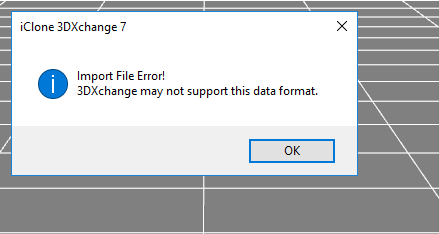
|
|
By but0fc0ursee - 8 Years Ago
|
What is the Data Format?
Can you send your file to RL Support. They will tell you what's wrong.
|
|
By pka4916 - 8 Years Ago
|
it's an exported file from Daz to FBX /FDX (Whatever the name is for Autodesk)
I'll have to upload it somewhere since it's a huge file
it works for smaller files, but some of them it just comes up with that after a while.
|
|
By but0fc0ursee - 8 Years Ago
|
Don't attempt to import and entire scene. 3dxchange will always have trouble importing "huge" files.
Characters... I import them by themselves and map the bones.
Props and Accessories..... I import them by themselves, to ensure proper pivot axis.
FBX is the format.... and "Use the 2011 or 2012 version."
|
|
By blindman - 8 Years Ago
|
Reviewing the DAZ help files I found this
NOTE! The LOD levels can be exported in any format currently available in Studio, however, only the currently selected mesh level will be exported. This means that the figure cannot be exported as a CR2 file with the LOD levels intact.
As Daz creates a resolution level called "decimator working" alond side the base mesh, when you decimate. So I guess if you select the decimated level then export the figure. . you can import the result with the base level having been stripped away during the export..
I haven't tried it but it could be tested by doing the above then comparing the mesh sizes of the original with the decimated version.
It's unclear whether during the export to FBX people are selecting the decimated level before hand. Also if you are measuring the success of your decimation using the size of the Daz scene file dont.as studio holds all LOD detail meaning the more times you decimate within a scene the more copies you make of the figure and the bigger the scene files will be.
|
|
By pka4916 - 8 Years Ago
|
Wonder where you can set that before exporting? I did not see such thing.
Got a ticket open with support as regards those error popups.
blindman (6/28/2017)
Reviewing the DAZ help files I found this
NOTE! The LOD levels can be exported in any format currently available in Studio, however, only the currently selected mesh level will be exported. This means that the figure cannot be exported as a CR2 file with the LOD levels intact.
As Daz creates a resolution level called "decimator working" alond side the base mesh, when you decimate. So I guess if you select the decimated level then export the figure. . you can import the result with the base level having been stripped away during the export..
I haven't tried it but it could be tested by doing the above then comparing the mesh sizes of the original with the decimated version.
It's unclear whether during the export to FBX people are selecting the decimated level before hand. Also if you are measuring the success of your decimation using the size of the Daz scene file dont.as studio holds all LOD detail meaning the more times you decimate within a scene the more copies you make of the figure and the bigger the scene files will be.
|