|
By WillFl - 8 Years Ago
|
I have multiple graphics cards on my machine, but it seems IC7 does not recognize all the other cards, is it possible to take advantage
of multiple GPU cards?
|
|
By Peter (RL) - 8 Years Ago
|
|
If you are using Nvidia GPU's you can open Nvidia Control Panel (or AMD's equivalent), then switch to Manage 3D Settings > Program Settings and select the most powerful graphic card for use with iClone.
|
|
By WillFl - 8 Years Ago
|
|
Peter (RL) (6/21/2017)
If you are using Nvidia GPU's you can open Nvidia Control Panel (or AMD's equivalent), then switch to Manage 3D Settings > Program Settings and select the most powerful graphic card for use with iClone.
Awesome!! thanks, let me try that.
|
|
By animagic - 8 Years Ago
|
|
Be aware that using a high-end NVidia card is advantageous for iClone if you have the choice.
|
|
By WillFl - 8 Years Ago
|
animagic (6/21/2017)
Be aware that using a high-end NVidia card is advantageous for iClone if you have the choice.
yes, I have a 1070
|
|
By WillFl - 8 Years Ago
|
|
Peter (RL) (6/21/2017)
If you are using Nvidia GPU's you can open Nvidia Control Panel (or AMD's equivalent), then switch to Manage 3D Settings > Program Settings and select the most powerful graphic card for use with iClone.
Hi Peter,
I tried what you suggested, but it still didn't change the gpu card that IC7 picks to use... it seems that we do need something in the preferences as a toggle for that..
I set the ndvidia settings for IC7 to my 1070 but when I launch IC7, in the viewport it says 2GB (for my 640) instead of 8GB which the 1070 has.
|
|
By animagic - 8 Years Ago
|
|
Is there a preference order in the BIOS that you can set or elsewhere?
|
|
By WillFl - 8 Years Ago
|
|
animagic (6/23/2017)
Is there a preference order in the BIOS that you can set or elsewhere?
I shouldn't have to do that. Other programs simply offer you the option to select the GPU card to use if you have multiple cards.
|
|
By Peter (RL) - 8 Years Ago
|
WillFl (6/23/2017)
Peter (RL) (6/21/2017)
If you are using Nvidia GPU's you can open Nvidia Control Panel (or AMD's equivalent), then switch to Manage 3D Settings > Program Settings and select the most powerful graphic card for use with iClone.Hi Peter, I tried what you suggested, but it still didn't change the gpu card that IC7 picks to use... it seems that we do need something in the preferences as a toggle for that.. I set the ndvidia settings for IC7 to my 1070 but when I launch IC7, in the viewport it says 2GB (for my 640) instead of 8GB which the 1070 has.
iClone will use the graphic card set in the Nvidia Control Panel. It doesn't ignore this setting so maybe something is not right in the Nvidia 3D Settings. Have you tried simply right clicking the iClone 7 desktop icon and choose "Run With Graphics Processor" and then select the 1070?
|
|
By WillFl - 8 Years Ago
|
Peter (RL) (6/24/2017)
WillFl (6/23/2017)
Peter (RL) (6/21/2017)
If you are using Nvidia GPU's you can open Nvidia Control Panel (or AMD's equivalent), then switch to Manage 3D Settings > Program Settings and select the most powerful graphic card for use with iClone.Hi Peter, I tried what you suggested, but it still didn't change the gpu card that IC7 picks to use... it seems that we do need something in the preferences as a toggle for that.. I set the ndvidia settings for IC7 to my 1070 but when I launch IC7, in the viewport it says 2GB (for my 640) instead of 8GB which the 1070 has. iClone will use the graphic card set in the Nvidia Control Panel. It doesn't ignore this setting so maybe something is not right in the Nvidia 3D Settings. Have you tried simply right clicking the iClone 7 desktop icon and choose "Run With Graphics Processor" and then select the 1070?
Hi Peter, thanks for the response ~ this suggestion "simply right clicking the iClone 7 desktop icon and choose "Run With Graphics Processor" is not available on my machine.. I am using Win 10 ~ I have tried adjusting the Ndvidia settings but to no avail, IC7 still doesn't use the 1070 that I have assigned to it, it defaults to the 640 which has both my monitors attached to it.
When I render using Octane both in Maya and Max, I can freely choose the different gpu cards and they are correctly used, so the issue seems to be with iClone 7.
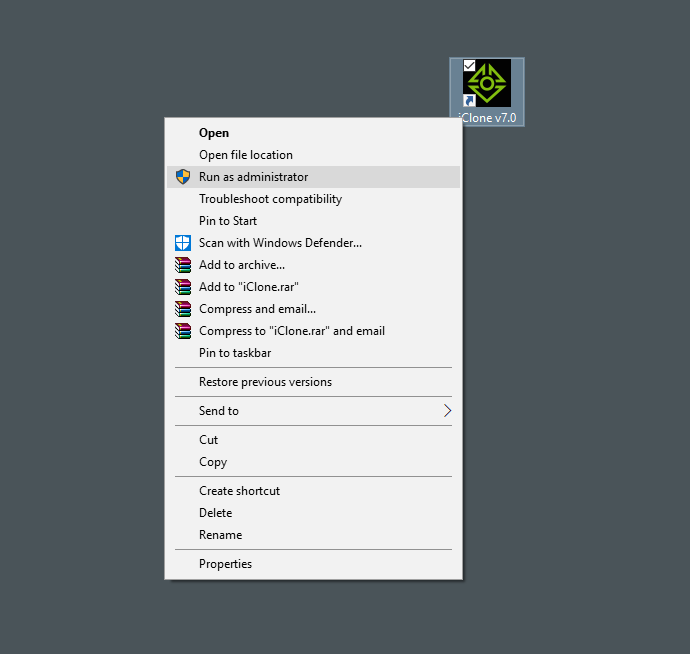
|
|
By Rampa - 8 Years Ago
|
R-click on an open space of your desktop, not on an icon. :)

|
|
By WillFl - 8 Years Ago
|
Rampa (6/26/2017)
R-click on an open space of your desktop, not on an icon. :) Hi Rampa, Peter's instruction does not refer to the desktop... This is is what he suggested ~ " Have you tried simply right clicking the iClone 7 desktop icon and choose "Run With Graphics Processor" and then select the 1070?"
|
|
By Peter (RL) - 8 Years Ago
|
WillFl (6/26/2017)Hi Peter, thanks for the response ~ this suggestion " simply right clicking the iClone 7 desktop icon and choose "Run With Graphics Processor" is not available on my machine.. I am using Win 10 ~ I have tried adjusting the Ndvidia settings but to no avail, IC7 still doesn't use the 1070 that I have assigned to it, it defaults to the 640 which has both my monitors attached to it.
When I render using Octane both in Maya and Max, I can freely choose the different gpu cards and they are correctly used, so the issue seems to be with iClone 7.
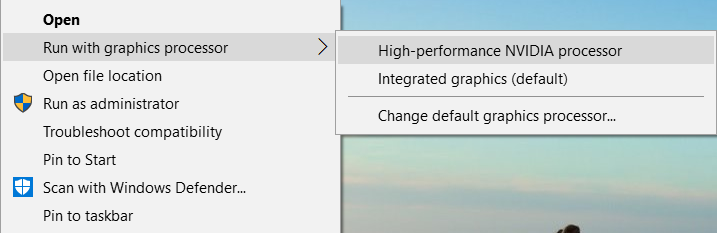
If your system is setup for graphics card switching you should see something similar to the option below. It may be that you don't have this option (especially if you are using a homebuilt system). In this case you might need to make the change in your BIOS settings to ensure the 1070 is the default graphic card. Do also check you are using the latest graphics drivers directly from Nvidia. If you are using OEM drivers then you may not have these options.
|
|
By WillFl - 8 Years Ago
|
Peter (RL) (6/26/2017)
WillFl (6/26/2017)Hi Peter, thanks for the response ~ this suggestion " simply right clicking the iClone 7 desktop icon and choose "Run With Graphics Processor" is not available on my machine.. I am using Win 10 ~ I have tried adjusting the Ndvidia settings but to no avail, IC7 still doesn't use the 1070 that I have assigned to it, it defaults to the 640 which has both my monitors attached to it.
When I render using Octane both in Maya and Max, I can freely choose the different gpu cards and they are correctly used, so the issue seems to be with iClone 7.
If your system is setup for graphics card switching you should see something similar to the option below. It may be that you don't have this option (especially if you are using a homebuilt system). In this case you might need to make the change in your BIOS settings to ensure the 1070 is the default graphic card. Do also check you are using the latest graphics drivers directly from Nvidia. If you are using OEM drivers then you may not have these options.
Thanks Peter, I think a video tutorial would be so helpful for other users who might experiencing what I am going through... like how to setup your machine so that iClone can take advantage of Multiple graphics cards.
|
|
By wildstar - 8 Years Ago
|
i have 2 workstations with 3 gpus each ( i am a octane render user )
1 gtx 1070, 2 gtx 780 ti.
just put your 1070 in your first slot ( and use it to display your desktop in your monitor) and done iclone use your 1070
|
|
By WillFl - 8 Years Ago
|
|
wildstar (6/29/2017)
i have 2 workstations with 3 gpus each ( i am a octane render user )
1 gtx 1070, 2 gtx 780 ti.
just put your 1070 in your first slot ( and use it to display your desktop in your monitor) and done iclone use your 1070
Wildstar... thanks for your response.. however as an Octane, user, which I am as well, you do appreciate the feature of being able to select which gpu card for Octane to use, without having to move the cards around or reattaching monitors to the cards... that, I think, is the way iClone should work.. have the option in the preferences for you to select which graphics card to use for realtime rendering. Currently that's not the case within IC7 ~ I think it would be a lot easier if that were made possible so users don't have to keep switching monitors onto different cards...
|