|
By mtakerkart - 9 Years Ago
|
After installing Iclone 7 , 3dxchange pre-release Character creator 2 doesn't launch. I get this error message:
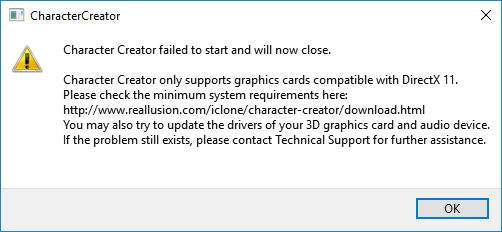
All my nvidia drivers are up to date and never had this issue with previous version.
|
|
By theschemer - 9 Years Ago
|
I am on Win 7 and I installed all the latest stuff and everything worked. I normally update my NVidia drivers when I get the update notice through GeForce Experience so I am most likely up to date on my drivers too.
|
|
By Pete_RL - 9 Years Ago
|
mtakerkart (5/24/2017)
After installing Iclone 7 , 3dxchange pre-release Character creator 2 doesn't launch. I get this error message: All my nvidia drivers are up to date and never had this issue with previous version.
The Character Creator 2 Pre-Release version doesn't interfere with your current 2.01 install of CC. Are you still able to launch the 2.01 version (non pre-release)?
|
|
By mtakerkart - 9 Years Ago
|
I uninstalled all CC version then reinstall one by one. after installing the patch 2.01, it doesn't lunch but after installing the pre-release It works now.
Very strange. :ermm:
|
|
By Rampa - 9 Years Ago
|
|
I've seen that issue from a couple other users as well. The 2.01 patch seems to throw message for a few people.
|
|
By GOETZIWOOD STUDIOS - 9 Years Ago
|
I think you made the same mistake I did.
Shouldn't we discuss this in the iClone - Early Access forum ? ^^
|
|
By SeanMac - 9 Years Ago
|
Yeah I have this and I am wondering if - as with certain games on Steam, the CC 2.01 pre-release is ONLY supporting DX11 rather than doing the obvious : supporting DX11 OR BETTER.


|
|
By animagic - 9 Years Ago
|
I have no problem with launching the CC pre-release version. I also have a card that supports DX12, but that shouldn't interfere with the application, which just uses whatever it needs: DX9, DX11, or DX12.
As instructed, I didn't uninstall the previous CC versions, but even that shouldn't make a difference.
|
|
By GrannyJ - 9 Years Ago
|
|
animagic (5/25/2017)
I have no problem with launching the CC pre-release version. I also have a card that supports DX12, but that shouldn't interfere with the application, which just uses whatever it needs: DX9, DX11, or DX12.
As instructed, I didn't uninstall the previous CC versions, but even that shouldn't make a difference.
Same as animagic, my card supports DX12 & I had no issues. I did not uninstall previous versions - just installed pre-release version in its own directory. All working fine (though it really shouldn't make a dif).
|
|
By SeanMac - 9 Years Ago
|
Hi Animagic
Thanks for that.
Ah well - back to the drawing board.
|
|
By Pete_RL - 9 Years Ago
|
SeanMac (5/25/2017)
Yeah I have this and I am wondering if - as with certain games on Steam, the CC 2.01 pre-release is ONLY supporting DX11 rather than doing the obvious : supporting DX11 OR BETTER.
Please can you tell us which graphic card you are using?
Do also make sure your graphics drivers are up to date as this problem can occur with outdated drivers.
|
|
By SeanMac - 9 Years Ago
|
Hi RL
The Graphics card is an Nvidia GeForce GTX 970.
Drivers are up to date - I do not use the specialist game drivers.
Home Built in Coolermaster ATX case with GigabyteGA-Z170X-GAMING 7 MoBo, i7-6700 @ 3.4 Ghz, Asus GeForce GTX 970 Graphics Card, 32GbDDR4 RAM, twin HD monitors, Huion H610 Pro Graphics Tablet, Kinect v2, LogitechWebcam, Win 10 64 Bit OS
|
|
By SeanMac - 9 Years Ago
|
Hi mtakerkart
I do not understand your message, could you please clarify?
You say you uninstalled all CC versions - so far so good - I understand.
You then say 'after installing patch 2.01' but did you install the patch when there were no CC versions on your system?
You then say 'it doesn't launch' But what is this 'it' that does not launch?
You say lastly 'after releasing the pre-release it works now. ' I am guessing that is the Charactor Creator (CC) 2.01 for iClone 7 pre-release version?
I don't know if you installed the patch in this version or another version.
Indeed I find my Charactor Creator (CC) 2.01 for iClone 7 pre-release version is actually labelled Character_Creator_2_for_iClone7Pre.
RL are going out of their way to confuse this issue. Again - please make it clear which versions you are talking about and what you did when. I would be grateful.
|
|
By mtakerkart - 9 Years Ago
|
@SeanMac
After removing all CC version :
-I reinstall CC 1.5
-reinstall CC2.0 wich open when starting it
-reinstall patch 2.1 but when I try to start nothing happen
-reinstall the pre-release CC and this one open when I start it.
I'm on windows 10 , Geforce 1070 , DX12 drivers ,16gig Ram.
|
|
By SeanMac - 9 Years Ago
|
Hi mtakerkart
Thanks for that.
I have finally managed to get the CC 201 pre-release up and running. There are many download possibilities and whoever runs the database has not linked all the possibilities together so as to update all when necessary. They are not synchronised.
I finally chased down the correct version and installed that. without installing the patch in the same package.
It has been one helluva week. I am exhausted.
Home Built in Coolermaster ATX case with GigabyteGA-Z170X-GAMING 7 MoBo, i7-6700 @ 3.4 Ghz, Asus GeForce GTX 970 Graphics Card, 32GbDDR4 RAM, twin HD monitors, Huion H610 Pro Graphics Tablet, Kinect v2, LogitechWebcam, Win 10 64 Bit OS
|
|
By prestonux - 9 Years Ago
|
|
I'm getting the same exact issue. I've tried uninstalling and re-installing. Any help would be appreciative, since I paid a lot for this.
|
|
By wires - 9 Years Ago
|
|
prestonux (5/29/2017)
I'm getting the same exact issue. I've tried uninstalling and re-installing. Any help would be appreciative, since I paid a lot for this.
The Pre-Release does not have an installer. You need to have CC 2.01 fully installed, unzip the Pre-Release files and run CC using the exe file in the BIN64 folder.
|