|
By Waterlane Studios - 9 Years Ago
|
Hi - My decal tabs have no options for images to be 'input'. Can anyone tell me why this is?
This is working fine in CC1.5 but not in CC2
I've just installed the latest version of CC2 and 'Essential Morphs'
Suggestions Please - I want add my own decals.
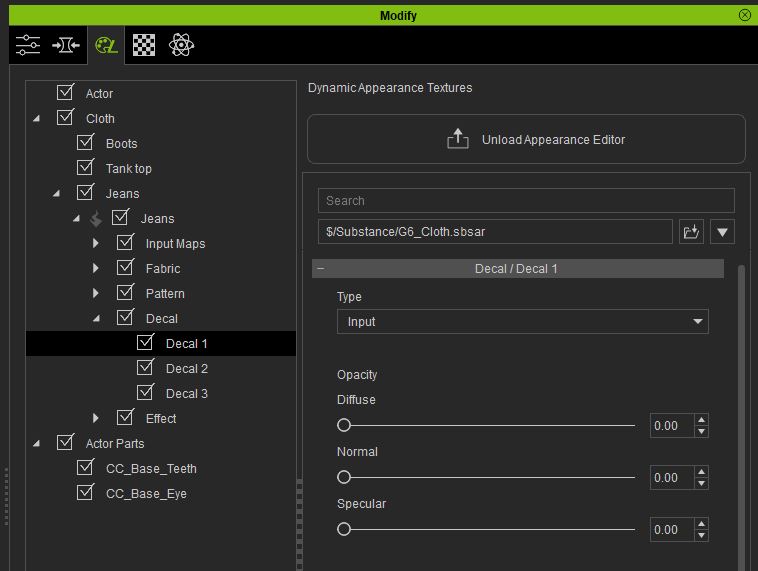
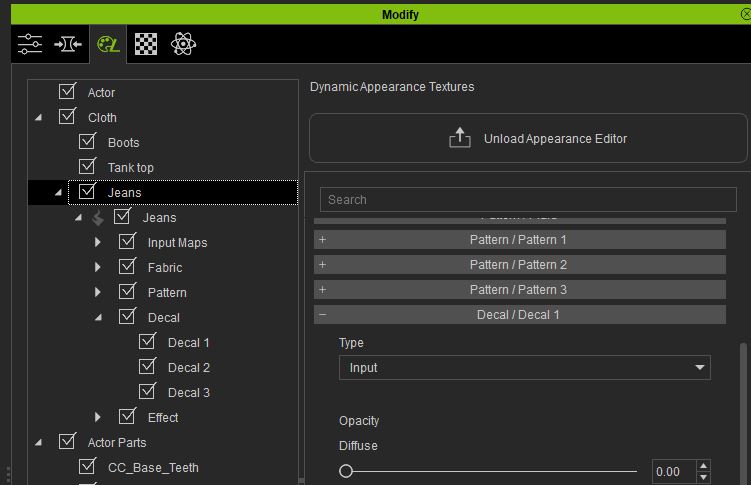
|
|
By Kelleytoons - 9 Years Ago
|
It works for me.
The input tab is below all the map tabs -- the default on the first decal for jeans is "hole1" but then you can scroll down until you hit "input" at which point the diffuse will show up just fine.
|
|
By Rampa - 9 Years Ago
|
|
Try running the "1-Click Verification" in the help menu. It looks like it is not recognizing the "Essential" pack. Do you have the "Essential" morphs available in the Modify panel?
|
|
By Waterlane Studios - 9 Years Ago
|
Thanks for your replies
If you see the pictures I've attached you can see I've already selected the 'input' option, but no map-image slots are visible...
I've tried the verification process and it seems fine - and yes, the essential morphs are showing.
:-(
I'm adding this to the feedback tracker instead - cheers anyway.
|
|
By Pete_RL - 9 Years Ago
|
If you only have CC Essentials Morphs & Skins then you will only have Input maps available for the Actor Skin.
If you need access to Input maps for clothing then you also need the CC Essential Clothing & Fabric pack.
|
|
By Waterlane Studios - 9 Years Ago
|
|
Forum Admin (RL) (5/23/2017)
If you only have CC Essentials Morphs & Skins then you will only have Input maps available for the Actor Skin.
If you need access to Input maps for clothing then you also need the CC Essential Clothing & Fabric pack.
Hi - thanks for the answer. you may be right as I don't have that pack installed...
How though could I add a decal (eg tattoo) onto a characters skin? I cannot see an "input" option under the body decal.
and, for example - If I go to the 'Misc/Body Hair' tab then I can choose 'Input' but the map option still does not show...
|
|
By Waterlane Studios - 9 Years Ago
|
|
... I cannot see any option to 'use maps' under any body 'input' option - eg Decal on the body or head.???
|
|
By Pete_RL - 9 Years Ago
|
You should see input map options for decals when you have it selected as shown below.
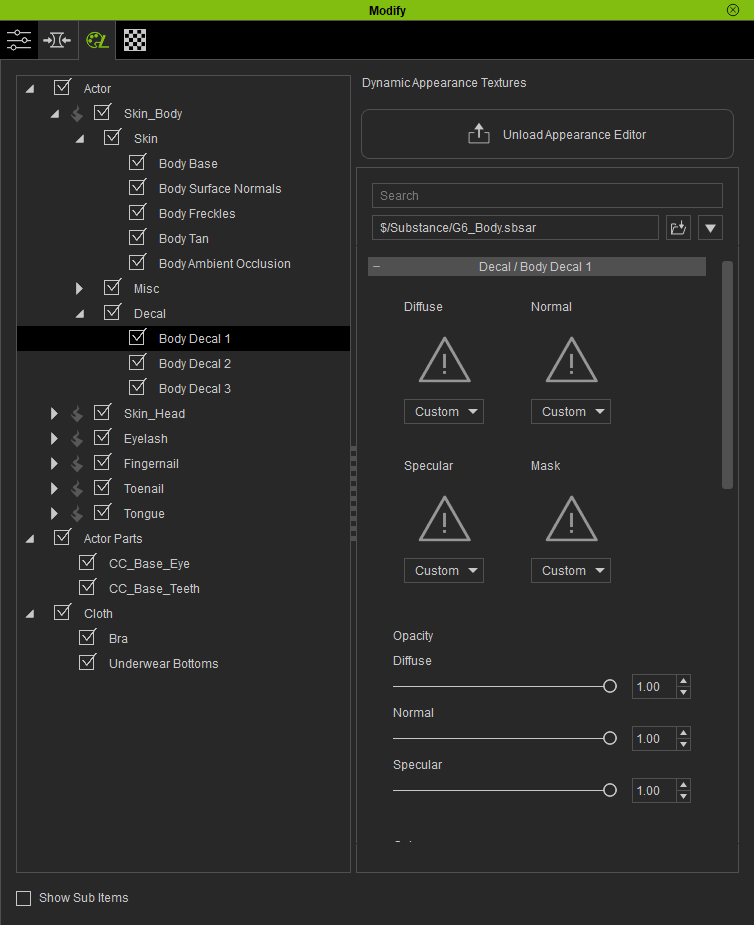
|
|
By Waterlane Studios - 9 Years Ago
|
Thanks for the screenshot - the input maps are not showing up for me though (here's my screenshot to show you...)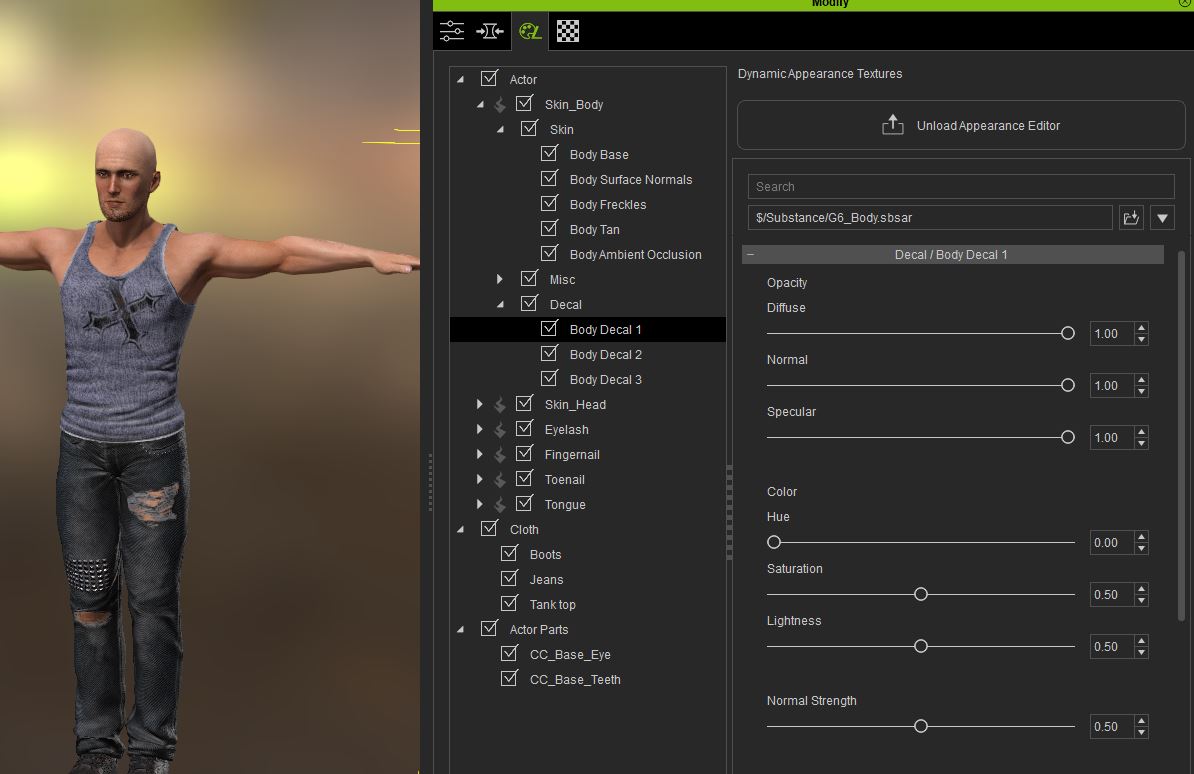
|
|
By Pete_RL - 9 Years Ago
|
I would advise reinstalling the CC Essentials Morph & Skin pack as clearly something isn't right. Once complete check the log to see if it completed successfully. It might indicate if there has been a problem during install.
|
|
By Waterlane Studios - 9 Years Ago
|
Hi - I've uninstalled CC1.5 and reinstalled 'essentials morphs' (making sure it could only install into CC2).
Decal image Maps are Still NOT showing. :-(
I can see no other problems.
'guess I can always reinstall CC and the morphs again... Is there a way to download the Essential Morphs, rather than running an install over the internet?
BTW - We're asked to use the feedback tracker, rather than the Forums - but I've had NO response on the tracker at all... :-/
|
|
By Waterlane Studios - 9 Years Ago
|
Is it possible that the 'essential' package I'm installing is only for CC1.5?(When installing though, it does state installing for CC2.01)
Should I have another install/download link for CC2?
|
|
By Waterlane Studios - 9 Years Ago
|
I have reinstalled CC1.52 + Essential Morphs and the Decal Map Images show up correctly.
However, they do Not show up with CC2.01 :-(
'I'll try uninstalling/reinstalling CC2.01 and the Essential Morphs for it...
|
|
By Rampa - 9 Years Ago
|
I have had DRM issues solved by entering my application serial number in the box on my Reallusion Account/Registration page. So try putting your CC2 serial number in there. These things are usually caused by the DRM not getting recognized properly, AFAIK.
The pack is compatible with CC2.
|
|
By Waterlane Studios - 9 Years Ago
|
|
Thanks for the message - I'm not sure where you mean I should enter the serial number though? - everything seems to be registered correctly...
|
|
By Waterlane Studios - 9 Years Ago
|
OK - I've uninstalled CC2.01
Then I've reinstalled CC2.01 and installed the essential morphs package (for CC2.01) - the body Decal Map Image slots still are missing.
:-(
|
|
By Rampa - 9 Years Ago
|
|
Waterlane Studios (5/30/2017)
Thanks for the message - I'm not sure where you mean I should enter the serial number though? - everything seems to be registered correctly...
Login to your Reallusion Account and try this:

|
|
By Waterlane Studios - 9 Years Ago
|
Ah - Thanks Rampa ('appreciate your time replying) - Unfortunately I did try that and it hasn't helped. :-/
Dave
|
|
By Miranda (RL) - 9 Years Ago
|
|
Waterlane Studios (5/30/2017)
BTW - We're asked to use the feedback tracker, rather than the Forums - but I've had NO response on the tracker at all... :-/
Hi Dave,
If you have bad experience in reporting in Feedback Tracker, this is what we (Reallusion) should improve.
FT is for general bug reporting, while for the personal cases, I would suggest you contacting our Support Team directly. They will handle it case by case efficiently.
https://reallusion.com/CustomerSupport/UserEx/QForm.aspx
Miranda
|
|
By Waterlane Studios - 9 Years Ago
|
Miranda (RL) (6/3/2017)
Waterlane Studios (5/30/2017)
BTW - We're asked to use the feedback tracker, rather than the Forums - but I've had NO response on the tracker at all... :-/
Hi Dave, If you have bad experience in reporting in Feedback Tracker, this is what we (Reallusion) should improve. FT is for general bug reporting, while for the personal cases, I would suggest you contacting our Support Team directly. They will handle it case by case efficientl https://reallusion.com/CustomerSupport/UserEx/QForm.aspxMiranda
Hi Miranda - I've also sent a Support ticket - still waiting upon a solution/explanation.
Thanks for your reply,
Dave
|
|
By Rampa - 9 Years Ago
|
Dave,
Do you only have "Essential Morphs" installed, and not "Essential Fabric"?
The former will get you inputs for skin decals, and the latter will get you inputs for clothing decals.
|
|
By Waterlane Studios - 9 Years Ago
|
Hi Rampa - I've replied in the support ticket.
|
|
By wires - 9 Years Ago
|
|
Waterlane Studios (6/4/2017)
Hi Rampa - I've replied in the support ticket.
Don't leave us all hanging in suspense. :w00t::ermm::blink::unsure:
Have you been able to solve the problem?
|
|
By Waterlane Studios - 9 Years Ago
|
Hi Gerry - Sorry, I wasn't thinking other people would be following... but obviously that's likely.
Unfortunately the issue is still being resolved... :-/
If/When it gets sorted I'll make sure to post about it.
Dave
|
|
By Rampa - 9 Years Ago
|
wires (6/5/2017)
Waterlane Studios (6/4/2017)
Hi Rampa - I've replied in the support ticket.
Don't leave us all hanging in suspense. :w00t::ermm::blink::unsure:
Have you been able to solve the problem?
Are you having this issue as well Gerry?
So far, Only Dave has mentioned this happening with CC2. I completely uninstalled and reinstalled to see if I could make it happen. But all worked as it should. I'll try again and make sure not to copy my CC1 packs during install.
|
|
By Waterlane Studios - 9 Years Ago
|
|
... still waiting upon this issue :-/
|
|
By Waterlane Studios - 9 Years Ago
|
I wanted to let Reallusion know that I've updated CC to 2.2.2314 and the problem still persists.
The support guy Rampa, was very helpful, but after 7 months I've still not been able to use the product which I paid for in advance of it being released. :-(
(and with the New Curve Editor in IClone, I'd really like to create characters for it).
I was going to revise the feedback tracker instead, but it seems comments can no longer be added to it.
It was suggested that maybe my machine is to fault, which could be the case. However, I've no other issues with any other software (including a range of 3D programmes).
Could this issue be taken up with Reallusion in any other way I wonder?
That's it - Merry Christmas and I'll keep an eye open for future updates.
Dave
|
|
By animagic - 9 Years Ago
|
Rampa is a user, albeit a very helpful one, not a "support guy". There seems to be a confusion lately that responses on this forum are from RL Support; they are not.
As others have been able to add decals, so it's not exactly clear what your issue is. There was a documented problem with decals that many of us encountered but that was resolved.
If it is an individual problem then it may be better to try RL Support (https://www.reallusion.com/CustomerSupport/UserEx/QForm.aspx).
|
|
By animagic - 9 Years Ago
|
|
There is a recent thread about the placement of tattoos that may help some: https://forum.reallusion.com/350146/Placement-of-Tattoo.
|
|
By Rogue Anime - 9 Years Ago
|

And to think I had to figure it out the HARD way!! lol (my profile pic is a good example) Thanks, Animagic ~V~
|
|
By Waterlane Studios - 9 Years Ago
|
Thanks Animagic and Rogue Anime - a few quick replies for you both.
1. Support ticket - Yes TY, I actually opened one of these for this back on the 30th May.
2. Rampa was the person I talked with in the Support ticket (116570). He signed himself as "Best Regards-Rampa-Technical Support-Reallusion Inc". Hence me calling him a "support guy".
3. The issue I had was well documented with numerous files and screenshots being transferred [10 support ticket pages].
4. My post this time wasn't to re-open the issue or re-explain, but just to let anyone who was reading this thread, know the recent patch to CC did not resolve the issue.
5. The issue was left before with it possibly being my machine missing some DLL. I had hoped to get a new machine and the problem would be redundant. Unfortunately I'm still using the same PC at the moment.
6. There have been plenty of 'trying to sort' things on my part - The forum was only a part of that.
Cheers
|
|
By Waterlane Studios - 9 Years Ago
|
(... I guess I did ask if anyone at Reallusion could help - but that was really a general question as I feel we exhausted most options from my end via the support ticket.)
FYI - Rampa has recently suggested a new setup I could test.
|
|
By animagic - 9 Years Ago
|
|
Waterlane Studios (12/20/2017)
2. Rampa was the person I talked with in the Support ticket (116570). He signed himself as "Best Regards-Rampa-Technical Support-Reallusion Inc". Hence me calling him a "support guy".
Sorry, I wasn't aware of his new role... Congratulations? :unsure:
|
|
By animagic - 9 Years Ago
|
Also, I don't believe anyone doubts you have this problem, but if it is something that cannot be repeated (by RL or other users), it is just very difficult to come up with a solution.
For example, I have a project file that no longer opens, but it opens fine for others. So it's an incidental problem and those are hard to resolve.
|
|
By Rogue Anime - 9 Years Ago
|
|
I sure hope your problem can be fixed - stuff like DLL file problems - registry problems, make my brain bleed! ~V~
|
|
By animagic - 9 Years Ago
|
@Val, You're welcome! Your profile picture looks very nice...:cool:
It's sometimes hard to keep track of all information and tips. Several years ago someone started an iClone Wiki, but it died.
BTW, I have trouble accessing your website. I get an error message:
Parse error: syntax error, unexpected T_OBJECT_OPERATOR in /home/content/93/4907393/html/RogueAnime/wp-content/plugins/wp-statistics/wp-statistics.php on line 16
|
|
By Waterlane Studios - 9 Years Ago
|
Cheers guys - I'll post here if I find a solution. :-)
(... and I agree, that when the issue seems to only be happening on my machine, it's difficult for others to find a fix. Which is why I've waited as patiently as I can until I get a new machine)
|
|
By Rogue Anime - 9 Years Ago
|
|
Thanks a bunch for the kind words - Yeah- my sites all got hacked - hopefully will be back up today! ~V~
|
|
By Waterlane Studios - 9 Years Ago
|
Hurrah!
It's taken loads of effort and many months, but this issue has now been fixed!
A combination of uptodate patches and reinstalling Character Creator and packs I've bought, have got the decals working.
Many thanks to Rampa for his continued efforts. All appreciated.
Dave :-)
|