Using CrazyTalk Animator With Photos


https://forum.reallusion.com/Topic324605.aspx
Print Topic | Close Window

By phil_78 - 9 Years Ago
Hi all,

I'm interested in learning more about how CrazyTalk Animator can manipulate photos.  I'm hoping to find examples, portfolios etc that focus on using CrazyTalk Animator for  photo manipulation.  For this thread, let's set aside the illustrated cartoon characters, and talk about photograph animation.  Thanks much!
By hj - 9 Years Ago
I'm interested in learning more about how CrazyTalk Animator can manipulate photos.


What do you mean ??????

You can manipulate every Photo with bones. By this you can use also the morph options.

https://orig12.deviantart.net/655b/f/2017/039/3/2/quada_game_by_marandor-daybytr.gif

https://forum.reallusion.com/uploads/images/a652c875-93b7-4b0d-bc89-bc13.jpg

https://forum.reallusion.com/uploads/images/fa59a0ec-1a01-439b-8d05-f4bf.gif


What do you want ??

best
hj
By phil_78 - 9 Years Ago
Hi, I'm hoping to see photographs that have been manipulated by CT Animator, the more the merrier.   Photos, not cartoon character illustrations. 

Thank you.


By hj - 9 Years Ago
Hi
Post a Photo, which you want to manipulete with CTA and write, what your will get.

Best
Hj
By hj - 9 Years Ago
😢😢
By Bjourne - 9 Years Ago
Hello, 

If I may I am interested in this topic :) New user here. Since the OP has not posted a photo for manipulation I will myself. How can you do some manipulations while not affecting the background? I ask because I tried with a mugshot of a head and when I calibrated it in Face Fitting Editor the background moved with the face. 


http://www.bild.me/bild.php?file=6501881269.jpg

Can you teach me to manipulate the hands and face so both in the images will appear moving without the background affected?

Best regards,

Bjourne

@hj,

love your work! Great!
By Edward (RL) - 9 Years Ago
Hi Bjourne,
Although CT Animator providing the masking tool, but I suggest you separate the image into 3 layers by using an image editor like Photoshop. 
And then bring into CT Animator. 
See the image below.
If you use pipeline version you can import .psd (the Photoshop file) directly.
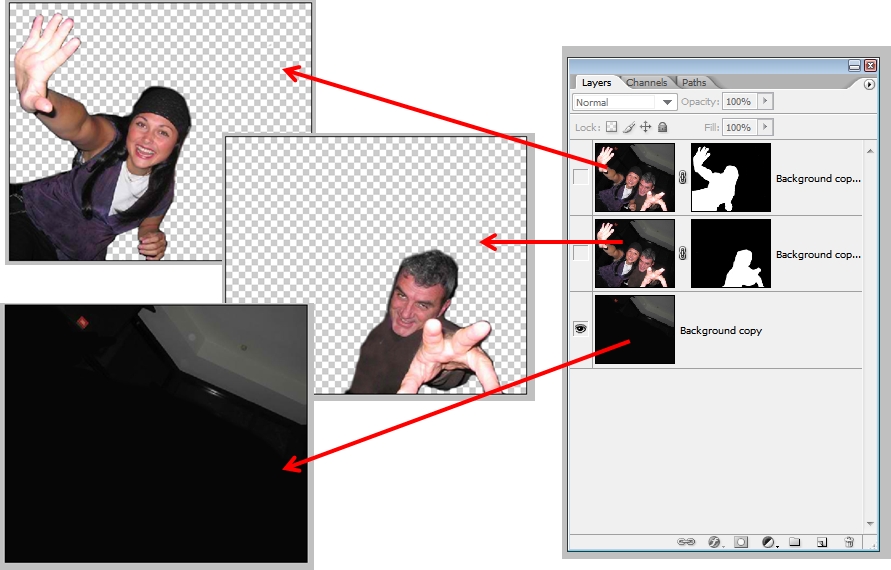
https://forum.reallusion.com/uploads/images/4642099f-d793-4127-8714-e7c9.jpg

By phil_78 - 9 Years Ago
Hi again,
I haven't posted a photo myself because my goal for now is not to learn how to manipulate photos.  Instead, my goal is to learn the degree to which CTA users are using CTA to manipulate photos.  That is, what is the judgment of the community?  Is CTA a tool they turn to for manipulating photos?

Given that I can't find portfolios of CTA photos anywhere, and neither this thread or support has been able to link to any, it seems the best theory for now is that CTA is primarily a tool for manipulating illustrated characters.  I can already see without even using the demo that CTA appears to be great for that.

If the forum mods find it appropriate, I would welcome any discussion of any Mac apps which can animate PHOTOS.  I know one, but won't mention the name unless the forum mods green light such discussion.

By Snarp Farkle - 9 Years Ago
I can't test this right now for you but will when I get some time.  I haven't used CT8 with photo's yet except to bring in some of my CT6 Characters, not even sure if it can be done yet but I'll look into it soon.
By Bjourne - 9 Years Ago
Scarecrow.H (5/3/2017)
Hi Bjourne,
Although CT Animator providing the masking tool, but I suggest you separate the image into 3 layers by using an image editor like Photoshop. 
And then bring into CT Animator. 
See the image below.
If you use pipeline version you can import .psd (the Photoshop file) directly.
https://forum.reallusion.com/uploads/images/4642099f-d793-4127-8714-e7c9.jpg


Hi,

Thanks for that!
Let me try it and I'll be back here again :)