Weight Map Daz Cloth question


https://forum.reallusion.com/Topic324353.aspx
Print Topic | Close Window

By pruiz - 9 Years Ago
New so not sure if this is the right place to ask this question. I have 6.3 iclone with successfully imported FBX conforming (in Daz Studio) long dress - trying to make and set UV's - there are 3 of them for bodice (for each section of conforming - hips- legs etc) but only one item for weight map i.e. Skirt. Do I have to combine all 3 UV images for the skirt? Any help - tutorial etc. would be appreciated. Also, I get an error message - exceeded 20K limit on weight map. Do I reduce pixels in the image? Any help or direction appreciated.
By TonyDPrime - 9 Years Ago
I will bump this as I am looking to export long dress outfits and legs pop through despite being skinned to model upon FBX export, and trialing weight map variations & body collision variations in iClone soft cloth physics editor.
I have seen videos where people use the Transfer utility in Daz to rig the outfit itself with the character.  I tried doing that for the entire character, and it works for the dress, but then the character has no facial/viseme compatibility with the Genesis Facekey.  So you can get a character exported with a working dress but then no more face viseme stuff.

I am next going to try just to export out a rigged dress, as opposed to the entire character, and see if this works better, but I am thinking it probably won't work. 
By animagic - 9 Years Ago
I'm far from the export here, but are you saying that applying the DUF file to include the morphs for the visemes doesn't work/has no effect?
By Skuzzlebutt - 9 Years Ago
add the rule
head.
exactly, with period on end and set it to ignore.
you dont need transfer utility unless it's a different generation

set your options like this, and profit! all cloth and visemes will work in iclone.
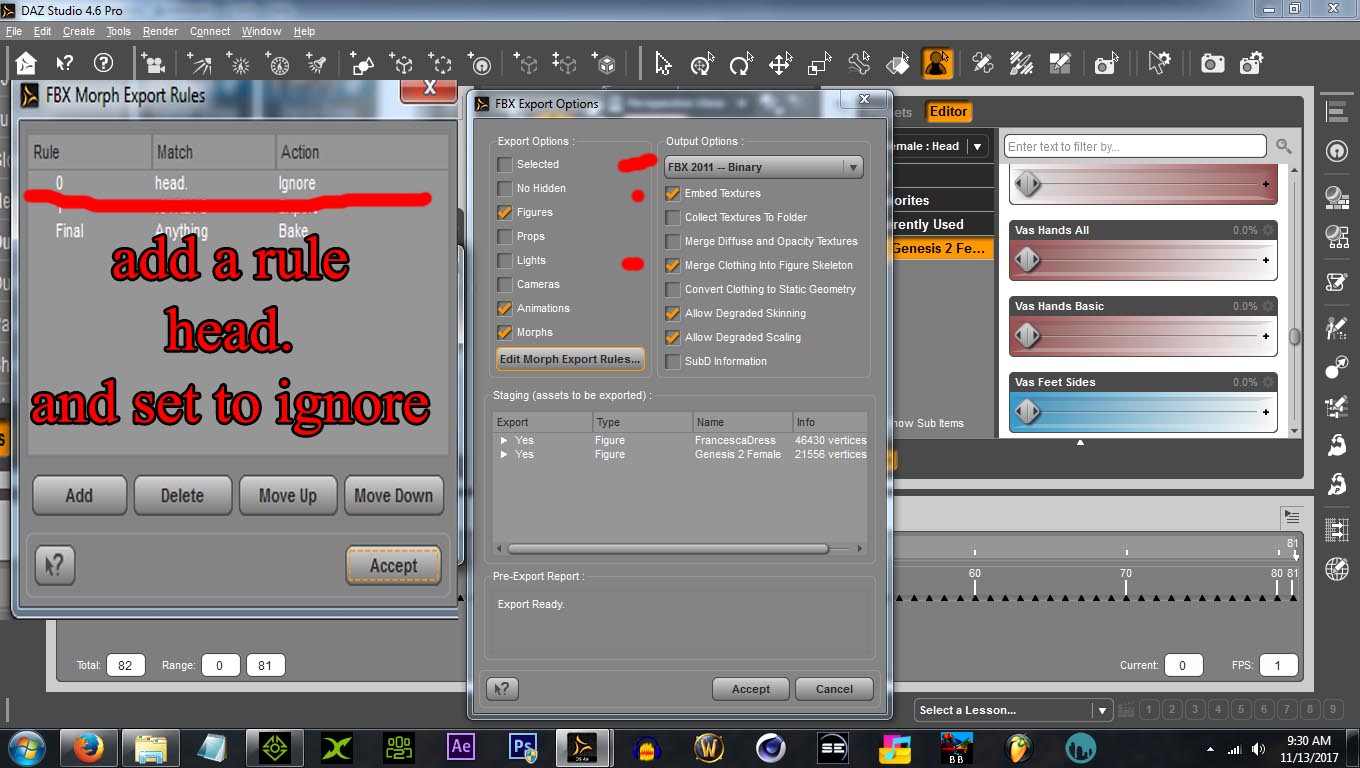
https://forum.reallusion.com/uploads/images/79886000-f26c-4c29-b3dc-6116.jpg


as for weight maps you have to understand the UV and build one that suits it in photoshop etc.


By TonyDPrime - 9 Years Ago
Magneto (11/13/2017)
add the rule
head.
exactly, with period on end and set it to ignore.
you dont need transfer utility unless it's a different generation

set your options like this, and profit! all cloth and visemes will work in iclone.
https://forum.reallusion.com/uploads/images/79886000-f26c-4c29-b3dc-6116.jpg


as for weight maps you have to understand the UV and build one that suits it in photoshop etc.


Magneto, I really want to thank you for taking the time to point out some things to better this. 
It was in my case the UV map.  I had a straight gradient going over a 3 piece dress mesh UV, with an uneven layout.  Once I was able to properly weight-map the layout for each individual piece, it works!
THX!!!!

Here was my try, not perfect, but just knowing how is great!