|
By mcass - 8 Years Ago
|
Could someone please help. How do I create a new folder in content manager for my own props? Thanks
Chrisgreenfingers
|
|
By wires - 8 Years Ago
|
If you are using iClone then open the "Custom" tab in Props, right click and select New Folder from the menu.
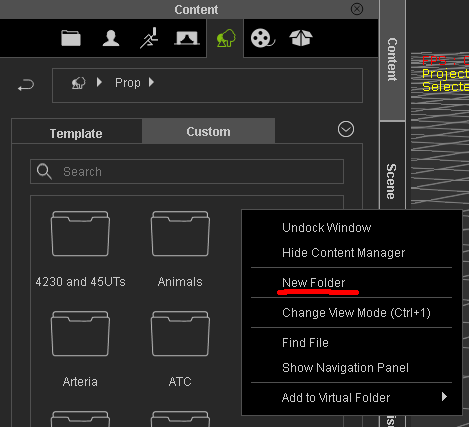
This works for the Custom folders for any category in the Content Manager.
|
|
By mcass - 8 Years Ago
|
|
Sorry I forgot to mention I am using Crazytalk 2 and the Drop down box ( right Click) New Folder is grayed out. Thanks
|
|
By Snarp Farkle - 8 Years Ago
|
In CTA2 the only place you can create a new folder from within the program when nothing is loaded into the scene is in the "Custom Project" area, to create new folders in props or any others you'll have load something into the scene like a prop then you can create a custom folder in the custom props area, same goes for any other areas.
|
|
By mcass - 8 Years Ago
|
|
Many Thanks for your prompt reply. Greatly appreciated. I can now organise my own character/props into appropriate folders. Cheers
|
|
By Snarp Farkle - 8 Years Ago
|
Glad to help, I learn something new each time. :)
|