|
By stevew - 8 Years Ago
|
Ver 3.03.1230.1
Just tried to export but no looping. Same if I select the number of loops.
The animated gif runs only once in safari or Chrome
PS tried to upload the gif but get error saying:
Sorry you have already exceeded your available space or this upload would cause you to exceed your available space.
Cheers
Steve Warby
|
|
By garylearntech - 8 Years Ago
|
I tried this out of curiosity - and got the same result, namely a single loop. Looks like it might be a bug.
If animated GIF's are especially important to you, I can suggest a couple of ways that you might try to work around this problem, both using the now free GIF Brewery by Gfycat. (Other similar apps would probably work just as well.)
I imported a CTA3 GIF into GIF Brewery. Matched the frame rate to the one set when I exported it from CTA3. Then I Created (ie saved) a new GIF file. This process worked when I tested it by simply dragging it onto an empty Safari browser window.
That other approach that would probably work would be to export as a MOV video file from CTA3, import that video into GIF Brewery and convert to a new GIF from there. I didn't actually try that, but converting videos into GIFs (rather than fixing existing GIFs) is what GIF Brewery is all about, so I reckon it should work.
|
|
By NoKat - 8 Years Ago
|
|
It would be nice to be able to export a once or loop for animated gifs. I export images and then import to photoshop. Easier to control the size of the file.
|
|
By Peter (RL) - 8 Years Ago
|
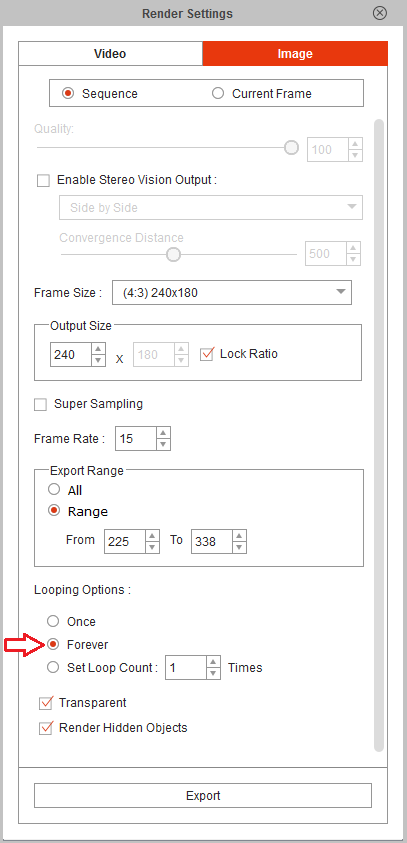
Looping works fine for me in CTA 3.03. Do make sure you are setting looping to forever (see attachment).
|
|
By stevew - 8 Years Ago
|
I have installed Animator on another Mac and opened the original file and exported as Gif loop forever and it is working.
Something wrong somewhere.
Cheers
Steve Warby
|