|
By Lord Ashes - 9 Years Ago
|
A while back I found a link to a Blender tutorial (somewhere on the forum) for creating Custom Cloth. The general gist was to take the custom clothing mesh, parent it to the iClone figure armature, transfer weights from CC Body to the custom cloth, export as FBX and import into Character Creator.
I followed this tutorial and managed to create some custom cloth bases. However, I ran into a problem when creating skirts and/or dresses because the transfer of the weight mapping from the CC Body would cause the bottom portion of the cloth to act like pants instead of a skirt/dress. I inquired about this on the forum and my conclusion was confirmed: I needed to modify the weight maps for the shirt/dress portion to correct the behavior.
I studied how to do this in Blender and discovered that it wasn't too hard. At least the process of editing the weight maps was not difficult but painting it would be more difficult.
As I understand it, weight maps just indicate how much areas of the mesh (cloth) bends/stretches to follow bending of the armature bones. An area of 0% (for any given bone) means the mesh remains static when the bone is bent. An area of 100% (for any given bone) means that area of the mesh fully follows the bending of that bone. However, all of this is relative to the bending of bones of the parent armature and in no way connected to a physical point in space. Thus if the armature position is changed, it has not effect on the mesh - only bending of the armature bones causes mesh bending/stretching according to the weight paint.
As a starting point, I wanted to take the default CC Dress and change the weight maps so that the skirt portion would have 0% weight mapping. I realize this would not be correct mapping for a dress but I just wanted to try that as a starting point. As I understood weight mapping, this should have created a static skirt which would not be affected by bending bones (e.g. character walking). I imagined this would probably generate legs that go right through the cloth since they would have no effect of the skirt portion of the dress.
What I got instead was very unexpected...When I placed the dress on a character in iClone and had the character walk, parts of the dress seemed to stick to the character/dress's initial location while the rest of the dress moved with the character. See below video. As far as I understand, no matter what kind of a weight map is applied, it should never cause such a "sticky situation". In the video I have hidden the character mesh so that the dress itself is more visible.
Can anyone suggest what is going on here and why I am not getting the result I expected?
On a related note, I recall that when weight painting the cloth in Blender, I had to create Empty Weight Groups and then transfer the Weight Maps from CC Body to the cloth. I recall Blender's Automatic Weight Map option did not work (i.e. created an FBX file that could not be imported into CC). Is there any way to get around this? (i.e. be able to use the Blender Automatic Weight Mapping as a starting point)
|
|
By Delerna - 9 Years Ago
|
As a starting point, I wanted to take the default CC Dress and change the weight maps so that the skirt portion would have 0% weight mapping. I realize this would not be correct mapping for a dress but I just wanted to try that as a starting point. As I understood weight mapping, this should have created a static skirt which would not be affected by bending bones (e.g. character walking). I imagined this would probably generate legs that go right through the cloth since they would have no effect of the skirt portion of the dress.
.................
What I got instead was very unexpected...
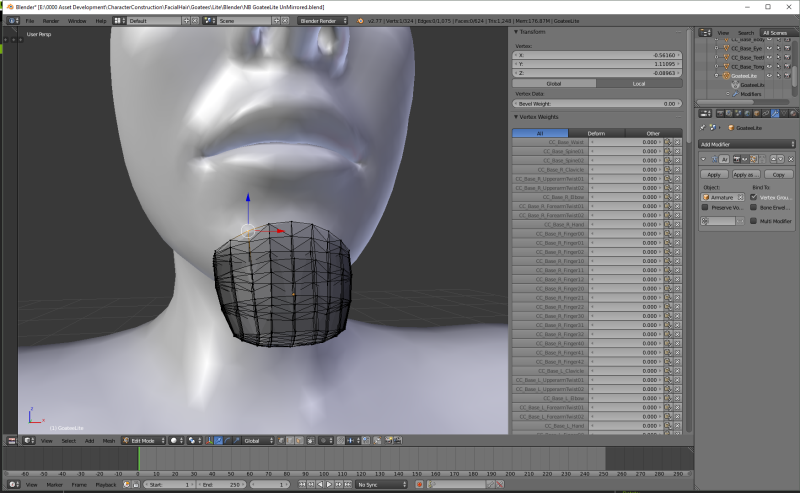
Yes, that is one of the many experiments I have tried. And what you expected is what happened. The legs just go straight through the cloth without affecting the skirt at all. However, I did not get the effect you are getting. The clothing moved along with the character fine. Just the legs didn't even know the skirt was there at all. without having that to check I cant say what the problem is but I would try and determine which vertices are doing that and then go back to blender and check the bone rigging values on those vertices and compare them with the vertices that aren't doing that. That might give you a hint to what is causing it.
Here is an image illustrating where to check the rigging values on any vertice
The general gist was to take the custom clothing mesh, parent it to the iClone figure armature, transfer weights from CC Body to the custom cloth, export as FBX and import into Character Creator.
That sounds like how I do the clothes I have in my store
I followed this tutorial and managed to create some custom cloth bases. However, I ran into a problem when creating skirts and/or dresses because the transfer of the weight mapping from the CC Body would cause the bottom portion of the cloth to act like pants instead of a skirt/dress. I inquired about this on the forum and my conclusion was confirmed: I needed to modify the weight maps for the shirt/dress portion to correct the behavior.
How to make the skirt act more like a skirt?
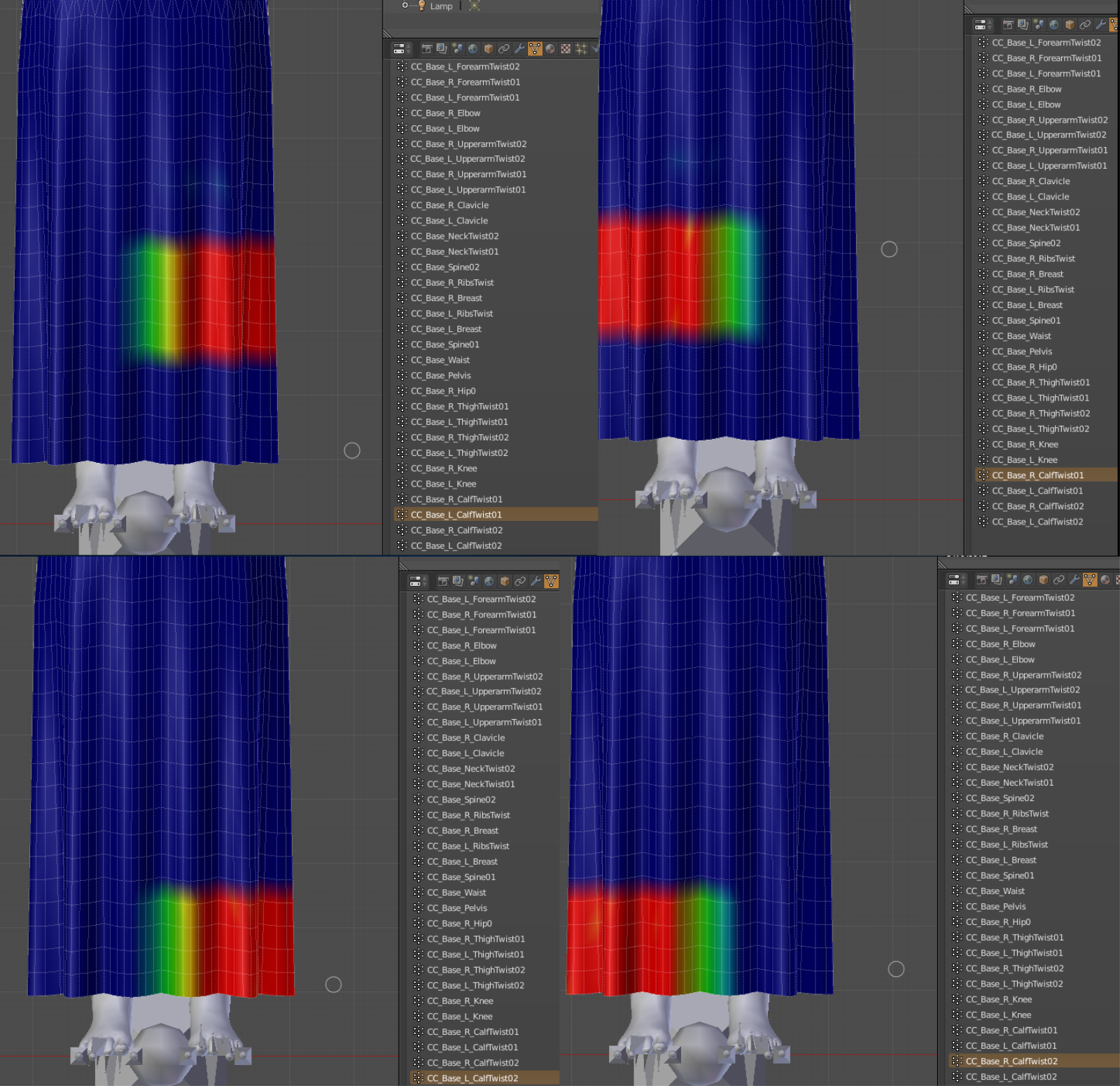
After transferring the skin rigging to the clothing mesh I do some manual rigging on the skirts vertices between the legs.
Here Is one method I have tried
I will keep this explanation simple by describing what I do with just one of the legs twist bones..... to make it easier to read.
I select the left leg and then make the center column between the legs at the front and back of the skirt .5
The next column of vertices towards the right leg I make .4
The next column of vertices towards the right leg I make .3
The next column of vertices towards the right leg I make .2
The next column of vertices towards the right leg I make .1
From the center column again
The next column towards the left leg I make .6
The next column towards the left leg I make .7
The next column towards the left leg I make .8
The next column towards the left leg I make .9
Then I repeat that on the right leg. That way, all the vertices I have changed add up to 1 and during animation in iclone both legs move the vertices between the legs so they flow like a skirt instead of like pants.
A picture is worth 1000 words so here are 4 images put together to illustrate what I am saying
and a video of how it looks
|
|
By Lord Ashes - 9 Years Ago
|
Thanks. To figure out what the skirt weight maps should look like (before you provided your thoughtful info), I cheated. I exported a skirt in DAZ Studio and looked what its weight maps looked like...so I know what I need to achieve.
I just don't understand how any weight painting could be causing part of the mesh to "stick". I mean even if the whole mesh was 0% (blue) then it should just be a static mesh. However, when I do the same with the exact same mesh except that I don't modify the weight painting, it works as expected (i.e. acts like pants but does not "stick").
|
|
By Lord Ashes - 9 Years Ago
|
|
Delerna (2/16/2017)
And a video of how it looks
Is your Multigown available in the Marketplace? If you are NOT selling it, would you mind making the FBX available for reference? I actually wanted to do this with the CC Dress but I only have 3DXChange Pro (not Pipeline) and thus I can't export FBX files (to preserve the weight maps).
|
|
By animagic - 9 Years Ago
|
Lord Ashes (2/16/2017)
Delerna (2/16/2017)
And a video of how it looks
Is your Multigown available in the Marketplace? If you are NOT selling it, would you mind making the FBX available for reference? I actually wanted to do this with the CC Dress but I only have 3DXChange Pro (not Pipeline) and thus I can't export FBX files (to preserve the weight maps).
Helping out with some marketing: http://city.reallusion.com/ContentPreview.aspx?i=JCC989bf8cb55ccf3fe1&g=.
|
|
By vidi - 9 Years Ago
|
|
I mean even if the whole mesh was 0% (blue) then it should just be a static mesh.
Are you sure it is blue for every bone ?
every bone has its own WM . You need to check all bones vertex influence
|
|
By Lord Ashes - 9 Years Ago
|
vidi (2/16/2017)
I mean even if the whole mesh was 0% (blue) then it should just be a static mesh. Are you sure it is blue for every bone ?every bone has its own WM . You need to check all bones vertex influence
Thanks for the clarification but I am aware of that. I went through all the bones and made sure that none of them caused any weighting on the skirt portion.
I think something else is going on because even if they did have weighting then they should respond to the bones bending but not "stick" (i.e. the cloth would bend/stretch with respect to the bones but not the character's initial position).
|
|
By Lord Ashes - 9 Years Ago
|
I tried again this time I just modified a few of the bones and that seem to work correctly...I did not get the "stick".
It almost seems that if you set too much of the bones to 0% weight (or maybe some bones to 0% weight) then the problem appears.
|
|
By Lord Ashes - 9 Years Ago
|
|
Delerna (2/16/2017)
A picture is worth 1000 words so here are 4 images put together to illustrate what I am saying
I tried your suggested weight map. I doubted them a bit because the body weight maps had the weight map gradient going vertically as well. But for the most part the suggested weight maps worked.
I definitely did not get the "stick" effect and walking and dancing seem to be okay...need a bit of a fix one one but otherwise OK.
However, I don't seem to be getting the nice bendable flow that you get in the gown. My dress bends to accommodate the bones but it is fairly rigid. Are you using weight painting for the bones AND physics weight maps? I tried to provide a simple Physics weight map (black on top, white on bottom) and this caused the hip area of the dress to go "inside" the body. I'm guessing I need a gradient from black to white instead of a rigid step.
|
|
By Delerna - 9 Years Ago
|
Yes absolutely
If you want the cloth to flow realistically then physics weight mapping is a must have. And yes grey scale from the top to the bottom.
what I mean by "The top" can vary.
For my multigown the top was at the waist, if memory serves me correctly.
For my multismock the top was on the breasts. so gradient mapped from top to bottom black to white or black to light grey depending on how you want it to flow.
Just a note on my discoveries.
I find that getting cloth flow to work properly is the most complicated, difficult, time consuming, frustrating and infuriating part of creating clothes.
However, when I finally get it working I also find it the most satisfying ego bumping achievement LOL
It definitely needs a good combination between your bone rigging in blender and the physics weight mapping in iClone that depends a lot on the type of clothing you are making.
I often just do a very basic meshing of a clothing and then try different ways of rigging and weight mapping just to see what effects it has and hopefully improve my capabilities.
When making actual clothes I now keep the meshing as simple as possible and get the cloth flowing right.
Once the cloth flow is right I then start adding mesh details I need.
I used to totally make the mesh first and then get the cloth flow but found that difficult to get cloth flowing right because of how I constructed the mesh.
Not saying the way I do it now is the best way but its the way I find easiest, at least for now. Who knows, I will probably make more discoveries and change my workflow again.
But I recommend, start simple and gradually work towards more complicated clothing. What you figure out with the simple stuff will assist you when you start making more complicated clothes. That's what I find anyway
|
|
By Snarp Farkle - 9 Years Ago
|
I think the video you were looking for is from this set of threads [HERE]
|
|
By Lord Ashes - 9 Years Ago
|
Snarp Farkle (2/17/2017)
I think the video you were looking for is from this set of threads [ HERE]
Thanks for finding it...That is the tutorial that I started with. It would be nice if they expanded it with the stuff that Delerna posted regarding weight paints because it is very informative but seems to be counter to the weight maps that you get when you do a body transfer. For example, the weight maps for the leg bones show up as vertical gradients on the skirt/pants portion of the mesh when you transfer the weights from the body but the weight maps (with no vertical gradient) indicated by Delerna seem to work much better for skirts/dresses.
|
|
By Lord Ashes - 9 Years Ago
|
|
Delerna (2/17/2017)
Yes absolutely
If you want the cloth to flow realistically then physics weight mapping is a must have. And yes grey scale from the top to the bottom.
Thanks for all the information. With your info, I am slowing getting there. Still needs some tweaks but I am much further along than I was before I posted.
(BTW, I completely understand what you mean by the fact that the "top" varies depending on the clothing)
|
|
By Delerna - 9 Years Ago
|
Sticking with the phrasing your using here is how I understand this
The horizontal weight mapping I described helps to smooth the cloth flow on the vertices between the left and right legs because each of those vertices are affected by both legs.
The closer the vertice is to the leg the more it is effected by that leg. The further the vertice is away from the leg the less it is effected. that's why it is smoothed.
The vertices in the middle, the ones set to .5 are affected by both legs equally. and then as you goto vertices towards a leg. those vertices get effected slightly more by one leg and slightly less by the other.
So now they are all effected smoothly a.
I realise that explanation is probably obvious to you but I am saying it because the vertical rig gradient your talking about does the same thing between each bone on that leg.
So, for example, If you need the cloth to flow smoothly between the calf knee and upper leg bones then you would need to do a similar thing like I have vertically for each of those bones more smoothly.
Sometimes I do that and that is why I said the way you rig and weight map depends on the clothing you are making. For a dress I find doing the vertical gradient to be unnecessary because the physics weight mapping smooths it out enough.
However, if you did do vertical gradients between the bones as well then I think the cloth flow would possibly work a bit better. But I don't think it makes much difference visibly on a dress.
I have studied reallusions method of rigging a dress. It seems that they do it so the rigging gradients are circular around each bone.
Here is a couple of images I took to help me with learning the best way to rig clothes


|
|
By Pitapan - 9 Years Ago
|
Delerna (2/17/2017)
Sticking with the phrasing your using here is how I understand this The horizontal weight mapping I described helps to smooth the cloth flow on the vertices between the left and right legs because each of those vertices are affected by both legs. The closer the vertice is to the leg the more it is effected by that leg. The further the vertice is away from the leg the less it is effected. that's why it is smoothed. The vertices in the middle, the ones set to .5 are affected by both legs equally. and then as you goto vertices towards a leg. those vertices get effected slightly more by one leg and slightly less by the other. So now they are all effected smoothly a. I realise that explanation is probably obvious to you but I am saying it because the vertical rig gradient your talking about does the same thing between each bone on that leg. So, for example, If you need the cloth to flow smoothly between the calf knee and upper leg bones then you would need to do a similar thing like I have vertically for each of those bones more smoothly. Sometimes I do that and that is why I said the way you rig and weight map depends on the clothing you are making. For a dress I find doing the vertical gradient to be unnecessary because the physics weight mapping smooths it out enough. However, if you did do vertical gradients between the bones as well then I think the cloth flow would possibly work a bit better. But I don't think it makes much difference visibly on a dress. I have studied reallusions method of rigging a dress. It seems that they do it so the rigging gradients are circular around each bone. Here is a couple of images I took to help me with learning the best way to rig clothes
Thank goodness. I have been stuck for weeks trying to solve this puzzle. I beg you, please can you do a video of the method, or at least do a step by step image tutorial. I will really help those of us are new to beginners in Blender.
|
|
By Delerna - 9 Years Ago
|
|
Ohhhhhh My. Yes I know the effect of that image.......all too well:crying:
So don't worry, your not alone on that effect. Happens to me quite regularly
Like I said earlier, I find that getting cloth flow to work properly is the most complicated, difficult, time consuming, frustrating and infuriating part of creating clothes.
Don't get me wrong though, I really enjoy doing it.....especially when I finally get it working.
Not sure if I'm a good enough tutorial maker but OK I will look into it and try and get something here soon.
I think I will post it in a new thread
I am working on quite a few things at the moment but I often put aside something that I am having trouble or getting frustrated with and go and work on something else. Actually, that would be my strongest suggestion.
Are you having problems and getting frustrated? Then put it aside and go and work on something else that is a bit simpler for a while. Come back to it later.
I often find I get new ideas and thoughts about how to resolve the problem by doing that.
I will try doing a step by step images with descriptions guide because I am getting old and struggle with pulling well known words out of my head while talking a lot. I find it much easier to type what I want to say
Anyway, PitaPan, do you mean only the rigging in blender part of making clothes? A bit of detail about what you would like to see will help me put together a guide that will help you the most. I sell content but I really don't mind helping people who want to model, well, at least as best as I can anyway. However be aware, I think I make reasonably good clothes but I don't consider myself to be an expert. What I show will be how I do it which works for me but may or may not be the best way. Getting to know the best way to do things is of course a primary goal and is something I allways target. But I find that just making what you want according to your current knowledge to be more important. For me, learning better ways to work comes from actually doing the work.
LOL, oh dear I starting to rant and rave now. I shall stop.
|
|
By Pitapan - 9 Years Ago
|
Delerna (2/25/2017)
Ohhhhhh My. Yes I know the effect of that image.......all too well:crying:
So don't worry, your not alone on that effect. Happens to me quite regularly
Like I said earlier, I find that getting cloth flow to work properly is the most complicated, difficult, time consuming, frustrating and infuriating part of creating clothes.
Don't get me wrong though, I really enjoy doing it.....especially when I finally get it working.
Not sure if I'm a good enough tutorial maker but OK I will look into it and try and get something here soon.
I think I will post it in a new thread
I am working on quite a few things at the moment but I often put aside something that I am having trouble or getting frustrated with and go and work on something else. Actually, that would be my strongest suggestion.
Are you having problems and getting frustrated? Then put it aside and go and work on something else that is a bit simpler for a while. Come back to it later.
I often find I get new ideas and thoughts about how to resolve the problem by doing that.
I will try doing a step by step images with descriptions guide because I am getting old and struggle with pulling well known words out of my head while talking a lot. I find it much easier to type what I want to say
Anyway, PitaPan, do you mean only the rigging in blender part of making clothes? A bit of detail about what you would like to see will help me put together a guide that will help you the most. I sell content but I really don't mind helping people who want to model, well, at least as best as I can anyway. However be aware, I think I make reasonably good clothes but I don't consider myself to be an expert. What I show will be how I do it which works for me but may or may not be the best way. Getting to know the best way to do things is of course a primary goal and is something I allways target. But I find that just making what you want according to your current knowledge to be more important. For me, learning better ways to work comes from actually doing the work.
LOL, oh dear I starting to rant and rave now. I shall stop.
Yes, I want the rigging part of it in blender. I can create basic cloth in Marvelous designer and Zbrush. I can import it to Blender and bind it to the body FBX body mesh in Blender and also do Weight Transfer.
This is where I am stuck. As you rightly said image can speak 1000 words

I do buy content from the market. However, at this moment what I need to create now is African clothes. They are lacking in the Reallusion Content.
So I must create it all by myself.
Thank you for the words of encouragement. As I wait for you to help me solve the puzzle I will go to other projects.
By the way, if you call that ranking, I beg you, dont stop. I need more of it.
Thank you very much.
|