|
By web3 - 9 Years Ago
|
I've created a series of polygon cards to be used for hair. I selected all of the polys and did a UV -> Automatic but ended up not seeing my individual hair cards. Instead I see this:
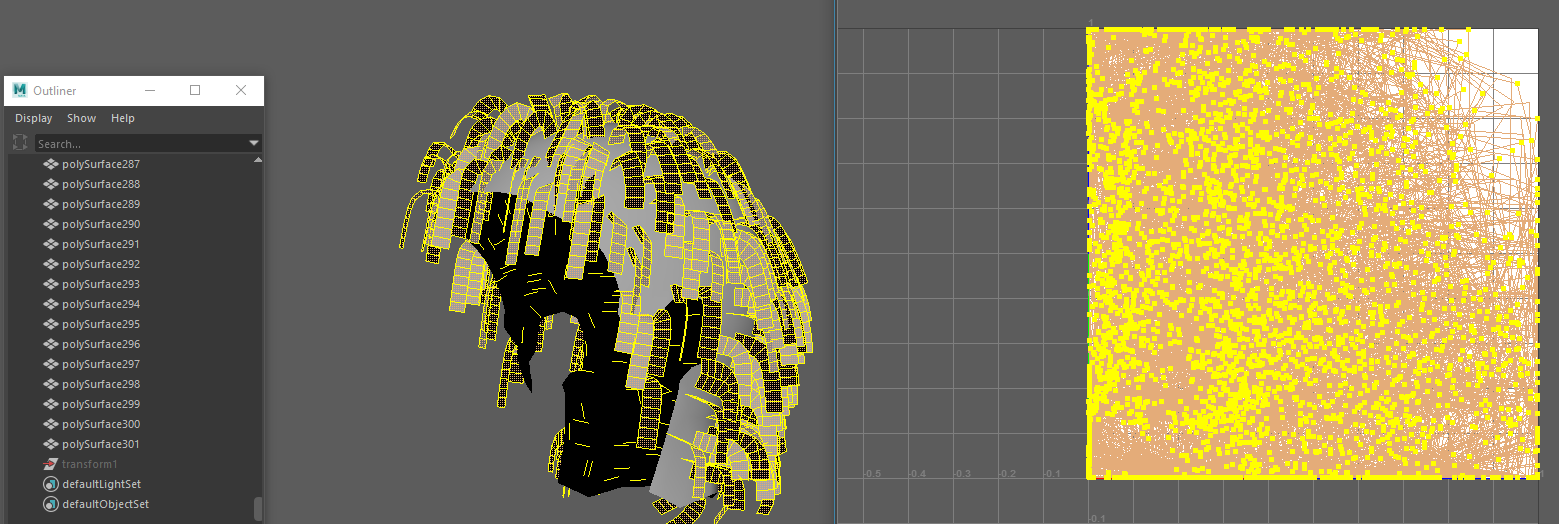
I'm fairly certain I missed something but I don't know what.
|
|
By web3 - 9 Years Ago
|
|
okay, so I was able to at least get a UV Map that looks somewhat normal, however, I'm not sure if it's the most efficient way to work with these cards. For example in one tutorial I saw that the guy had 5 vertical cards representing thicker and thinner pieces of hair. Is it possible to take the UV map I have in the image below and convert them to vertical and overlap the same size and shapes? Otherwise wow, this will take a century to texture in Photoshop.
|
|
By web3 - 9 Years Ago
|
like for example at about the 3:25 mark in the video below how did he get these strips to be straight? His hair is obviously not completely straight...
https://www.youtube.com/watch?list=PLNV5zSFadPdl8bX7wzxg2MGbhRjUvSt5J&v=E7f__LNUviw
|
|
By web3 - 9 Years Ago
|
|
okay, i'm starting to get it now I think. I'll try to work on this more with these suggestions. thank you!
|
|
By mrmdesign - 9 Years Ago
|
|
I create my strip variations first and uv map them to be planar and vertical. Then I duplicate and place as necessary. This is a lot more efficient than spending ages with the UV map at the end 8and you can see how the texture will work with your hair card arrangement as you do it. I previously used blender but I am currently working on a brand new standalone hair app. (Which will make this whole process quicker and easier for you.)
|
|
By animagic - 9 Years Ago
|
|
mrmdesign (2/12/2017)
I previously used blender but I am currently working on a brand new standalone hair app. (Which will make this whole process quicker and easier for you.)
That would be so cool! :w00t:
|
|
By vidi - 9 Years Ago
|
Is it possible to take the UV map I have in the image below and convert them to vertical and overlap the same size and shapes? e.g. in your case , in the UV View you only need to select all Segments and Press the R Key .or Shift + R* (*internal UVs are aligned ) :cool: All strips are now straighten
|
|
By web3 - 9 Years Ago
|
|
mrmdesign (2/12/2017)
I create my strip variations first and uv map them to be planar and vertical. Then I duplicate and place as necessary. This is a lot more efficient than spending ages with the UV map at the end 8and you can see how the texture will work with your hair card arrangement as you do it. I previously used blender but I am currently working on a brand new standalone hair app. (Which will make this whole process quicker and easier for you.)
so are you saying you create your basic cards without any transformation applied and UV map them first, then you work from those cards by duplicating and placing? Is this is correct?
Also if you ever want beta testers for your hair standalone app let me know ;-)
|
|
By web3 - 9 Years Ago
|
vidi (2/12/2017)
Is it possible to take the UV map I have in the image below and convert them to vertical and overlap the same size and shapes? e.g. in your case , in the UV View you only need to select all Segments and Press the R Key .or Shift + R* (*internal UVs are aligned ) :cool: All strips are now straighten
wow! nice! I'm actually going to give this demo a try. Super thank you!
|
|
By web3 - 9 Years Ago
|
vidi (2/12/2017)
Is it possible to take the UV map I have in the image below and convert them to vertical and overlap the same size and shapes? e.g. in your case , in the UV View you only need to select all Segments and Press the R Key .or Shift + R* (*internal UVs are aligned ) :cool: All strips are now straighten
wow, this is a very cool program you pointed me toward! I'm really liking it so far ;-)
|
|
By web3 - 9 Years Ago
|
So a little bit of learning with UVLayout but I've managed for the most part to achieve what I was looking for so far!!! I've included two screenshots to show my UV Hair Maps straighten as I wanted them ;-) plus showed the checkered texture on top of the polys that I mapped.


|
|
By web3 - 9 Years Ago
|
So just a quick copy of the UVs from similar polys. I discovered I only needed 3 variations of the hair cards in my UV map. haha.


|