|
By dgoldeng - 9 Years Ago
|
|
Can someone tell me how I can achieve a higher quality of my Iclone videos. Indigo Render is just too time consuming for rendering my files. Thanks
|
|
By mark - 9 Years Ago
|
You can get higher "resolution" by rendering out a .png image sequence. You can really up the resolution by doing that. Then take the sequence into your NLE and render from there the type of video file you need.
As far as "quality" goes, the 'look'" of an Indigo "still-image" is very nice. But as you say it's not practical for one-man animation studio for the most part. I'm hoping iClone 7 will give us a very close approximation of that look....maybe better in some ways.....we'll see. ;)
|
|
By dgoldeng - 9 Years Ago
|
|
Good point. Thanks Tutor.
|
|
By dgoldeng - 9 Years Ago
|
|
Good point. Thanks Tutor.
|
|
By Kevin.S - 9 Years Ago
|
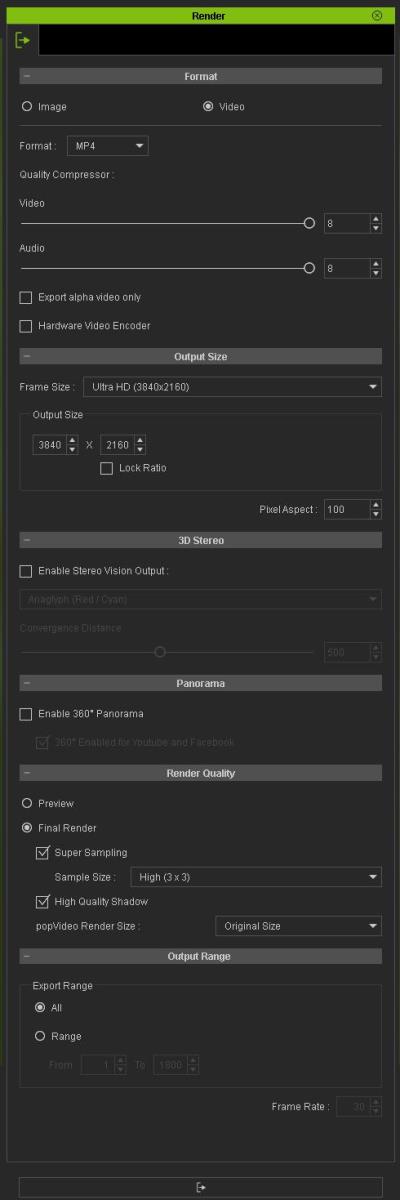
Go to the render panel" adjust frame size will set the resolution or the render" the higher you go' the better the resolution'
Standard should always be set at 1920x1080 HD...3840x2160 is full 4K UHD quality
Go to the render quality section' choose super sampling which is the same as antialising'
turn it up to 2x2 or 3x3 and turn on high quality shadows.
Frame Size 3840x2160, Super sampling 3x3, and high quality shadows
will give you the best render quality iclone can produce in ether video or pictures.
 .. ..
|
|
By dgoldeng - 9 Years Ago
|
|
Thanks again Tutor.
|
|
By dgoldeng - 9 Years Ago
|
|
Very nice animation
|